Outline ·
[ Standard ] ·
Linear+
DECO M4 settings anyone can advise?
|
TSachong09
|
 Mar 6 2023, 11:51 AM, updated 3y ago Mar 6 2023, 11:51 AM, updated 3y ago
|

|
Anyone using Mesh wifi at home???
i just gotten a MESH wifi TPlink DECO M4. its so cool. i have manage to set it up and its working fine already able to connect to internet and all. However was exploring the settings, notice that it has 2 operating modes - router mode ( default) and AP mode. Which mode should i choose? by default already router mode.. its is ok to choose default?
Anyone can advise?
|
|
|
|
|
|
Imp Bron
|
Mar 6 2023, 11:53 AM
|
Getting Started

|
Router mode if you use it connects direct with fiber
AP mode if you connect with old router
|
|
|
|
|
|
pgsiemkia
|
Mar 6 2023, 11:54 AM
|
|
|
QUOTE(achong09 @ Mar 6 2023, 11:51 AM) Anyone using Mesh wifi at home??? i just gotten a MESH wifi TPlink DECO M4. its so cool. i have manage to set it up and its working fine already able to connect to internet and all. However was exploring the settings, notice that it has 2 operating modes - router mode ( default) and AP mode. Which mode should i choose? by default already router mode.. its is ok to choose default? Anyone can advise? I use default mode even though connected to TM router earlier. Now have 7 decos in my 3-storey house for uninterrupted internet. Can control my kids Int access with this.. |
|
|
|
|
|
TSachong09
|
Mar 6 2023, 11:55 AM
|
|
|
QUOTE(pgsiemkia @ Mar 6 2023, 11:54 AM) I use default mode even though connected to TM router earlier. Now have 7 decos in my 3-storey house for uninterrupted internet. Can control my kids Int access with this.. default mode is router mode wo.... |
|
|
|
|
|
TSachong09
|
Mar 6 2023, 11:56 AM
|
|
|
QUOTE(Imp Bron @ Mar 6 2023, 11:53 AM) Router mode if you use it connects direct with fiber AP mode if you connect with old router i am connecting the deco mesh to unifi router TPlink AC1200. so what mode should choose? default mode ( router mode) or change to AP mode? |
|
|
|
|
|
SUSWahlberg
|
Mar 6 2023, 12:02 PM
|
Getting Started
|
QUOTE(achong09 @ Mar 6 2023, 11:56 AM) i am connecting the deco mesh to unifi router TPlink AC1200. so what mode should choose? default mode ( router mode) or change to AP mode? current setting working? |
|
|
|
|
|
acbc
|
Mar 6 2023, 12:02 PM
|
|
|
I'm using the M4 too.
I set mine to AP and using the AX20 to do the routing.
Better for performance because the unit no need to do everything except wireless connectivity only.
|
|
|
|
|
|
pandah
|
Mar 6 2023, 12:10 PM
|
|
|
Don't update the firmware if it prompt, newer update makes the signal unstable and range very poor.
|
|
|
|
|
|
TSachong09
|
Mar 6 2023, 12:12 PM
|
|
|
QUOTE(pandah @ Mar 6 2023, 12:10 PM) Don't update the firmware if it prompt, newer update makes the signal unstable and range very poor. alamak sudah update  |
|
|
|
|
|
SUSasx26365
|
Mar 6 2023, 12:12 PM
|
New Member
|
I subscribe 3 unifi to eliminate the dead zone in my house.
|
|
|
|
|
|
TSachong09
|
Mar 6 2023, 12:12 PM
|
|
|
QUOTE(Wahlberg @ Mar 6 2023, 12:02 PM) yes... had intermitten up and down connection.. so i do a factory reset and reconfigure it again ( as advise by unifi technician) but i do speed test still feel abit slow la.. i dont know is the deco problem or unifi router problem... This post has been edited by achong09: Mar 6 2023, 12:13 PM |
|
|
|
|
|
TSachong09
|
Mar 6 2023, 12:14 PM
|
|
|
QUOTE(acbc @ Mar 6 2023, 12:02 PM) I'm using the M4 too. I set mine to AP and using the AX20 to do the routing. Better for performance because the unit no need to do everything except wireless connectivity only. oh i set mine to default as router mode i didnt change wo.. so should i change it or just stick with it? |
|
|
|
|
|
Current Events guy
|
Mar 6 2023, 12:17 PM
|
|
|
I use M4 at parents place and M5 at mine.
Set as AP as I use the deco for extending wifi range.
Also I regularly update mine without issues. I dont know if theres planned obsolescence being uploaded to our units but my speed are good and drops are less.
|
|
|
|
|
|
Haters_Gonna_H8
|
Mar 6 2023, 12:17 PM
|
|
|
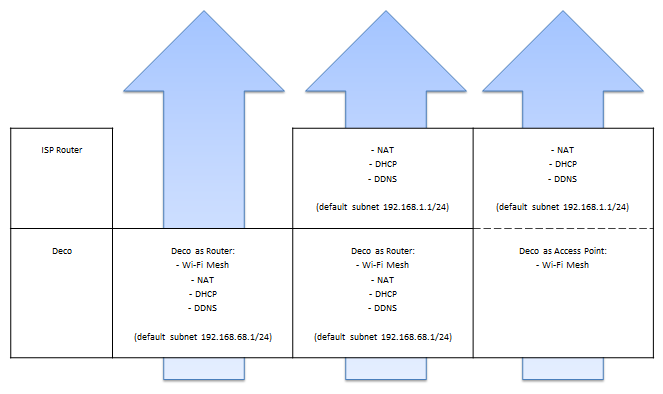
QUOTE(achong09 @ Mar 6 2023, 11:56 AM) i am connecting the deco mesh to unifi router TPlink AC1200. so what mode should choose? default mode ( router mode) or change to AP mode? short answer: if u connect the deco to the modem. use router mode..if u connect it to another router, use AP mode. you dont want 2 router becoming DHCP server, later all the ip distribution gg |
|
|
|
|
|
pandah
|
Mar 6 2023, 12:18 PM
|
|
|
QUOTE(achong09 @ Mar 6 2023, 12:12 PM) alamak sudah update If not 1.55 then may still be ok, if 1.55 then depend luck some may get terrible nerf and intermittent interruptions, 1.56 not sure yet. |
|
|
|
|
|
acbc
|
Mar 6 2023, 12:52 PM
|
|
|
QUOTE(achong09 @ Mar 6 2023, 12:14 PM) oh i set mine to default as router mode i didnt change wo.. so should i change it or just stick with it? If u not familiar, leave it. U need some networking skills to do what I did for my set-up. |
|
|
|
|
|
TSachong09
|
Mar 6 2023, 01:32 PM
|
|
|
QUOTE(Haters_Gonna_H8 @ Mar 6 2023, 12:17 PM) short answer: if u connect the deco to the modem. use router mode..if u connect it to another router, use AP mode. you dont want 2 router becoming DHCP server, later all the ip distribution gg router is the black color one provided by TM right?? currently the deco is connected to the black color provided by tm via cable and setup is default ( router mode) didnt change... so need to change or not? i ask tm technican he say no need to change wo... |
|
|
|
|
|
TSachong09
|
Mar 6 2023, 01:33 PM
|
|
|
QUOTE(acbc @ Mar 6 2023, 12:52 PM) If u not familiar, leave it. U need some networking skills to do what I did for my set-up. anything wrong if i leave it? |
|
|
|
|
|
TSachong09
|
Mar 6 2023, 01:34 PM
|
|
|
QUOTE(pandah @ Mar 6 2023, 12:18 PM) If not 1.55 then may still be ok, if 1.55 then depend luck some may get terrible nerf and intermittent interruptions, 1.56 not sure yet. updated to 1.5.6... but i still feel not so stable intermittent down not sure if its cable problem or ? |
|
|
|
|
|
pandah
|
Mar 6 2023, 02:11 PM
|
|
|
QUOTE(achong09 @ Mar 6 2023, 01:34 PM) updated to 1.5.6... but i still feel not so stable intermittent down not sure if its cable problem or ? You can try to change to access point like mentioned before by others. For older device you may try changing the security type or the band. If you have a laptop that can plug direct to the cable then you can verify if the cable is ok or not. This post has been edited by pandah: Mar 6 2023, 02:11 PM |
|
|
|
|
|
Oltromen Ripot
|
Mar 6 2023, 02:17 PM
|
|
|
QUOTE(achong09 @ Mar 6 2023, 12:12 PM) yes... had intermitten up and down connection.. so i do a factory reset and reconfigure it again ( as advise by unifi technician) but i do speed test still feel abit slow la.. i dont know is the deco problem or unifi router problem... If you used Deco in Router mode (+1 NAT layer) behind another router (+1 NAT layer) := Double NAT, of course will be slower.... If you want to keep using another as router, then no need to use your Deco as a router behind the other router. |
|
|
|
|
|
SUSeds2
|
Mar 6 2023, 02:19 PM
|
Getting Started
|
if your router is good/have many functions, use the m4 as AP
|
|
|
|
|
|
Haters_Gonna_H8
|
Mar 6 2023, 02:28 PM
|
|
|
QUOTE(achong09 @ Mar 6 2023, 01:32 PM) router is the black color one provided by TM right?? currently the deco is connected to the black color provided by tm via cable and setup is default ( router mode) didnt change... so need to change or not? i ask tm technican he say no need to change wo... take a pic of your setup and post it here. easier. |
|
|
|
|
|
Oltromen Ripot
|
Mar 6 2023, 02:38 PM
|
|
|
|
|
|
|
|
|
TSachong09
|
Mar 6 2023, 02:46 PM
|
|
|
QUOTE(pandah @ Mar 6 2023, 02:11 PM) You can try to change to access point like mentioned before by others. For older device you may try changing the security type or the band. If you have a laptop that can plug direct to the cable then you can verify if the cable is ok or not. can change just like this??? will it work? |
|
|
|
|
|
pandah
|
Mar 6 2023, 02:50 PM
|
|
|
QUOTE(achong09 @ Mar 6 2023, 02:46 PM) can change just like this??? will it work? It works, i am using ap mode. can change back any time. Like other mentioned if you have pic of setup may be it will be easier to see. |
|
|
|
|
|
TSachong09
|
Mar 6 2023, 03:00 PM
|
|
|
QUOTE(pandah @ Mar 6 2023, 02:50 PM) It works, i am using ap mode. can change back any time. Like other mentioned if you have pic of setup may be it will be easier to see. yeah i just change the deco to AP mode... seems working fine.. done a speed test speed quite fast faster than router mode.. i guess its setup problem |
|
|
|
|
|
drpsyko
|
Mar 6 2023, 03:05 PM
|
|
|
Deco M4 CPU is so underpowered even stock router is better than that at routing. Better just use it as AP instead of router mode.
|
|
|
|
|
|
TSachong09
|
Mar 6 2023, 03:51 PM
|
|
|
QUOTE(drpsyko @ Mar 6 2023, 03:05 PM) Deco M4 CPU is so underpowered even stock router is better than that at routing. Better just use it as AP instead of router mode. understand. thanks bro |
|
|
|
|
|
ticke
|
Mar 6 2023, 04:16 PM
|
|
|
shud be 1 AP, 1 router.
|
|
|
|
|
|
Haters_Gonna_H8
|
Mar 6 2023, 04:33 PM
|
|
|
QUOTE(drpsyko @ Mar 6 2023, 03:05 PM) Deco M4 CPU is so underpowered even stock router is better than that at routing. Better just use it as AP instead of router mode. agree. even my deco m9 is the same. very limited function. everything needs to be done in the app. cant even set access control, mac binding etc with it. so better to set it as AP, and let another router handle the rest. lel |
|
|
|
|
|
tahfeikei
|
Mar 6 2023, 04:38 PM
|
|
|
QUOTE(achong09 @ Mar 6 2023, 11:51 AM) Anyone using Mesh wifi at home??? i just gotten a MESH wifi TPlink DECO M4. its so cool. i have manage to set it up and its working fine already able to connect to internet and all. However was exploring the settings, notice that it has 2 operating modes - router mode ( default) and AP mode. Which mode should i choose? by default already router mode.. its is ok to choose default? Anyone can advise? choose router also go in settings and enable auto reboot daily and choose the right time |
|
|
|
|
|
tahfeikei
|
Mar 6 2023, 04:41 PM
|
|
|
QUOTE(pandah @ Mar 6 2023, 12:10 PM) Don't update the firmware if it prompt, newer update makes the signal unstable and range very poor. i always update and no problem for me |
|
|
|
|
|
frequency
|
Mar 6 2023, 04:41 PM
|
|
|
I use M4, I use only AP mode as well
and turn off the wifi on default maxis router
|
|
|
|
|
|
acbc
|
Mar 6 2023, 04:43 PM
|
|
|
It is always best not to let the router do everything from a firewall, AP, routing, and file server.
The same goes for mesh.
In your case, if u already have an existing router that works, just change the operation mode of M4 to AP. Ensure u also disable DHCP on the M4 if enabled by default to avoid double NAT.
Once the router works and is online, disable WiFi too. This way, u plug off 1 potential security hole.
All WiFi businesses let the M4 handle it because u can monitor it using the Deco app.
|
|
|
|
|
|
TSachong09
|
Mar 6 2023, 04:55 PM
|
|
|
QUOTE(acbc @ Mar 6 2023, 04:43 PM) It is always best not to let the router do everything from a firewall, AP, routing, and file server. The same goes for mesh. In your case, if u already have an existing router that works, just change the operation mode of M4 to AP. Ensure u also disable DHCP on the M4 if enabled by default to avoid double NAT. Once the router works and is online, disable WiFi too. This way, u plug off 1 potential security hole. All WiFi businesses let the M4 handle it because u can monitor it using the Deco app. Seems like i when i set router mode ( default) do speed test very slow.. then change to AP mode do speed test super fast. Also somehow when in router mode printer not working properly ( printer connected via wifi to the tm provided router - the black color one) when switch the deco to AP mode then printer works liao... seems like AP mode is the solution let tm provided black router do the job la while deco gives me extended wifi connection even in toilets/backrooms/kitchen etc... and also before this... the DEco M4 always lost connection by itself... and family always complain slow la etc etc.. so now i set to AP mode let's see.... did few times speed test seems ok This post has been edited by achong09: Mar 6 2023, 05:00 PM |
|
|
|
|
|
jpaul
|
Mar 6 2023, 05:44 PM
|
|
|
If on AP mode, cannot use parental control.
|
|
|
|
|
|
mi-g
|
Mar 6 2023, 07:26 PM
|
|
|
got 2 M4 at home, use as AP/Mesh only.. router use TM punya
my house double storey, router at ground floor, sometimes wireless connection above very slow before getting the M4.. now OK already
|
|
|
|
|



 Quote
Quote









 0.0651sec
 0.67
0.67
 5 queries
 GZIP Disabled