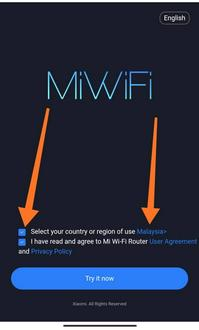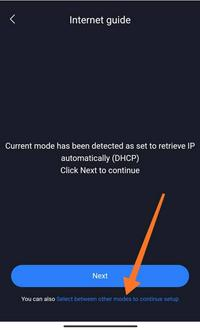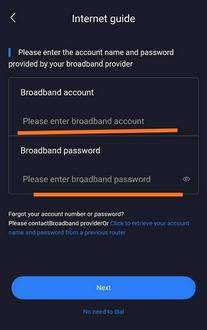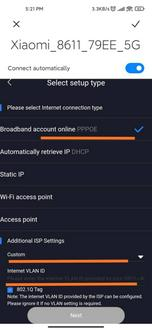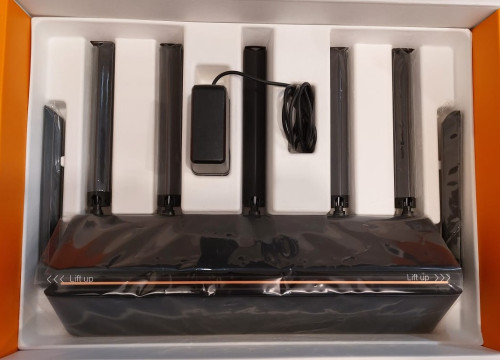
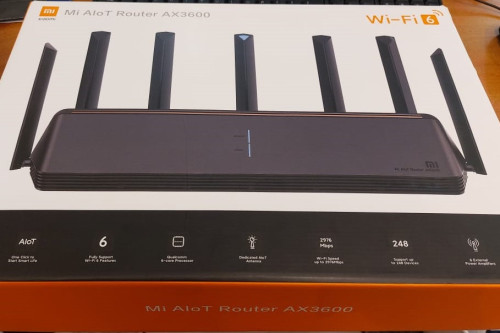
Bought this from xiaomi shop. seller say is easy to configure. but just cant make it.
insert broadband username and password. then keep say not detected. sien...money wasted
This post has been edited by Femsroot: Feb 27 2023, 09:10 PM
Mi Alot Router AX3600
|
|
 Feb 27 2023, 09:05 PM, updated 3y ago Feb 27 2023, 09:05 PM, updated 3y ago
Show posts by this member only | Post
#1
|
 
Junior Member
299 posts Joined: Apr 2020  
|
Bought this from xiaomi shop. seller say is easy to configure. but just cant make it. insert broadband username and password. then keep say not detected. sien...money wasted This post has been edited by Femsroot: Feb 27 2023, 09:10 PM |
|
|
|
|
|
Feb 27 2023, 09:31 PM
Show posts by this member only | Post
#2
|

Senior Member
1,974 posts Joined: Dec 2011
|
which isp r u using?
|
|
|
Feb 27 2023, 09:34 PM
Show posts by this member only | Post
#3
|
|
Senior Member
1,590 posts Joined: Sep 2011
|
asus best, I dont think can support malaysia isp, I might be wrong.
This post has been edited by kelvinfixx: Feb 27 2023, 09:35 PM |
|
|
Feb 27 2023, 11:12 PM
Show posts by this member only | Post
#4
|

Senior Member
4,454 posts Joined: Apr 2006
|
Vlan already setup also?
|
|
|
Feb 27 2023, 11:16 PM
Show posts by this member only | IPv6 | Post
#5
|
|
Senior Member
5,650 posts Joined: Mar 2012
|
Xiaomi last time can't support vlan
Need to flash custom |
|
|
Feb 27 2023, 11:28 PM
Show posts by this member only | Post
#6
|
|
Junior Member
299 posts Joined: Apr 2020
|
i got check u tube. but the roter keep say not detect broadband even though i have insert username and password correctly. i never know so difficult to change router. i always tot is like plug and play.
|
|
|
|
|
|
Feb 28 2023, 12:53 AM
Show posts by this member only | IPv6 | Post
#7
|

Senior Member
4,166 posts Joined: Jan 2003 From: Cheras, KL
|
QUOTE(Femsroot @ Feb 27 2023, 09:05 PM) Bought this from xiaomi shop. seller say is easy to configure. but just cant make it. insert broadband username and password. then keep say not detected. sien...money wasted  https://s.lazada.com.my/s.UhgtB |
|
|
Feb 28 2023, 06:27 AM
Show posts by this member only | IPv6 | Post
#8
|

All Stars
14,323 posts Joined: Jan 2011
|
QUOTE(Femsroot @ Feb 27 2023, 09:05 PM) Bought this from xiaomi shop. seller say is easy to configure. but just cant make it. insert broadband username and password. then keep say not detected. sien...money wasted |
|
|
Feb 28 2023, 09:15 AM
Show posts by this member only | Post
#9
|
|
Junior Member
299 posts Joined: Apr 2020
|
QUOTE(westlife @ Feb 28 2023, 06:27 AM) if it does not support VLAN, it cannot be used for unifi. I was trying to do the vlan tagging but can't connect. |
|
|
Feb 28 2023, 09:16 AM
|
|
Junior Member
299 posts Joined: Apr 2020
|
I wanna sell this. Bought ard 500. Sell 300 anybody wan
|
|
|
Feb 28 2023, 09:50 AM
|
|
All Stars
14,323 posts Joined: Jan 2011
|
QUOTE(Femsroot @ Feb 28 2023, 09:15 AM) I was trying to do the vlan tagging but can't connect. this is the prob for fibre broadband in bolehland i guess, it requires authentication while lion city just plug in the fibre modem and connect to wifi router, it works seamlessly. |
|
|
Feb 28 2023, 10:00 AM
|

Senior Member
2,527 posts Joined: Feb 2007 From: Im a Medical Officer in /K. I'm here to lepak. 
|
» Click to show Spoiler - click again to hide... « Y U NO get PC Master Race Kayangan Router??? 
|
|
|
Feb 28 2023, 10:42 AM
|
|
Senior Member
848 posts Joined: Feb 2005 From: everywhere, yet nowhere.
|
https://www.youtube.com/watch?v=ZsPOiFS20AY
https://www.youtube.com/watch?v=jdg9KaC4LpY see if its applicable for your router seems easy enough to enable ssh and edit config to tag vlan |
|
|
|
|
|
Feb 28 2023, 12:53 PM
Show posts by this member only | IPv6 | Post
#14
|
|
Junior Member
299 posts Joined: Apr 2020
|
QUOTE(trix @ Feb 28 2023, 10:42 AM) https://www.youtube.com/watch?v=ZsPOiFS20AY I will try again. Tq for the link. I need wait waifu not around to so. Kenot disturb her WiFi time.https://www.youtube.com/watch?v=jdg9KaC4LpY see if its applicable for your router seems easy enough to enable ssh and edit config to tag vlan |
|
|
Feb 28 2023, 12:54 PM
Show posts by this member only | IPv6 | Post
#15
|
|
Junior Member
299 posts Joined: Apr 2020
|
QUOTE(CyberSetan @ Feb 28 2023, 10:00 AM) » Click to show Spoiler - click again to hide... « Y U NO get PC Master Race Kayangan Router???
|
|
|
Feb 28 2023, 01:45 PM
|

Senior Member
1,472 posts Joined: Apr 2005 From: SumwHeRe In MaLaYsIa
|
QUOTE(Femsroot @ Feb 27 2023, 09:05 PM) Bought this from xiaomi shop. seller say is easy to configure. but just cant make it. insert broadband username and password. then keep say not detected. sien...money wasted soul_gamerz liked this post
|
|
|
Feb 28 2023, 01:47 PM
|

Junior Member
446 posts Joined: Feb 2010
|
QUOTE(amirsubhi @ Feb 28 2023, 01:45 PM) install global firmware, during setup, choose advanced and key in vlan, then only u can use Mi router also have global firmware? I tot their phone only. |
|
|
Feb 28 2023, 06:37 PM
Show posts by this member only | IPv6 | Post
#18
|
|
Junior Member
932 posts Joined: Dec 2019
|
QUOTE(Femsroot @ Feb 28 2023, 12:54 PM) Haiz...I went to xiaomi buy smart switch this and that. Then sales man intro me. Say easy configure. I got interested and Flash my money. Then all is history. If you have space for an extra smart switch, go that route? I'm also using a Xiaomi AX1800 atm, global firmware but I'm running TP-Link smart switch to seperate Internet and IPTV VLAN atm, worked fine so far. (Also because my Xiaomi AX1800 only has 3 LAN and 1 WAN, so to free up another LAN port, went with the TP-Link smart switch route.  ) )OR.. https://miuirom.org/miwifi/xiaomi-aiot-router-ax3600  This post has been edited by yenchenje: Feb 28 2023, 06:37 PM |
|
|
Feb 28 2023, 09:55 PM
|
|
Junior Member
299 posts Joined: Apr 2020
|
QUOTE(yenchenje @ Feb 28 2023, 06:37 PM) If you have space for an extra smart switch, go that route? I'm also using a Xiaomi AX1800 atm, global firmware but I'm running TP-Link smart switch to seperate Internet and IPTV VLAN atm, worked fine so far. (Also because my Xiaomi AX1800 only has 3 LAN and 1 WAN, so to free up another LAN port, went with the TP-Link smart switch route. i really sorry. i dont understand. )OR.. https://miuirom.org/miwifi/xiaomi-aiot-router-ax3600 i have the unifi modem and the CAT6 cable connect modem to router WAN. how to install smart switch? |
|
|
Feb 28 2023, 11:19 PM
Show posts by this member only | IPv6 | Post
#20
|
|
Junior Member
818 posts Joined: Jul 2008 From: Kota Kinabalu <-> Kuala Lumpur
|
if you have global version, try this step,
work for my redmi ax5 global version (warning, low quality picture)  » Click to show Spoiler - click again to hide... « |
|
|
Mar 1 2023, 12:01 AM
Show posts by this member only | IPv6 | Post
#21
|
|
Junior Member
932 posts Joined: Dec 2019
|
QUOTE(Femsroot @ Feb 28 2023, 09:55 PM) i really sorry. i dont understand. Basically, it sits between your Unifi provided router (TP-Link, FibreHome etc) and your ONU BTU box (White Fibrehome/ZTE/Nokia box) that receives the incoming fibre signal from TM's port to your house with fibre optic cable. Refer to this guide here. i have the unifi modem and the CAT6 cable connect modem to router WAN. how to install smart switch? https://www.blacktubi.com/guide/make-any-ro...-work-on-unifi/ You don't strictly need the same exact model, any other modem that supports VLAN tagging on their port would work fine. |
|
|
Mar 1 2023, 01:52 AM
Show posts by this member only | IPv6 | Post
#22
|

Senior Member
2,075 posts Joined: Sep 2021 From: nowhere
|
QUOTE(Femsroot @ Feb 28 2023, 12:54 PM) Haiz...I went to xiaomi buy smart switch this and that. Then sales man intro me. Say easy configure. I got interested and Flash my money. Then all is history. hi and welcome to xiaomi smarthome ecosystemunfortunately, that sales man seem desperate clear old stock model because the ax3600 model already discontinued. but fortunately its global version as packaging you post in op is english so please follow instructions from yt below in Step 7, change the VLAN ID to something suitable for your fiber. unifi please enter 500, maxis enter 621 |
| Change to: |  0.0223sec 0.0223sec
 1.09 1.09
 6 queries 6 queries
 GZIP Disabled GZIP Disabled
Time is now: 24th December 2025 - 10:55 PM |
 Quote
Quote