Welcome Guest ( Log In | Register )

Bump Topic Topic Closed RSS Feed
87 Pages « < 9 10 11 12 13 > » Bottom

Outline · [ Standard ] · Linear+

Maxis The Official Maxis Wireless Broadband Thread, OMG PORT FORWARDING KRACKED !

views
     
TSprasys
post Oct 22 2007, 03:53 PM

Heros Never Die
Group Icon
VIP
12,925 posts

Joined: Mar 2005
From: Kuala Lumpur
No it has nothing got to do with base station

How

I did an experiment with my phone and ZTE Modem. Both of them are connected to the same base station (I used a tool in my Trinity to find out which base station I'm connected to)

My Phone's APN is set to unet . I get an IP op 58.x.x.x (which is a Class B IP Address and its Public). I'm getting speeds around 900kbps-1.1Mbps (my phone has a 1.8Mbps HSDPA Chip , so yeah its pretty good)

On the other hand the ZTE (Not too sure bout the USB)'s APN is maxisbb. It gives me a 121.120.x.x IP Address. Now here comes the problem , the speed is pretty bad compared to the phone


zipitup
post Oct 22 2007, 03:58 PM

New Member
*
Junior Member
29 posts

Joined: Nov 2006
Hi Prasys,

I just called Maxis yesterday and they say Internet2GO (the internet service with your mobile phone) is limited to 384kbps no matter if your phone supports HSPDA or not..

You just mentioned you downloaded 900kbps-1.1mbps, thats not 384kbps :\


Edit: The lady at the Midvalley mall that is doing the maxisbb promotion also said the same. Thats why I called up maxis there and then to confirm.. I was contemplating whether to use my phone as a modem or get the maxisbb package.

This post has been edited by zipitup: Oct 22 2007, 03:59 PM
TSprasys
post Oct 22 2007, 04:17 PM

Heros Never Die
Group Icon
VIP
12,925 posts

Joined: Mar 2005
From: Kuala Lumpur
But if you notice , some guy whos using the Maxis Internet2Go package can get higher speeds. I am not sure if that is the RM 99 package or the RM 120 (Unlimited Data package).
JWCheah
post Oct 22 2007, 04:28 PM

Getting Started
**
Junior Member
251 posts

Joined: Sep 2007


QUOTE(prasys @ Oct 22 2007, 04:17 PM)
But if you notice , some guy whos using the Maxis Internet2Go package can get higher speeds. I am not sure if that is the RM 99 package or the RM 120 (Unlimited Data package).
*
I can confirm this as I've tried the Internet2go RM120 package..... VERY stable and fast. I do think that maybe the information given out is not that accurate as I also heard a rumor that the USB wireless sales is not doing good, maybe more promo to win new user and upset the old ones like us vmad.gif

Bottomline is that the speed on the 121.120.X.X really varies. I've witness a 1800KBps/700KBps connection using the USB in Hartamas.

prasys... u mention abt "tool in my Trinity" can helps to locate the basestation, any recommended tools for WinXP? Really find that interesting.
fions
post Oct 22 2007, 10:59 PM

New Member
*
Junior Member
14 posts

Joined: Dec 2005


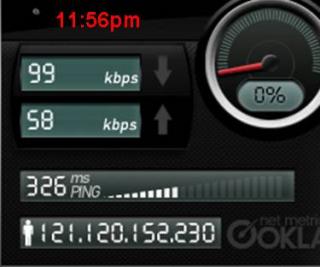
user posted image

haha feel like jumping down!!!
what shud i do man
llhm87
post Oct 22 2007, 11:48 PM

Casual
***
Junior Member
346 posts

Joined: Oct 2006
From: Kuala Lumpur, Malaysia


QUOTE(fions @ Oct 22 2007, 10:59 PM)
user posted image

haha feel like jumping down!!!
what shud i do man
*
A lot people also having this problem. So you are not alone. Same goes to me. I just tired complaining to Maxis. Just see what they can provide this few couple days.
JWCheah
post Oct 23 2007, 12:24 AM

Getting Started
**
Junior Member
251 posts

Joined: Sep 2007


yawn.gif blink.gif shakehead.gif doh.gif sad.gif

Hmmm..... speed sux..... only torrenting abt 10KBps..... cannot suft..... this is not good..... gonna call Maxis now...... to let out some fire!!!!


Attached thumbnail(s)
Attached Image
BBXiong
post Oct 23 2007, 12:35 AM

CFX
*******
Senior Member
6,317 posts

Joined: Sep 2007
QUOTE(fions @ Oct 22 2007, 10:59 PM)
user posted image

haha feel like jumping down!!!
what shud i do man
*
ur speed is consider quite fast, just look at mine..
i have posted it at page 9....
after that u know that u are getting high speed ( for maxis bb)
gtoforce
post Oct 23 2007, 01:07 AM

SPAM AND BECOME A SENIOR MEMBER
*******
Senior Member
2,967 posts

Joined: May 2006


QUOTE(BBXiong @ Oct 21 2007, 10:25 AM)
i live in Sunway area too, the speed yesterday is extremely slow...
now, that they have finally tell everyone that they are facing network problem, they use that issue as a shield to all out complaints against the slow connection speed...


Added on October 21, 2007, 1:17 pmthis is a speed test i do last night bout 11pm, i live in sunway area
user posted image

i tot i was using a 28k modem.....
this sucks man, i call them up, and they use the problem a a shield, saying that we will fix the problem soon...
even before this, when the problem exist, i didnt get anything similar to this also
what the f*** are they actually doing after taking our money???
*
QUOTE(fions @ Oct 22 2007, 10:59 PM)
user posted image

haha feel like jumping down!!!
what shud i do man
*
QUOTE(JWCheah @ Oct 23 2007, 12:24 AM)
yawn.gif  blink.gif  shakehead.gif  doh.gif  sad.gif

Hmmm..... speed sux..... only torrenting abt 10KBps..... cannot suft..... this is not good..... gonna call Maxis now...... to let out some fire!!!!
*
for all of u who's using maxisbb and geting more than 20kbps for download
i congratulate
and prasys, gua try kat keramat also the speed sucks despite a lil better
cuz gombak, the rssi is 83-90
keramat rssi is 70-80

but speed still suck jugak
dl wont reach more than 20kbps nowadays
MX510
post Oct 23 2007, 01:27 AM

Love Me Sin Hate Me Sinner
*******
Senior Member
4,038 posts

Joined: Aug 2005
From: Earth


QUOTE(prasys @ Oct 22 2007, 03:53 PM)
No it has nothing got to do with base station

How

I did an experiment with my phone and ZTE Modem. Both of them are connected to the same base station (I used a tool in my Trinity to find out which base station I'm connected to)

My Phone's APN is set to unet . I get an IP op 58.x.x.x (which is a Class B IP Address and its Public). I'm getting speeds around 900kbps-1.1Mbps (my phone has a 1.8Mbps HSDPA Chip , so yeah its pretty good)

On the other hand the ZTE (Not too sure bout the USB)'s APN is maxisbb. It gives me a 121.120.x.x IP Address. Now here comes the problem , the speed is pretty bad compared to the phone
*
user posted image

I think what u said is true smile.gif better use Internet2Go only ip with 58.x.x.x give that superb speed smile.gif RM 120 plan

tracyjz
post Oct 23 2007, 01:59 AM

-Jay Jay-
******
Senior Member
1,059 posts

Joined: Jan 2007
From: Petaling jaya
my area here dun have the service yet
sob
gr44
post Oct 23 2007, 02:08 AM

Getting Started
**
Junior Member
269 posts

Joined: Aug 2005


just want to share something..

my package is advance

1st day i bought it n test it im not happy at all..damm slow..i plug direct.signal is good then rssi didnt blink n its hsdpa..but still slow...download getting around less then 15kb..tested it for few days still da same...im damm piss off with it..event i used dap still cant get much around 20kb..

few days later i try connect using my wireless router..then i try to download some stuff direct download..using dap or ie download im quite suprise im getting around 1++kb ...i dont believes it also..i download few big files n small the speed quite fast..event torrent or limewire full speed im getting at night..

next day i try direct connect again zte to my comp damm slow..i dont understand why..but when i connect back to my wireless router i get full speed..now im quite happy wit it..no problem at all..i download more then 5gb....not sure what is the prob....
llhm87
post Oct 23 2007, 02:37 AM

Casual
***
Junior Member
346 posts

Joined: Oct 2006
From: Kuala Lumpur, Malaysia


QUOTE(gr44 @ Oct 23 2007, 02:08 AM)
just want to share something..

my package is advance

1st day i bought it n test it im not happy at all..damm slow..i plug direct.signal is good then rssi didnt blink n its hsdpa..but still slow...download getting around less then 15kb..tested it for few days still da same...im damm piss off with it..event i used dap still cant get much around 20kb..

few days later i try connect using my wireless router..then i try to download some stuff direct download..using dap or ie download im quite suprise im getting around 1++kb ...i dont believes it also..i download few big files n small the speed quite fast..event torrent or limewire full speed im getting at night..

next day i try direct connect again zte to my comp damm slow..i dont understand why..but when i connect back to my wireless router i get full speed..now im quite happy wit it..no problem at all..i download more then 5gb....not sure what is the prob....
*
Are you trying to say that when you connect the ZTE modem to your computer / laptop, you are getting very slow download speed. And when you connect your modem with your wireless router, your download speed is fast. I think that will not help to boost up your connection.

1st : How can your wireless router perform better with ZTE modem?
2nd : Do you know the difference between a router and a modem?

No insult/flame OK. Just want to clarify. Correct me if I'm wrong. =)
JWCheah
post Oct 23 2007, 08:55 AM

Getting Started
**
Junior Member
251 posts

Joined: Sep 2007


user posted image
Results @ Plaza Mont Kiara.
9:00am also can torrent more than 25KB/s.... must move here to get faster torrent.....


zipitup
post Oct 23 2007, 10:53 AM

New Member
*
Junior Member
29 posts

Joined: Nov 2006
JWCheah: with maxisbb or Internet2GO?
JWCheah
post Oct 23 2007, 11:04 AM

Getting Started
**
Junior Member
251 posts

Joined: Sep 2007


QUOTE(zipitup @ Oct 23 2007, 10:53 AM)
JWCheah: with maxisbb or Internet2GO?
*
MaxisBB USB RM138 per month.

Starngely during my surfing at the Mont Plaza, as I was torrenting @ 40+KBps... a friend of mine turn on his Maxis 3G and starting reading the KLSE and all of the sudden my connection drops deep down and torrenting only @ 10KBps.... Therefore, I asked him to discon to confirm the factors and it the line resume as before (+40KBps) just after 5 second he discon his.... hmmmm
lilac_alex
post Oct 23 2007, 05:33 PM

Getting Started
**
Junior Member
235 posts

Joined: Jun 2007
From: Kuala Lumpur/Malaysia


wow, the power of advertisement.

before reading thru this thread, thought maxis broadband would be better than celcom, but now, really think twice before subscribing it.

what about celcom broadband? same probs as maxis?
TSprasys
post Oct 23 2007, 05:52 PM

Heros Never Die
Group Icon
VIP
12,925 posts

Joined: Mar 2005
From: Kuala Lumpur
I suggest you to take a look at the Celcom Thread !
cloudstrife07
post Oct 23 2007, 06:42 PM

I'm back, beaches!
*******
Senior Member
4,688 posts

Joined: Jan 2003
From: http://127.0.0.1


guys i think now it's not the suitable time to test ur speed using www.speedtest.net.

why?

i've been getting crap uploads and download from the speedtest, but when i on my deluge, the speed is hovers around 40kBps.direct download too.

refer to the screenshot.that's the speed i've been getting for the past 2 days i think.i thought maxis is real slow, but i realise that my torrents are constantly downloading around 30~40kBps everytime i use it.

hmm..


Attached thumbnail(s)
Attached Image
Oracles
post Oct 23 2007, 07:13 PM

New Member
*
Junior Member
24 posts

Joined: Oct 2006
oh man...prasys...i've tried everything but my dl still won't even move for azureus..is there anything that i need to set or do??...they aren't working at all...but msn hotmail all fine and working after 3 days of torrid time trying to find out the prob...

87 Pages « < 9 10 11 12 13 > » Top
Topic ClosedOptions
 

Change to:
| Lo-Fi Version
0.0265sec    0.68    6 queries    GZIP Disabled
Time is now: 9th December 2025 - 02:33 PM