

Thank you in advance.


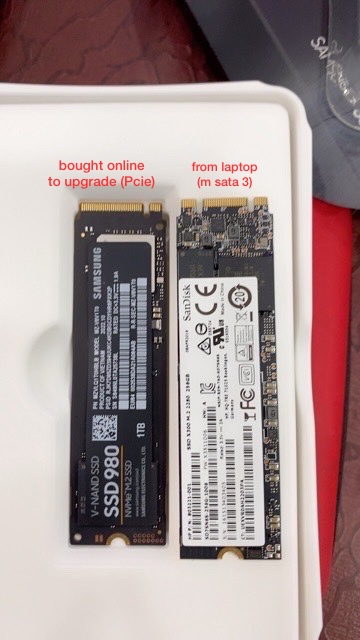
Help. Is this SSD compatible?, should i find adapter, or should i sell?
|
|
  Jan 12 2023, 07:12 PM, updated 3y ago Jan 12 2023, 07:12 PM, updated 3y ago
Show posts by this member only | IPv6 | Post
#1
|
 
Probation
5 posts Joined: Dec 2022 
|
Hi all. I am using laptop HP Spectre X360 13-4138TU. Wanting to upgrade laptop ssd storage so bought this ssd from seller but when installed on laptop, laptop cannot detect. Is it really not compatible, do I need an adapter, or should i resell and find another ssd of exact interface?
Thank you in advance. |
|
|
|
|
|
Jan 12 2023, 07:27 PM
Show posts by this member only | IPv6 | Post
#2
|
|
Senior Member
5,650 posts Joined: Mar 2012
|
Video Graphics
Intel® HD Graphics 520 Hard Drive 256 GB M.2 SSD Display 13.3" diagonal FHD BrightView LED-backlit touch screen (1920 x 1080) Means you must use m2 only. By right you should not be able to plug in at all. Got a notch there |
|
|
Jan 12 2023, 07:56 PM
Show posts by this member only | Post
#3
|
|
Junior Member
723 posts Joined: Jul 2008
|
QUOTE(johorjedi @ Jan 12 2023, 07:12 PM) Hi all. I am using laptop HP Spectre X360 13-4138TU. Wanting to upgrade laptop ssd storage so bought this ssd from seller but when installed on laptop, laptop cannot detect. Is it really not compatible, do I need an adapter, or should i resell and find another ssd of exact interface? Thank you in advance.  QUOTE(fireballs @ Jan 12 2023, 07:27 PM) Video Graphics The laptop spec says M.2 SSD. This M.2 means form factor, like how M.2 is different than 2.5". SATA and PCIE is the connection standard. If the SSD from laptop says SATA, that means you must but M.2 SATA SSD and not M.2 PCIE SSD. Intel® HD Graphics 520 Hard Drive 256 GB M.2 SSD Display 13.3" diagonal FHD BrightView LED-backlit touch screen (1920 x 1080) Means you must use m2 only. By right you should not be able to plug in at all. Got a notch there I would say you bought wrong type. I know it's frustating, I once bought wrong SATA vs PCIE, M.2 SSD as well. |
|
|
Jan 13 2023, 01:41 PM
Show posts by this member only | Post
#4
|
|
Junior Member
411 posts Joined: Mar 2013
|
QUOTE(fireballs @ Jan 12 2023, 07:27 PM) Video Graphics Some laptop have dual mode slot. Accepts both NVME type.Intel® HD Graphics 520 Hard Drive 256 GB M.2 SSD Display 13.3" diagonal FHD BrightView LED-backlit touch screen (1920 x 1080) Means you must use m2 only. By right you should not be able to plug in at all. Got a notch there You probably want to check your bios version/setting and upgrade if needed. Do at your own risk. Note: One of my older laptop have dual model, it came with NVME SATA, but can accept the newer NVME PCIE. Hence, even the notch is there, it still works. Coz, it's dual mode slot. |
|
|
Jan 14 2023, 08:04 AM
Show posts by this member only | Post
#5
|

Senior Member
2,211 posts Joined: Jan 2003 From: stankonia
|
QUOTE(johorjedi @ Jan 12 2023, 08:12 PM) Hi all. I am using laptop HP Spectre X360 13-4138TU. Wanting to upgrade laptop ssd storage so bought this ssd from seller but when installed on laptop, laptop cannot detect. Is it really not compatible, do I need an adapter, or should i resell and find another ssd of exact interface? Left is m.2 NVMe. Right is m.2 Satay (SATA). Sorry but you will need the right one.Thank you in advance. |
|
|
Jan 15 2023, 02:27 AM
Show posts by this member only | Post
#6
|
|
Senior Member
1,026 posts Joined: Jan 2003 From: Kuala Lumpur, Malaysia
|
HP Spectre X360 13-4138TU
http://h10032.www1.hp.com/ctg/Manual/c04807803.pdf Refer to the user manual page 32. This laptop only support M2 SATA drive. |
| Change to: |  0.0228sec 0.0228sec
 0.66 0.66
 5 queries 5 queries
 GZIP Disabled GZIP Disabled
Time is now: 19th December 2025 - 11:06 PM |
 Quote
Quote