Outline ·
[ Standard ] ·
Linear+
Excel question: Can a range of cells be 1 cell?
|
TSzenix
|
 Dec 21 2022, 12:37 PM, updated 4y ago Dec 21 2022, 12:37 PM, updated 4y ago
|

|
CODE =SUMPRODUCT((LEN(rawdata!F$1:F$30)-LEN(SUBSTITUTE(rawdata!F$1:F$30,B2,"")))/LEN(B2)) is there a way to put rawdata!F$1:F$30 range into one cell so i can change the formula to CODE =SUMPRODUCT((LEN(A1)-LEN(SUBSTITUTE(A1,B2,"")))/LEN(B2)) because i have multiple lines of this formula to process a batch of raw data editing each line is tedious so i was wondering if i could set the range into a cell then the formula always stays the same |
|
|
|
|
|
cYus
|
Dec 21 2022, 01:03 PM
|
Getting Started

|
» Click to show Spoiler - click again to hide... « QUOTE(zenix @ Dec 21 2022, 12:37 PM) CODE =SUMPRODUCT((LEN(rawdata!F$1:F$30)-LEN(SUBSTITUTE(rawdata!F$1:F$30,B2,"")))/LEN(B2)) is there a way to put rawdata!F$1:F$30 range into one cell so i can change the formula to CODE =SUMPRODUCT((LEN(A1)-LEN(SUBSTITUTE(A1,B2,"")))/LEN(B2)) because i have multiple lines of this formula to process a batch of raw data editing each line is tedious so i was wondering if i could set the range into a cell then the formula always stays the same try INDIRECT function CODE =SUMPRODUCT((LEN(INDIRECT("rawdata!F$1:F$30"))-LEN(SUBSTITUTE(INDIRECT("rawdata!F$1:F$30"),B2,"")))/LEN(B2)) or INDEX function to get values in a range and use in formula CODE =SUMPRODUCT((LEN(INDEX(rawdata!F:F,1,1):INDEX(rawdata!F:F,30,1))-LEN(SUBSTITUTE(INDEX(rawdata!F:F,1,1):INDEX(rawdata!F:F,30,1),B2,"")))/LEN(B2)) |
|
|
|
|
|
TSzenix
|
Dec 21 2022, 01:37 PM
|
|
|
QUOTE(cYus @ Dec 21 2022, 01:03 PM) » Click to show Spoiler - click again to hide... « try INDIRECT function CODE =SUMPRODUCT((LEN(INDIRECT("rawdata!F$1:F$30"))-LEN(SUBSTITUTE(INDIRECT("rawdata!F$1:F$30"),B2,"")))/LEN(B2)) or INDEX function to get values in a range and use in formula CODE =SUMPRODUCT((LEN(INDEX(rawdata!F:F,1,1):INDEX(rawdata!F:F,30,1))-LEN(SUBSTITUTE(INDEX(rawdata!F:F,1,1):INDEX(rawdata!F:F,30,1),B2,"")))/LEN(B2)) 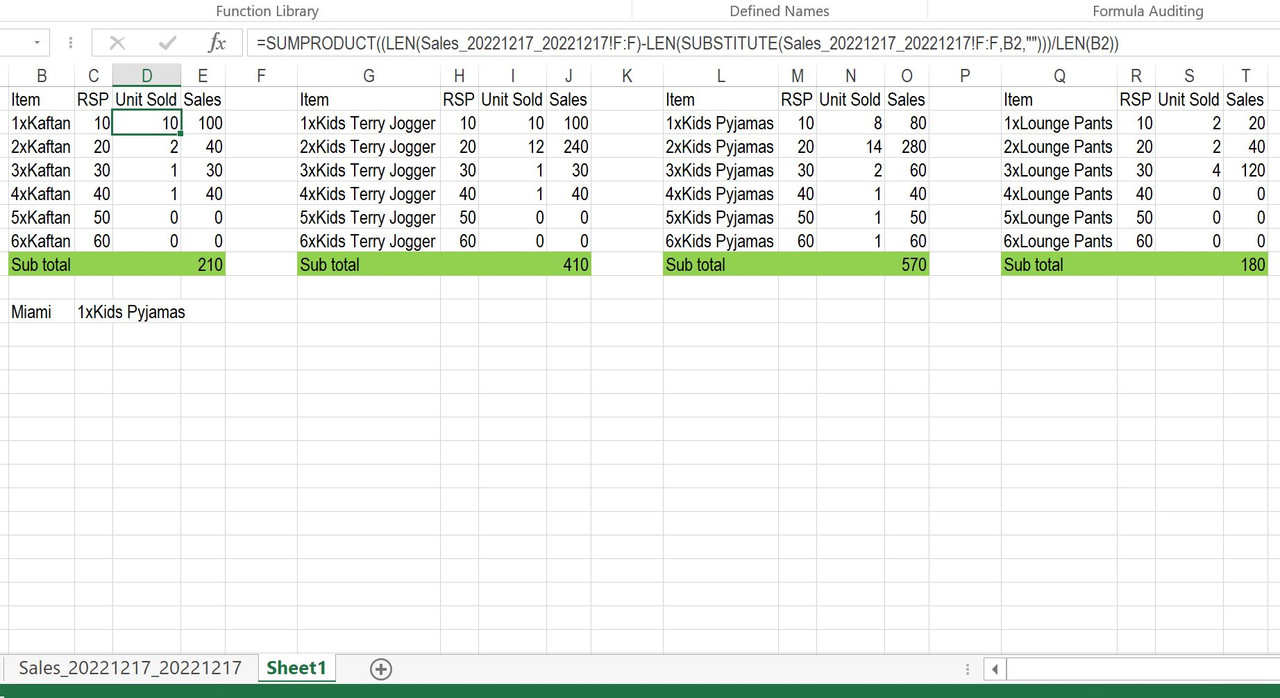 the raw data file will usually be on another tab every cell for unit sold will have that formula but it is a pain to change each of those cells when i plug in a new rawdata file |
|
|
|
|
|
cYus
|
Dec 21 2022, 01:50 PM
|
Getting Started
|
QUOTE(zenix @ Dec 21 2022, 01:37 PM) the raw data file will usually be on another tab every cell for unit sold will have that formula but it is a pain to change each of those cells when i plug in a new rawdata file You may be looking at INDIRECT. It takes a cell reference in the form of a string and returns a reference to that cell, regardless of the sheet it is on. [CODE]=SUMPRODUCT((LEN(INDIRECT(A1))-LEN(SUBSTITUTE(INDIRECT(A1),B2,"")))/LEN(B2))[CODE] For example, if A1 contains the string "rawdata!F1:F30", the INDIRECT function will return a reference to the range "rawdata!F1:F30". You can then use this reference in your formula as if it was a normal cell range reference. This way, you can simply change the value in A1 to reference a different range in a different sheet, and the formula will automatically update to use the new range. |
|
|
|
|
|
TSzenix
|
Dec 21 2022, 03:32 PM
|
|
|
QUOTE(cYus @ Dec 21 2022, 01:50 PM) You may be looking at INDIRECT. It takes a cell reference in the form of a string and returns a reference to that cell, regardless of the sheet it is on. [CODE]=SUMPRODUCT((LEN(INDIRECT(A1))-LEN(SUBSTITUTE(INDIRECT(A1),B2,"")))/LEN(B2))[CODE] For example, if A1 contains the string "rawdata!F1:F30", the INDIRECT function will return a reference to the range "rawdata!F1:F30". You can then use this reference in your formula as if it was a normal cell range reference. This way, you can simply change the value in A1 to reference a different range in a different sheet, and the formula will automatically update to use the new range. sounds like a plan how do i setup indirect? |
|
|
|
|



 Quote
Quote


 0.0176sec
 1.26
1.26
 5 queries
 GZIP Disabled