Welcome Guest ( Log In | Register )

Outline · [ Standard ] · Linear+

 Why is windows actively using hdd while on ssd?, acessing hdd, slowdowns

views
     
TShdbjhn2
post Dec 13 2022, 04:44 PM, updated 4y ago

Getting Started
**
Junior Member
267 posts

Joined: Mar 2014
From: Seremban


I installed windows fresh from Microsoft on SSD, and i don't have any bloatware on my pc. Not even windows built-in stuff like OneDrive and such.
I have an internal 5400rpm HDD as, used for storage only, not programmes or anything.

Even though my pc is running on SSD, i hear sound from HDD while using my pc. When i'm opening a programme(even folder from ssd), there is delay in launching and i can hear the sound of hdd spinning/clicking.
The worst offender is Edge, while using certain websites, like twitter or such. I can hear activities on it, followed by micro delay. Other activities include, right clicking on My computer icon, using Control panel, i can hear click noises.

Nope the noise is not RANDOM, only when initiating or doing something. Otherwise fully quiet.

SO, Why TF is windows still disturbing the HDD?

- I can confirm this for 2 reasons:

a) the HDD never went to sleep even after hours of not accessing any files from it - in power management, its set to sleep after 20mins but this bitch always awake.

b) that delay won't be there once i disconnect the HDD. I have tried another 7200rpm hdd as well, same issue.


The noise includes hdd spinning and lil clicks, but what really annoys me is the slight delay/slow down.


Yes, i have checked all the settings such as Virtual memory. Its fully on default. No hdd used for caching.

I don't have any special hard ware, just i3 10105f, Rx 570, Asus B460m r2.0, 2 x 4gb 2400mhz ram in dual chnnel, all the drivers needed.

BTW, this in not my first time. I have tried many fresh installs, since windows 7, many build of pc. Only now i'm asking, annoys me since i'm on SSD.

Could this be the culprit too ?
https://www.ghacks.net/2022/07/28/what-is-d...microsoft-edge/
My ssd is just 128gb.

user posted image
akhito
post Dec 13 2022, 04:56 PM

Enthusiast
*****
Junior Member
751 posts

Joined: Jul 2016


why dun u open task manager during got sound and check for hard disk activity see which app use a lot of hard disk. also check in ur hdd got page file or not at task manager
jibpek
post Dec 13 2022, 05:08 PM

Enthusiast
*****
Junior Member
708 posts

Joined: Jul 2012
Windows sucks in term of SSD / HDD management. It is constantly writting to your SSD even when there is no activity.

Use Windows Server / Linux if you are really concern about that.
PJng
post Dec 13 2022, 05:59 PM

10k Club
********
All Stars
12,058 posts

Joined: Oct 2017


If you in use pc, all disk wil not sleep, that setting does nothing
TShdbjhn2
post Dec 13 2022, 07:19 PM

Getting Started
**
Junior Member
267 posts

Joined: Mar 2014
From: Seremban


QUOTE(akhito @ Dec 13 2022, 04:56 PM)
why dun u open task manager during got sound and check for hard disk activity see which app use a lot of hard disk. also check in ur hdd got page file or not at task manager
*
I did but, its not showing which process is using which disk. I can see on process tab for disk percentage use. On performance tab, i can see individual disk load but not which process is creating that.

But fckin hell, i just saw this now.
On ssd, it says no page file and yes on system disk.
On hdd, it says no for system disk as it should be but, page file yes.

How do i change that??
Do you know what could cause this ??

Thanks for helping a bit. I been askin everywhere.
TShdbjhn2
post Dec 13 2022, 07:19 PM

Getting Started
**
Junior Member
267 posts

Joined: Mar 2014
From: Seremban


QUOTE(akhito @ Dec 13 2022, 04:56 PM)
why dun u open task manager during got sound and check for hard disk activity see which app use a lot of hard disk. also check in ur hdd got page file or not at task manager
*
I did but, its not showing which process is using which disk. I can see on process tab for disk percentage use. On performance tab, i can see individual disk load but not which process is creating that.

But fckin hell, i just saw this now.
On ssd, it says no page file and yes on system disk.
On hdd, it says no for system disk as it should be but, page file yes.

How do i change that??
Do you know what could cause this ??

Thanks for helping a bit. I been askin everywhere.
TShdbjhn2
post Dec 13 2022, 07:21 PM

Getting Started
**
Junior Member
267 posts

Joined: Mar 2014
From: Seremban


QUOTE(jibpek @ Dec 13 2022, 05:08 PM)
Windows sucks in term of SSD / HDD management. It is constantly writting to your SSD even when there is no activity.

Use Windows Server / Linux if you are really concern about that.
*
Yeah, but windows server and linux is not an option for me, i play games and used with normal apps.
akhito
post Dec 13 2022, 08:03 PM

Enthusiast
*****
Junior Member
751 posts

Joined: Jul 2016


QUOTE(hdbjhn2 @ Dec 13 2022, 07:19 PM)
I did but, its not showing which process is using which disk. I can see on process tab for disk percentage use. On performance tab, i can see individual disk load but not which process is creating that.

But fckin hell, i just saw this now.
On ssd, it says no page file and yes on system disk.
On hdd, it says no for system disk as it should be but, page file yes.

How do i change that??
Do you know what could cause this ??

Thanks for helping a bit. I been askin everywhere.
*
https://www.top-password.com/blog/change-di...-in-windows-10/
seelink above for more info go advanced system setting
turn automatic page file management off
then set ur ssd for page file while turn off for hdd
PJng
post Dec 13 2022, 11:25 PM

10k Club
********
All Stars
12,058 posts

Joined: Oct 2017


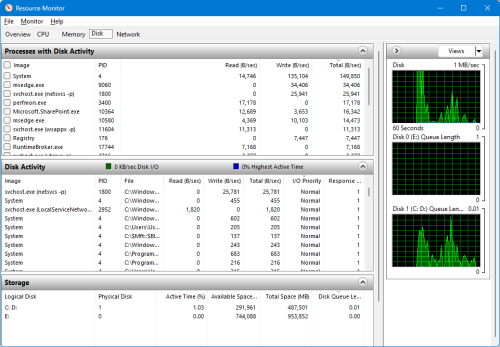
user posted image

open this and see, task manager does not show which process using which disk
TShdbjhn2
post Dec 13 2022, 11:56 PM

Getting Started
**
Junior Member
267 posts

Joined: Mar 2014
From: Seremban


QUOTE(akhito @ Dec 13 2022, 08:03 PM)
https://www.top-password.com/blog/change-di...-in-windows-10/
seelink above for more info go advanced system setting
turn automatic page file management off
then set ur ssd for page file while turn off for hdd
*
Thanks bro/sis
Yeap just did that. And, not facing that problem any more.
I can see hdd graph on task manager is now empty. 0 activity.

Still, can i know if this is the default behaviour for windows? use paging file on hdd??
If its not the default, why am i facing this issue? -afterall, its a fresh windows install, nothing modified.

Or, should i use ssd with Dram?


TShdbjhn2
post Dec 13 2022, 11:58 PM

Getting Started
**
Junior Member
267 posts

Joined: Mar 2014
From: Seremban


QUOTE(PJng @ Dec 13 2022, 11:25 PM)
user posted image

open this and see, task manager does not show which process using which disk
*
my resmon is only showing one drive. Don't know why. haish, nother problem.
PJng
post Dec 14 2022, 12:01 AM

10k Club
********
All Stars
12,058 posts

Joined: Oct 2017


are sound too big until you can hear it? until you cannot tahan.i set my old pc page file use another HDD, boot drive also HDD, so is normal
should show up all connected drive
acbc
post Dec 14 2022, 12:12 AM

Look at all my stars!!
*******
Senior Member
9,050 posts

Joined: Jan 2003
Very likely the pagefile is on the HDD. Move it back to SSD.
akhito
post Dec 14 2022, 07:21 AM

Enthusiast
*****
Junior Member
751 posts

Joined: Jul 2016


QUOTE(hdbjhn2 @ Dec 13 2022, 11:56 PM)
Thanks bro/sis
Yeap just did that. And, not facing that problem any more.
I can see hdd graph on task manager is now empty. 0 activity.

Still, can i know if this is the default behaviour for windows? use paging file on hdd??
If its not the default, why am i facing this issue? -afterall, its a fresh windows install, nothing modified.

Or, should i use ssd with Dram?
*
possibly no i dun think so, my setup also fresh default install few months ago left untouched page file at ssd only. But my ssd larger la 500gb
maybe different in size got influence.
well ssd with dram is always better than dramless wan if u can afford why not. So far if the setting solve ur problem then depends on to spend to upgrade ur setup

This post has been edited by akhito: Dec 14 2022, 07:22 AM
jonathanYYDS
post Dec 14 2022, 09:43 AM

Getting Started
**
Junior Member
144 posts

Joined: Aug 2022
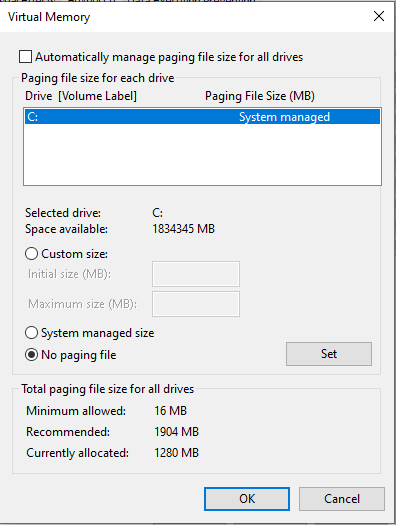
By default, Windows turn on for all hard drives that it detected. You can just uncheck the box "Automatically manage page file size for all drives". Under Drive, select your HDD and then choose on No paging file.

user posted image

But this will affect your Windows performance they they process huge file/data from that drive.
sHawTY
post Dec 14 2022, 11:40 AM

Frequent Reporter
********
All Stars
14,909 posts

Joined: Jul 2005

QUOTE(hdbjhn2 @ Dec 13 2022, 04:44 PM)
My ssd is just 128gb.
That's exactly why. Your SSD capacity is too small
Hence your Windows automatically choose the HDD as the paging file location
You can manually move the paging file location to your SSD but since your current SSD is only 128GB, you won't have much space left for anything else

The best option is to upgrade your SSD to a bigger capacity. Minimum 256GB
TShdbjhn2
post Dec 14 2022, 02:13 PM

Getting Started
**
Junior Member
267 posts

Joined: Mar 2014
From: Seremban


QUOTE(PJng @ Dec 14 2022, 12:01 AM)
are sound too big until you can hear it? until you cannot tahan.i set my old pc page file use another HDD, boot drive also HDD, so is normal
should show up all connected drive
*
sounds is one reason(i don't use casing, i can hear hdd directly, like 70cm away),
but its the suddent lag/slowdown. Like when i click something, had to wait hdd produce the click/spin up.
But its ok now, fixed dy by moving to ssd.


Change to:
| Lo-Fi Version
0.0185sec    1.15    5 queries    GZIP Disabled
Time is now: 20th December 2025 - 08:54 PM