Outline ·
[ Standard ] ·
Linear+
Android app, Possible to do ?
|
TSnarf03
|
 Dec 4 2022, 02:25 PM, updated 4y ago Dec 4 2022, 02:25 PM, updated 4y ago
|

|
ultra simple android app that if you start it, it send a UDP signal and instantly close. use it like to open/close gate, without opening any UI, no loading, no option, no setting, no shit, all hardcoded inclusive ip/port, it just send UDP, can send or fail to send, no error, no indication, no log, no feeling, like nothing just happened, but the gate supposed to open if it able to send =P
can ah ?
will the android detected something attempt to start, not nothing started, and assume problem with the app ?
temporary ignore the receiver side. at this point only consider the android device sender side.
|
|
|
|
|
|
flashang
|
Dec 5 2022, 12:33 AM
|
|
|
If your don't handle app error properly, you might see "Unfortunately App has Stopped" Error message. QUOTE will the android detected something attempt to start, not nothing started, and assume problem with the app ? Android will "know" the app status. Some system tuning app will notify user how much data / battery is used by which app. User can check the app from settings - apps.  This post has been edited by flashang: Dec 5 2022, 12:41 AM This post has been edited by flashang: Dec 5 2022, 12:41 AM |
|
|
|
|
|
TSnarf03
|
Dec 5 2022, 01:30 AM
|
|
|
QUOTE(flashang @ Dec 5 2022, 12:33 AM) If your don't handle app error properly, you might see "Unfortunately App has Stopped" Error message. Android will "know" the app status. Some system tuning app will notify user how much data / battery is used by which app. User can check the app from settings - apps. in windows, if you start an application and it ends almost instantly, windows will ask you if the app ran correctly. especially those older app what was written in winxp era. |
|
|
|
|
|
flashang
|
Dec 5 2022, 08:11 AM
|
|
|
QUOTE(narf03 @ Dec 5 2022, 01:30 AM) in windows, if you start an application and it ends almost instantly, windows will ask you if the app ran correctly. especially those older app what was written in winxp era. we could create a very simple "blank" exe file CODE
void main() {}
do nothing and just exit, windows won't have such message. i suspect if application does not handle exit properly (e.g. have some internal error cause force exit) may cause such message. This post has been edited by flashang: Dec 5 2022, 08:12 AM |
|
|
|
|
|
TSnarf03
|
Dec 5 2022, 12:57 PM
|
|
|
QUOTE(flashang @ Dec 5 2022, 08:11 AM) we could create a very simple "blank" exe file CODE
void main() {}
do nothing and just exit, windows won't have such message. i suspect if application does not handle exit properly (e.g. have some internal error cause force exit) may cause such message. got, something like this, i saw it a few times, it usually on something that ends very fast 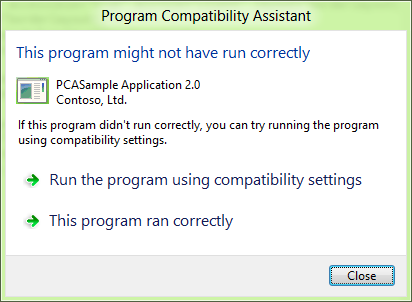 This post has been edited by narf03: Dec 5 2022, 12:58 PM This post has been edited by narf03: Dec 5 2022, 12:58 PM |
|
|
|
|
|
flashang
|
Dec 5 2022, 08:27 PM
|
|
|
QUOTE(narf03 @ Dec 5 2022, 12:57 PM) got, something like this, i saw it a few times, it usually on something that ends very fast Some old application does not met ms new requirements. This could because of using older version of dll library, or some activities has been block by windows update. |
|
|
|
|



 Quote
Quote


 0.0175sec
 0.49
0.49
 5 queries
 GZIP Disabled