

 Oct 8 2007, 02:42 PM, updated 19y ago


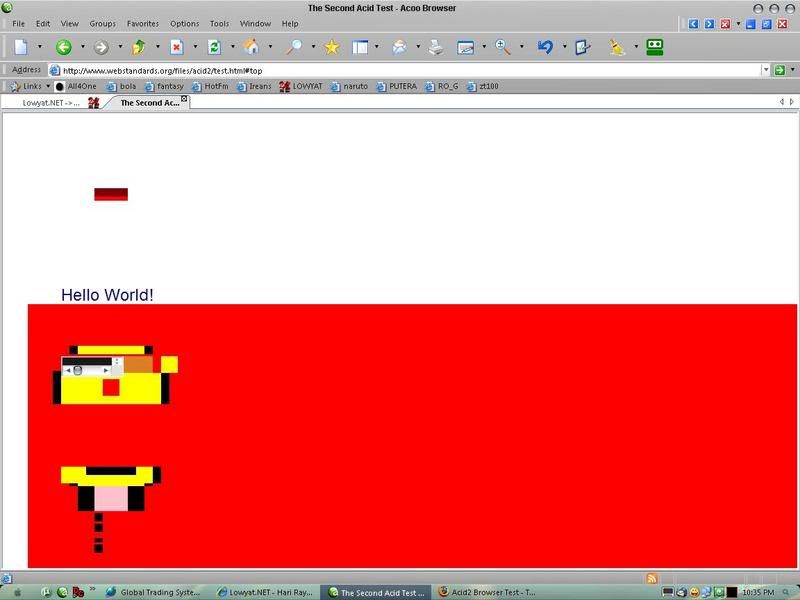
Acoo browser feature list
-Multi-Window Browsing: Brows multiple web pages simultaneously.
-Built-in Pop-up Blocker based on intelligent identification makes browsing the Internet more enjoyable by enabling you to reduce unwanted ads and content.
-Built-in Ad Filter: Block Ad banners, flash animations, iframes or any components within any web pages by URL patterns.
-Built-in ActiveX Filter: Block obtrusive dialogs prompting you to install unsafe ActiveX controls.
-Convenient access to major search engines by Search Bar. Built-in search engines enable user to search for web pages, images, music, lyrics, news and software in Internet.
-Built-in calculator: Use Acoo Browser to evaluate mathematical expressions. To use Acoo Browser's built-in calculator function, simply enter the calculation you'd like done into the search box or address box and hit the Enter key or click on the Search/Go button.
-Built-in HTML Source Viewer: Syntax highlighted web page HTML source code viewer. View screenshot.
-Built-in Web Page Analyzer: A powerful tools shows syntax highlighted script code the page executes, information about images, etc. View screenshot.
-Built-in RSS News Rendering Engine: You can read RSS news directly inside Acoo Browser without additional RSS Reader software.
-Super Drag & Drop: Super drag and drop lets you open new links by using your mouse to drag and drop the link into the page. You can also select and drag text to be searched using the default search engine.
-Records Cleaner: With Acoo Browser, you can easily keep your privacy by deleting Typed Addresses, Cookies, History of Visited Web Sites, Temporary Internet Files and Search Keywords.
-Mouse Gestures: Simple symbols that you "draw" on your screen using your mouse.
-Group: Open and save a collection of sites as a group.
Ability to suppress script error message dialog.
Seamless integration with AI RoboForm FormFiller/Password Manager.
Flexible control of startup actions.
-URL Alias: Type short alias instead long URL.
Zoom in /Zoom out ANY Web page for better visuality and readability.
-Safe Recovery: If Acoo Browser is closed improperly, all open web pages are saved and will be automatically reopened at next startup.
-Skinned window frame.
-Support the "data: protocol": The data: protocol is described in RFC 2397.
What's new?
» Click to show Spoiler - click again to hide... «
Version 1.70.798 - [Sep-05-2007]
Now the popup window in a new tab can't maximize automatically any longer.
Fixed a bug while Acoo Browser hanging caused by Ad-Filter (such
www.maxnews.com opened in Acoo Browser).
Now after closing tab, the new activated tab is the tab in the left.
Small enhancements and a few bugs fixed.
Version 1.61.684 - [Aug-08-2007]
Fix the bug of being not able to save skins setting.
Add two skins.
Now the command of shifting tabs ahead or backwards adopts means of cyclic shifting.
Add several tips in "Tip of the Day".
If you choose to "Open new tab in background" and "Automatically open new tab from" "Address Bar", the website you input in address bar will open a new tab in background.
Fix the big that Acoo Browser can not run under Win98.
Add the "Fill Form" button in "Standard Buttons".
Small enhancements and a few bugs fixed.
Version 1.60.970 - [Jul-19-2007]
Now you can see the thumbnail of web page automatically display in tooltip of tab bar.
Add the function of displaying "Tip of the Day" automatically when Acoo Browser startups.
Small enhancements and a few bugs fixed.
Version 1.59.812 - [Jun-05-2007]
Now you can input abbreviation of search engine in address bar or search bar to choose and use search engine.
Now you can add, modify and delete search engine in search bar's management option.
Small enhancements and a few bugs fixed.
Version 1.58 build 770 - [Apr-23-2007]
Fixed several bugs under Windows Vista.
Added Serbian Cyrillic language file.
Added Slovak language file.
Small enhancements and a few bugs fixed.
Version 1.57 build 994 - [Mar-10-2007]
Now offers support for download managers.
Added a new option to open a new page by clicking links on the Web page.
Now can select NOT to automatically scan the Web sites in Favorites for Favicons.
Improved the speed of get Favicons by giving first priority to the local hard disk.
Small enhancements and a few bugs fixed.
Version 1.56 build 876 - [Jan-31-2007]
Added a built-in "Form Filler and Saver" feature.
Fixed a bug in the "Save as MHTML" function.
Small enhancements and a few bugs fixed.
Version 1.55 build 904 - [Dec-26-2006]
Fixed a bug that background tab window incorrectly gains focus when it refreshes.
Added a new dialog to remove "typed address" selected.
Use the (ctrl 1) key combination to jump to the far left tab. Use the (ctrl 9) key to jump to the far right tab. Use the (ctrl 2), (ctrl 3), (ctrl 4) etc (all the way up to ctrl 8) to navigate to the 2nd, 3rd, 4th (etc) tabs.
Added the "cascading style sheets" analyzer in the "Page Analyzer".
Small enhancements and a few bugs fixed.
Version 1.54 build 738 - [Nov-23-2006]
Now you can assign a keyboard shortcut to an Acoo Browser menu item.
Acoo Browser now can detect when a page is really a web feed, and it display a view of the feed that's much easier to read.
Add support for alias in the dialog brought up by selecting "file->open".
Small enhancements and a few bugs fixed.
Version 1.53 build 590 - [Oct-30-2006]
Added support for open links inside MSN Messenger within Acoo Browser.
Acoo Browser now can be closed before a file is completely downloaded.
Added the skin preview feature.
Added shortcut key for go to "previous window" and "next window".
Now history pane in Acoo Browser works properly with IE7.
Now you can set the default action for the "New" button.
Small enhancements and a few bugs fixed.
Version 1.52 build 676 - [Oct-09-2006]
Added the built-in calculator. The calculator can solve math problems involving basic arithmetic, more complicated math.
Added the "data: protocol" support.
Small enhancements and a few bugs fixed.
Version 1.51 build 714 - [Sep-19-2006]
Now you can automatically discover RSS feeds while browsing the web.
Added a new option to set the maximum tabs that can be opened.
Small enhancements and a few bugs fixed.
Version 1.50 build 922 - [Aug-24-2006]
Added the built-in RSS news rendering engine.
Now you can customize system bar.
Now you can suppress the Internet Explorer Script Error dialog.
Small enhancements and a few bugs fixed.
Version 1.43 build 662 - [Jul-28-2006]
Added Serbian language file.
Added new features to clear AutoComplete forms and passwords.
Added the feature of URL Hotkey.
Small enhancements and a few bugs fixed.
Version 1.42 build 548 - [Jul-12-2006]
Added the ActiveX history log.
Fixed a bug that some websites can't be opened correctly.
Added a new option to enable/disable the "URL Alias".
Small enhancements and a few bugs fixed.
Version 1.41 build 712 - [Jun-28-2006]
Added the ActiveX filter.
Enhanced the "windows list" dialog and the "close windows" dialog.
Small enhancements and a few bugs fixed.
Version 1.40 build 556 - [Jun-05-2006]
Added the new dialog of opening windows manager.
Added the function of supporting some Internet Explorer extensions.
Fixed the bug that the page context menu couldn't show when "Mouse Gesture" function is disabled.
Small enhancements and a few bugs fixed.
Version 1.39 build 600 - [May-16-2006]
Added Portuguese language file.
Added the "Folders" explorer bar.
Added the function to save page as image.
Enhanced the system toolbar.
Small enhancements and a few bugs fixed.
Version 1.38 build 512 - [Apr-28-2006]
Added Arabic language file.
Added Portuguese Brazilian language file.
Added Indonesian language file.
Added the tool "Collector".
Small enhancements and a few bugs fixed.
Version 1.37 build 758 - [Mar-28-2006]
Added a new dialog to close the selected tab windows.
Added "Show/Hide Acoo Browser" hot key.
Added the "external tools" bar.
Small enhancements and a few bugs fixed.
Version 1.36 build 638 - [Mar-06-2006]
Added Croatian language file.
Added a new feature to search URL in typed address with a specified text.
Added a new feature to remove URL directly from favorites, history, groups and typed address by using "find dialog".
Added skin support.
Small enhancements and a few bugs fixed.
Version 1.35 build 520 - [Feb-17-2006]
Added a new feature to search URL in favorites, history and groups with a specified text.
Added a new option to change the default favorites folder.
Added a context menu in the favorites bar, from which you can rename or delete favorites.
Small enhancements and a few bugs fixed.
Version 1.34 build 402 - [Feb-06-2006]
Enhanced the "History" explorer bar, added two more ways to view the history.
Enhanced the "Group" menu.
Small enhancements and a few bugs fixed.
Version 1.33 build 916 - [Jan-18-2006]
Added Spanish language file.
Improved the startup speed when there are a lot of items in favorites folder.
Added "Save As" icon into the main toolbar.
Added menu item "Paste and go" to the context menu of address bar.
Small enhancements and a few bugs fixed.
Version 1.32 build 740 - [Dec-30-2005]
Add the menu items "Open All Favorites in This Folder" and "Add URL Here" to the "Favorites" menu.
Added the new dialog of "add favorite".
Added the new option "Place new tab next to current".
Small enhancements and a few bugs fixed.
Version 1.31 build 560 - [Dec-09-2005]
Added an option to enable middle-click in tab to close window.
Added an option to open a new window in the background or the foreground by using "super drag and drop".
Added a setting to set the number of characters in the tab.
Added a new action "Open new background window" to the actions of Mouse gestures.
Added the menu item "Restore IE as Default Browser" to the "Options" menu.
Restore IE as default browser in the uninstaller of Acoo Browser.
Small enhancements and a few bugs fixed.
Version 1.30 build 674 - [Nov-28-2005]
Added Korean language file.
Added the feature to open a new instance of Acoo Browser from file menu.
Added "clear records" icon into the main toolbar.
Small enhancements and a few bugs fixed.
Version 1.29 build 724 - [Nov-08-2005]
Enhanced the "Super Drag & Drop" function so that you can search directly from the web page by dragging & dropping the selected text.
Added new functions of "Refresh All" and "Stop All" web pages.
Added percentage text to the progress bar of page loading.
Added a new option of "Suppress script errors".
Added the new dialog to view script errors in the current page.
Fixed the bug that the option dialog couldn't show on Win98/WinME.
Fixed a bug that caused Acoo Browser to crash in some cases when using Ad-filter.
Small enhancements and a few bugs fixed.
Version 1.28 build 610 - [Oct-27-2005]
Fixed a bug of mouse gesture.
Added an option to add mouse trail effect on web pages (You'll need a quite powerful graphics card to get the full mouse trail experience).
'Shift + Left Click' on links now opens new tab in background instead of foreground.
Small enhancements and a few bugs fixed.
Version 1.27 build 905 - [Oct-14-2005]
Added the "Super Drag & Drop" support.
Fixed the bug that selecting an item of the typed address list in the address bar fails to function.
Fixed the bug that Group can't save correctly when the browser exits in some cases.
Fixed the bug that block web page dialog popups caused Acoo Browser to crash in some cases.
Fixed the bug that dragging from the address bar caused Acoo Browser to crash in some cases.
Small enhancements and a few bugs fixed.
Version 1.26 build 626 - [Sep-27-2005]
Added a new feature to block web page dialog popups.
Improved the Ad-Filter.
The blocked ads by Ad-Filter can be replaced by a specified text.
Added a new option to show/hide the icon of "Address" button on the address bar.
Small enhancements and a few bugs fixed.
Version 1.25 build 870 - [Sep-16-2005]
Added Turkish language file.
Added new Plug-in type (Button) support.
Added the "Plug-in" option dialog.
Small enhancements and a few bugs fixed.
Version 1.24 build 782 - [Sep-04-2005]
Added: Hebrew language file.
Fixed the bug that caused Acoo Browser to crash when closing on Win98, WinME.
Added a new option to hide the "Address" button and the "Go" button on the address bar.
Added a new option to hide the tray icon of Acoo Browser.
Small enhancements and many small bugs fixed.
Version 1.23 build 842 - [Aug-19-2005]
Fixed the bug that Group can't save correctly when the browser exits.
Added the tool "Page Analyzer".
"Source Viewer" can support UTF-8 encoding now.
Added the finding function in "Source Viewer".
Small enhancements and a few bugs fixed.
Version 1.22 build 972 - [Aug-09-2005]
Added: French Traditional language file.
Added: A built-in HTML source viewer with syntax highlighting.
Small enhancements and a few bugs fixed.
Version 1.21 build 286 - [Jul-20-2005]
Added: Chinese Traditional language file.
Improved the "Tab Bar" option dialog and added a new tab style.
Added menu item "Clear All" to the "Clear Records" menu.
Added drop-down menu to the "Go" button of address bar to support web page translation.
Small enhancements and a few bugs fixed.
Version 1.20 build 293 - [Jul-13-2005]
Fixed the bug that tooltip didn't show on button of dialog box in the Unicode version.
Fixed the bug that the "splash screen" didn't show on Win98, WinME.
Integrated the "Select Language" dialog into options dialog.
Added "zoom page" icon into main toolbar.
Added new option "show splash screen" at startup setup dialog.
Added the "Start Pages" option dialog.
Small enhancements and a few bugs fixed.
Version 1.19 build 226 - [Jul-05-2005]
Fixed the bug that caused Acoo Browser unable to run under WinNT 4.x.
Added "splash screen" on launch.
Added the "Address Bar" option dialog and improved domain completion.
Fixed a bug that proxy server can't be used properly in the Unicode version.
Small enhancements and a few bugs fixed.
Version 1.18 build 438 - [Jun-28-2005]
Added Unicode version of the program, which is automatically installed instead of the ANSI one in case your OS supports Unicode (WinNT/Win2k/WinXP).
Added the "Open Selected Sites" dialog, it will show at startup if you have selected the option "Resume this session on next start" or the browser didn't exit normally in the last session.
Fixed the bug that the status bar of browser displays the activity of another tab window.
Small enhancements and a few bugs fixed.
Version 1.17 build 283 - [Jun-15-2005]
Fixed the bug that browser is out of respond in some period when it fails to open some sites.
Improved the startup speed when there are a lot of items in favorites folder.
The dialog of "set as default browser" will show before the main window is opened.
Small enhancements and a few bugs fixed.
Version 1.16 build 302 - [Jun-07-2005]
Added: The "Search Bar" option dialog.
The search category in "search bar" now can be turned off.
The search engines in each search category of "search bar" now can be set as default search engines.
Improved the drop-down menu of "Address Bar".
Small enhancements and a few bugs fixed.
Version 1.15 build 265 - [May-25-2005]
Added: Polish language file.
The Search Engine list in "Search Bar" is now read from the configuration file.
Enhanced the "Address Bar", now it can select "URL Alias" from the drop-down menu.
Small enhancements and a few bugs fixed.
Version 1.14 build 692 - [Apr-24-2005]
Fixed bug that caused Acoo Browser unable to run under Win98 and WinME.
Added: Hungarian language file.
Enhanced the "Search Bar" and added the option "Clear Search History".
Added: A group of options of "Automatically open new tab from..."
Small enhancements and a few bugs fixed.
Version 1.13 build 219 - [Apr-05-2005]
Fixed: "Create Shortcut" in context menu of web page that is always gray.
Fixed: Some fonts showing incorrectly in some non-English languages.
Added: New option "Open new tab in background".
Popup blocker will also check the exceptions list of Ad-Filter.
Small enhancements and a few bugs fixed.
Version 1.12 build 145 - [Mar-29-2005]
Fixed: Crash when closing a long title website.
Added: "Favorites" options dialog.
Enhanced the "Links Bar".
Small enhancements and a few bugs fixed.
Version 1.11 build 171 - [Mar-22-2005]
Fixed: Crash when closing in some cases.
Added: Favorites Tool Bar.
Added: Show URL in Status Bar when mouse move over the favorites menu.
Added: Generate a debug log file if a software crash occurs.
Added: Shortcut key "Ctrl+T" to open new blank tab.
Added: New option "Auto new tab".
Small enhancements and a few bugs fixed.
Version 1.10 build 205 - [Mar-15-2005]
Added: Seamless integration with AI RoboForm Form Filler.
Added: Show Icon in front of sites item in the "Undo" menu.
Added: Context menu in blank area of Tab Bar.
Added: "Open All" item and "Close All" item in the "Explorer Bar" menu.
Added: "Download Plug-ins" item in the "Help" menu.
Small enhancements and a few bugs fixed.
Version 1.09 build 188 - [Mar-05-2005]
Added: Plug-in support (PANE).
Added: Update the favorites pane automatically without restarting AcooBrowser.
Added: Press F5 key to refresh the favorites pane.
Fixed: Double click on the scroll button of the tab bar will create a new blank window.
Small enhancements and a few bugs fixed.
Version 1.08 build 113 - [Feb-24-2005]
Added: A hint when mouse move over the edit box of the search bar.
Added: Tab option dialog and two more tab styles.
Added: Support Internet keyboards and 5-button wheel mouse.
Small enhancements and a few bugs fixed.
Version 1.07 build 244 - [Feb-17-2005]
Added: Update favorites menu automatically without restarting Acoo Browser.
Added: Show translator's website instead of email address in about dialog.
Fixed: Site tab showing incorrectly in some cases.
Added: Show hot key name of "user action" in option dialog of Mouse Gestures.
Small enhancements and a few bugs fixed.
Version 1.06 build 138 - [Feb-05-2005]
Added: The name of translator in about dialog.
Added: Show mouse gesture's name and action in status bar when you perform a mouse gesture.
Added: Show the list of mouse gestures in options dialog.
Added: Dutch language file.
Added: German language file.
Added: Italian language file.
Small enhancements and a few bugs fixed.
Version 1.05 build 070 - [Jan-28-2005]
Added drop-down menu to the "Close All Windows" button.
Added confirmation on exit.
Small enhancements and a few bugs fixed.
Version 1.04 build 084 - [Jan-21-2005]
Improved the speed of open new window.
Fixed a bug in the "Restore last open sites" option.
Small enhancements and a few bugs fixed.
Version 1.03 build 118 - [Jan-14-2005]
Added double click on the empty area of the tab bar to create a new blank window.
Added middle mouse button click to open a link in new window.
Fixed a bug in double click to close site tab.
Small enhancements and a few bugs fixed.
Version 1.02 build 069 - [Jan-07-2005]
Added favorite icon support to favorites menu.
If the string in address bar can't be interpreted as a legal web address, AcooBrowser will pass the string to default search engine.
Small enhancements and a few bugs fixed.
Version 1.01 build 098 - [Dec-31-2004]
Added more options to control favorites menu.
Integrated more search engines in "Search Bar".
Small enhancements and a few bugs fixed.
Version 1.00 build 531 - [Dec-22-2004]
Small enhancements and a few bugs fixed.
Version 1.00 build 504 - [Dec-19-2004]
First public release.
Now the popup window in a new tab can't maximize automatically any longer.
Fixed a bug while Acoo Browser hanging caused by Ad-Filter (such
www.maxnews.com opened in Acoo Browser).
Now after closing tab, the new activated tab is the tab in the left.
Small enhancements and a few bugs fixed.
Version 1.61.684 - [Aug-08-2007]
Fix the bug of being not able to save skins setting.
Add two skins.
Now the command of shifting tabs ahead or backwards adopts means of cyclic shifting.
Add several tips in "Tip of the Day".
If you choose to "Open new tab in background" and "Automatically open new tab from" "Address Bar", the website you input in address bar will open a new tab in background.
Fix the big that Acoo Browser can not run under Win98.
Add the "Fill Form" button in "Standard Buttons".
Small enhancements and a few bugs fixed.
Version 1.60.970 - [Jul-19-2007]
Now you can see the thumbnail of web page automatically display in tooltip of tab bar.
Add the function of displaying "Tip of the Day" automatically when Acoo Browser startups.
Small enhancements and a few bugs fixed.
Version 1.59.812 - [Jun-05-2007]
Now you can input abbreviation of search engine in address bar or search bar to choose and use search engine.
Now you can add, modify and delete search engine in search bar's management option.
Small enhancements and a few bugs fixed.
Version 1.58 build 770 - [Apr-23-2007]
Fixed several bugs under Windows Vista.
Added Serbian Cyrillic language file.
Added Slovak language file.
Small enhancements and a few bugs fixed.
Version 1.57 build 994 - [Mar-10-2007]
Now offers support for download managers.
Added a new option to open a new page by clicking links on the Web page.
Now can select NOT to automatically scan the Web sites in Favorites for Favicons.
Improved the speed of get Favicons by giving first priority to the local hard disk.
Small enhancements and a few bugs fixed.
Version 1.56 build 876 - [Jan-31-2007]
Added a built-in "Form Filler and Saver" feature.
Fixed a bug in the "Save as MHTML" function.
Small enhancements and a few bugs fixed.
Version 1.55 build 904 - [Dec-26-2006]
Fixed a bug that background tab window incorrectly gains focus when it refreshes.
Added a new dialog to remove "typed address" selected.
Use the (ctrl 1) key combination to jump to the far left tab. Use the (ctrl 9) key to jump to the far right tab. Use the (ctrl 2), (ctrl 3), (ctrl 4) etc (all the way up to ctrl 8) to navigate to the 2nd, 3rd, 4th (etc) tabs.
Added the "cascading style sheets" analyzer in the "Page Analyzer".
Small enhancements and a few bugs fixed.
Version 1.54 build 738 - [Nov-23-2006]
Now you can assign a keyboard shortcut to an Acoo Browser menu item.
Acoo Browser now can detect when a page is really a web feed, and it display a view of the feed that's much easier to read.
Add support for alias in the dialog brought up by selecting "file->open".
Small enhancements and a few bugs fixed.
Version 1.53 build 590 - [Oct-30-2006]
Added support for open links inside MSN Messenger within Acoo Browser.
Acoo Browser now can be closed before a file is completely downloaded.
Added the skin preview feature.
Added shortcut key for go to "previous window" and "next window".
Now history pane in Acoo Browser works properly with IE7.
Now you can set the default action for the "New" button.
Small enhancements and a few bugs fixed.
Version 1.52 build 676 - [Oct-09-2006]
Added the built-in calculator. The calculator can solve math problems involving basic arithmetic, more complicated math.
Added the "data: protocol" support.
Small enhancements and a few bugs fixed.
Version 1.51 build 714 - [Sep-19-2006]
Now you can automatically discover RSS feeds while browsing the web.
Added a new option to set the maximum tabs that can be opened.
Small enhancements and a few bugs fixed.
Version 1.50 build 922 - [Aug-24-2006]
Added the built-in RSS news rendering engine.
Now you can customize system bar.
Now you can suppress the Internet Explorer Script Error dialog.
Small enhancements and a few bugs fixed.
Version 1.43 build 662 - [Jul-28-2006]
Added Serbian language file.
Added new features to clear AutoComplete forms and passwords.
Added the feature of URL Hotkey.
Small enhancements and a few bugs fixed.
Version 1.42 build 548 - [Jul-12-2006]
Added the ActiveX history log.
Fixed a bug that some websites can't be opened correctly.
Added a new option to enable/disable the "URL Alias".
Small enhancements and a few bugs fixed.
Version 1.41 build 712 - [Jun-28-2006]
Added the ActiveX filter.
Enhanced the "windows list" dialog and the "close windows" dialog.
Small enhancements and a few bugs fixed.
Version 1.40 build 556 - [Jun-05-2006]
Added the new dialog of opening windows manager.
Added the function of supporting some Internet Explorer extensions.
Fixed the bug that the page context menu couldn't show when "Mouse Gesture" function is disabled.
Small enhancements and a few bugs fixed.
Version 1.39 build 600 - [May-16-2006]
Added Portuguese language file.
Added the "Folders" explorer bar.
Added the function to save page as image.
Enhanced the system toolbar.
Small enhancements and a few bugs fixed.
Version 1.38 build 512 - [Apr-28-2006]
Added Arabic language file.
Added Portuguese Brazilian language file.
Added Indonesian language file.
Added the tool "Collector".
Small enhancements and a few bugs fixed.
Version 1.37 build 758 - [Mar-28-2006]
Added a new dialog to close the selected tab windows.
Added "Show/Hide Acoo Browser" hot key.
Added the "external tools" bar.
Small enhancements and a few bugs fixed.
Version 1.36 build 638 - [Mar-06-2006]
Added Croatian language file.
Added a new feature to search URL in typed address with a specified text.
Added a new feature to remove URL directly from favorites, history, groups and typed address by using "find dialog".
Added skin support.
Small enhancements and a few bugs fixed.
Version 1.35 build 520 - [Feb-17-2006]
Added a new feature to search URL in favorites, history and groups with a specified text.
Added a new option to change the default favorites folder.
Added a context menu in the favorites bar, from which you can rename or delete favorites.
Small enhancements and a few bugs fixed.
Version 1.34 build 402 - [Feb-06-2006]
Enhanced the "History" explorer bar, added two more ways to view the history.
Enhanced the "Group" menu.
Small enhancements and a few bugs fixed.
Version 1.33 build 916 - [Jan-18-2006]
Added Spanish language file.
Improved the startup speed when there are a lot of items in favorites folder.
Added "Save As" icon into the main toolbar.
Added menu item "Paste and go" to the context menu of address bar.
Small enhancements and a few bugs fixed.
Version 1.32 build 740 - [Dec-30-2005]
Add the menu items "Open All Favorites in This Folder" and "Add URL Here" to the "Favorites" menu.
Added the new dialog of "add favorite".
Added the new option "Place new tab next to current".
Small enhancements and a few bugs fixed.
Version 1.31 build 560 - [Dec-09-2005]
Added an option to enable middle-click in tab to close window.
Added an option to open a new window in the background or the foreground by using "super drag and drop".
Added a setting to set the number of characters in the tab.
Added a new action "Open new background window" to the actions of Mouse gestures.
Added the menu item "Restore IE as Default Browser" to the "Options" menu.
Restore IE as default browser in the uninstaller of Acoo Browser.
Small enhancements and a few bugs fixed.
Version 1.30 build 674 - [Nov-28-2005]
Added Korean language file.
Added the feature to open a new instance of Acoo Browser from file menu.
Added "clear records" icon into the main toolbar.
Small enhancements and a few bugs fixed.
Version 1.29 build 724 - [Nov-08-2005]
Enhanced the "Super Drag & Drop" function so that you can search directly from the web page by dragging & dropping the selected text.
Added new functions of "Refresh All" and "Stop All" web pages.
Added percentage text to the progress bar of page loading.
Added a new option of "Suppress script errors".
Added the new dialog to view script errors in the current page.
Fixed the bug that the option dialog couldn't show on Win98/WinME.
Fixed a bug that caused Acoo Browser to crash in some cases when using Ad-filter.
Small enhancements and a few bugs fixed.
Version 1.28 build 610 - [Oct-27-2005]
Fixed a bug of mouse gesture.
Added an option to add mouse trail effect on web pages (You'll need a quite powerful graphics card to get the full mouse trail experience).
'Shift + Left Click' on links now opens new tab in background instead of foreground.
Small enhancements and a few bugs fixed.
Version 1.27 build 905 - [Oct-14-2005]
Added the "Super Drag & Drop" support.
Fixed the bug that selecting an item of the typed address list in the address bar fails to function.
Fixed the bug that Group can't save correctly when the browser exits in some cases.
Fixed the bug that block web page dialog popups caused Acoo Browser to crash in some cases.
Fixed the bug that dragging from the address bar caused Acoo Browser to crash in some cases.
Small enhancements and a few bugs fixed.
Version 1.26 build 626 - [Sep-27-2005]
Added a new feature to block web page dialog popups.
Improved the Ad-Filter.
The blocked ads by Ad-Filter can be replaced by a specified text.
Added a new option to show/hide the icon of "Address" button on the address bar.
Small enhancements and a few bugs fixed.
Version 1.25 build 870 - [Sep-16-2005]
Added Turkish language file.
Added new Plug-in type (Button) support.
Added the "Plug-in" option dialog.
Small enhancements and a few bugs fixed.
Version 1.24 build 782 - [Sep-04-2005]
Added: Hebrew language file.
Fixed the bug that caused Acoo Browser to crash when closing on Win98, WinME.
Added a new option to hide the "Address" button and the "Go" button on the address bar.
Added a new option to hide the tray icon of Acoo Browser.
Small enhancements and many small bugs fixed.
Version 1.23 build 842 - [Aug-19-2005]
Fixed the bug that Group can't save correctly when the browser exits.
Added the tool "Page Analyzer".
"Source Viewer" can support UTF-8 encoding now.
Added the finding function in "Source Viewer".
Small enhancements and a few bugs fixed.
Version 1.22 build 972 - [Aug-09-2005]
Added: French Traditional language file.
Added: A built-in HTML source viewer with syntax highlighting.
Small enhancements and a few bugs fixed.
Version 1.21 build 286 - [Jul-20-2005]
Added: Chinese Traditional language file.
Improved the "Tab Bar" option dialog and added a new tab style.
Added menu item "Clear All" to the "Clear Records" menu.
Added drop-down menu to the "Go" button of address bar to support web page translation.
Small enhancements and a few bugs fixed.
Version 1.20 build 293 - [Jul-13-2005]
Fixed the bug that tooltip didn't show on button of dialog box in the Unicode version.
Fixed the bug that the "splash screen" didn't show on Win98, WinME.
Integrated the "Select Language" dialog into options dialog.
Added "zoom page" icon into main toolbar.
Added new option "show splash screen" at startup setup dialog.
Added the "Start Pages" option dialog.
Small enhancements and a few bugs fixed.
Version 1.19 build 226 - [Jul-05-2005]
Fixed the bug that caused Acoo Browser unable to run under WinNT 4.x.
Added "splash screen" on launch.
Added the "Address Bar" option dialog and improved domain completion.
Fixed a bug that proxy server can't be used properly in the Unicode version.
Small enhancements and a few bugs fixed.
Version 1.18 build 438 - [Jun-28-2005]
Added Unicode version of the program, which is automatically installed instead of the ANSI one in case your OS supports Unicode (WinNT/Win2k/WinXP).
Added the "Open Selected Sites" dialog, it will show at startup if you have selected the option "Resume this session on next start" or the browser didn't exit normally in the last session.
Fixed the bug that the status bar of browser displays the activity of another tab window.
Small enhancements and a few bugs fixed.
Version 1.17 build 283 - [Jun-15-2005]
Fixed the bug that browser is out of respond in some period when it fails to open some sites.
Improved the startup speed when there are a lot of items in favorites folder.
The dialog of "set as default browser" will show before the main window is opened.
Small enhancements and a few bugs fixed.
Version 1.16 build 302 - [Jun-07-2005]
Added: The "Search Bar" option dialog.
The search category in "search bar" now can be turned off.
The search engines in each search category of "search bar" now can be set as default search engines.
Improved the drop-down menu of "Address Bar".
Small enhancements and a few bugs fixed.
Version 1.15 build 265 - [May-25-2005]
Added: Polish language file.
The Search Engine list in "Search Bar" is now read from the configuration file.
Enhanced the "Address Bar", now it can select "URL Alias" from the drop-down menu.
Small enhancements and a few bugs fixed.
Version 1.14 build 692 - [Apr-24-2005]
Fixed bug that caused Acoo Browser unable to run under Win98 and WinME.
Added: Hungarian language file.
Enhanced the "Search Bar" and added the option "Clear Search History".
Added: A group of options of "Automatically open new tab from..."
Small enhancements and a few bugs fixed.
Version 1.13 build 219 - [Apr-05-2005]
Fixed: "Create Shortcut" in context menu of web page that is always gray.
Fixed: Some fonts showing incorrectly in some non-English languages.
Added: New option "Open new tab in background".
Popup blocker will also check the exceptions list of Ad-Filter.
Small enhancements and a few bugs fixed.
Version 1.12 build 145 - [Mar-29-2005]
Fixed: Crash when closing a long title website.
Added: "Favorites" options dialog.
Enhanced the "Links Bar".
Small enhancements and a few bugs fixed.
Version 1.11 build 171 - [Mar-22-2005]
Fixed: Crash when closing in some cases.
Added: Favorites Tool Bar.
Added: Show URL in Status Bar when mouse move over the favorites menu.
Added: Generate a debug log file if a software crash occurs.
Added: Shortcut key "Ctrl+T" to open new blank tab.
Added: New option "Auto new tab".
Small enhancements and a few bugs fixed.
Version 1.10 build 205 - [Mar-15-2005]
Added: Seamless integration with AI RoboForm Form Filler.
Added: Show Icon in front of sites item in the "Undo" menu.
Added: Context menu in blank area of Tab Bar.
Added: "Open All" item and "Close All" item in the "Explorer Bar" menu.
Added: "Download Plug-ins" item in the "Help" menu.
Small enhancements and a few bugs fixed.
Version 1.09 build 188 - [Mar-05-2005]
Added: Plug-in support (PANE).
Added: Update the favorites pane automatically without restarting AcooBrowser.
Added: Press F5 key to refresh the favorites pane.
Fixed: Double click on the scroll button of the tab bar will create a new blank window.
Small enhancements and a few bugs fixed.
Version 1.08 build 113 - [Feb-24-2005]
Added: A hint when mouse move over the edit box of the search bar.
Added: Tab option dialog and two more tab styles.
Added: Support Internet keyboards and 5-button wheel mouse.
Small enhancements and a few bugs fixed.
Version 1.07 build 244 - [Feb-17-2005]
Added: Update favorites menu automatically without restarting Acoo Browser.
Added: Show translator's website instead of email address in about dialog.
Fixed: Site tab showing incorrectly in some cases.
Added: Show hot key name of "user action" in option dialog of Mouse Gestures.
Small enhancements and a few bugs fixed.
Version 1.06 build 138 - [Feb-05-2005]
Added: The name of translator in about dialog.
Added: Show mouse gesture's name and action in status bar when you perform a mouse gesture.
Added: Show the list of mouse gestures in options dialog.
Added: Dutch language file.
Added: German language file.
Added: Italian language file.
Small enhancements and a few bugs fixed.
Version 1.05 build 070 - [Jan-28-2005]
Added drop-down menu to the "Close All Windows" button.
Added confirmation on exit.
Small enhancements and a few bugs fixed.
Version 1.04 build 084 - [Jan-21-2005]
Improved the speed of open new window.
Fixed a bug in the "Restore last open sites" option.
Small enhancements and a few bugs fixed.
Version 1.03 build 118 - [Jan-14-2005]
Added double click on the empty area of the tab bar to create a new blank window.
Added middle mouse button click to open a link in new window.
Fixed a bug in double click to close site tab.
Small enhancements and a few bugs fixed.
Version 1.02 build 069 - [Jan-07-2005]
Added favorite icon support to favorites menu.
If the string in address bar can't be interpreted as a legal web address, AcooBrowser will pass the string to default search engine.
Small enhancements and a few bugs fixed.
Version 1.01 build 098 - [Dec-31-2004]
Added more options to control favorites menu.
Integrated more search engines in "Search Bar".
Small enhancements and a few bugs fixed.
Version 1.00 build 531 - [Dec-22-2004]
Small enhancements and a few bugs fixed.
Version 1.00 build 504 - [Dec-19-2004]
First public release.
Download
 Quote
Quote



 0.0250sec
 1.51
1.51
 5 queries
 GZIP Disabled