Came home to my dad complaining WiFi signal is shiet so went and bought tp link mesh to upgrade. So I get the app, go through installation phase but there is always no internet. Using back old router, and the Internet comes back. What am i doing wrong?
Modem is Nokia box from Unifi. Old router is tplink Ac1200 ec221-g3v Mesh is tplink ac1200 deco e4r
This post has been edited by moleman4eva: Oct 30 2022, 12:20 AM
1. You need to choose UniFi VLAN profile in the Deco app. Video example below 2. Did you type in the UniFi username correctly? Example: blabla@unifi 3. Do you have the PPPoE password too? If not, you need to get it from UniFi helpline 4. Deco E4R is the lowest of the low. You might get bigger coverage but any device connected the secondary mesh/tertiary mesh will get very low speeds unless you connect all MESH device using Ethernet cable
1. You need to choose UniFi VLAN profile in the Deco app. Video example below 2. Did you type in the UniFi username correctly? Example: blabla@unifi 3. Do you have the PPPoE password too? If not, you need to get it from UniFi helpline 4. Deco E4R is the lowest of the low. You might get bigger coverage but any device connected the secondary mesh/tertiary mesh will get very low speeds unless you connect all MESH device using Ethernet cable
1. You need to choose UniFi VLAN profile in the Deco app. Video example below 2. Did you type in the UniFi username correctly? Example: blabla@unifi 3. Do you have the PPPoE password too? If not, you need to get it from UniFi helpline 4. Deco E4R is the lowest of the low. You might get bigger coverage but any device connected the secondary mesh/tertiary mesh will get very low speeds unless you connect all MESH device using Ethernet cable
Bro, all these steps compulsory, the PPPoE, VLAN?
I just installed same model last week, but i didn't remove the router, just connect the deco e4 to the router port and setup without the pppoe & vlan
Wat would be the difference between these 2 methods?
Yes those steps will allow you to bypass the original router (IE. You no longer need the original router) Afterwards you can remove the original router and you dont have to deal with multiple WIiFi SSID anymore
Yes those steps will allow you to bypass the original router (IE. You no longer need the original router) Afterwards you can remove the original router and you dont have to deal with multiple WIiFi SSID anymore
Ic Maybe mine setup as access point to extend coverage to further parts of the house, so need these?
Any difference in terms of speed between both method?
I just installed same model last week, but i didn't remove the router, just connect the deco e4 to the router port and setup without the pppoe & vlan
Wat would be the difference between these 2 methods?
Difference wise, no longer need the stock router, less wifi congestion Also, letting the better processor in the mesh system handle routing than the stock router.
Difference wise, no longer need the stock router, less wifi congestion Also, letting the better processor in the mesh system handle routing than the stock router.
Ic I just installed deco e4 mesh as access point only I am thinking to buy another tp link router to replace the zte router provided by TM. BTW, is zte router a standard router from TM? or it varies depending on the technician that come to install?
- connect to original router and use the mesh as extension - remove original router. Set up first mesh as main router and the rest as extension.
I have my own house set up with first method. Used the nokia mesh and connect to original router with lan cable. It was easy plug and play. Somehow doesn't work now for 1st method.
Yes those steps will allow you to bypass the original router (IE. You no longer need the original router) Afterwards you can remove the original router and you dont have to deal with multiple WIiFi SSID anymore
Does this mean i will have few wifi points? Original router wifi and mesh wifi?
Does this mean i will have few wifi points? Original router wifi and mesh wifi?
If by WiFi points you mean WiFi names (the correct term is SSID [Service Set Identifier]), then yes
For example, your original router broadcasts "moleman4eva@unifi" and your MESH system is broadcasting "moleman4evaMESH", with the VLAN configuration and PPPoE setup on your Deco E4 will eliminate "moleman4eva@unifi" WiFi signal since you'll be removing the original router from the whole network
There's absolutely no reason to keep the original router anyway. You're flooding your neighborhood with multiple WiFi SSIDs and wasting electricity (not that a router consumes much power anyway)
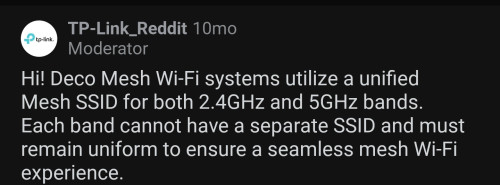
Thanks for the tip. Called unifi and got the username and pass for pppoe. Next problem is i only see one SSID now. Shouldn't there be 2? One 2.4ghz amd one 5ghz?
I checked the Deco app and both 2.4ghz and 5ghz is checked.
Edit* found my answer. RIP. That is so weird.
This post has been edited by moleman4eva: Nov 3 2022, 02:52 AM
Thanks for the tip. Called unifi and got the username and pass for pppoe. Next problem is i only see one SSID now. Shouldn't there be 2? One 2.4ghz amd one 5ghz?
I checked the Deco app and both 2.4ghz and 5ghz is checked. Edit* found my answer. RIP. That is so weird.
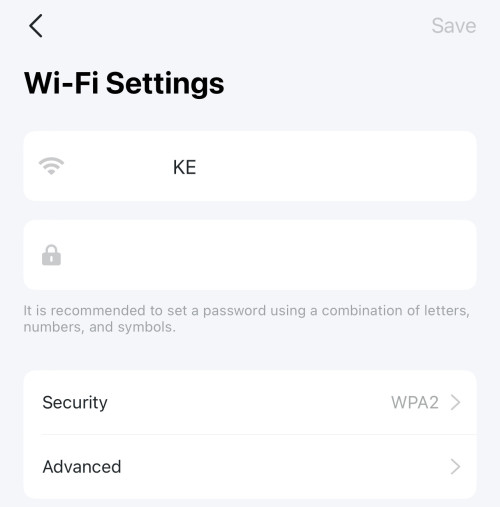
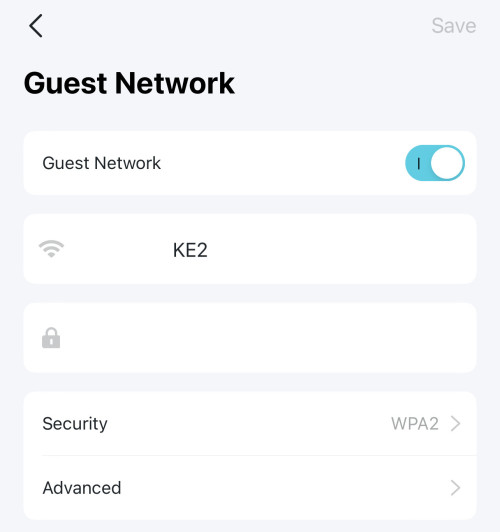
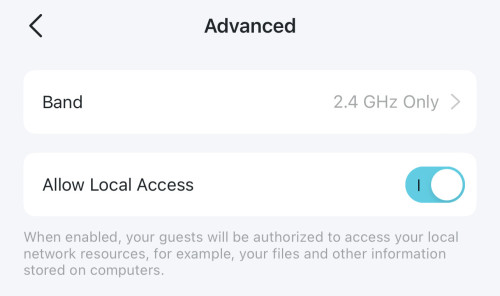
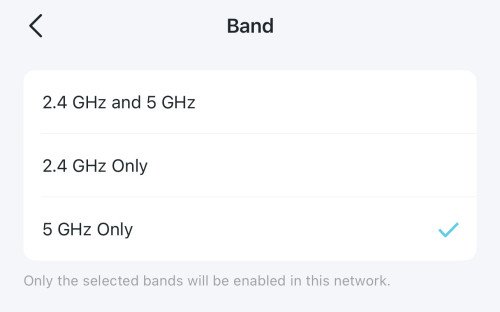
Enable the Guest network so that you can create an additional SSID, then Allow Local Access so that devices on both primary and Guest wifi can crosstalk to each other (else, both SSID are separated cannot even see each other, I guess).
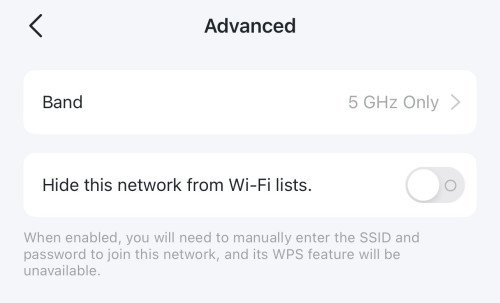
For both primary Wifi and Guest Wifi, you can select to use which band. I put my primary Wifi only on 5GHz, while Guest Wifi only on 2.4GHz.


 Oct 30 2022, 12:18 AM, updated 4y ago


 Quote
Quote






 0.0181sec
 1.24
1.24
 5 queries
 GZIP Disabled