Welcome Guest ( Log In | Register )

Outline · [ Standard ] · Linear+

Home Networking Some Discovery on Unifi VLAN

views
     
TSleezhijiang
post Oct 20 2022, 05:05 PM, updated 3y ago

Getting Started
**
Junior Member
273 posts

Joined: Jan 2010


Hi community,

I have made some progress on opening up and tagging VLAN209 and VLAN400. DHCP Server is available in both of this VLAN. I also able to setup Unifi vocie services as one of the trunk in my FreePBX server.

Next, I do the below

1. Tagging VLAN400 and VLAN209 on other empty ports in the router (Mikrotik)
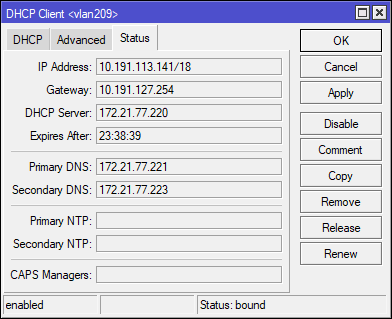
2. Craete DHCP Client and bind on VLAN400-bridge and VLAN209-bridge. Retreive the IP Address [A]
3. Plugin a PC (not connected to internet) to the empty port set in step 1. Your PC should be able to retreive the IP from DHCP server [B]
4. As of this stage, there is no internet connection yet.
5. At the PC set static ip using the same ip retreived from Step 3 [B]. Change the Gateway IP to the value obtained in Step 2 [A] . Dns server can use your fav 1.1.1.1 8.8.8.8
6. Voila, there is internet connection now.

The exact steps of setting up VLAN can be digged online


Hence, from the test above, this is the analysis

1. There will be multiple customers will be under the same gateway for the IP retreived from 2 [A] and 3 [B], hence by doing so, there are able to utilize someone else internet connection by specifying the IP address obtained in Step 2 [A]

Hence, "neighbourhoring internet sharing" will be made possible whereby your neighbour/friend can pay for 30 mbps speed but can utilize your 800 Mbps internet connection.


Internet connection can be shared with each other for Load Balancing purpose.


2. Can expereince LAN gaming with ultra low latency.


3. Community files / video sharing / movie streaming with neighbours


.. and many other benefits


Device Used: Mikrotik RB4011GS


Not sure if anyone tested and tried this yet.

This post has been edited by leezhijiang: Oct 20 2022, 05:07 PM
surianti
post Oct 22 2022, 09:03 AM

Getting Started
**
Junior Member
198 posts

Joined: Aug 2018
How does this work in basics?
You need to link your neighbors and your router with Ethernet cable and the result is you get load balanced shared bandwidth?
TSleezhijiang
post Oct 25 2022, 07:27 PM

Getting Started
**
Junior Member
273 posts

Joined: Jan 2010


QUOTE(surianti @ Oct 22 2022, 09:03 AM)
How does this work in basics?
You need to link your neighbors and your router with Ethernet cable and the result is you get load balanced shared bandwidth?
*
You do not need to pull the ethernet cable physically, because you can use existing fiber optic cable done by TM which will be connected to same ONT
amirsubhi
post Oct 26 2022, 02:56 PM

The Power Is IN Your Hand!
******
Senior Member
1,472 posts

Joined: Apr 2005
From: SumwHeRe In MaLaYsIa


what is the speed u get from 209 and 400 btway, is there any speedtest on this
TSleezhijiang
post Oct 26 2022, 05:43 PM

Getting Started
**
Junior Member
273 posts

Joined: Jan 2010


QUOTE(amirsubhi @ Oct 26 2022, 02:56 PM)
what is the speed u get from 209 and 400 btway, is there any speedtest on this
*
Technically there is no limit on the speed. You can be subscribed to 100 Mbps, but if your jiran has 800 Mbps, you can enjoy 800 Mbps too
TSleezhijiang
post Oct 26 2022, 05:43 PM

Getting Started
**
Junior Member
273 posts

Joined: Jan 2010


QUOTE(amirsubhi @ Oct 26 2022, 02:56 PM)
what is the speed u get from 209 and 400 btway, is there any speedtest on this
*
Technically there is no limit on the speed. You can be subscribed to 100 Mbps, but if your jiran has 800 Mbps, you can enjoy 800 Mbps too
TSleezhijiang
post Oct 26 2022, 05:43 PM

Getting Started
**
Junior Member
273 posts

Joined: Jan 2010


QUOTE(amirsubhi @ Oct 26 2022, 02:56 PM)
what is the speed u get from 209 and 400 btway, is there any speedtest on this
*
Technically there is no limit on the speed. You can be subscribed to 100 Mbps, but if your jiran has 800 Mbps, you can enjoy 800 Mbps too
amirsubhi
post Oct 26 2022, 05:49 PM

The Power Is IN Your Hand!
******
Senior Member
1,472 posts

Joined: Apr 2005
From: SumwHeRe In MaLaYsIa


QUOTE(leezhijiang @ Oct 26 2022, 05:43 PM)
Technically there is no limit on the speed. You can be subscribed to 100 Mbps, but if your jiran has 800 Mbps, you can enjoy 800 Mbps too
*
can u try do speedtest one time, just to know they really doesn't implement kind of speed limiter ont the vlan
TSleezhijiang
post Oct 28 2022, 09:02 AM

Getting Started
**
Junior Member
273 posts

Joined: Jan 2010


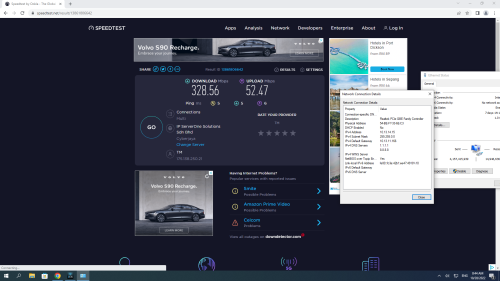
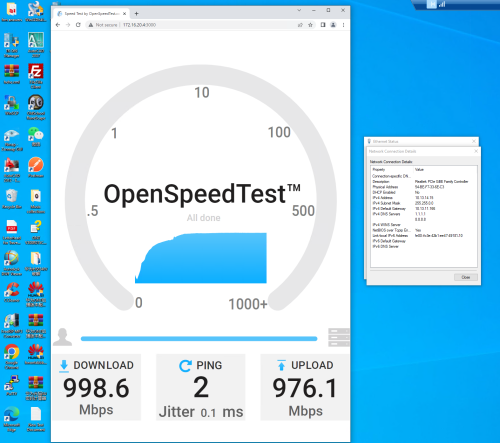
WAN/Internet Speedtest when on VLAN400/VLAN209
user posted image


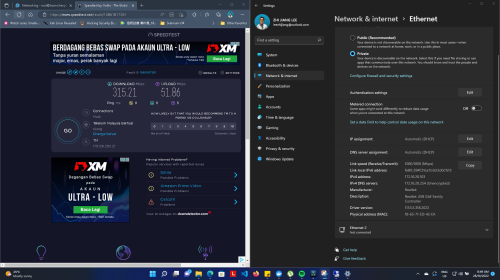
Internet Speedtest on normal VLAN

user posted image


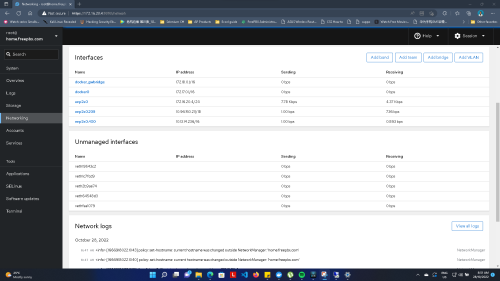
Screenshot showing server that has multiple VLAN interface connected to Local network, VLAN400 and VLAN209 respectively


user posted image


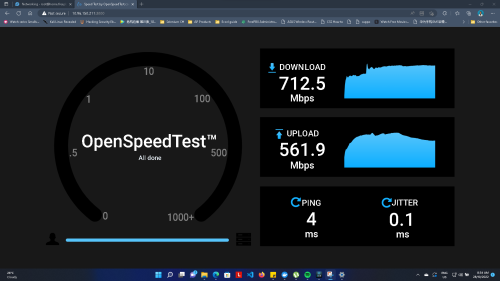
Speed test Between VLAN using Server above as host. (From Wifi local network to VLAN 209)

user posted image

Speed test Between VLAN using Server above as host. (Wired VLAN400 to local network wired)[U]
user posted image


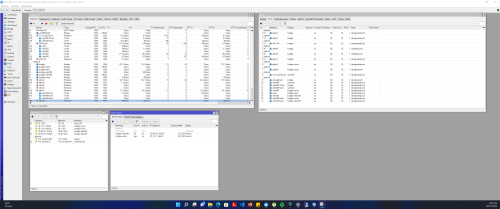
Settings on Mikrotik

user posted image

This post has been edited by leezhijiang: Oct 28 2022, 09:07 AM
Anime4000
post Oct 28 2022, 01:20 PM

Look at all my stars!!
*******
Senior Member
2,400 posts

Joined: Jul 2009
From: /dev/null


this same routable network like bypassing TM Walled Garden?
TSleezhijiang
post Oct 28 2022, 03:14 PM

Getting Started
**
Junior Member
273 posts

Joined: Jan 2010


QUOTE(Anime4000 @ Oct 28 2022, 01:20 PM)
this same routable network like bypassing TM Walled Garden?
*
Yes, if you have friends staying like beside you / opposite you, they might be able to help you to bypass it where you can use their internet connection.

Both of you can technically be on the same network without having to pull cables across houses because you are able to use existing resources and infrastructures laid by TM.


I am not sure if I explained this clear enough.


This post has been edited by leezhijiang: Oct 28 2022, 03:15 PM
Anime4000
post Oct 28 2022, 04:41 PM

Look at all my stars!!
*******
Senior Member
2,400 posts

Joined: Jul 2009
From: /dev/null


QUOTE(leezhijiang @ Oct 28 2022, 03:14 PM)
Yes, if you have friends staying like beside you / opposite you, they might be able to help you to bypass it where you can use their internet connection.

Both of you can technically be on the same network without having to pull cables across houses because you are able to use existing resources and infrastructures laid by TM.
I am not sure if I explained this clear enough.
*
Yeah, this same method, did during streamyx Walled Garden and Unifi to have free internet...

I also tried with TM-Maxis VLAN 822 & 821, in same area, unfortunately VLAN 821 & 822 capped at 128kbps,

also not work when in different state, like Seremban and Nilai.

but with VLAN 209 (TM Management) can be obtained when using GPON ONU SFP,

with Stock ONU, Maxis customer cannot have VLAN 209

This post has been edited by Anime4000: Oct 29 2022, 11:21 AM
TSleezhijiang
post Oct 28 2022, 05:22 PM

Getting Started
**
Junior Member
273 posts

Joined: Jan 2010


QUOTE(Anime4000 @ Oct 28 2022, 04:41 PM)
Yeah, this same method, did during streamyx Walled Garden and Unifi to have free internet...

I also tried with TM-Maxis VLAN 822 & 821, in same area, unfortunately VLAN 821 & 821 capped at 128kbps,

also not work when in different state, like Seremban and Nilai.

but with VLAN 201 (TM Management) can be obtained when using GPON ONU SFP,

with Stock ONU, Maxis customer cannot have VLAN 201
*
How about voice VLAN ?
TSleezhijiang
post Oct 28 2022, 05:23 PM

Getting Started
**
Junior Member
273 posts

Joined: Jan 2010


QUOTE(Anime4000 @ Oct 28 2022, 04:41 PM)
Yeah, this same method, did during streamyx Walled Garden and Unifi to have free internet...

I also tried with TM-Maxis VLAN 822 & 821, in same area, unfortunately VLAN 821 & 821 capped at 128kbps,

also not work when in different state, like Seremban and Nilai.

but with VLAN 201 (TM Management) can be obtained when using GPON ONU SFP,

with Stock ONU, Maxis customer cannot have VLAN 201
*
Anime4000
post Oct 29 2022, 11:41 AM

Look at all my stars!!
*******
Senior Member
2,400 posts

Joined: Jul 2009
From: /dev/null


I managed to obtain VLAN 209 IP Address even I using Maxis under TM fiber,

with stock ONU, VLAN 209 are not bridged, so using XPON ONU SFP it bridged everything:

CODE

=================================
EntityID: 0x120b
FilterTbl[0]: PRI 0,CFI 0, VID 621
FilterTbl[2]: PRI 0,CFI 0, VID 821
FilterTbl[4]: PRI 0,CFI 0, VID 822
FwdOp:  0x10
NumOfEntries: 3
=================================


=================================
EntityID: 0xe10b
FilterTbl[0]: PRI 0,CFI 0, VID 209
FwdOp:  0x10
NumOfEntries: 1
=================================


user posted image
TSleezhijiang
post Oct 30 2022, 08:55 PM

Getting Started
**
Junior Member
273 posts

Joined: Jan 2010


QUOTE(Anime4000 @ Oct 29 2022, 11:41 AM)
I managed to obtain VLAN 209 IP Address even I using Maxis under TM fiber,

with stock ONU, VLAN 209 are not bridged, so using XPON ONU SFP it bridged everything:

CODE

=================================
EntityID: 0x120b
FilterTbl[0]: PRI 0,CFI 0, VID 621
FilterTbl[2]: PRI 0,CFI 0, VID 821
FilterTbl[4]: PRI 0,CFI 0, VID 822
FwdOp:  0x10
NumOfEntries: 3
=================================
=================================
EntityID: 0xe10b
FilterTbl[0]: PRI 0,CFI 0, VID 209
FwdOp:  0x10
NumOfEntries: 1
=================================


user posted image
*
I tried to add static route. It seems networks in VLAN209 are not routable although the DHCP server and DNS server seems to be on the same network

This post has been edited by leezhijiang: Oct 30 2022, 09:00 PM
amirsubhi
post Oct 31 2022, 11:30 PM

The Power Is IN Your Hand!
******
Senior Member
1,472 posts

Joined: Apr 2005
From: SumwHeRe In MaLaYsIa


QUOTE(leezhijiang @ Oct 28 2022, 09:02 AM)
WAN/Internet Speedtest when on VLAN400/VLAN209
user posted image
Internet Speedtest on normal VLAN

user posted image
Screenshot showing server that has multiple VLAN interface connected to Local network, VLAN400 and VLAN209 respectively


user posted image
Speed test Between VLAN using Server above as host. (From Wifi local network to VLAN 209)

user posted image

Speed test Between VLAN using Server above as host. (Wired VLAN400 to local network wired)[U]
user posted image
Settings on Mikrotik

user posted image
*
this is within you lan network is it, have u try connecting to other user/neighour friend and get their speed?
teckyuan
post Nov 1 2022, 07:54 AM

Getting Started
**
Junior Member
137 posts

Joined: Mar 2008


parking
teckyuan
post Nov 1 2022, 08:00 AM

Getting Started
**
Junior Member
137 posts

Joined: Mar 2008


can i do it with any microtik router?
or only microtik router can do it?
TSleezhijiang
post Nov 4 2022, 08:48 PM

Getting Started
**
Junior Member
273 posts

Joined: Jan 2010


QUOTE(teckyuan @ Nov 1 2022, 08:00 AM)
can i do it with any microtik router?
or only microtik router can do it?
*
Any mirktoik router can do it

2 Pages  1 2 >Top
 

Change to:
| Lo-Fi Version
0.0240sec    0.33    5 queries    GZIP Disabled
Time is now: 22nd December 2025 - 04:57 AM