Welcome Guest ( Log In | Register )

Outline · [ Standard ] · Linear+

 PC Shutdown After 1 Hour Idle

views
     
TSbass4focus
post Oct 12 2022, 04:48 PM, updated 4y ago

Getting Started
**
Junior Member
119 posts

Joined: Jan 2021


I'm trying to set my PC (windows 10) to shutdown automatically after 1 hour of idle time. Googled and tried using the Task Scheduler to create a task to do so. I followed the online instructions step-by-step and then let the PC continue idling before I sleep. When I awoke, the PC was still idling. Looks like the created task did not work.

I thought of using power management but the setting there is for PC to sleep and not shutdown.

Any other method to set automatic shutdown after idling?
Natsukashii
post Oct 12 2022, 04:54 PM

^^
******
Senior Member
1,084 posts

Joined: Jul 2022
There are another two ways: click here
TSbass4focus
post Oct 12 2022, 05:03 PM

Getting Started
**
Junior Member
119 posts

Joined: Jan 2021


QUOTE(Natsukashii @ Oct 12 2022, 04:54 PM)
There are another two ways: click here
*
Thanks. Will take a look.
jonathanYYDS
post Nov 4 2022, 10:49 AM

Getting Started
**
Junior Member
144 posts

Joined: Aug 2022
QUOTE(bass4focus @ Oct 12 2022, 04:48 PM)
I'm trying to set my PC (windows 10) to shutdown automatically after 1 hour of idle time. Googled and tried using the Task Scheduler to create a task to do so. I followed the online instructions step-by-step and then let the PC continue idling before I sleep. When I awoke, the PC was still idling. Looks like the created task did not work.

I thought of using power management but the setting there is for PC to sleep and not shutdown.

Any other method to set automatic shutdown after idling?
*
I believe it is not working due to some background application still intermittently running. Windows Defender, Antivirus software, security software, Anydesk, Teamviewer, Adobe Reader, etc. A lot of software actually running in background, so if you want set it as idle for 1 hour then it auto shutdown is a bit difficult unless you're 100% no application is actively running in background.

A lot of people don't understand this clearly. If you put firewall or Wireshark to monitor your network, you will notice you computer when it idle, it will still sending data out to external such as Microsoft server, etc.

WebDpot
post Nov 5 2022, 08:49 PM

Regular
******
Senior Member
1,026 posts

Joined: Jul 2011


Here's another way to shutdown your PC after 1 hour but you need to manually trigger it before go to bed.

in Windows 10, open a Notepad and paste these code:

QUOTE
shutdown -s -f -t 3600


Then, save the notepad by selecting "Save As", name the file as you wish + .cmd and then select "All files (*.*)".

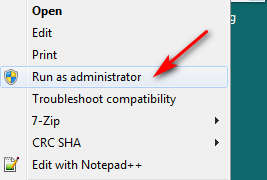
Lastly, to trigger this file, right click and select "Run as administrator".

user posted image


user posted image


Change to:
| Lo-Fi Version
0.0162sec    0.37    5 queries    GZIP Disabled
Time is now: 8th December 2025 - 10:33 PM