

Hi there.
I want to ask which mesh I should buy?
Mainly for surfing and torrenting.
Currently I am using Digi Fibre 300Mbps (Modem ZTE + Router Zyxel)
Thank you.
Which mesh I should buy?
Which mesh I should buy?
|
|
 Sep 19 2022, 08:08 AM, updated 4y ago Sep 19 2022, 08:08 AM, updated 4y ago
Show posts by this member only | Post
#1
|
 
Newbie
10 posts Joined: Aug 2009 
|
Hi there.
I want to ask which mesh I should buy? Mainly for surfing and torrenting. Currently I am using Digi Fibre 300Mbps (Modem ZTE + Router Zyxel) Thank you. |
|
|
|
|
|
Sep 19 2022, 11:51 AM
Show posts by this member only | Post
#2
|

Senior Member
1,343 posts Joined: Dec 2016
|
QUOTE(khairulnazli @ Sep 19 2022, 08:08 AM) Hi there. If under budget:I want to ask which mesh I should buy? Mainly for surfing and torrenting. Currently I am using Digi Fibre 300Mbps (Modem ZTE + Router Zyxel) Thank you.  TP-Link Wi-Fi 5 = M4, M5, or M9 If no budget but macai TP-Link: TP-Link Wi-Fi 6 = X20, X50, X60, X68 or X90. ------------------------------------------------------------------- Firmware features, long-term support, multi-platform compatibility, coverage: Obviously ASUS. My suggestion, go for AX56U, flash with merlin. For mesh, go for RT-AX92U, XD4Mini or XT8. AX56U can be paired with other mesh solutions from ASUS (either ethernet backhaul or wireless backhaul). This post has been edited by Jjuggler: Sep 19 2022, 11:52 AM |
|
|
Sep 19 2022, 01:30 PM
Show posts by this member only | IPv6 | Post
#3
|

All Stars
11,459 posts Joined: Oct 2007 From: KL 
|
QUOTE(khairulnazli @ Sep 19 2022, 08:08 AM) Hi there. For Wifi6, Deco X20 if can wire the 2nd AP. I using this at home.I want to ask which mesh I should buy? Mainly for surfing and torrenting. Currently I am using Digi Fibre 300Mbps (Modem ZTE + Router Zyxel) Thank you. For Wifi5, Deco M4 or M5 if can wire the 2nd AP. M9 Plus if fully wireless. M9 Plus is really cheap now. My relatives all using Decos which I recommended. So far mostly no problem. Personally I would get a separate router, I use Mikrotik. RB750Gr3 for example. But that's additional expense and not really necessary in many cases. This post has been edited by soonwai: Sep 19 2022, 01:46 PM |
|
|
Sep 19 2022, 01:32 PM
Show posts by this member only | IPv6 | Post
#4
|
|
All Stars
11,459 posts Joined: Oct 2007 From: KL
|
sorry, meant to edit instead tekan reply...
This post has been edited by soonwai: Sep 19 2022, 01:47 PM |
|
|
Sep 20 2022, 09:47 AM
Show posts by this member only | Post
#5
|
|
Junior Member
429 posts Joined: Jul 2022
|
QUOTE(Jjuggler @ Sep 19 2022, 11:51 AM) If under budget: nice. i needed this as well.TP-Link Wi-Fi 5 = M4, M5, or M9 If no budget but macai TP-Link: TP-Link Wi-Fi 6 = X20, X50, X60, X68 or X90. ------------------------------------------------------------------- Firmware features, long-term support, multi-platform compatibility, coverage: Obviously ASUS. My suggestion, go for AX56U, flash with merlin. For mesh, go for RT-AX92U, XD4Mini or XT8. AX56U can be paired with other mesh solutions from ASUS (either ethernet backhaul or wireless backhaul). Jjuggler liked this post
|
|
|
Sep 24 2022, 02:56 PM
Show posts by this member only | IPv6 | Post
#6
|
|
All Stars
11,459 posts Joined: Oct 2007 From: KL
|
QUOTE(khairulnazli @ Sep 19 2022, 08:08 AM) Hi there. Just realised that you have Zyxel. Is it Zyxel EX3220-T0? If yes, this one got mesh. Just buy one more unit cheap cheap from garage sale or carousell.I want to ask which mesh I should buy? Mainly for surfing and torrenting. Currently I am using Digi Fibre 300Mbps (Modem ZTE + Router Zyxel) Thank you. |
|
|
|
|
|
Sep 27 2022, 06:16 PM
Show posts by this member only | Post
#7
|
|
Senior Member
1,687 posts Joined: Oct 2012
|
tumpang thread a bit. wanna know for a 4800 sq ft house with thick walls, which mesh system is better? currently using TP link Deco M4 with wifi 6 router. inside the room only can get max 130 mbps. i am currently on 500 mbps.
|
|
|
Sep 27 2022, 06:41 PM
Show posts by this member only | IPv6 | Post
#8
|
|
All Stars
11,459 posts Joined: Oct 2007 From: KL
|
QUOTE(19 Degree South @ Sep 27 2022, 06:16 PM) tumpang thread a bit. wanna know for a 4800 sq ft house with thick walls, which mesh system is better? currently using TP link Deco M4 with wifi 6 router. inside the room only can get max 130 mbps. i am currently on 500 mbps. Can't say which brand is better but TPLink Deco is quite ok. Not too expensive. Roaming works well.I use TPLink Deco models as example. If got cable to mesh units, dual band is OK. (m4, m5, x20, x50) If no cable, must get tri-band. (m9, x60) Can mix and match. I recommend to get a dedicated router like Mikrotik RB750Gr3, hAP ac2 or RB5009. One of my reasons for this is that I can upgrade my wifi separate from my router. My house is using RB5009 and 2 units of cabled X20 but only about 3600 sqft built-up. (and RB2011 as vlan switch but that's another story) This post has been edited by soonwai: Sep 27 2022, 07:20 PM |
|
|
Sep 27 2022, 06:45 PM
Show posts by this member only | Post
#9
|
|
Senior Member
1,687 posts Joined: Oct 2012
|
QUOTE(soonwai @ Sep 27 2022, 06:41 PM) I use TPLink Deco as example. Looking at x20 also. Wonder do you have any idea on M9+? Saw some YouTube video reviews and seemed like Asus mesh also quite capable.If got cable to mesh units, dual band is OK. (m4, m5, x20, x50) If no cable, must get tri-band. (m9, x60) Can mix and match. I recommend to get a dedicated router like Mikrotik RB750Gr3, hAP ac2 or RB5009. One of my reasons for this is that I can upgrade my wifi separate from your router. My house is using RB5009 and 2 units of cabled X20 but only about 3600 sqft built-up. (and RB2011 as vlan switch but that's another story) |
|
|
Sep 27 2022, 07:08 PM
Show posts by this member only | IPv6 | Post
#10
|

Junior Member
584 posts Joined: May 2013
|
QUOTE(soonwai @ Sep 27 2022, 07:41 PM) Can't say which brand is better but TPLink Deco is quite ok. Not too expensive. Roaming works well. Any place running RB5009 promo? Hehehe...I use TPLink Deco models as example. If got cable to mesh units, dual band is OK. (m4, m5, x20, x50) If no cable, must get tri-band. (m9, x60) Can mix and match. I recommend to get a dedicated router like Mikrotik RB750Gr3, hAP ac2 or RB5009. One of my reasons for this is that I can upgrade my wifi separate from your router. My house is using RB5009 and 2 units of cabled X20 but only about 3600 sqft built-up. (and RB2011 as vlan switch but that's another story) |
|
|
Sep 27 2022, 08:31 PM
Show posts by this member only | IPv6 | Post
#11
|
|
All Stars
11,459 posts Joined: Oct 2007 From: KL
|
QUOTE(19 Degree South @ Sep 27 2022, 06:45 PM) Looking at x20 also. Wonder do you have any idea on M9+? Saw some YouTube video reviews and seemed like Asus mesh also quite capable. M9+ is actually very good if you need the third band. Last month or so, dual pack of M9+ and x20 almost same price. When I bought X20, I seriously considered buying the M9+ instead but eventually went with X20 just because it's wifi6.Here I did some speed test with M9+ and M4. https://forum.lowyat.net/index.php?showtopi...post&p=96378294 X20 here. https://forum.lowyat.net/index.php?showtopi...ost&p=105043089 I never touch Asus. Too expensive. But I'm sure their products are good. This post has been edited by soonwai: Sep 27 2022, 08:43 PM |
|
|
Sep 27 2022, 08:58 PM
|
|
Senior Member
1,687 posts Joined: Oct 2012
|
QUOTE(soonwai @ Sep 27 2022, 08:31 PM) M9+ is actually very good if you need the third band. Last month or so, dual pack of M9+ and x20 almost same price. When I bought X20, I seriously considered buying the M9+ instead but eventually went with X20 just because it's wifi6. Thanks for the heads up. just a noob question. Do you use the normal router or use the node as the main router? My current set up is main node connected to the wifi6 router and the other node on the first floor. Guessed i need to buy x20 (x3) to cover deadzones which are those bedrooms. Now first floor 's speed is really pathetic at most 140mbps. Here I did some speed test with M9+ and M4. https://forum.lowyat.net/index.php?showtopi...post&p=96378294 X20 here. https://forum.lowyat.net/index.php?showtopi...ost&p=105043089 I never touch Asus. Too expensive. But I'm sure their products are good.  |
|
|
Sep 27 2022, 10:10 PM
Show posts by this member only | IPv6 | Post
#13
|
|
All Stars
11,459 posts Joined: Oct 2007 From: KL
|
QUOTE(19 Degree South @ Sep 27 2022, 08:58 PM) Thanks for the heads up. just a noob question. Do you use the normal router or use the node as the main router? My current set up is main node connected to the wifi6 router and the other node on the first floor. Guessed i need to buy x20 (x3) to cover deadzones which are those bedrooms. Now first floor 's speed is really pathetic at most 140mbps. I use a Mikrotik RB5009 as my main router. The 2 x X20 as the wifi nodes.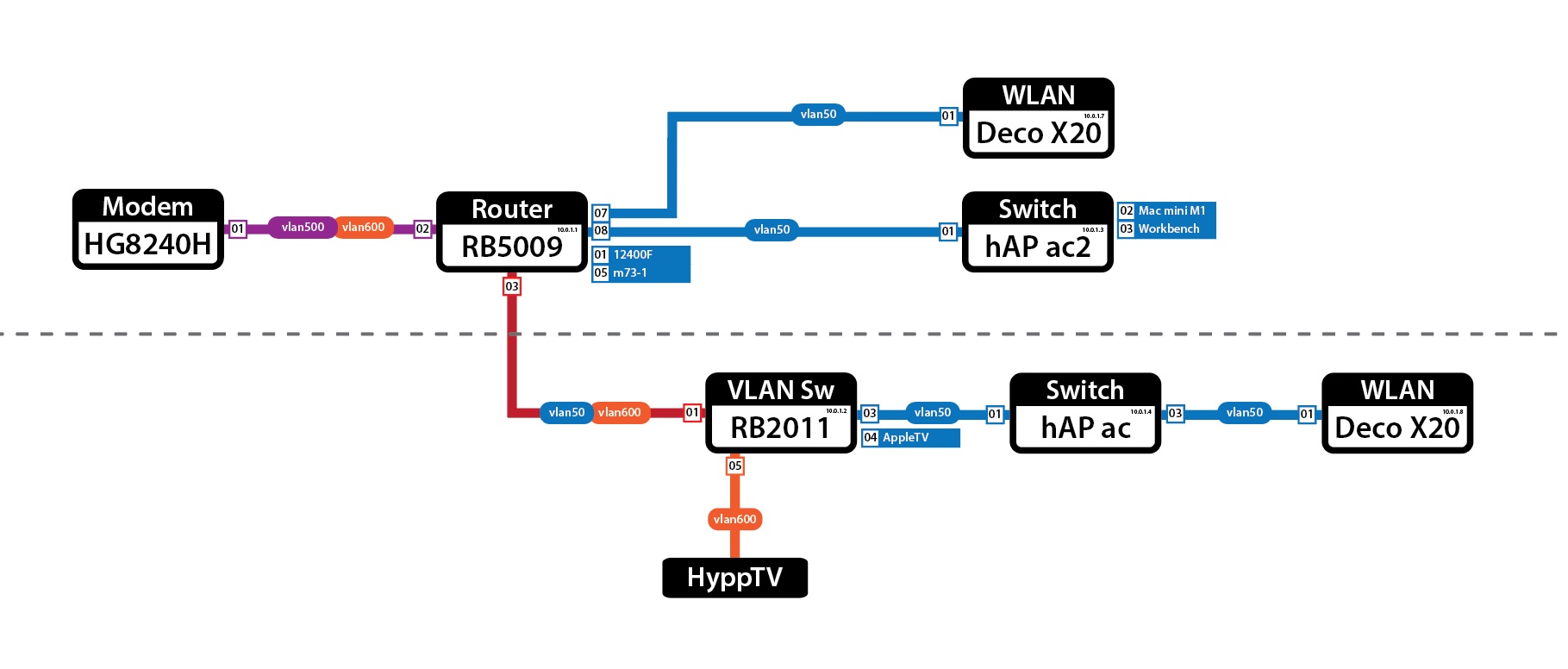 - Modem, router, switch and one X20 upstairs. Downstairs one X20 and one switch. Well, currently 2 as in the diagram above but I only need one. - The Mikrotik hAP ac and hAP ac2 are my old wifi nodes which the X20 replaced. For now, their wifi is off and just running as switches. The RB2011 is my even older wifi node, now just running as a vlan switch. What model is the wifi6 router that you have now? Do you have LAN cables at the places where you want to place the wifi nodes? This post has been edited by soonwai: Sep 27 2022, 10:19 PM |
|
|
|
|
|
Sep 27 2022, 10:13 PM
Show posts by this member only | IPv6 | Post
#14
|
|
Junior Member
289 posts Joined: Sep 2012
|
QUOTE(19 Degree South @ Sep 27 2022, 08:58 PM) Thanks for the heads up. just a noob question. Do you use the normal router or use the node as the main router? My current set up is main node connected to the wifi6 router and the other node on the first floor. Guessed i need to buy x20 (x3) to cover deadzones which are those bedrooms. Now first floor 's speed is really pathetic at most 140mbps. Depends on your usage, like soonwai said wired backhaul get x20, wireless backhaul get m9+.If you don't mind second hand, can get M9+ for RM450 for two pack on carousell. Depending on the deal. Then add on one unit if needed. |
|
|
Sep 27 2022, 10:44 PM
|
|
Senior Member
1,687 posts Joined: Oct 2012
|
QUOTE(soonwai @ Sep 27 2022, 10:10 PM) I use a Mikrotik RB5009 as my main router. The 2 x X20 as the wifi nodes. having the stock unifi homefibre wifi 6 router. I only have lan cable point at ground floor which i connect modem+ router + main deco mode. The other node is on the first floor. - Modem, router, switch and one X20 upstairs. Downstairs one X20 and one switch. Well, currently 2 as in the diagram above but I only need one. - The Mikrotik hAP ac and hAP ac2 are my old wifi nodes which the X20 replaced. For now, their wifi is off and just running as switches. The RB2011 is my even older wifi node, now just running as a vlan switch. What model is the wifi6 router that you have now? Do you have LAN cables at the places where you want to place the wifi nodes? QUOTE(jacktiew @ Sep 27 2022, 10:13 PM) Depends on your usage, like soonwai said wired backhaul get x20, wireless backhaul get m9+. Thanks for the heads up.If you don't mind second hand, can get M9+ for RM450 for two pack on carousell. Depending on the deal. Then add on one unit if needed. |
|
|
Mar 12 2023, 09:44 PM
Show posts by this member only | IPv6 | Post
#16
|

Junior Member
69 posts Joined: Apr 2008
|
QUOTE(soonwai @ Sep 24 2022, 02:56 PM) Just realised that you have Zyxel. Is it Zyxel EX3220-T0? If yes, this one got mesh. Just buy one more unit cheap cheap from garage sale or carousell. Hi Soon Wai, may I how to setup mesh with the same 2 units router? Mine is Digi fibre with router EX3300-T0? Thanks. |
|
|
Mar 13 2023, 03:57 PM
|
|
Senior Member
2,615 posts Joined: Nov 2020
|
QUOTE(soonwai @ Sep 27 2022, 10:10 PM) Efalex liked this post
|
|
|
Apr 4 2023, 06:43 PM
Show posts by this member only | IPv6 | Post
#18
|
|
All Stars
11,459 posts Joined: Oct 2007 From: KL
|
QUOTE(PRSXFENG @ Mar 13 2023, 03:57 PM) unrelated question: what software did you use to create this map? Adobe Illustrator. Manually done, nothing automated.For automated one, I use Mikrotik's TheDude. A bit fugly. 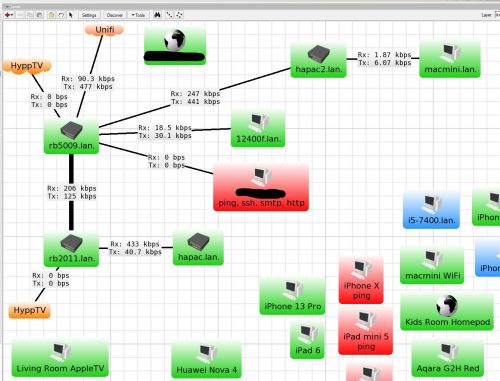 PRSXFENG liked this post
|
|
|
Apr 7 2023, 05:03 PM
Show posts by this member only | IPv6 | Post
#19
|

Senior Member
4,476 posts Joined: Jan 2003
|
i strongly suggest you check out this local youtuber pendakwah teknologi
He has a few youtube videos on the wifi mesh subject and what to look for https://www.youtube.com/watch?v=OW6PPTs6L6E For mesh i like the TPLINK deco series. Ideally you want wifi 6e which is the latest, but in terms of costs, wifi5 is cheaper. the tplink deco mesh some models support the wired mesh mode which is great if you are able to do wired to another room, this way the other mesh will have solid wifi compared to the wireless mesh mode (you connect to the 2nd mesh via wireless instead of wired). or like the youtuber said, rather than get the specialized mesh models, you get the regular wifi routers that support mesh mode which he said was a cheaper option e.g. asus or tplink. This post has been edited by Moogle Stiltzkin: Apr 14 2023, 02:09 PM |
|
|
Apr 21 2024, 10:59 AM
|

Senior Member
1,423 posts Joined: Nov 2013
|
QUOTE(soonwai @ Apr 4 2023, 06:43 PM) Adobe Illustrator. Manually done, nothing automated. Hi, i need some advises. I'm not really good at networking stuff.For automated one, I use Mikrotik's TheDude. A bit fugly. I am currently using Unifi's router d-link dir-x1860z. and i wished to connect it with Deco X20. If i bought a 2-pack Deco X20, do i need to use a node as a Mesh router and put it beside the d-link dir-x1860z, and then i got 1 unit left as a node? Please help to clear my confusion on my above doubt. Thanks!  |
| Change to: |  0.0230sec 0.0230sec
 0.86 0.86
 5 queries 5 queries
 GZIP Disabled GZIP Disabled
Time is now: 22nd December 2025 - 10:00 AM |
 Quote
Quote