Welcome Guest ( Log In | Register )

Outline · [ Standard ] · Linear+

 hex to ascii conversion

views
     
TS15cm
post Aug 29 2022, 10:11 PM, updated 4y ago

Casual
***
Junior Member
423 posts

Joined: Apr 2022
CODE
const int avi_header[AVIOFFSET] PROGMEM = {
 0x52, 0x49, 0x46, 0x46, 0xD8, 0x01, 0x0E, 0x00, 0x41, 0x56, 0x49, 0x20, 0x4C, 0x49, 0x53, 0x54,
 0xD0, 0x00, 0x00, 0x00, 0x68, 0x64, 0x72, 0x6C, 0x61, 0x76, 0x69, 0x68, 0x38, 0x00, 0x00, 0x00,
 0xA0, 0x86, 0x01, 0x00, 0x80, 0x66, 0x01, 0x00, 0x00, 0x00, 0x00, 0x00, 0x10, 0x00, 0x00, 0x00,
 0x64, 0x00, 0x00, 0x00, 0x00, 0x00, 0x00, 0x00, 0x01, 0x00, 0x00, 0x00, 0x00, 0x00, 0x00, 0x00,
 0x80, 0x02, 0x00, 0x00, 0xe0, 0x01, 0x00, 0x00, 0x00, 0x00, 0x00, 0x00, 0x00, 0x00, 0x00, 0x00,
 0x00, 0x00, 0x00, 0x00, 0x00, 0x00, 0x00, 0x00, 0x4C, 0x49, 0x53, 0x54, 0x84, 0x00, 0x00, 0x00,
 0x73, 0x74, 0x72, 0x6C, 0x73, 0x74, 0x72, 0x68, 0x30, 0x00, 0x00, 0x00, 0x76, 0x69, 0x64, 0x73,
 0x4D, 0x4A, 0x50, 0x47, 0x00, 0x00, 0x00, 0x00, 0x00, 0x00, 0x00, 0x00, 0x00, 0x00, 0x00, 0x00,
 0x01, 0x00, 0x00, 0x00, 0x01, 0x00, 0x00, 0x00, 0x00, 0x00, 0x00, 0x00, 0x0A, 0x00, 0x00, 0x00,
 0x00, 0x00, 0x00, 0x00, 0x00, 0x00, 0x00, 0x00, 0x00, 0x00, 0x00, 0x00, 0x73, 0x74, 0x72, 0x66,
 0x28, 0x00, 0x00, 0x00, 0x28, 0x00, 0x00, 0x00, 0x80, 0x02, 0x00, 0x00, 0xe0, 0x01, 0x00, 0x00,
 0x01, 0x00, 0x18, 0x00, 0x4D, 0x4A, 0x50, 0x47, 0x00, 0x84, 0x03, 0x00, 0x00, 0x00, 0x00, 0x00,
 0x00, 0x00, 0x00, 0x00, 0x00, 0x00, 0x00, 0x00, 0x00, 0x00, 0x00, 0x00, 0x49, 0x4E, 0x46, 0x4F,
 0x10, 0x00, 0x00, 0x00, 0x6A, 0x61, 0x6D, 0x65, 0x73, 0x7A, 0x61, 0x68, 0x61, 0x72, 0x79, 0x20,
 0x76, 0x35, 0x30, 0x20, 0x4C, 0x49, 0x53, 0x54, 0x00, 0x01, 0x0E, 0x00, 0x6D, 0x6F, 0x76, 0x69,
};


i am learning low level programming out of interest and i bump into this problem

as you can see above the code is the header for an avi file format.

since the code starts with 0x, they should be hexadecimals right? so i went to the hexa to ascii chart to convert one by one

heres what i manage to convert for the first few lines

RIFF Ø <START OF HEADING> <Shift Out> NULL AVI <space> LIST
Ð NULL NULL NULL hdrlvih8 NULL NULL NULL
<NO-BREAK SPACE> V SOH NULL 128 f SOH NULL NULL NULL NULL NULL <DLE data link escape> NULL NULL NULL
d NULL NULL NULL NULL NULL NULL NULL SOH NULL NULL NULL NULLNULL NULL NULL NULL
128 STX<Start of Text> NULL à SOH<Start of Header> NULL NULL NULL NULL NULL NULL NULL NULL NULL
NULL NULL NULL NULL NULL NULL NULL NULL LIST„ NULL NULL NULL
strlstrh0 NULL NULL NULL vids
MJPG NULL NULL NULL NULL NULL NULL NULL NULL NULL NULL NULL NULL


however i notice that not all hexa has a code on the chart, some simply doesnt exist on the hex 2 ascii chart and i have to go and look at another chart called the "extended chart"

Am i doing it right? The code doesnt make sense to me, why is there strange characters like Ø and Ð and what does hdrlvih8 even mean?

icon_question.gif I feel like i know nothing at all after trying out lower level programming, please teach me icon_question.gif

This post has been edited by 15cm: Aug 29 2022, 10:12 PM
FlierMate1
post Aug 29 2022, 10:50 PM

Getting Started
**
Validating
139 posts

Joined: Jun 2022
Nice attempt! You are almost there.

QUOTE(15cm @ Aug 29 2022, 10:11 PM)
since the code starts with 0x, they should be hexadecimals right?
*
Yes, it is often referenced with prefix 0x....., or 0....h (e.g 0xFF or 0FFh)
However, a hexadecimal number starts with "\x" in high level languages (e.g. C++ or Javascript).

QUOTE
however i notice that not all hexa has a code on the chart, some simply doesnt exist on the hex 2 ascii chart and i have to go and look at another chart called the "extended chart"
*
Yes, extended ASCII chart starts from 0x80 (128) to 0xFF (255).
The lower 128 character set is 7-bit ASCII (e.g. below 0x7F, or 127).

QUOTE
Am i doing it right? The code doesnt make sense to me, why is there strange characters like  Ø and Ð and what does hdrlvih8  even mean?
*
I don't know about AVI file format header, but we often ignore those strange characters (unless it is meaningful English phrase, like ".code", "ELF", for example) and treat the hexadecimal value as it is.

Maybe I also need to refer to AVI file format specification after this. laugh.gif
techm
post Aug 29 2022, 10:52 PM

Getting Started
**
Junior Member
123 posts

Joined: Nov 2007
Not all hex code can be printed on screen. For example, Ascii code 7 is a bell (sound).

AVI format is basically a RIFF file format, which is similar to the IFF (Interchange File Format) except for the bit endianness I think.

Go google the format for more details.

It's basically a container format that holds many various chunks, with each chunk in the form of

4 byte string identifier (in this case, "hdrl")
4-byte integer (for RIFF, it's little endian) that denotes the length of the chunk.
n-bytes chunk data

And it repeats.

What format of data each chunk holds depends on the chunk type.

Resource Interchange File Format

This is clearer
RIFF File Structure

The first 4 bytes that you see actually an identifier too ("RIFF"), followed by 4 bytes of length.

This post has been edited by techm: Aug 29 2022, 11:00 PM
FlierMate1
post Aug 30 2022, 05:38 AM

Getting Started
**
Validating
139 posts

Joined: Jun 2022
If you have Linux or WSL, can use "xxd -r -p < avi.txt" to reverse hexdump into binary, where avi.txt is the content of integer array (from 0x52 to 0x69) excluding brackets (with comma is fine).

It saves you hassle for converting each hexadecimal number to ASCII character:
user posted image
flashang
post Aug 30 2022, 11:19 AM

Casual
***
Junior Member
355 posts

Joined: Aug 2021


You may have a look :
ASCII Code - The extended ASCII table
https://www.ascii-code.com/

Code page - Wikipedia
https://en.wikipedia.org/wiki/Code_page

Note :
From 0x00 - 0x7F (00 - 127) are standard ascii.
0x80 - 0xFF (128 - 255) are extended ascii codes, which depends on code page.

smile.gif


junyian
post Aug 30 2022, 11:38 AM

Casual
***
Junior Member
401 posts

Joined: Jan 2003


Chiming in on what others have mentioned. Not all hex values are "ASCII printable". Only 0x20 (the space character) onwards are printable. Of course there are the ones like \r\n (0x13 and 0x10), but those simply control the output of text.

If you're parsing AVI files, you definitely need to have the AVI file header doc in hand. There are already libraries that helps with parsing (i.e. you don't need to parse the bytes by hand), e.g. https://formats.kaitai.io/avi/

FlierMate1
post Aug 30 2022, 12:53 PM

Getting Started
**
Validating
139 posts

Joined: Jun 2022
QUOTE(junyian @ Aug 30 2022, 11:38 AM)
(0x13 and 0x10)
*
laugh.gif Now you forgot to convert to its hex values.

Nice to see everyone's input.

junyian
post Aug 30 2022, 02:05 PM

Casual
***
Junior Member
401 posts

Joined: Jan 2003


QUOTE(FlierMate1 @ Aug 30 2022, 12:53 PM)
laugh.gif  Now you forgot to convert to its hex values.

Nice to see everyone's input.
*
Oops. biggrin.gif
angch
post Aug 30 2022, 02:16 PM

On my way
****
Junior Member
636 posts

Joined: Jul 2006
Add `od` for fun. High level programming:

CODE
% cat foo.c | tail -n+2|head -n15 |perl -p -e 's/0x(..),/$1/g'|xxd -r -p | od -ta
0000000    R   I   F   F   � soh  so nul   A   V   I  sp   L   I   S   T
0000020    � nul nul nul   h   d   r   l   a   v   i   h   8 nul nul nul
0000040    �  86 soh nul  80   f soh nul nul nul nul nul dle nul nul nul
0000060    d nul nul nul nul nul nul nul soh nul nul nul nul nul nul nul
0000100   80 stx nul nul   � soh nul nul nul nul nul nul nul nul nul nul
0000120  nul nul nul nul nul nul nul nul   L   I   S   T  84 nul nul nul
0000140    s   t   r   l   s   t   r   h   0 nul nul nul   v   i   d   s
0000160    M   J   P   G nul nul nul nul nul nul nul nul nul nul nul nul
0000200  soh nul nul nul soh nul nul nul nul nul nul nul  nl nul nul nul
0000220  nul nul nul nul nul nul nul nul nul nul nul nul   s   t   r   f
0000240    ( nul nul nul   ( nul nul nul  80 stx nul nul   � soh nul nul
0000260  soh nul can nul   M   J   P   G nul  84 etx nul nul nul nul nul
0000300  nul nul nul nul nul nul nul nul nul nul nul nul   I   N   F   O
0000320  dle nul nul nul   j   a   m   e   s   z   a   h   a   r   y  sp
0000340    v   5   0  sp   L   I   S   T nul soh  so nul   m   o   v   i
0000360

TS15cm
post Sep 1 2022, 10:46 PM

Casual
***
Junior Member
423 posts

Joined: Apr 2022
Positions Sample Value Description
1 - 4 “RIFF” Marks the file as a riff file. Characters are each 1 byte long.
5 - 8 File size (integer) Size of the overall file - 8 bytes, in bytes (32-bit integer). Typically, you’d fill this in after creation.
9 -12 “WAVE” File Type Header. For our purposes, it always equals “WAVE”.
13-16 “fmt " Format chunk marker. Includes trailing null
17-20 16 Length of format data as listed above
21-22 1 Type of format (1 is PCM) - 2 byte integer
23-24 2 Number of Channels - 2 byte integer
25-28 44100 Sample Rate - 32 byte integer. Common values are 44100 (CD), 48000 (DAT). Sample Rate = Number of Samples per second, or Hertz.
29-32 176400 (Sample Rate * BitsPerSample * Channels) / 8.
33-34 4 (BitsPerSample * Channels) / 8.1 - 8 bit mono2 - 8 bit stereo/16 bit mono4 - 16 bit stereo
35-36 16 Bits per sample
37-40 “data” “data” chunk header. Marks the beginning of the data section.
41-44 File size (data) Size of the data section.


https://docs.fileformat.com/audio/wav/

This is the wav header formating

i fail to see how those decoded hexa matches the description of the wav table? can someone explain to me like i m a baby?
junyian
post Sep 1 2022, 11:47 PM

Casual
***
Junior Member
401 posts

Joined: Jan 2003


QUOTE(15cm @ Sep 1 2022, 10:46 PM)
Positions Sample Value Description
1 - 4 “RIFF” Marks the file as a riff file. Characters are each 1 byte long.
5 - 8 File size (integer) Size of the overall file - 8 bytes, in bytes (32-bit integer). Typically, you’d fill this in after creation.
9 -12 “WAVE” File Type Header. For our purposes, it always equals “WAVE”.
13-16 “fmt " Format chunk marker. Includes trailing null
17-20 16 Length of format data as listed above
21-22 1 Type of format (1 is PCM) - 2 byte integer
23-24 2 Number of Channels - 2 byte integer
25-28 44100 Sample Rate - 32 byte integer. Common values are 44100 (CD), 48000 (DAT). Sample Rate = Number of Samples per second, or Hertz.
29-32 176400 (Sample Rate * BitsPerSample * Channels) / 8.
33-34 4 (BitsPerSample * Channels) / 8.1 - 8 bit mono2 - 8 bit stereo/16 bit mono4 - 16 bit stereo
35-36 16 Bits per sample
37-40 “data” “data” chunk header. Marks the beginning of the data section.
41-44 File size (data) Size of the data section.
https://docs.fileformat.com/audio/wav/

This is the wav header formating

i fail to see how those decoded hexa matches the description of the wav table? can someone explain to me like i m a baby?
*
Because you're comparing the WAV header formatting against an AVI file. Sure cannot lah.

Try this instead:
https://docs.microsoft.com/en-us/windows/wi...-file-reference

@techm also provided some links to the AVI RIFF format that can be used as reference.

This post has been edited by junyian: Sep 1 2022, 11:49 PM
TS15cm
post Sep 2 2022, 08:55 PM

Casual
***
Junior Member
423 posts

Joined: Apr 2022
QUOTE(junyian @ Sep 1 2022, 11:47 PM)
Because you're comparing the WAV header formatting against an AVI file. Sure cannot lah.

Try this instead:
https://docs.microsoft.com/en-us/windows/wi...-file-reference

@techm also provided some links to the AVI RIFF format that can be used as reference.
*
oppppps i was studying wav and avi and i mixed up the both

however i still dont understand and hopefully someone can help me get to it. forgive me for my low grade, dumb questions.


1) whats the purpose of so many nulls? i used hex viewer and opened an avi file and i saw a whole bunch (many many rows) of full nulls after the header
2) whats the purpose of cant-be-printed-on-screen hex symbols? what data do they store?
user posted imageuser posted image


3) arent there supposed to be part of the header that indicate the file size , number of frames, frame rate? where are them in the avi header?
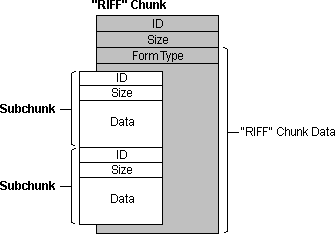
4) can explain this picture for me? i tried but i dont understand

user posted image

5) am i right to say that video formatting is like having vectors/matrix of colour codes in an array? how do i see that pattern in the avi hexas/ascii?


FlierMate1
post Sep 2 2022, 09:53 PM

Getting Started
**
Validating
139 posts

Joined: Jun 2022
I just pick the easier question to reply. laugh.gif

QUOTE(15cm @ Sep 2 2022, 08:55 PM)
1) whats the purpose of so many nulls? i used hex viewer and opened an avi file and i saw a whole bunch (many many rows) of full nulls after the header
*
It is for padding, IMO. For example, if you have a fixed size of 1024 bytes of header section, but can only fill up 768 bytes of data, so in order to make up 1KB, it will be filled with 256 bytes of null characters.

And some more, text strings are often terminated using null character, called null terminating char.

As for the RIFF file format, I am not sure if there is alignment like compilers do to our binary executable, if that is the case, that may also explain the need of null padding. (Example of data alignment like stack alignment, file alignment, normally is required for faster access or paging, so that we can have different permissions for each page.... and that gap in between is filled with null characters)

Okay, I might be wrong in term of my technical view, corrections are welcomed as I still don't know many things.
FlierMate1
post Sep 2 2022, 10:59 PM

Getting Started
**
Validating
139 posts

Joined: Jun 2022
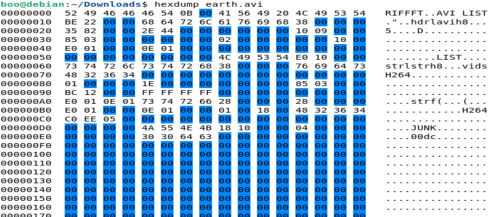
Time for advertisement. Do you know that some hex viewer can show color depending on the hexadecimal values?

Mine is just a tiny example (highlights blue color for null values), there are many out there. cool2.gif
user posted image
junyian
post Sep 2 2022, 11:16 PM

Casual
***
Junior Member
401 posts

Joined: Jan 2003


QUOTE(15cm @ Sep 2 2022, 08:55 PM)
oppppps i was studying wav and avi and i mixed up the both

however i still dont understand and hopefully someone can help me get to it. forgive me for my low grade, dumb questions.
1) whats the purpose of so many nulls? i used hex viewer and opened an avi file and i saw a whole bunch (many many rows) of full nulls after the header
2) whats the purpose of cant-be-printed-on-screen hex symbols? what data do they store?
user posted imageuser posted image
3) arent there supposed to be part of the header that indicate the file size , number of frames, frame rate? where are them in the avi header?
4) can explain this picture for me? i tried but i dont understand

user posted image

5) am i right to say that video formatting is like having vectors/matrix of colour codes in an array? how do i see that pattern in the avi hexas/ascii?
*
To answer questions 1-4, you really need to understand the file format first. The links provided before is supposed to help you with that. You have to read the contents carefully and try to understand it bit by bit. I'll try to walk you through the basic header (based on my rough reading of the format doc).

I'm using the example RIFF format that came from @techm's link: https://johnloomis.org/cpe102/asgn/asgn1/riff.html. It has a file called Canimate.avi, which is playable in VLC.
I'm using xxd from ConEmu on my Windows machine to show the hex dump. I'm not a linux guy but I'm also a bit lazy to take snapshots and upload images, link here, etc.

Firstly, here's the hex dump for the 1st 160 bytes of the sample file.
CODE
λ xxd -g 1 -l 160 .\Canimate.avi
00000000: 52 49 46 46 30 67 01 00 41 56 49 20 4c 49 53 54  RIFF0g..AVI LIST
00000010: c0 04 00 00 68 64 72 6c 61 76 69 68 38 00 00 00  ....hdrlavih8...
00000020: a0 86 01 00 b2 e9 00 00 00 00 00 00 10 00 00 00  ................
00000030: 0f 00 00 00 00 00 00 00 01 00 00 00 e4 24 00 00  .............$..
00000040: cc 00 00 00 dc 00 00 00 00 00 00 00 00 00 00 00  ................
00000050: 00 00 00 00 00 00 00 00 4c 49 53 54 74 04 00 00  ........LISTt...
00000060: 73 74 72 6c 73 74 72 68 38 00 00 00 76 69 64 73  strlstrh8...vids
00000070: 00 00 00 00 00 00 00 00 00 00 00 00 00 00 00 00  ................
00000080: 01 00 00 00 0a 00 00 00 00 00 00 00 0f 00 00 00  ................
00000090: e4 24 00 00 00 00 00 00 00 00 00 00 00 00 00 00  .$..............


Going back to the image in your Q4... that image alone is useless without the description. There is this text just above the image from the source website you got this from:
CODE
typedef unsigned long DWORD;
typedef unsigned char BYTE;
typedef DWORD FOURCC;    // Four-character code
typedef struct {
    FOURCC ckID;        // The unique chunk identifier
    DWORD ckSize;       // The size of field <ckData>
    BYTE ckData[ckSize];     // The actual data of the chunk
} CK;

This is telling us that ID (aka FOURCC) is a DWORD (double-word, i.e. 4 bytes).
Followed by Size, which is also a DWORD.
Then by a list of bytes.

So... referring back to the 1st line of the hex dump.

00000000: 52 49 46 46 30 67 01 00 41 56 49 20 4c 49 53 54 RIFF0g..AVI LIST

4 bytes of the FOURCC/ID is [52 49 46 46], which is "RIFF" (from the ASCII code).
Next 4 bytes is the size, in little endian format. The 4 bytes are [30 67 01 00]. Since it's little endian, the value is 0x00016730 (yep, terbalik-kan the numbers). In decimal, this equates to 91952. From the Microsoft link I shared earlier, this size DOES NOT include ID and Size fields which are 8 bytes long in total.

You see the size of the file, it's 91960 bytes.

20/02/1996 03:09 pm 91,960 Canimate.avi

Correct boh? 91952 from the converted value + 8 bytes for the header = 91960.

The remaining data are chunks/sub-chunks of data. From the sample file I can see the LIST chunk, which from the Microsoft link says it has the form ['LIST' listSize listType listData], kindof similar to the ['RIFF' size data] as we've seen earlier.

After the 'LIST', there is the 'hdrl'. Quoted from Microsoft site again "The 'hdrl' list defines the format of the data and is the first required LIST chunk".

00000010: c0 04 00 00 68 64 72 6c 61 76 69 68 38 00 00 00 ....hdrlavih8...

Immediately after 'hdrl', is 'avih'. Again from Microsoft's doc, avih contains the AVIMAINHEADER structure. That is documented at https://docs.microsoft.com/en-us/previous-v...f-avimainheader.

typedef struct _avimainheader {
FOURCC fcc;
DWORD cb;
DWORD dwMicroSecPerFrame;
DWORD dwMaxBytesPerSec;
DWORD dwPaddingGranularity;
DWORD dwFlags;
DWORD dwTotalFrames;
DWORD dwInitialFrames;
DWORD dwStreams;
DWORD dwSuggestedBufferSize;
DWORD dwWidth;
DWORD dwHeight;
DWORD dwReserved[4];
} AVIMAINHEADER;

Quite a sizeable struct compared to the previous ones, and with many DWORDs. If you understand each struct member here, then you'll understand what the NULLs (0x00) are.
You can try to dig into the file format deeper and eventually get answers to your questions.

As for question 5... maybe, maybe not. I guess depends on whether the video frames are compressed or not. If it is compressed, that's a whole different thing.


But TBH, if you're just starting out on low-level studies, AVI/WAV might be a bit too complicated? Maybe studying BMP vs PNG might be better.


TS15cm
post Sep 3 2022, 08:20 PM

Casual
***
Junior Member
423 posts

Joined: Apr 2022
QUOTE(junyian @ Sep 2 2022, 11:16 PM)
To answer questions 1-4, you really need to understand the file format first. The links provided before is supposed to help you with that. You have to read the contents carefully and try to understand it bit by bit. I'll try to walk you through the basic header (based on my rough reading of the format doc).

I'm using the example RIFF format that came from @techm's link: https://johnloomis.org/cpe102/asgn/asgn1/riff.html. It has a file called Canimate.avi, which is playable in VLC.
I'm using xxd from ConEmu on my Windows machine to show the hex dump. I'm not a linux guy but I'm also a bit lazy to take snapshots and upload images, link here, etc.

Firstly, here's the hex dump for the 1st 160 bytes of the sample file.
CODE
λ xxd -g 1 -l 160 .\Canimate.avi
00000000: 52 49 46 46 30 67 01 00 41 56 49 20 4c 49 53 54  RIFF0g..AVI LIST
00000010: c0 04 00 00 68 64 72 6c 61 76 69 68 38 00 00 00  ....hdrlavih8...
00000020: a0 86 01 00 b2 e9 00 00 00 00 00 00 10 00 00 00  ................
00000030: 0f 00 00 00 00 00 00 00 01 00 00 00 e4 24 00 00  .............$..
00000040: cc 00 00 00 dc 00 00 00 00 00 00 00 00 00 00 00  ................
00000050: 00 00 00 00 00 00 00 00 4c 49 53 54 74 04 00 00  ........LISTt...
00000060: 73 74 72 6c 73 74 72 68 38 00 00 00 76 69 64 73  strlstrh8...vids
00000070: 00 00 00 00 00 00 00 00 00 00 00 00 00 00 00 00  ................
00000080: 01 00 00 00 0a 00 00 00 00 00 00 00 0f 00 00 00  ................
00000090: e4 24 00 00 00 00 00 00 00 00 00 00 00 00 00 00  .$..............


Going back to the image in your Q4... that image alone is useless without the description. There is this text just above the image from the source website you got this from:
CODE
typedef unsigned long DWORD;
typedef unsigned char BYTE;
typedef DWORD FOURCC;    // Four-character code
typedef struct {
    FOURCC ckID;        // The unique chunk identifier
    DWORD ckSize;       // The size of field <ckData>
    BYTE ckData[ckSize];     // The actual data of the chunk
} CK;

This is telling us that ID (aka FOURCC) is a DWORD (double-word, i.e. 4 bytes).
Followed by Size, which is also a DWORD.
Then by a list of bytes.

So... referring back to the 1st line of the hex dump.

00000000: 52 49 46 46 30 67 01 00 41 56 49 20 4c 49 53 54  RIFF0g..AVI LIST

4 bytes of the FOURCC/ID is [52 49 46 46], which is "RIFF" (from the ASCII code).
Next 4 bytes is the size, in little endian format. The 4 bytes are [30 67 01 00]. Since it's little endian, the value is 0x00016730 (yep, terbalik-kan the numbers). In decimal, this equates to 91952. From the Microsoft link I shared earlier, this size DOES NOT include ID and Size fields which are 8 bytes long in total.

You see the size of the file, it's 91960 bytes.

20/02/1996  03:09 pm            91,960 Canimate.avi

Correct boh? 91952 from the converted value + 8 bytes for the header = 91960.

The remaining data are chunks/sub-chunks of data. From the sample file I can see the LIST chunk, which from the Microsoft link says it has the form ['LIST' listSize listType listData], kindof similar to the ['RIFF' size data] as we've seen earlier.

After the 'LIST', there is the 'hdrl'. Quoted from Microsoft site again "The 'hdrl' list defines the format of the data and is the first required LIST chunk".

00000010: c0 04 00 00 68 64 72 6c 61 76 69 68 38 00 00 00  ....hdrlavih8...

Immediately after 'hdrl', is 'avih'. Again from Microsoft's doc, avih contains the AVIMAINHEADER structure. That is documented at https://docs.microsoft.com/en-us/previous-v...f-avimainheader.

typedef struct _avimainheader {
  FOURCC fcc;
  DWORD  cb;
  DWORD  dwMicroSecPerFrame;
  DWORD  dwMaxBytesPerSec;
  DWORD  dwPaddingGranularity;
  DWORD  dwFlags;
  DWORD  dwTotalFrames;
  DWORD  dwInitialFrames;
  DWORD  dwStreams;
  DWORD  dwSuggestedBufferSize;
  DWORD  dwWidth;
  DWORD  dwHeight;
  DWORD  dwReserved[4];
} AVIMAINHEADER;

Quite a sizeable struct compared to the previous ones, and with many DWORDs. If you understand each struct member here, then you'll understand what the NULLs (0x00) are.
You can try to dig into the file format deeper and eventually get answers to your questions.

As for question 5... maybe, maybe not. I guess depends on whether the video frames are compressed or not. If it is compressed, that's a whole different thing.
But TBH, if you're just starting out on low-level studies, AVI/WAV might be a bit too complicated? Maybe studying BMP vs PNG might be better.
*
i did jpg when i was back in uni, we used java to invert colours, black / white an image, resize image ..

i forgot what happened but i want to move to sound and video now

rclxub.gif rclxub.gif its gonna take time for me to digest this
junyian
post Sep 3 2022, 09:59 PM

Casual
***
Junior Member
401 posts

Joined: Jan 2003


QUOTE(15cm @ Sep 3 2022, 08:20 PM)
i did jpg when i was back in uni, we used java to invert colours, black / white an image, resize image ..

i forgot what happened but i want to move to sound and video now

rclxub.gif  rclxub.gif its gonna take time for me to digest this
*
If JPG then very likely you were not dealing with arrays of RGBx (X being the alpha/transparency, forgot the actual acronym now). Since JPG is a lossy compression. You must have been using some library to manipulate the colours and sizes instead.
Formats like BMP should be using the actual raw colour values per pixel.

I personally don't deal with sound and video files at the binary level so I won't try to advice what to do biggrin.gif But generally, it would probably be good to study the specs very carefully with a sample file. You could also gain a lot by writing your own code to parse the file headers and compare the output to other software that can also read the headers. Good luck!
TS15cm
post Sep 3 2022, 10:15 PM

Casual
***
Junior Member
423 posts

Joined: Apr 2022
QUOTE(junyian @ Sep 3 2022, 09:59 PM)
If JPG then very likely you were not dealing with arrays of RGBx (X being the alpha/transparency, forgot the actual acronym now). Since JPG is a lossy compression. You must have been using some library to manipulate the colours and sizes instead.
Formats like BMP should be using the actual raw colour values per pixel.

I personally don't deal with sound and video files at the binary level so I won't try to advice what to do biggrin.gif But generally, it would probably be good to study the specs very carefully with a sample file. You could also gain a lot by writing your own code to parse the file headers and compare the output to other software that can also read the headers. Good luck!
*
the projects i am interested in working in are all related to video and sound.. so inevitable..
junyian
post Sep 3 2022, 10:45 PM

Casual
***
Junior Member
401 posts

Joined: Jan 2003


QUOTE(15cm @ Sep 3 2022, 10:15 PM)
the projects i am interested in working in are all related to video and sound.. so inevitable..
*
Oho... all the best then! Don't worry. With preserverence and dedication, you'll eventually get it thumbup.gif


Change to:
| Lo-Fi Version
0.0217sec    0.12    5 queries    GZIP Disabled
Time is now: 25th December 2025 - 01:42 AM