Outline ·
[ Standard ] ·
Linear+
Question on Unifi TV port, Possible to make it as normal port
|
TSshyan90's
|
 Aug 26 2022, 10:57 AM, updated 4y ago Aug 26 2022, 10:57 AM, updated 4y ago
|

|
As topic...Currently using Asus AX53U and 2 of the lan port are full... 1 for TV 1 for TVbox.. However I will adding another device which requires Lan port...
if I not mistaken plug any ethernet port in that UNIFI TV Port will not working...I not really want to go to Ethernet Splitter but that is my last choice...Any idea can change the UNIFI TV port into normal TV port or it just normal port and work whenever we plug in our device in? Sorry ah noob question..
|
|
|
|
|
|
kuntilanak
|
Aug 26 2022, 11:07 AM
|
|
|
QUOTE(shyan90's @ Aug 26 2022, 10:57 AM) As topic...Currently using Asus AX53U and 2 of the lan port are full... 1 for TV 1 for TVbox.. However I will adding another device which requires Lan port... if I not mistaken plug any ethernet port in that UNIFI TV Port will not working...I not really want to go to Ethernet Splitter but that is my last choice...Any idea can change the UNIFI TV port into normal TV port or it just normal port and work whenever we plug in our device in? Sorry ah noob question.. hmm, i think you can change the TV port to normal port in the router setting, but i might be wrong. as for the splitter, my experience is don't, unless it is a powered switch. i tried a cheapo 2-way splitter and only 1 port is functioning at any given time...  |
|
|
|
|
|
papyrous
|
Aug 26 2022, 11:14 AM
|
Getting Started

|
QUOTE(kuntilanak @ Aug 26 2022, 11:07 AM) hmm, i think you can change the TV port to normal port in the router setting, but i might be wrong. as for the splitter, my experience is don't, unless it is a powered switch. i tried a cheapo 2-way splitter and only 1 port is functioning at any given time... if you login your router, go to LAN > IPTV. if you have selected Unifi Home, the default profile reserves port 4 for Unifi STB with VLAN ID 600. so, you set your profile to manual, then VID 500 for internet only. now all your LAN ports are free to use as you like |
|
|
|
|
|
soul_gamerz
|
Aug 26 2022, 11:16 AM
|
|
|
I'm not sure if Asus router can do this but TP-Link router can change the port to normal use. I use TP-Link AX10 and you can define the port usage. See below..you can choose each port what you want to use it for.. 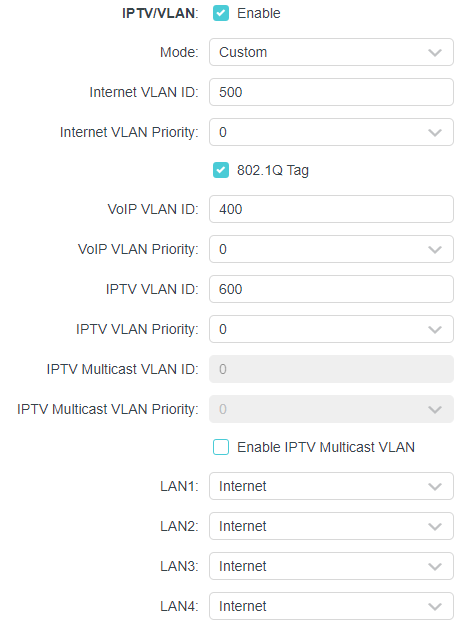 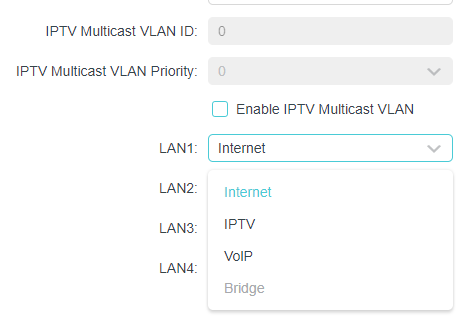 This post has been edited by soul_gamerz: Aug 26 2022, 11:18 AM This post has been edited by soul_gamerz: Aug 26 2022, 11:18 AM |
|
|
|
|
|
sHawTY
|
Aug 26 2022, 11:34 AM
|
|
|
QUOTE(papyrous @ Aug 26 2022, 11:14 AM) so, you set your profile to manual, then VID 500 for internet only. now all your LAN ports are free to use as you like No need to choose manual Just use UniFi-Business profile and you're good to go UniFi-Business profile frees the IPTV port for you |
|
|
|
|
|
TSshyan90's
|
Aug 26 2022, 11:46 AM
|
|
|
QUOTE(papyrous @ Aug 26 2022, 11:14 AM) if you login your router, go to LAN > IPTV. if you have selected Unifi Home, the default profile reserves port 4 for Unifi STB with VLAN ID 600. so, you set your profile to manual, then VID 500 for internet only. now all your LAN ports are free to use as you like QUOTE(sHawTY @ Aug 26 2022, 11:34 AM) No need to choose manual Just use UniFi-Business profile and you're good to go UniFi-Business profile frees the IPTV port for you Ok! I might give a try later! Thanks! Update: I just change the profile to UNIFI Bussniess in the IPTV tab then it automatically frees me up the port! XD Thanks Everyone! This post has been edited by shyan90's: Aug 26 2022, 12:05 PM |
|
|
|
|



 Quote
Quote




 0.0151sec
 1.23
1.23
 5 queries
 GZIP Disabled