Welcome Guest ( Log In | Register )

Bump Topic Topic Closed RSS Feed

Outline · [ Standard ] · Linear+

 Sifu help needed. Maxis Fiber third party router, Xiaomi ax6000 vlan setup Maxis

views
     
TSAlbertloo25
post Jul 24 2022, 10:37 PM, updated 4y ago

New Member
*
Junior Member
31 posts

Joined: Nov 2006
From: Cyberia


Dear masters, if you reading this i would like your help on correcting my setup incase i did it wrong. I bought a Xiaomi Ax6000, and a TL-SG105E switch, bring back my hometown to my existing default maxis router. I been following and reading guides a bout Vlan Tagging setups from blacktubi too.
My hometown i believe is maxis using tm infrastructure, kindly refer the photos attached.
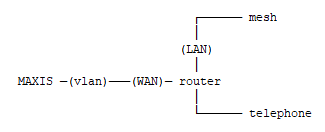
I mostly copy back the original setup. Currently the grey tm modem (which fiber optic are connected to) are connecting to white maxis router WAN port, then i will have internet already. White maxis router have the pppoe setups and vlan tagging setup. It has voip function as its got 2 telephone line to my landline phone.

So now, how i setup my xiaomi is, I done vlag tagging of 621 at port 3, and the voip of 822 at port 5 for my switch. Then the grey tM modem connect to TL-sg105e switch first port. 3rd port from TL-SG105E to my xiaomii ax6000 Wan port. Thats it. I setup pppoe setups in xiaomi and its mentioned succesfully dial up and connected. But how come i doesnt have internet access? Is it something i did wrong? do i need to change any of the default ip gateway address? Or xiaomi ax6000 is giving me false report about succesfully connected with PPPOE? I just need internet, i doesnt need the landline so i skipped the VOIP thing, will this affected me?


Thanks for your time... appreciate if anyone can advise me.
Please take note the photo of pppoe status is taken after i left my hometown, so its showing failed connection instead of success one.

https://pictr.com/image/BttaOB
https://pictr.com/image/BttZwn
https://pictr.com/image/BttE2Z
https://pictr.com/image/BttHUJ
https://pictr.com/image/BttBWY
https://pictr.com/image/BttmZc
https://pictr.com/image/Bttr4G
https://pictr.com/image/BttNvP
https://pictr.com/image/Btti5j

Kindly inform me if you need more details , i will provide you. Because this is at my hometown, i can only get some of the photos when i back during the weekend.
Satori 14118a
post Jul 24 2022, 10:58 PM

Regular
******
Senior Member
1,006 posts

Joined: Sep 2014


If I read it right is the switch between your modem and router?
Oltromen Ripot
post Jul 25 2022, 12:15 AM

👍 999999 person Likes this member
*******
Senior Member
4,034 posts

Joined: Dec 2019
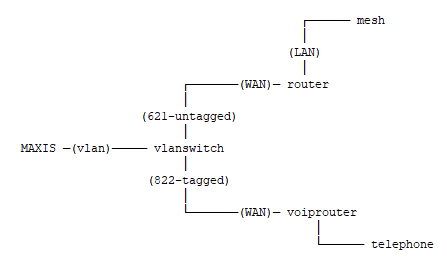
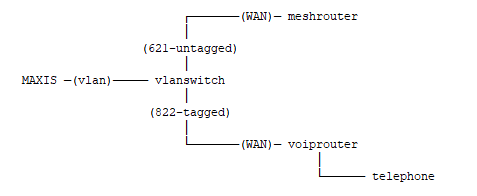
Port 1 vlan TAGGED to BTU port 2 (default for Maxis)
vlan621 - general internet
vlan822 - voip

Port 3 vlan UNTAGGED to WAN port of internet dialer router Xiaomi AX6000
vlan621 - general internet

Port 5 vlan TAGGED to WAN port of Maxis' modem
vlan822 - voip

The maxis modem will handle voip untagging within itself, while you need to help untag packets towards AX6000.
TSAlbertloo25
post Jul 25 2022, 10:04 AM

New Member
*
Junior Member
31 posts

Joined: Nov 2006
From: Cyberia


QUOTE(Satori 14118a @ Jul 24 2022, 10:58 PM)
If I read it right is the switch between your modem and router?
*
Yes do i need to do this? i think is needed right? Because i need the switch to do the vlan tagging. I havent try to access in the first tm modem, havent figure out the password or the ip address yet, is it necessary to access that? I thought that one just leave it be while i set the router and the switch.

Right now fiber optic cable go to the grey TM Modem, then i connect LAN cable to 1st port of my TLSG switch, then 3rd port from TLSG Switch to my Xiaomi router WAN port
TSAlbertloo25
post Jul 25 2022, 10:06 AM

New Member
*
Junior Member
31 posts

Joined: Nov 2006
From: Cyberia


QUOTE(Oltromen Ripot @ Jul 25 2022, 12:15 AM)
Port 1 vlan TAGGED to BTU port 2 (default for Maxis)
vlan621 - general internet
vlan822 - voip

Port 3 vlan UNTAGGED to WAN port of internet dialer router Xiaomi AX6000
vlan621 - general internet

Port 5 vlan TAGGED to WAN port of Maxis' modem
vlan822 - voip

The maxis modem will handle voip untagging within itself, while you need to help untag packets towards AX6000.
*
Master, i will pm you. Thank you
Oltromen Ripot
post Jul 25 2022, 12:59 PM

👍 999999 person Likes this member
*******
Senior Member
4,034 posts

Joined: Dec 2019
QUOTE(Albertloo25 @ Jul 25 2022, 10:06 AM)
Master, i will pm you. Thank you
*
Sorry @albert, I am against any facebook-related product and all chat applications. once i entertain one choice, the other colleagues will hound me to use their own personal choices as well, so, i made it a policy to not entertain anyone.

Your VLAN switch have 5 ports.
I assumed that you have correct vlan IDs for your ISP. (I do not check your correctness.)
vlan621 - general internet
vlan822 - voip

(1) You are connecting BTU port 2 (default for maxis fibre) to port 1 of switch.
This link contains both vlan621 and vlan822.
Your switch port 1 must accept tagged vlan621 and vlan822.

(2) You are connecting switch port 3 to AX6000's WAN port.
The AX6000's WAN port is not capable of handling VLAN-tagged traffic, so you cannot send vlan-tag to it.
Your switch's port 3 must configure for UNTAGGED vlan621 (ONLY), to supply general internet traffic to AX6000.

(3) You are connecting switch port 5 to Maxis router's WAN port.
The Maxis router's WAN port expects VLAN-tagged to contain both general internet traffic and voip traffic.
However, you already have general internet traffic sent towards port 3.
Your switch's port 5 must configure for TAGGED vlan822 (ONLY), to supply voip traffic that will be processed internally by maxis's router.
Oltromen Ripot
post Jul 25 2022, 01:06 PM

👍 999999 person Likes this member
*******
Senior Member
4,034 posts

Joined: Dec 2019
***

This post has been edited by Oltromen Ripot: Jul 25 2022, 01:09 PM
Oltromen Ripot
post Jul 25 2022, 01:11 PM

👍 999999 person Likes this member
*******
Senior Member
4,034 posts

Joined: Dec 2019
QUOTE(Albertloo25 @ Jul 24 2022, 10:37 PM)
*
That second table is where your problem is.

You have member ports selected correctly for each vlan.

For vlan621, you are sending correct untagged port3 traffic towards AX6000.

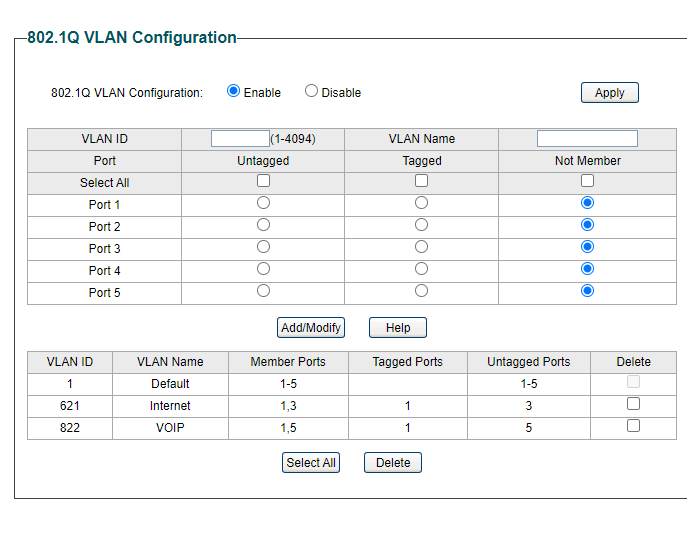
For vlan822, both ports 1,5 needs to be tagged type. You are wrongly sending untagged port5 traffic, while the maxis modem is expecting tagged traffic.


AND, reset the PVID setting (on another section which you have in another picture) back to original "1" for all ports. not required. This sentence is incorrect.

PVID, default vlan tag to reapply on incoming traffic.
Some ports untagged traffic exiting from switch; the switch needs to reapply tagging to packets arriving through the same port. I.e. remove vlan621 tagging to traffic exiting port3, so need to reapply vlan621 back onto traffic arriving on port3.

user posted image

This post has been edited by Oltromen Ripot: Jul 25 2022, 08:31 PM
TSAlbertloo25
post Jul 25 2022, 05:17 PM

New Member
*
Junior Member
31 posts

Joined: Nov 2006
From: Cyberia


QUOTE(Oltromen Ripot @ Jul 25 2022, 01:11 PM)
That second table is where your problem is.

You have member ports selected correctly for each vlan.

For vlan621, you are sending correct untagged port3 traffic towards AX6000.

For vlan822, both ports 1,5 needs to be tagged type. You are wrongly sending untagged port5 traffic, while the maxis modem is expecting tagged traffic.
AND, reset the PVID setting (on another section which you have in another picture) back to original "1" for all ports. not required.

user posted image
*
Ok let me try to follow your instruction and understand them..a bit deep for me .haha.. But do i need set vlan822? I am not planning to use maxis router or use the voip landline. I want to skip voip settings. and just focus totally BTU to switch and to AX6000 only. I dont want too many devices on top of the table. Because very often i will use landline now. I just wish to be minimalist it.
Oltromen Ripot
post Jul 25 2022, 08:27 PM

👍 999999 person Likes this member
*******
Senior Member
4,034 posts

Joined: Dec 2019
QUOTE(Oltromen Ripot @ Jul 25 2022, 01:11 PM)
AND, reset the PVID setting (on another section which you have in another picture) back to original "1" for all ports. not required.
*
Albertloo25, I'd like to correct my earlier statement.

You are correct to set the PVID of switch' port3 to "621" and switch' port5 to "822".

The PVID information is required to apply vlan tagging to what is otherwise untagged traffic arriving on the switch.
This is especially needed on port3; packets exiting the switch is not tagged, need to apply tagging for packets arriving from AX6000.
Oltromen Ripot
post Jul 25 2022, 08:37 PM

👍 999999 person Likes this member
*******
Senior Member
4,034 posts

Joined: Dec 2019
QUOTE(Albertloo25 @ Jul 25 2022, 05:17 PM)
Ok let me try to follow your instruction and understand them..a bit deep for me .haha.. But do i need set vlan822? I am not planning to use maxis router or use the voip landline. I want to skip voip settings. and just focus totally BTU to switch and to AX6000 only. I dont want too many devices on top of the table. Because very often i will use landline now. I just wish to be minimalist it.
*
It's okay if you don't want the VoIP. My earlier response is based on reading that you attempted it but aborted halfway since it does not work. The only thing i outright see as wrong is due to applying "untag" to port5 instead of "tagged", aince the maxis router had always expected vlan-tagged traffic.

I had a googled TLDR of Xiaomi's AX6000; it says it does not support VLAN tagging. So untagging vlan621 on port3 is indeed necessary. If you failed to dial and maintain PPPoE.. probably need to look elsewhere on the AX6000 set up, which I am not well-versed in (and that looks like alien language to me, not chinese-educated).
TSAlbertloo25
post Jul 26 2022, 10:49 AM

New Member
*
Junior Member
31 posts

Joined: Nov 2006
From: Cyberia


QUOTE(Oltromen Ripot @ Jul 25 2022, 08:37 PM)
It's okay if you don't want the VoIP. My earlier response is based on reading that you attempted it but aborted halfway since it does not work. The only thing i outright see as wrong is due to applying "untag" to port5 instead of "tagged", aince the maxis router had always expected vlan-tagged traffic.

I had a googled TLDR of Xiaomi's AX6000; it says it does not support VLAN tagging. So untagging vlan621 on port3 is indeed necessary. If you failed to dial and maintain PPPoE.. probably need to look elsewhere on the AX6000 set up, which I am not well-versed in (and that looks like alien language to me, not chinese-educated).
*
So right now the only mistake is should be untag port 5 instead of tagging it. Others the setup should be correct? I just need to figure it out why it connected but dont have internet access? my vlan port of 621 is correct right?
TSAlbertloo25
post Jul 26 2022, 10:53 AM

New Member
*
Junior Member
31 posts

Joined: Nov 2006
From: Cyberia


I believe is succesfully connected to PPPOE but i wonder why there is not internet connection available. as it mentioned succesfully connected
Oltromen Ripot
post Jul 26 2022, 11:01 AM

👍 999999 person Likes this member
*******
Senior Member
4,034 posts

Joined: Dec 2019
QUOTE(Albertloo25 @ Jul 26 2022, 10:49 AM)
So right now the only mistake is should be untag port 5 instead of tagging it.
*
doh.gif i thought i was already clear - you need to TAG port5...
maxis router's WAN expects vlan-TAG.
you are connecting switch's port5 to maxis router's WAN port.
you need to TAG port5.

QUOTE(Albertloo25 @ Jul 26 2022, 10:49 AM)
Others the setup should be correct? I just need to figure it out why it connected but dont have internet access? my vlan port of 621 is correct right?
*
yes, based on superficial english material available, Xiaomi's AX6000 does not support VLAN.
you are connecting switch's port3 to AX6000.
you need to (and already did) UNTAG port3.
TSAlbertloo25
post Jul 26 2022, 11:15 AM

New Member
*
Junior Member
31 posts

Joined: Nov 2006
From: Cyberia


QUOTE(Oltromen Ripot @ Jul 26 2022, 11:01 AM)
doh.gif i thought i was already clear - you need to TAG port5...
maxis router's WAN expects vlan-TAG.
you are connecting switch's port5 to maxis router's WAN port.
you need to TAG port5.


Sorry boss. I am new in this. Appreciate your patience, i will share a screenshot again later tonight after i set my switch.

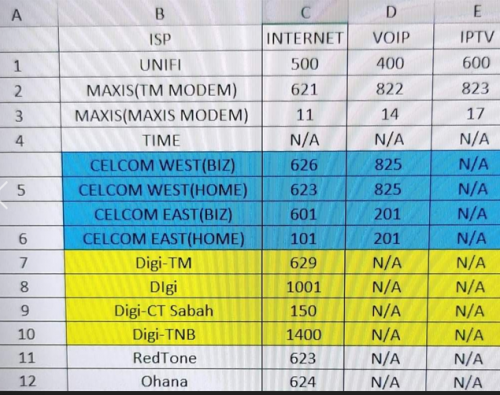
How about vlan ID 821? I see the existing maxis router have this VLAN 821 TM Management network. Do you know what this for?
because i am checking the original maxis router, to see what else vlan id i am missing out

This post has been edited by Albertloo25: Jul 26 2022, 11:15 AM
Oltromen Ripot
post Jul 26 2022, 11:24 AM

👍 999999 person Likes this member
*******
Senior Member
4,034 posts

Joined: Dec 2019
QUOTE(Albertloo25 @ Jul 26 2022, 11:15 AM)
Sorry  boss. I am new in this. Appreciate your patience, i will share a screenshot again later tonight after i set my switch.

How about vlan ID 821? I see the existing maxis router have this VLAN 821 TM Management network. Do you know what this for?
because i am checking the original maxis router, to see what else vlan id i am missing out
*
Perhaps the following post (and thread) can be of reference?

QUOTE(QuantumEdge @ Mar 7 2022, 10:34 PM)
user posted image
Yep, Maxis on Maxis infra
*
Oltromen Ripot
post Jul 29 2022, 11:52 AM

👍 999999 person Likes this member
*******
Senior Member
4,034 posts

Joined: Dec 2019
Dumping these here.

user posted image

user posted image

user posted image

TSAlbertloo25
post Aug 2 2022, 12:05 PM

New Member
*
Junior Member
31 posts

Joined: Nov 2006
From: Cyberia


Thank you. this weekend i go back i try it again!

Topic ClosedOptions
 

Change to:
| Lo-Fi Version
0.0191sec    0.19    5 queries    GZIP Disabled
Time is now: 25th December 2025 - 01:38 AM