Outline ·
[ Standard ] ·
Linear+
RAM issue not showing dual channel on CPU-Z
|
TSRainings
|
 Jul 23 2022, 04:21 PM, updated 4y ago Jul 23 2022, 04:21 PM, updated 4y ago
|

|
Today suddenly when the PC bootup but no display. So I suspect last week I replace the CMOS battery and clean the dust causes the issue. so I reseat both RAM and use microfiber cloth to clean the pin and also clean the GPU pin. So the PC can turn on again. But When I check CPU-Z it seems like it's not running dual channel anymore. Anyone know why? I am sure I seated the RAM into the correct slot. Is this normal? My spec i7 8700k MOBO: MSI z370 16GB ram mhz26000 https://forum.lowyat.net/topic/5290791This is my previous thread when I encounter Bios reset issue, but the issue gone after I replaced with a new battery. 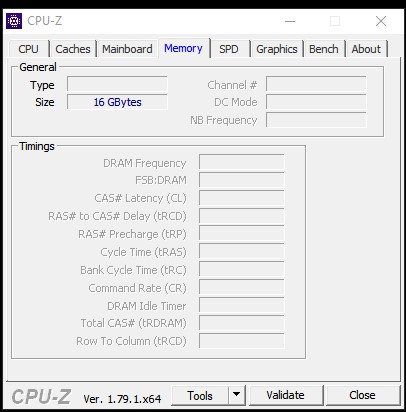 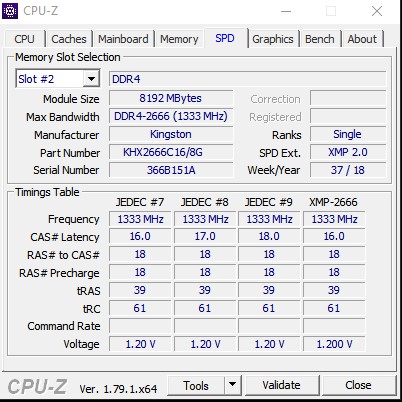 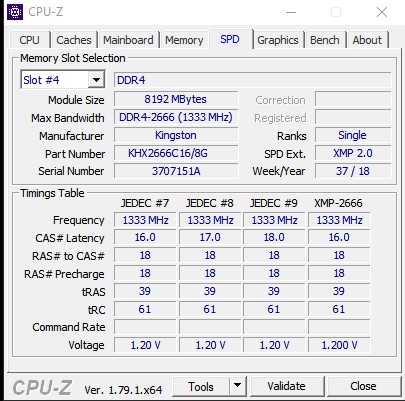 This post has been edited by Rainings: Jul 23 2022, 04:32 PM This post has been edited by Rainings: Jul 23 2022, 04:32 PM |
|
|
|
|
|
PzGman
|
Jul 23 2022, 08:25 PM
|
|
|
Enter your computer's BIOS and load the default settings. Save and reboot. See if that sorts things out.
*slot DIMMA2 and DIMMB2 should be populated for dual channel mode as per the motherboard manual.
|
|
|
|
|
|
sixguyz_jayhan
|
Jul 27 2022, 06:04 PM
|
Getting Started

|
check your motherboards specification, it will stated where is the slot for dual channel.
|
|
|
|
|
|
TSRainings
|
Jul 28 2022, 10:13 AM
|
|
|
QUOTE(PzGman @ Jul 23 2022, 08:25 PM) Enter your computer's BIOS and load the default settings. Save and reboot. See if that sorts things out. *slot DIMMA2 and DIMMB2 should be populated for dual channel mode as per the motherboard manual. I will do it during the weekend when im free. Don't want to mess with the settings for now on my daily drive PC. It just weird that suddenly it's not dual channel anymore. QUOTE(sixguyz_jayhan @ Jul 27 2022, 06:04 PM) check your motherboards specification, it will stated where is the slot for dual channel. I'm using the correct slot 2, 4 slot. Refer CPUZ image. |
|
|
|
|
|
sixguyz_jayhan
|
Jul 28 2022, 11:11 AM
|
Getting Started
|
QUOTE(Rainings @ Jul 28 2022, 10:13 AM) I'm using the correct slot 2, 4 slot. Refer CPUZ image. There is one more reason, I guess. Because in the earlier type of DDR4 RAM running at a double clock (meaning that it actually runs at 2.6Ghz but 1.3Ghz per clock). So it actually working at 2.6 Ghz at your PC. One more thing is that you might also enable the XMP function (in SPD detail showing XMP 2.0). It feels logic to me....Or is this different previously? |
|
|
|
|



 Quote
Quote


 0.0152sec
 0.45
0.45
 5 queries
 GZIP Disabled