

 Jul 2 2022, 08:42 PM, updated 4y ago


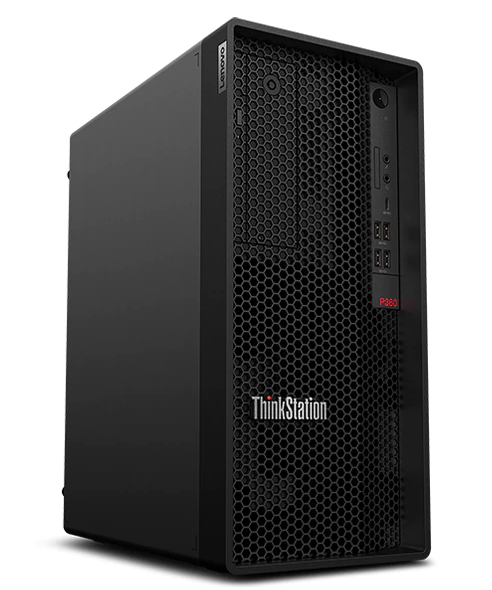
Without spending a lot to run a server or a private cloud at home, either the cost of the server itself or the power consumption the server will draw, this Lenovo ThinkStation P360 Tower can be one of your choice.
Product page (Malaysia): https://www.lenovo.com/my/en/workstations/t...r/p/LEN102S0006
Detail Specification & Documentations: https://psref.lenovo.com/Product/ThinkStati...tion_P350_Tower
I was looking for a workstation or entry server which support ECC RAM and able to fit in at least two 3.5" hard disk drives.
Main usage for this server will be a private cloud storage, with some other minor roles such as web hosting.
For private cloud storage, RAID1 is part of a requirement, and therefore the server casing must be able to fit at least two 3.5" hard disk drives.
This Lenovo ThinkStation P360 Tower suits my needs well. It runs on Intel desktop CPU but with ECC RAM support thanks to W680 chipset.
For the hardware configuration, I tried to make this machine as much future upgrade room as possible, while keeping the cost affordable for myself.
This machine will not be intended to run intensive tasks most of the time, and also there will be no graphics load needed at this time.
Therefore only one stick of RAM and no dedicated graphics card is configured.
On the other side, a power supply rating of 750W is selected to anticipate future upgrade or add-ons.
The Flex Bay is configured as an empty 3.5" HDD enclosure, so that the 2nd hard disk drive can be slotted in.
The list, as configured:
| Processor | 12th Generation Intel® Core™ i7-12700 vPro® Processor (2.10 GHz up to 4.90 GHz) |
| Operating System | Windows 11 Pro 64 |
| Operating System Language | Windows 11 Pro 64 English |
| Memory | 16 GB DDR5-4000MHz (UDIMM, ECC) |
| Memory Qty | 1 |
| Motherboard | Intel Alder Lake-S W680 |
| First Video Adapter | Integrated Graphics |
| Onboard M.2 SSD G4 Boot Drive | YES |
| Onboard M.2 SSD G4 | 512 GB SSD M.2 2280 PCIe Gen4 Performance TLC Opal |
| OnBoard M.2 SSD G4 QTY | 1 |
| Second OnBoard M.2 SSD G4 QTY | 0 |
| Single AIC SSD G3 Boot Drive | NO |
| Single AIC M.2 SSD G3 QTY | 0 |
| Storage Boot Drive | No |
| First Storage Qty | 0 |
| Second Storage Qty | 0 |
| Flex Bay | Empty 3.5" HDD Enclosure |
| First Ethernet Adapter | Integrated Ethernet |
| WiFi Wireless LAN Adapter | Intel® Wi-Fi 6E AX211 2x2 AX & Bluetooth® 5.0 or above with vPro® |
| Flexible I/O Port | Flexible I/O Port Card-USB-C |
| Audio Card | Integrated Audio |
| Power Cord | LineCord - Malaysia |
| Power Supply | Tower 92% Power 750W |
| Rear Fan | REAR_SYSTEM_FAN |
| Language Pack | Publication - Traditional Chinese/Simplified Chinese/English |
| EPEAT Gold Certificate | EPEAT Gold Certificate |
| Warranty | 1 Year On-site |
Packaging
A 3-pin UK plug is provided in a separate small box, located inside the main packaging box.
The tower itself is sealed inside a plastic packaging using a red colour security sticker to deter tampering and to protect from water splashing.


Tower Exterior
On the left side, it is a house for slim optical drive, and a flex bay.
On the right side, from top to bottom, power button with power LED, disk activity LED, house for SDCard, microphone jack, headphone/microphone combo jack, USB-C 3.2 Gen 2 (data transfer only), 2x USB 3.2 Gen 1, and 2x USB 3.2 Gen 2

From top to bottom, Line-out (3.5mm), Flex-IO (Configured as USB-C port with both data transfer and video output support), HDMI Port, 2x Display Ports, 4x USB 3.2 Gen 1, Ethernet (RJ-45) Port, PCIe expansion card slot, and power connector.

View from the top

View from the side

Tower Interior
Tower interior with empty 3.5" HDD Enclosure mounted on Flex Bay.

Tower interior without empty 3.5" HDD Enclosure mounted on Flex Bay.

Closer up picture for the upper section of the tower interior

Closer up picture for the lower section of the tower interior

The "Empty 3.5" HDD Enclosure" removed from Flex Bay.

The 16GB DDR5 ECC RAM from Samsung


Power Supply Unit
The power supply unit provided might be a proprietary PSU, although it looks a lot similar to the ATX12VO.


Connecting 3.5" SATA Hard Disk Drives
According to the specification, P360 Tower is able to fit in up to 2x 3.5" SATA HDD or 4x 2.5" SATA HDD.
If you would like to install two 3.5" HDD on your own, you might want to add additional empty 3.5" HDD enclosure under Flex Bay option during your purchase.
For the current setup, two WD Red Plus 4TB are installed into the tower, one installed inside the enclosure on the Flex Bay, and the other one installed in the enclosure at the bottom of the tower.
Due to the design and the location of the bottom enclosure, the HDD has to be installed up side down, this is to ease the connection of both SATA cable and SATA power cable.
To install 3.5" HDD into the bottom HDD enclosure, first the front panel has to be removed, so that the black colour bracket inside the enclosure can be taken out.
No screw is needed to install the 3.5" HDD, which is very convenient.


Both SATA signalling cables and SATA power cables are provided inside the box.
The power for the SATA HDD are to be tapped from the motherboard rather than from the PSU, similar to ATX12VO design.


After completed all the SATA cable connections, head to BIOS setup page and you can have option to setup RAID for the two HDD.

Continue on next post.
This post has been edited by alexander3133: Jul 2 2022, 09:41 PM
 Quote
Quote


 0.0229sec
 0.68
0.68
 7 queries
 GZIP Disabled