Outline ·
[ Standard ] ·
Linear+
Sony SONY Xperia 1 & 5 series.. IV, V, VI generation
|
chubbyliao
|
 Aug 16 2023, 10:01 PM Aug 16 2023, 10:01 PM
|
Getting Started


|
Bought 1V last month from Sony store. Don't see any vowifi option on my phone. Asked Digi multiple times but they keep on telling me if volte works then vowifi should work too. Anyone got their vowifi works with Digi?
|
|
|
|
|
|
chubbyliao
|
Aug 17 2023, 10:47 AM
|
Getting Started
|
QUOTE(ChuanHong @ Aug 17 2023, 09:14 AM) nope.. even my Xperia 1 IV listed in compatible device list in Maxis/Hotlink website, but i didnt have wifi calling setting available in my SIM setting.. not sure firmware/telco side went wrong.. even my POCO phone would have vowifi.. but still fine.. doesnt bother my daily usage in fact.. Unfortunately in my office vowifi is important because of poor Digi signal. I read the relevant post about checking IMEI if Malaysia or hongkong set. How to do so? Could that be the reason? |
|
|
|
|
|
chubbyliao
|
Aug 20 2023, 08:11 AM
|
Getting Started
|
QUOTE(ChuanHong @ Aug 17 2023, 03:05 PM) i think you could download Support App from Sony.. from there and check on Contact Us.. suppose your Msia set will show Msia Number.. our IMEI, Serial Number will be there. Model Number also could be an indicator for you.. as APJC have CN, HK, TW & SEA.. malaysia is having SEA firmware.. this one u have to enter service menu>software info to have details check.. Then mine should be Malaysia set since it looks like having SEA firmware. |
|
|
|
|
|
chubbyliao
|
Sep 9 2023, 10:53 AM
|
Getting Started
|
QUOTE(Dozz @ Sep 5 2023, 11:14 PM) oh thats sad to heard that! what about other telco like DiGi and Celcom? Do you think they are supported Xperia's VoWiFi ? Nope. I am on Digi with 1V, no vowifi. |
|
|
|
|
|
chubbyliao
|
Sep 21 2023, 08:16 AM
|
Getting Started
|
QUOTE(ChuanHong @ Sep 6 2023, 09:36 AM) so far i had tried all main telco, maxis, hotlink, celcom, umobile.. except digi.. all telco that i had tried, no vowifi at xperia.. umobile had vowifi on my other poco phone models.. i guess it dont support due to software update.. by default, Sony Xperia phone for wifi provisioning call is disabled if we check the phone info .. but im not so particular on that as VoLTE is more than enough for my case.. however, xda forum do have guidance on enable it thru certain way.. but try on your own risk.. https://forum.xda-developers.com/t/vowifi-a...quired.4566313/I installed shizuku and enable vowifi with pixel IMS on 1V, but sadly still not supported by Digi. My past experience when asking Digi to add the device support all they mentioned is please check back again in the future if device will be supported. Worst, they even mentioned if volte is supported then vowifi should be too. (Volte is working on 1V with Digi). So puzzling.. |
|
|
|
|
|
chubbyliao
|
Nov 25 2023, 08:15 PM
|
Getting Started
|
Just noticed astro go and Netflix app are no longer compatible with Xperia 1v, so can't install them from playstore. Anyone having the same problem? Of course I could get them from APKPure or other sites, but... Didn't have this problem before so wondering if it's just me?
|
|
|
|
|
|
chubbyliao
|
Dec 14 2023, 08:35 AM
|
Getting Started
|
Can 1V owner check if your device is Google play certified? Mine is not, though I am quite sure it was definitely certified when I first got it. Original Malaysia set. Problem being not certified - some apps are no longer compatible so I could not download/install them from playstore.
|
|
|
|
|
|
chubbyliao
|
Dec 14 2023, 04:11 PM
|
Getting Started
|
QUOTE(ChuanHong @ Dec 14 2023, 01:38 PM) go to google playstore > select your profile > setting > About > at bottom is about play protect certification.. i guess above user can just update play store version will do.. Did that, both play store update and Google play system update. But still being shown as not certified. Therefore interested to find out if this is an odd case or more wide spread. Also did a factory reset just to double check, problem remains.. |
|
|
|
|
|
chubbyliao
|
Dec 17 2023, 04:05 PM
|
Getting Started
|
QUOTE(ChuanHong @ Dec 16 2023, 08:59 PM) Did you root your phone or did anything before that? Can you post a screenshot about that page? I can help to ask in Taiwan HK user group for more details. Didn't root or anything, just normal usage. Admittedly I did install from apk for app which is not on playstore, such as tachiyomi. But don't think that is the root cause since I did the same in the past without such issue. Screenshot to come in next post. Thanks for your help. |
|
|
|
|
|
chubbyliao
|
Dec 17 2023, 04:11 PM
|
Getting Started
|
QUOTE(chubbyliao @ Dec 17 2023, 04:08 PM) Screenshot of my playstore > settings > about 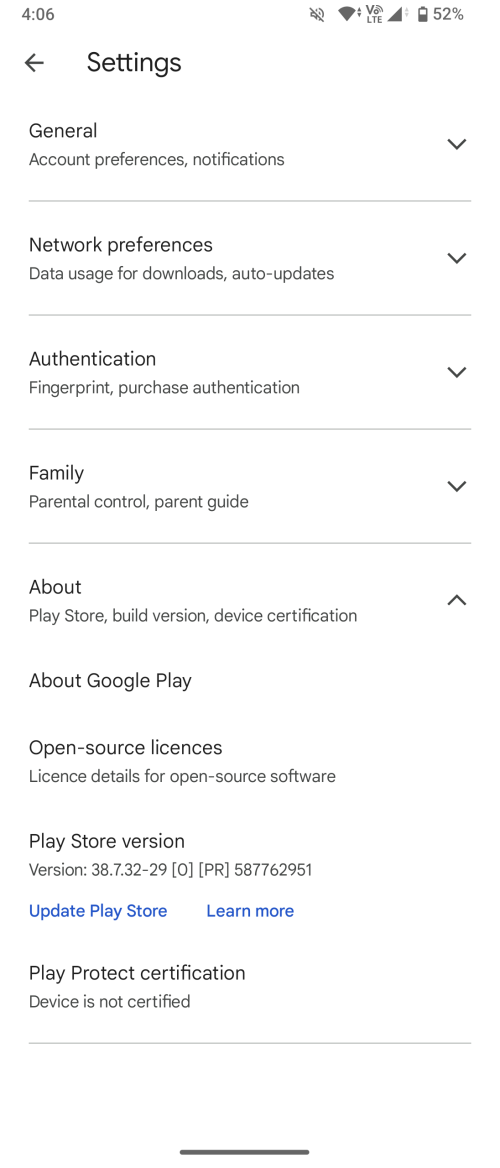 Can't recall exactly when I first have this issue. Only when I reset my phone for a clean setup then I noticed some apps are no longer supported for my device, such as Netflix, Sarawak pay (spay global), astro go, that I started to search around for hint and come across this "device not certified" issue. |
|
|
|
|
|
chubbyliao
|
Dec 20 2023, 09:47 PM
|
Getting Started
|
QUOTE(Silverfire @ Dec 20 2023, 08:31 PM) Just checked my HK unit. Netflix listed as no longer supporting this device. Should check if your device is play protect certified. Check under playstore > setting > about That is my problem currently.. unfortunately it seems not everyone is having this issue. |
|
|
|
|
|
chubbyliao
|
Jan 3 2024, 06:46 PM
|
Getting Started
|
Anyone suffering from the device not certified issue for the Google play device certification please take note that a reddit user reported an update will come in Feb fixing the bravia kernel issue. I am one of the minority having this problem. Just FYI.
|
|
|
|
|
|
chubbyliao
|
Jan 15 2024, 08:19 PM
|
Getting Started
|
QUOTE(simzy1 @ Jan 15 2024, 12:02 PM) Is esim available on 5V (Local variant)? Nope. Physical sim1 and 2, and remember sim2 is shared with microsd. |
|
|
|
|
|
chubbyliao
|
Jul 12 2024, 09:38 AM
|
Getting Started
|
Can any new 1VI owner help to check vowifi if this is finally supported? For 1V even enabling it with Shizuka and gms it actually does not work, although it is listed as compatible device for maxis.
|
|
|
|
|
|
chubbyliao
|
Jul 12 2024, 11:15 AM
|
Getting Started
|
QUOTE(testinglabha @ Jul 12 2024, 11:05 AM) Actually why VoWifi is so important? How does it different from normal Call with Mobile Network? is it as long as u using VoWifi with a WIFI connection then you can use ur phone no call to any Network (Telephone Line or Telco Mobile Line) with 100% Free of Charge? I believe doing Phone Call or Video Call using social media like whatapps, facebook, skype, team, zoom, etc, don need VoWiFi feature at all, they all can just rely on Wifi connection to have the call done without VoWifi feature, am i correct? Phone signal is very poor at my work place. Some of the bank/site transaction still depends on otp. Also, not having signal means calls are not possible. With vowifi, then at least I would not have any of these problems. |
|
|
|
|
|
chubbyliao
|
Jul 12 2024, 07:19 PM
|
Getting Started
|
QUOTE(ChuanHong @ Jul 12 2024, 05:13 PM) Not receiving it.. at least I don't see it in setting It's a pity.. Well good for me, one less reason to get it.. 😅 |
|
|
|
|
|
chubbyliao
|
Jul 27 2024, 05:29 PM
|
Getting Started
|
QUOTE(ChuanHong @ Jul 12 2024, 05:13 PM) Not receiving it.. at least I don't see it in setting Would you mind helping me to check this again? Try to find the vowifi seting here (as per screen shot). I went to Sony store asking for permission to put in my sim card into the display set to check, but they don't allow it since that would activate the warranty and I would have to buy it. So can't test there. Thanks a lot. 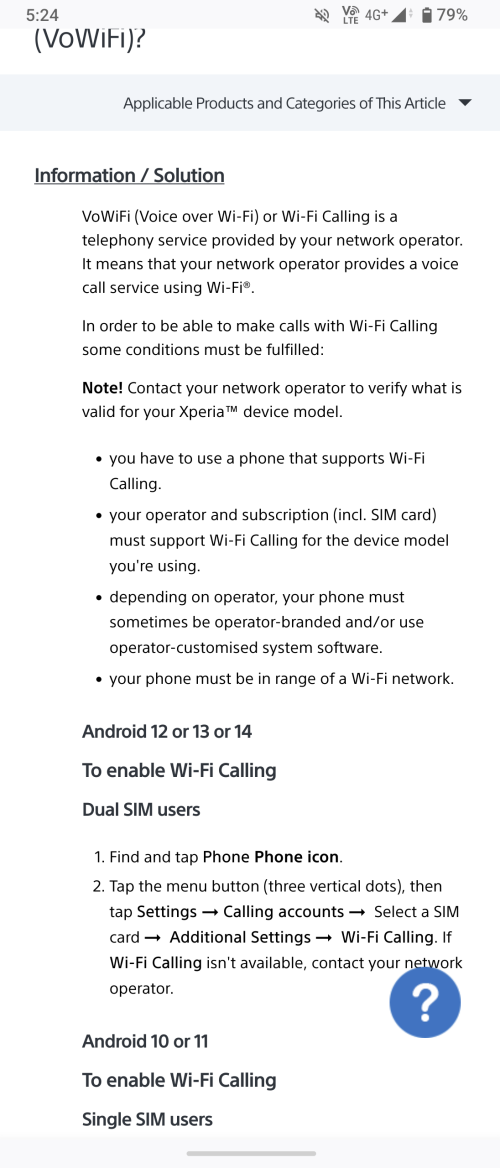 |
|
|
|
|
|
chubbyliao
|
Jul 27 2024, 08:17 PM
|
Getting Started
|
QUOTE(nebousuke @ Jul 27 2024, 06:01 PM) The setting is not available unless your carrier activates it on their end. I am using Maxis, they didn't activate it. You maybe able to convince them to activate it for you on their end but there's no guarantee about it. Thanks. I've spoken to their Careline but they insists problem is with sony. The device is listed on maxis device list that support vowifi. I couldn't get any response from Sony. Dead end so far... Any idea what else could I do? |
|
|
|
|
|
chubbyliao
|
Jul 27 2024, 10:31 PM
|
Getting Started
|
QUOTE(nebousuke @ Jul 27 2024, 08:55 PM) I didn't see Xperia 1vi in Maxis' list though [attachmentid=11499934] Sorry I am using 1V. I am thinking of getting 1VI if it works. |
|
|
|
|



 Quote
Quote

 0.0330sec
 0.50
0.50
 7 queries
 GZIP Disabled