

save the trouble from using Tkinter and use PyQt5 instead. It has a GUI-based tool to facilitate your GUI design.
Used it for my Final Year Project and saved me a ton of work.
Python How many of you use TKinter ?, Python GUI
Python How many of you use TKinter ?, Python GUI
|
|
 Jun 27 2022, 07:10 PM Jun 27 2022, 07:10 PM
|
 
Newbie
17 posts Joined: Feb 2017 From: A place where I don't belong.  
|
save the trouble from using Tkinter and use PyQt5 instead. It has a GUI-based tool to facilitate your GUI design.
Used it for my Final Year Project and saved me a ton of work. |
|
|
|
|
|
Jun 30 2022, 09:16 PM
Show posts by this member only | IPv6 | Post
#22
|

Validating
139 posts Joined: Jun 2022
|
I have question regarding Tkinter's Listbox selected value.
This line printed "3" if I selected row no. 4: CODE messagebox.showinfo('Test', listbox.curselection()) But ironically, this shows nothing no matter which row I select: 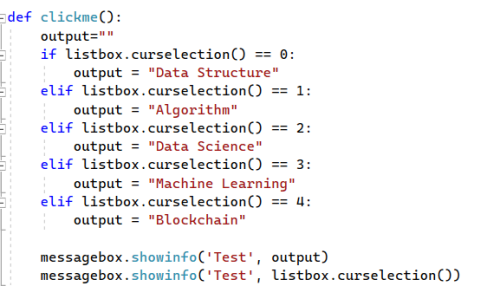 (Even I treat ".curselection()" as string, also the same, empty output) 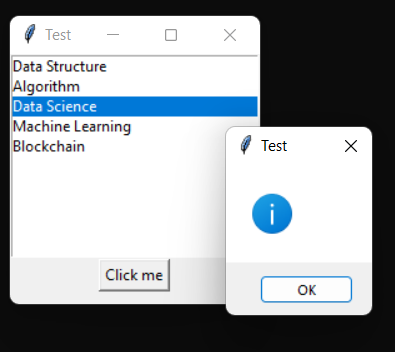 Full source: CODE from tkinter import * from tkinter import messagebox 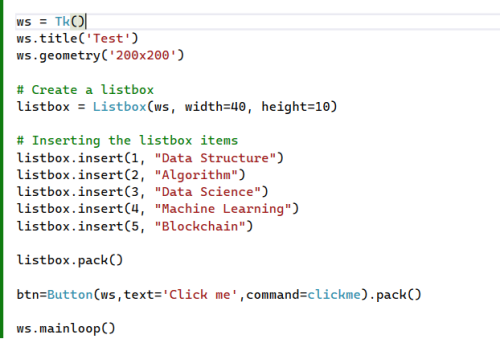 Does anyone know why? (Yeah, I think I will still stick to Tkinter after hearing your all opinions  ) ) |
|
|
Jun 30 2022, 10:16 PM
|

Junior Member
636 posts Joined: Jul 2006
|
QUOTE(FlierMate1 @ Jun 30 2022, 09:16 PM) I have question regarding Tkinter's Listbox selected value. Give lar copy/paste-able code, por favor!This line printed "3" if I selected row no. 4: CODE messagebox.showinfo('Test', listbox.curselection()) But ironically, this shows nothing no matter which row I select: (Even I treat ".curselection()" as string, also the same, empty output) Full source: CODE from tkinter import * from tkinter import messagebox Does anyone know why? (Yeah, I think I will still stick to Tkinter after hearing your all opinions ) |
|
|
Jun 30 2022, 10:37 PM
|
|
Junior Member
636 posts Joined: Jul 2006
|
Meh. I Github Copiloted it.
CODE from tkinter import * from tkinter import messagebox ws = Tk() ws.title("Hello World") ws.geometry("300x300") listbox = Listbox(ws) selection = ["hello", "world", "foo", "bar"] for i, j in enumerate(selection): listbox.insert(i, j) listbox.pack() btn = Button(ws, text="Click Me", command=lambda: messagebox.showinfo('', listbox.get(listbox.curselection()))).pack() ws.mainloop() Don't lar use so much if/then/else, you're not a game programmer. listbox.get() is used to shortcut unpack listbox.curselection() because it returns a list of selections (there can be more than one, ok, ok, it's technically a tuple, not a list), not a single selection. The hint is in the source/documentation for curselection:  It returns a tuple, or None. e.g. CODE listbox = Listbox(ws, selectmode=MULTIPLE) Full example: CODE from tkinter import * from tkinter import messagebox ws = Tk() ws.title("Hello World") ws.geometry("300x300") listbox = Listbox(ws, selectmode=MULTIPLE) for i, j in enumerate(["hello", "world", "foo", "bar"]): listbox.insert(i, j) listbox.pack() btn = Button(ws, text="Click Me", command=lambda: messagebox.showinfo("Hello"," ".join(map(lambda x: listbox.get(x), listbox.curselection())))).pack() ws.mainloop() This post has been edited by angch: Jun 30 2022, 11:10 PM |
|
|
Jul 1 2022, 12:15 AM
Show posts by this member only | IPv6 | Post
#25
|
|
Validating
139 posts Joined: Jun 2022
|
QUOTE(angch @ Jun 30 2022, 10:16 PM) Give lar copy/paste-able code, por favor! Forum blocked me from posting code, and I have no idea which keyword triggered it.  QUOTE(angch @ Jun 30 2022, 10:37 PM) Don't lar use so much if/then/else, you're not a game programmer. Yes, your example work, but I need to use if/then/else to evaluate the selected index (for single item listbox), so that I can assign a value based on the selected index.listbox.get() is used to shortcut unpack listbox.curselection() because it returns a list of selections (there can be more than one, ok, ok, it's technically a tuple, not a list), not a single selection. ......It returns a tuple, or None. This code doesn't work:  CODE if listbox.get(listbox.curselection()) == 1: messagebox.showerror("Yeah, world") ...and also this not working (as pointed out in my previous post): CODE if listbox.curselection() == 0: output = "Data Structure" Any more idea? This post has been edited by FlierMate1: Jul 1 2022, 12:20 AM |
|
|
Jul 1 2022, 12:21 AM
Show posts by this member only | IPv6 | Post
#26
|
|
Validating
139 posts Joined: Jun 2022
|
I think I will end up with Radio button, much easier to get the selected value.
|
|
|
Jul 1 2022, 01:02 AM
|
|
Junior Member
636 posts Joined: Jul 2006
|
I repeat. listbox.curselection() returns a list of ints, not an int. Of course if listbox.curselection() == 0 will always be false. This post has been edited by angch: Jul 1 2022, 01:03 AM FlierMate1 liked this post
|
| Change to: |  0.0145sec 0.0145sec
 1.12 1.12
 6 queries 6 queries
 GZIP Disabled GZIP Disabled
Time is now: 24th December 2025 - 11:24 PM |
 Quote
Quote