

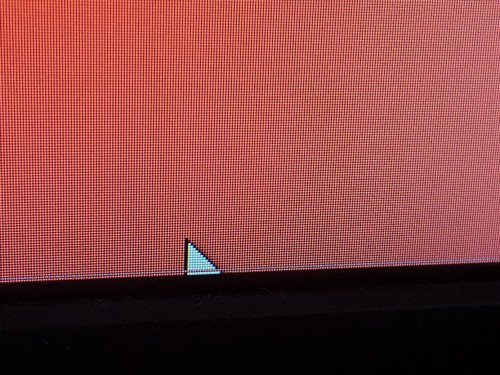
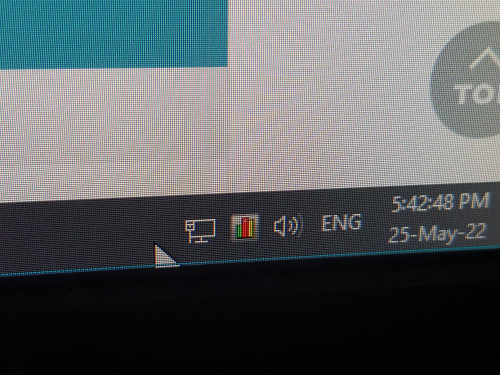
A line on bottom but color not always same
It show up top of pointer, look like is monitor problem
BenQ GW2280, no more warranty
This post has been edited by PJng: May 25 2022, 05:49 PM
One line on bottom of monitor
|
|
 May 25 2022, 05:48 PM, updated 3y ago May 25 2022, 05:48 PM, updated 3y ago
Show posts by this member only | IPv6 | Post
#1
|
 
All Stars
12,047 posts Joined: Oct 2017  
|
Just a quick question, does it will getting worse?
A line on bottom but color not always same It show up top of pointer, look like is monitor problem BenQ GW2280, no more warranty This post has been edited by PJng: May 25 2022, 05:49 PM |
|
|
|
|
|
May 25 2022, 07:44 PM
Show posts by this member only | Post
#2
|

Junior Member
671 posts Joined: May 2019 
|
» Click to show Spoiler - click again to hide... « I got this line at the screen bottom exactly like yours, in my laptop screen since 2 years ago, 2 years later i got 2nd and 3rd line at the bottom  |
|
|
May 25 2022, 07:48 PM
Show posts by this member only | IPv6 | Post
#3
|
|
All Stars
12,047 posts Joined: Oct 2017
|
QUOTE(The.Lucas.DaY @ May 25 2022, 07:44 PM) » Click to show Spoiler - click again to hide... « I got this line at the screen bottom exactly like yours, in my laptop screen since 2 years ago, 2 years later i got 2nd and 3rd line at the bottom  First was think is it any program cause problem So just win + L, still got line 4 years old this monitor |
|
|
May 25 2022, 08:02 PM
Show posts by this member only | Post
#4
|
|
Junior Member
671 posts Joined: May 2019
|
QUOTE(PJng @ May 25 2022, 07:48 PM) I press on screen, press on casing, nothing change Nothing we can do unless replace itFirst was think is it any program cause problem So just win + L, still got line 4 years old this monitor I just ignore it as it is located at the bottom, can’t tahan if located at middle  And yes, it will getting worse 1 day, sooner or later, 2nd line, 3rd line….. |
|
|
May 25 2022, 10:28 PM
Show posts by this member only | Post
#5
|
|
Junior Member
671 posts Joined: May 2019
|
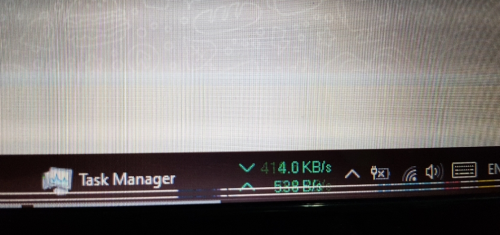 |
|
|
May 25 2022, 10:32 PM
Show posts by this member only | IPv6 | Post
#6
|
|
All Stars
12,047 posts Joined: Oct 2017
|
QUOTE(The.Lucas.DaY @ May 25 2022, 10:28 PM) Lucky is bottom part, i google search some of them is middle of screen |
|
|
|
|
|
May 25 2022, 10:41 PM
Show posts by this member only | Post
#7
|
|
Junior Member
671 posts Joined: May 2019
|
QUOTE(PJng @ May 25 2022, 10:32 PM) More serious, eye sore Yeah luckily not middle partLucky is bottom part, i google search some of them is middle of screen As most of the time I won't staring the bottom, so be it  |
|
|
May 26 2022, 07:48 AM
Show posts by this member only | Post
#8
|

Junior Member
114 posts Joined: Nov 2021 From: Penang, Malaysia
|
The sign of changing new monitor.
 How many years old your monitor? Usually monitor nowadays come with 3 years warranty. If under warranty, send it back for warranty claim. If your monitor is 5 years old or more, well stick with it for the moment until you cannot bare anymore with it, buy new one to replace it. |
|
|
May 26 2022, 07:53 AM
Show posts by this member only | Post
#9
|
|
Senior Member
977 posts Joined: Jun 2009
|
QUOTE(JonathanHanYT @ May 26 2022, 07:48 AM) The sign of changing new monitor. probably it's time for new monitor... mine around 8-9 yrs old now showing white glare spots in the middle... How many years old your monitor? Usually monitor nowadays come with 3 years warranty. If under warranty, send it back for warranty claim. If your monitor is 5 years old or more, well stick with it for the moment until you cannot bare anymore with it, buy new one to replace it. |
|
|
May 26 2022, 10:10 AM
Show posts by this member only | IPv6 | Post
#10
|

Junior Member
355 posts Joined: May 2022
|
This can be anything.
QUOTE A single set of horizontal lines could indicate damage, a graphics system failure, or loose internal video cables. Broken signals from cables or graphics hardware creates impurities in reproducing an image on an LCD screen, conditions that often manifest in the form of vertical or horizontal lines of color. Try on another external monitor and observe if it's there |
|
|
May 26 2022, 12:49 PM
|

Junior Member
381 posts Joined: Aug 2010
|
Take screenshot and look at your screenshot. If there is no line in your screenshot, get ready to change monitor.
|
|
|
May 30 2022, 04:57 PM
Show posts by this member only | IPv6 | Post
#12
|
|
All Stars
12,047 posts Joined: Oct 2017
|
look like confirm monitor problem, just use it until getting serious la
lucky is on very bottom of screen checking cable, unplug replug back, still got line taken screenshot, does not see got line |
|
|
Mar 13 2023, 10:24 AM
Show posts by this member only | IPv6 | Post
#13
|
|
All Stars
12,047 posts Joined: Oct 2017
|
QUOTE(The.Lucas.DaY @ May 25 2022, 10:28 PM) Now getting serious got about 5 line Time to replace monitor if keep more line |
|
|
|
|
|
Mar 13 2023, 10:30 PM
|
|
Junior Member
671 posts Joined: May 2019
|
QUOTE(PJng @ Mar 13 2023, 10:24 AM) Sorry sudden necro old thread I got 4 lines now from 2 lines, all still within the taskbar "luckily" Now getting serious got about 5 line Time to replace monitor if keep more line |
|
|
Mar 14 2023, 11:24 AM
|
|
Senior Member
5,184 posts Joined: Jan 2009
|
Test it using 2 PC. If it shows the same pattern confirm is monitor problem.
can be the panel, ribbon cable or LCD controller... but basically you need new monitor if just basic one.. replacing panel not worth they cost almost the same if not more. This post has been edited by Mea Culpa: Mar 14 2023, 11:24 AM |
|
|
Mar 19 2023, 06:01 PM
|

Senior Member
1,406 posts Joined: Dec 2004 From: Living Hell
|
Few years old monitor already like this? Usually caused by those flexible "tape cables" glued onto panel starting to malfunction by losing proper contact, don't really know the proper term. If that is really the case, got chance to fix if confirmed that is the issue by stuffing something at the right spot to apply additional pressure for better contact. If ribbon cable problem usually much more serious than mere lines like this.
|
|
|
Mar 19 2023, 06:05 PM
Show posts by this member only | IPv6 | Post
#17
|
|
All Stars
12,047 posts Joined: Oct 2017
|
QUOTE(Chanwsan @ Mar 19 2023, 06:01 PM) Few years old monitor already like this? Usually caused by those flexible "tape cables" glued onto panel starting to malfunction by losing proper contact, don't really know the proper term. If that is really the case, got chance to fix if confirmed that is the issue by stuffing something at the right spot to apply additional pressure for better contact. If ribbon cable problem usually much more serious than mere lines like this. Buy on 2018, now like this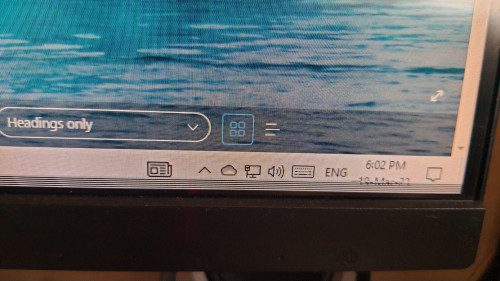 Mean pressinh a bit on casing, not on screen? Was planning to get new monitor on incoming raya sale |
|
|
Mar 19 2023, 06:16 PM
|
|
Senior Member
1,406 posts Joined: Dec 2004 From: Living Hell
|
QUOTE(PJng @ Mar 19 2023, 06:05 PM) Buy on 2018, now like this Yes the casing/side once you can figure out the location of the contacts, not screen or you might just break the entire thing.Mean pressinh a bit on casing, not on screen? Was planning to get new monitor on incoming raya sale But judging from your picture, don't think can do anything with that type of bezel unless you dismantle the entire shell to reach the actual panel part. Suggest you keep the monitor for non demanding use and just buy a new one |
|
|
Mar 27 2023, 08:54 PM
|
|
Junior Member
453 posts Joined: Mar 2015
|
you can consider buying a second hand monitor.
|
|
|
Mar 27 2023, 08:57 PM
Show posts by this member only | IPv6 | Post
#20
|
|
All Stars
12,047 posts Joined: Oct 2017
|
QUOTE(earshore @ Mar 27 2023, 08:54 PM) you can consider buying a second hand monitor. Just order new monitor on laz bday sale |
| Change to: |  0.0228sec 0.0228sec
 0.41 0.41
 5 queries 5 queries
 GZIP Disabled GZIP Disabled
Time is now: 14th December 2025 - 10:25 PM |
 Quote
Quote