

QUOTE(xxQue_Sera_Seraxx @ May 25 2022, 08:07 AM)
FHD+, Standard refresh rate, Dark mode,
Others pretty much default

weird, we have same settings. i dont encounter that issue even with other streaming appOthers pretty much default
Realme Realme GT 2 Pro/GT 6/GT 7 Pro/GT 8 Pro, Realme GT series
|
|
 May 25 2022, 03:37 PM May 25 2022, 03:37 PM
|
 
Junior Member
419 posts Joined: Jul 2011 From: PJ, Malaysia  
|
QUOTE(xxQue_Sera_Seraxx @ May 25 2022, 08:07 AM) FHD+, Standard refresh rate, Dark mode, weird, we have same settings. i dont encounter that issue even with other streaming appOthers pretty much default |
|
|
|
|
|
May 25 2022, 04:35 PM
|

Senior Member
1,567 posts Joined: Jul 2011 From: Grand Ol' Lady
|
QUOTE(shinjite @ May 25 2022, 11:41 AM) Weird, I noticed in I process manager that certain 3rd party apps keeps on running by itself eventhough I had set up app freeze, disable it running in the background and foreground and even disable account sync. Seems to be a bug in realme ui 3. anyone got the zepp app? seems like i can never get to kill it as well no matter what setting i put it as  keeps on at the background keeps on at the background |
|
|
May 25 2022, 06:07 PM
|

Junior Member
151 posts Joined: Jun 2007
|
QUOTE(xxQue_Sera_Seraxx @ May 24 2022, 10:01 PM) Anyone faced YouTube video stuttering / lag / frame drop? It happens when i pause YT video then quick home button to check some message then enter back YT apps to play video but it is stuttering. Audio is fine. Any permanent solution to fixed this? you using browser or using app to watch YT? |
|
|
May 25 2022, 07:10 PM
|

All Stars
19,321 posts Joined: Jan 2003 From: Klang
|
QUOTE(christ14 @ May 25 2022, 04:35 PM) anyone got the zepp app? seems like i can never get to kill it as well no matter what setting i put it as Nope, didn't use the zepp app. Mine auto runs IG, FB, Chrome, FB messenger. Just cant ever kill them. They will run during screen off 🤣🤣 keeps on at the background |
|
|
May 25 2022, 09:52 PM
|
|
Junior Member
134 posts Joined: Oct 2014
|
QUOTE(zgerm @ May 25 2022, 07:07 PM) you using browser or using app to watch YT? App, only YT faced this issue weirdly |
|
|
May 25 2022, 09:57 PM
|
|
Junior Member
134 posts Joined: Oct 2014
|
QUOTE(christ14 @ May 25 2022, 05:35 PM) anyone got the zepp app? seems like i can never get to kill it as well no matter what setting i put it as I am using zepp but upon receiving calls on my phone my watch doesn't vibrate. I need enter zepp everytime to sync my sleep data and like to activate the apps that kind. keeps on at the background |
|
|
|
|
|
May 26 2022, 10:26 AM
|
|
Senior Member
1,567 posts Joined: Jul 2011 From: Grand Ol' Lady
|
QUOTE(shinjite @ May 25 2022, 07:10 PM) Nope, didn't use the zepp app. Mine auto runs IG, FB, Chrome, FB messenger. Just cant ever kill them. They will run during screen off 🤣🤣 yeah FB keeps running too. always pop up say that app draining bettery, but when try to kill or optimize like cannot je QUOTE(xxQue_Sera_Seraxx @ May 25 2022, 09:57 PM) I am using zepp but upon receiving calls on my phone my watch doesn't vibrate. I need enter zepp everytime to sync my sleep data and like to activate the apps that kind. yes correct. it doesnt auto sync like my previous phone... kinda annoying lol |
|
|
May 26 2022, 10:57 AM
|
|
All Stars
19,321 posts Joined: Jan 2003 From: Klang
|
QUOTE(christ14 @ May 26 2022, 10:26 AM) yeah FB keeps running too. always pop up say that app draining bettery, but when try to kill or optimize like cannot je Yeah exactly....the app freeze functions, auto optimize, disabled foreground and background running services are buggy and not working. My system apps Chrome keeps on running too. 3rd party apps pretty much random but the regular culprits being FB, FB Messenger and IG This post has been edited by shinjite: May 26 2022, 10:58 AM |
|
|
May 26 2022, 02:29 PM
|
|
Senior Member
1,567 posts Joined: Jul 2011 From: Grand Ol' Lady
|
QUOTE(shinjite @ May 26 2022, 10:57 AM) Yeah exactly....the app freeze functions, auto optimize, disabled foreground and background running services are buggy and not working. My system apps Chrome keeps on running too. 3rd party apps pretty much random but the regular culprits being FB, FB Messenger and IG i have come to the same conclusionperhaps need to reboot or was it the same case for some after the system update a few pages back hmmm |
|
|
May 26 2022, 03:44 PM
|
|
Junior Member
419 posts Joined: Jul 2011 From: PJ, Malaysia
|
QUOTE(christ14 @ May 26 2022, 10:26 AM) yeah FB keeps running too. always pop up say that app draining bettery, but when try to kill or optimize like cannot je FB is the main culprit, try to use FB lite if any significant improvement. limited but serve enough for me. yes correct. it doesnt auto sync like my previous phone... kinda annoying lol with FHD+ 60hz, i able to get avg 7-8hrs SOT with more than a day juice.. just casual use and video streaming 10 to 20% gaming |
|
|
May 26 2022, 04:21 PM
Show posts by this member only | IPv6 | Post
#831
|

Senior Member
4,790 posts Joined: Jan 2003
|
QUOTE(dallas316 @ May 26 2022, 03:44 PM) FB is the main culprit, try to use FB lite if any significant improvement. limited but serve enough for me. Battery life seems pretty good for me also. Lasts all day based on my usage. with FHD+ 60hz, i able to get avg 7-8hrs SOT with more than a day juice.. just casual use and video streaming 10 to 20% gaming Am on FHD+ with auto refresh rate. Didn't try freezing apps but I do have some apps disabled and all apps set to auto-optimize. 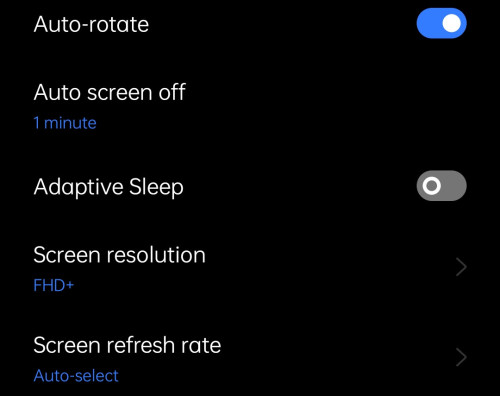 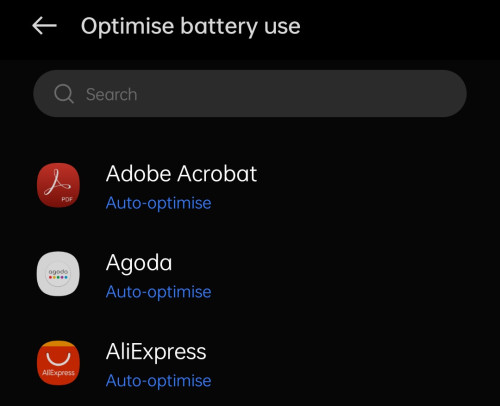 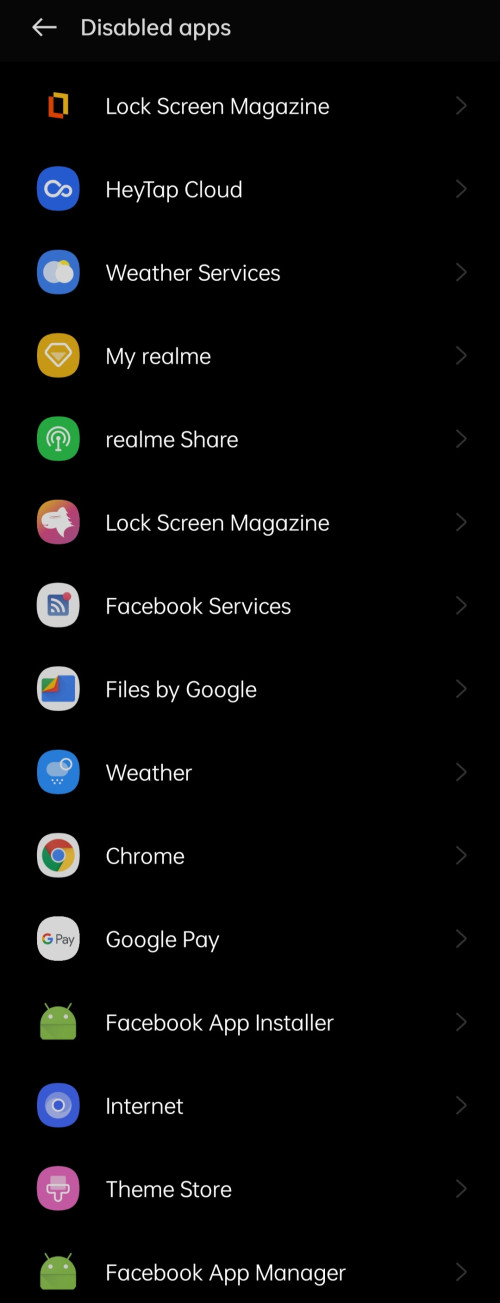 |
|
|
May 26 2022, 07:22 PM
Show posts by this member only | IPv6 | Post
#832
|
|
Junior Member
58 posts Joined: Nov 2008
|
I just noticed that after got the lastest update, App Freeze no longer worker. It seems crash and jump back to previous menu. Anyone facing same issue?
|
|
|
May 26 2022, 08:23 PM
Show posts by this member only | IPv6 | Post
#833
|

Junior Member
198 posts Joined: Mar 2006
|
QUOTE(aranny2001 @ May 26 2022, 07:22 PM) I just noticed that after got the lastest update, App Freeze no longer worker. It seems crash and jump back to previous menu. Anyone facing same issue? Think every1 here has this issue since the previous update already 😅 including meThis post has been edited by dextm: May 26 2022, 08:23 PM |
|
|
|
|
|
May 26 2022, 09:38 PM
|
|
Senior Member
1,567 posts Joined: Jul 2011 From: Grand Ol' Lady
|
ahhh darn it thanks guys. mine average 6hrs even on wifi
|
|
|
May 26 2022, 10:57 PM
Show posts by this member only | IPv6 | Post
#835
|
|
Junior Member
58 posts Joined: Nov 2008
|
QUOTE(dextm @ May 26 2022, 09:23 PM) Think every1 here has this issue since the previous update already 😅 including me Oh no.... I thought previous version was the app freeze fine caused I just got my phone 2 weeks back and after the latest update on the second day didn't noticed bout until today 😂 |
|
|
May 27 2022, 04:35 AM
|
|
Junior Member
419 posts Joined: Jul 2011 From: PJ, Malaysia
|
i dont think its related to update why app freeze is not working coz I experienced it before the update.. im guessing its related to the app you freezed...try to unsinstall that app and try again app freeze
This post has been edited by dallas316: May 27 2022, 04:35 AM |
|
|
May 27 2022, 09:46 AM
|
|
All Stars
19,321 posts Joined: Jan 2003 From: Klang
|
QUOTE(aranny2001 @ May 26 2022, 07:22 PM) I just noticed that after got the lastest update, App Freeze no longer worker. It seems crash and jump back to previous menu. Anyone facing same issue? Try turning on your Developer Options and see if your App Freeze works after that. |
|
|
May 27 2022, 11:15 AM
Show posts by this member only | IPv6 | Post
#838
|
|
Junior Member
58 posts Joined: Nov 2008
|
QUOTE(shinjite @ May 27 2022, 10:46 AM) Try turning on your Developer Options and see if your App Freeze works after that. Developer option on since the first day got my phone 😂.. the app freeze function stop working right after the latest update |
|
|
May 27 2022, 11:16 AM
Show posts by this member only | IPv6 | Post
#839
|
|
Junior Member
58 posts Joined: Nov 2008
|
QUOTE(dallas316 @ May 27 2022, 05:35 AM) i dont think its related to update why app freeze is not working coz I experienced it before the update.. im guessing its related to the app you freezed...try to unsinstall that app and try again app freeze It's not the app can't be freeze but instead the function in the setting of app freeze is not working at all 😞... Maybe it just froze itself 😂 |
|
|
May 27 2022, 11:20 AM
|
|
All Stars
19,321 posts Joined: Jan 2003 From: Klang
|
QUOTE(aranny2001 @ May 27 2022, 11:15 AM) Developer option on since the first day got my phone 😂.. the app freeze function stop working right after the latest update Try turning off and turning it on again. I had the same issue, eventually I did that and the App Freeze was running normally again. Weird, I would say. |
| Change to: |  0.0203sec 0.0203sec
 1.24 1.24
 6 queries 6 queries
 GZIP Disabled GZIP Disabled
Time is now: 21st December 2025 - 08:24 PM |
 Quote
Quote