
Welcome Guest ( Log In | Register )

Outline · [ Standard ] · Linear+

TIME Can Time Huawei Modem/Router work with MESH?, Huawei HG8145V5

views
     
TSHoNgZ
post Mar 23 2022, 03:12 PM, updated 4y ago

Casual
***
Junior Member
355 posts

Joined: Sep 2009
From: Kuala Lumpur
Hello Sifu,

My condo recently installed Time Internet, and I'm new to Time.

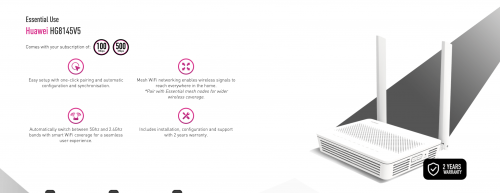
It only comes with 1 device which is Huawei HG8145V5 (Modem / Router 2 in 1), and the WiFi coverage a bit bad inside my bedroom. So I plan to buy 2 TP-Link X20 Mesh routers (1 put beside the modem/router, another put inside my room.

But I've heard from my colleague (not sure how accurate is that) Huawei Router / Modem doesn't works very well with TP-Link Mesh routers because Huawei Router dual band WiFi are in 1 SSID and it switch automatically depends on signal strength , but TP-Link router will need to have 2 SSIDs for 2.4GHz and 5GHz. So I not sure should I buy TP-Link Mesh Router or some Huawei Mesh Router. Any suggestion?

Also, can I use Huawei HG8145V5 solely as modem, and add on another TP-Link router like AX73?

This is the router I got from Time
user posted image

This post has been edited by HoNgZ: Mar 23 2022, 03:16 PM
shinichi88
post Mar 23 2022, 03:18 PM

Holy Crusader
*****
Senior Member
984 posts

Joined: Sep 2005
From: Selangor
Turn off Huawei Modem Wifi,
Plug-in Mesh Router to the modem using LAN cable
Set Mesh router as Wireless Router mode & turn on WiFi from the mesh router.

This post has been edited by shinichi88: Mar 23 2022, 03:20 PM
TSHoNgZ
post Mar 23 2022, 03:21 PM

Casual
***
Junior Member
355 posts

Joined: Sep 2009
From: Kuala Lumpur
QUOTE(shinichi88 @ Mar 23 2022, 03:18 PM)
Turn off Huawei Modem Wifi,
Plug-in Mesh Router to the modem using LAN cable
Set Mesh router as Wireless Router mode & turn on WiFi from the mesh router.
*
Oh, didn't know I can turn off Huawei Modem Wifi, in this case, 2 Mesh WiFi sufficient for my case? Btw, my condo is just 900 sqft, 2 Mesh should enough I guess?
shinichi88
post Mar 23 2022, 03:26 PM

Holy Crusader
*****
Senior Member
984 posts

Joined: Sep 2005
From: Selangor
QUOTE(HoNgZ @ Mar 23 2022, 03:21 PM)
Oh, didn't know I can turn off Huawei Modem Wifi, in this case, 2 Mesh WiFi sufficient for my case? Btw, my condo is just 900 sqft, 2 Mesh should enough I guess?
*
Yes. 1 at the modem, another 1 just plug in power and place it somewhere middle of your condo.
Use app to manage the mesh router.

I did the same.
BTW i'm using TIME + TP-Link Deco.
PRSXFENG
post Mar 23 2022, 03:47 PM

Look at all my stars!!
*******
Senior Member
2,611 posts

Joined: Nov 2020


QUOTE(HoNgZ @ Mar 23 2022, 03:12 PM)
Hello Sifu,

My condo recently installed Time Internet, and I'm new to Time.

It only comes with 1 device which is Huawei HG8145V5 (Modem / Router 2 in 1), and the WiFi coverage a bit bad inside my bedroom. So I plan to buy 2 TP-Link X20 Mesh routers (1 put beside the modem/router, another put inside my room.

But I've heard from my colleague (not sure how accurate is that) Huawei Router / Modem doesn't works very well with TP-Link Mesh routers because Huawei Router dual band WiFi are in 1 SSID and it switch automatically depends on signal strength , but TP-Link router will need to have 2 SSIDs for 2.4GHz and 5GHz. So I not sure should I buy TP-Link Mesh Router or some Huawei Mesh Router. Any suggestion?

Also, can I use Huawei HG8145V5 solely as modem, and add on another TP-Link router like AX73?

This is the router I got from Time
user posted image
*
Huawei has it's own mesh you can buy from TIME if you want those together

Otherwise, the best way is to disable wifi on the huawei (use as modem only) and use only the tplink mesh
Also pretty sure you can merge both 2.4 and 5ghz together on both

If you want to use AX73 also can

So either

Huawei Modem/Router 2 in one + it's mesh nodes
or
Huawei as Modem -> TP-Link Mesh
or
Huawei as Modem -> AX73

TSHoNgZ
post Mar 23 2022, 06:46 PM

Casual
***
Junior Member
355 posts

Joined: Sep 2009
From: Kuala Lumpur
QUOTE(shinichi88 @ Mar 23 2022, 03:26 PM)
Yes. 1 at the modem, another 1 just plug in power and place it somewhere middle of your condo.
Use app to manage the mesh router.

I did the same.
BTW i'm using TIME + TP-Link Deco.
*
great, thanks for sharing!
TSHoNgZ
post Mar 23 2022, 06:49 PM

Casual
***
Junior Member
355 posts

Joined: Sep 2009
From: Kuala Lumpur
QUOTE(PRSXFENG @ Mar 23 2022, 03:47 PM)
Huawei has it's own mesh you can buy from TIME if you want those together

Otherwise, the best way is to disable wifi on the huawei (use as modem only) and use only the tplink mesh
Also pretty sure you can merge both 2.4 and 5ghz together on both

If you want to use AX73 also can

So either

Huawei Modem/Router 2 in one + it's mesh nodes
or
Huawei as Modem -> TP-Link Mesh
or
Huawei as Modem -> AX73
*
The TIME installer technician even advise me not to take TIME mesh, he said it's better I go get TP-Link Deco.
NGV22
post Dec 12 2022, 01:36 AM

On my way
****
Junior Member
615 posts

Joined: Feb 2014


gotta bump this thread. I am a TIME user as well with similar modem router as OP. Using TP-Link Deco mesh wifi E4. It worked well for one year then recently it start producing issues where all the nodes produce solid red. Need to always reboot modem and the main node, but the problem will comes back hours later. TP-Link support not helpful and in fact they said this modem has many issues with Deco. So if anyone face this please chime in too.


Change to:
| Lo-Fi Version
0.0209sec    0.56    5 queries    GZIP Disabled
Time is now: 16th December 2025 - 11:23 PM