


We have seen a variety of graphical wait cursor from hourglass to spinning circle.
But what about console mode.... Is this a thing?
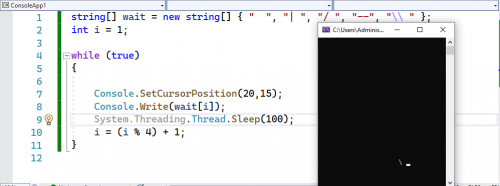
More pattern is welcome.
C# How did they create wait cursor?, In character subsystem
|
|
  Mar 17 2022, 04:36 AM, updated 4y ago Mar 17 2022, 04:36 AM, updated 4y ago
Show posts by this member only | IPv6 | Post
#1
|
 
Validating
543 posts Joined: Nov 2020 
|
I will be the last one to know.
We have seen a variety of graphical wait cursor from hourglass to spinning circle. But what about console mode.... Is this a thing? More pattern is welcome. |
|
|
|
|
|
Mar 17 2022, 06:51 AM
Show posts by this member only | Post
#2
|

Junior Member
708 posts Joined: Jul 2012
|
There is no wait cursor in Console mode, you have to draw it yourself, erase it, and then draw again. FlierMate liked this post
|
|
|
Mar 17 2022, 08:32 AM
Show posts by this member only | Post
#3
|

Junior Member
355 posts Joined: Aug 2021 
|
When display such custom cursor,
you need to do a lot of extra things when you need readline from keyboard.  |
|
|
Mar 17 2022, 05:40 PM
Show posts by this member only | IPv6 | Post
#4
|
|
Validating
543 posts Joined: Nov 2020
|
QUOTE(flashang @ Mar 17 2022, 08:32 AM) When display such custom cursor, Yes, you've pinpointed the issue.you need to do a lot of extra things when you need readline from keyboard.  But it is quite easy, given this, in .NET: CODE while (true) { if (Console.KeyAvailable) break; Console.Write('.'); } ...where it doesn't pause for keypress from user.  |
|
|
Mar 17 2022, 07:53 PM
Show posts by this member only | Post
#5
|
|
Junior Member
355 posts Joined: Aug 2021
|
QUOTE(FlierMate @ Mar 17 2022, 05:40 PM) Yes, you've pinpointed the issue. Nope.But it is quite easy, given this, in .NET: CODE while (true) { if (Console.KeyAvailable) break; Console.Write('.'); } ...where it doesn't pause for keypress from user. To handle "proper" readline, you need to check for backspace, insert / overwrite, arrow keys, some other keys such as ctrl / alt + keys... |
|
|
Mar 17 2022, 08:50 PM
Show posts by this member only | Post
#6
|

Junior Member
636 posts Joined: Jul 2006
|
Back in the DOS days, I hooked on interrupt 8 to change the cursor scan lines 18 times a second, bouncing it up and down. One of my first TSR program.
I suppose in modern times, it's a matter of getting something running in the background to animate it, in your current platform, be it web or console or gui. This post has been edited by angch: Mar 17 2022, 08:54 PM |
|
|
|
|
|
Mar 18 2022, 03:06 PM
Show posts by this member only | IPv6 | Post
#7
|
 
Elite
4,956 posts Joined: Jan 2003
|
This is done quite commonly in bash scripts, there are plenty of ways to do progress indicators as well. Here's a simple spinner example CODE #!/bin/bash function shutdown() { # reset cursor tput cnorm } trap shutdown EXIT function spinner() { # cursor invisible tput civis frames='-\|/' input="" i=0 while [[ -z $input ]]; do read -rsn1 -t 0.1 input i=$(( (i+1) %4 )) printf "\r${frames:$i:1}" sleep .1 done # restore cursor tput cnorm } spinner FlierMate liked this post
|
|
|
Mar 19 2022, 05:23 PM
Show posts by this member only | IPv6 | Post
#8
|
|
Validating
543 posts Joined: Nov 2020
|
QUOTE(silverhawk @ Mar 18 2022, 03:06 PM) This is done quite commonly in bash scripts, there are plenty of ways to do progress indicators as well. Here's a simple spinner example Yes, that "frames='-\|/'" is one of the popular way to do it.» Click to show Spoiler - click again to hide... « When you mean progress indicator, do you mean this? CODE . .. ... . .. ... (and repeats) |
|
|
Mar 19 2022, 05:26 PM
Show posts by this member only | IPv6 | Post
#9
|
|
Validating
543 posts Joined: Nov 2020
|
QUOTE(flashang @ Mar 17 2022, 07:53 PM) Nope. But I wonder, why do we need to read keystroke when animating a wait cursor??To handle "proper" readline, you need to check for backspace, insert / overwrite, arrow keys, some other keys such as ctrl / alt + keys... QUOTE(angch @ Mar 17 2022, 08:50 PM) Back in the DOS days, I hooked on interrupt 8 to change the cursor scan lines 18 times a second, bouncing it up and down. One of my first TSR program. Interesting, looks like everyone was a DOS master. |
|
|
Mar 19 2022, 08:53 PM
Show posts by this member only | IPv6 | Post
#10
|
|
Elite
4,956 posts Joined: Jan 2003
|
QUOTE(FlierMate @ Mar 19 2022, 05:23 PM) Yes, that "frames='-\|/'" is one of the popular way to do it. Like a normal progress bar you see on windows when you're transferring a file. Its quite common in command line scripts now. When you mean progress indicator, do you mean this? CODE . .. ... . .. ... (and repeats) |
|
|
Mar 19 2022, 10:33 PM
|
|
Junior Member
355 posts Joined: Aug 2021
|
QUOTE(FlierMate @ Mar 19 2022, 05:26 PM) But I wonder, why do we need to read keystroke when animating a wait cursor?? After re-read the 1st post, realized this was talking about waiting cursor in console.Interesting, looks like everyone was a DOS master. Not for 'waiting command cursor'  This post has been edited by flashang: Mar 19 2022, 10:43 PM FlierMate liked this post
|
|
|
Mar 19 2022, 10:41 PM
|
|
Junior Member
355 posts Joined: Aug 2021
|
QUOTE(silverhawk @ Mar 19 2022, 08:53 PM) Like a normal progress bar you see on windows when you're transferring a file. Its quite common in command line scripts now. If we look at recent common application, including web, desktop gui and console app,The waiting cursor could be progress bar, or some text info such as xx mb/sec, xx sec / min reminding, 1 of 999 steps / processes, ... This may give user some info for them to decide if they are willing to wait until complete or terminate it. Animation cursor may be is OK for short waiting, but not for long waiting time. |
| Change to: |  0.0227sec 0.0227sec
 0.79 0.79
 5 queries 5 queries
 GZIP Disabled GZIP Disabled
Time is now: 17th December 2025 - 08:50 PM |
 Quote
Quote