

what should i do now?
i cant start my mac OS...sorry, newbie here~
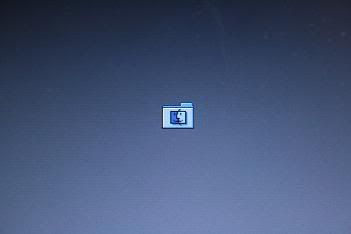
need help from you all~
|
|
 Sep 24 2007, 01:18 AM, updated 19y ago Sep 24 2007, 01:18 AM, updated 19y ago
Show posts by this member only | Post
#1
|
 
Junior Member
5 posts Joined: Jul 2007  
|
Can i know what the problem i face?
what should i do now? i cant start my mac OS...sorry, newbie here~ |
|
|
|
|
|
Sep 24 2007, 05:08 AM
Show posts by this member only | Post
#2
|

Senior Member
5,252 posts Joined: Jan 2003 From: Apple MACland
|
|
|
|
Sep 25 2007, 12:21 AM
Show posts by this member only | Post
#3
|

Senior Member
2,642 posts Joined: Jan 2005 From: Penang
|
this is first time i seen this
new thing for me to learn |
|
|
Sep 25 2007, 10:55 AM
Show posts by this member only | Post
#4
|
|
Junior Member
5 posts Joined: Jul 2007
|
my ibook problem is "Flashing Question Mark during Startup OS"
http://docs.info.apple.com/article.html?artnum=58042 this is the problem i facing now... I have try all the step, still cannot reach boot menu....  even i press "option" button also not success.....  take a look for these step i tried (copy from apple mac website) Steps for Mac OS X The possible causes and solutions for this symptom appear in the order that you should try them. If any step resolves the issue, you don't need to continue to the next one. If at any time in this process you determine that your Mac OS X system software is missing, reinstall Mac OS X. Mac OS X system software is stored in the System and Library folders at the top (root) level of your hard disk. It is also stored in folders that are invisible when started up from Mac OS X but that are visible when started up from Mac OS 9. If you have started up from Mac OS 9 and deleted folders that were unfamiliar to you, you may have accidentally deleted your Mac OS X system software. If you're not sure, save reinstallation for your last option. Start up from a system software CD or DVD, and repair your disk using Disk Utility: Insert the Mac OS X Install or Restore disc. Restart the computer, then hold the C key during startup. From the Apple menu, choose Disk Utility. Do this in the first screen of the Installer. Don't click Continue. If you click Continue in a Mac OS X Installer version earlier than 10.2, you must restart from CD again. Click the First Aid tab. Click Repair Disk. After repairing the disk, try to start from the Mac OS X hard disk. Tip: If your hard disk is not available (mounted) when started up from CD, reset the parameter RAM (PRAM) as described in step 3, then repeat these steps. If your hard disk is still not available after resetting PRAM, contact an Apple Authorized Service Provider or Apple Technical Support. Try to select your Mac OS X startup disk using either Startup Manager or the X key. If this doesn't work, go to step 3. Reset parameter RAM (PRAM). Reset PRAM, then see if the computer starts up. If it doesn't, repeat step 2. If none of these steps resolved the issue, start up from the Mac OS X Installation CD and reinstall Mac OS X. If your hard disk is not available (mounted) when started up from CD, contact an Apple Authorized Service Provider or Apple Technical Support. Hmmm.....possible DVD problem? have any idea to fix this problem? or.....terus send this ibook to service center.... |
| Change to: |  0.0135sec 0.0135sec
 1.93 1.93
 5 queries 5 queries
 GZIP Disabled GZIP Disabled
Time is now: 18th December 2025 - 04:44 PM |
 Quote
Quote