Welcome Guest ( Log In | Register )

Outline · [ Standard ] · Linear+

 Unifi stability vs Allo vs Maxis, Allo and Maxis users welcome feedback

views
     
TSjimlim007
post Mar 14 2022, 09:11 PM, updated 4y ago

Enoch
*******
Senior Member
4,073 posts

Joined: Aug 2006


I am using streamyx (>10yrs) and moved to Unifi 100mb already seevral years, contract has already ended.

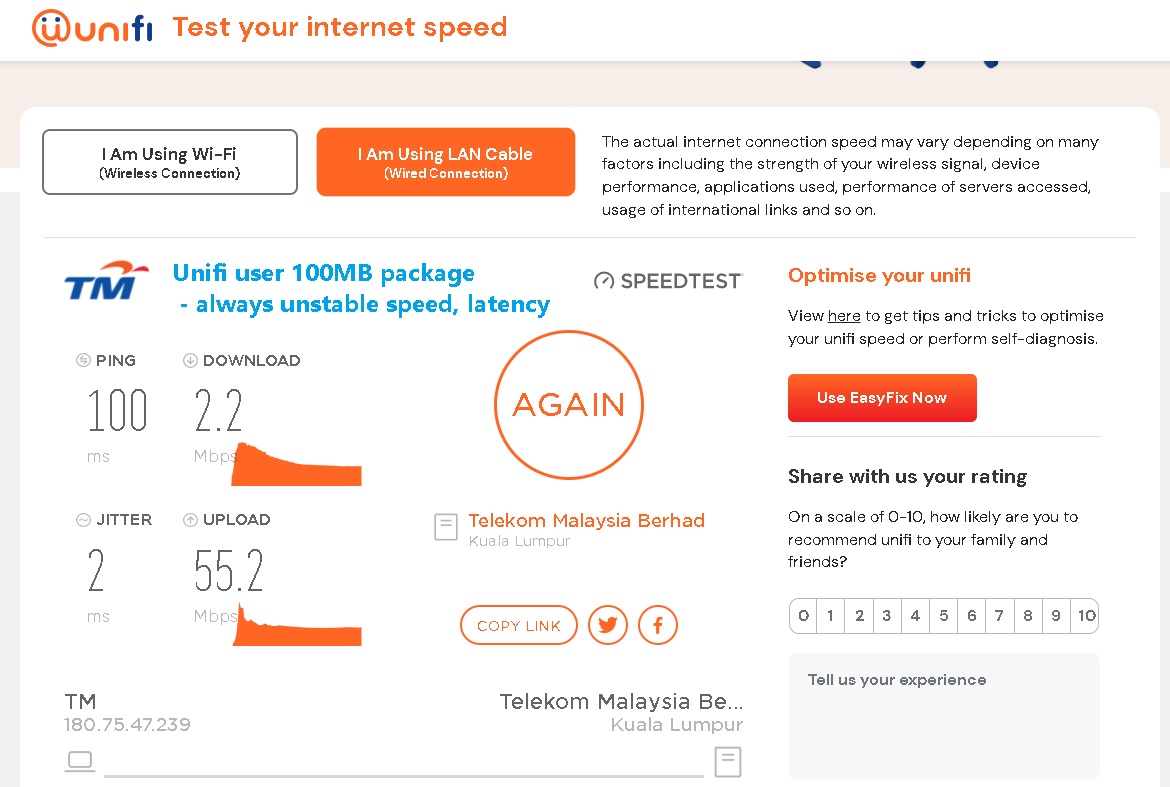
I have area I like TMnut which their support service to up internet is quick good (responsive once ticket is generated). but I OFTEN encountered frequent hours few days a week (eg: 7pm to 12pm, and so on - random) my unifi speed dropped from 100mb to 2mb - 8mb, all gaming cannot be played this period because latency will be BAD.


Since Allo has started, would like does Allo have this problem? while Maxis is using TM intra, does it has same problem?


user posted image
go626201
post Mar 14 2022, 10:05 PM

Regular
******
Senior Member
1,882 posts

Joined: Sep 2017
My overall opinion about unifi(800mbps) for 3years.(Using Unifi Since 2010 or 2011)
My network device:
ONU:Alcatel-Lucent I240G-T
Router:Mikrotik RB5009
Wifi AP:Xiaomi AX3600-CN ver
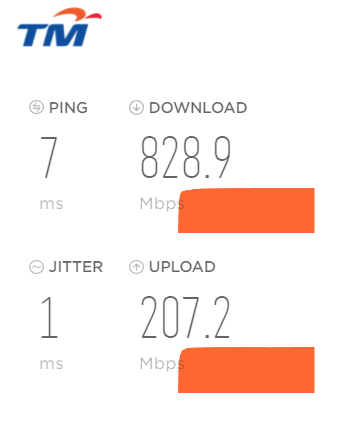
user posted image

Uptime: 99.9% average uptime per year,0.1% due to midnight maintenance or some short term maintenance-Rarely happens(like almost 1 weeks every days specific time will slower speed like below 200mbps)

Speed:
MY:
Always full speed from local national server.(90% fast server, 10% might lower speed)

SG:
50% SG server can get full speed as the routing is well.
(Another 50% will be getting lower speed or ridiculous low speed due to the unstable routing causing packet lost or some else issue. or QoS)

Worldwide:
80% worldwide server speed is okay,and 20% country server might be slow due to routing non-optimize or congestion.(Without submarine cable break)
50% country server is okay,and another 40% will be slow due to due to routing non-optimize or congestion.(With submarine cable break)

Latency:
MY: 95% national server low latency,5% server higher latency due to routing issue or congestion.

SG: Similar to speed opinion. but higher latency does not mean lower speed,just because of congestion or routing non-optimized or QoS.

Worldwide: Similar to speed opinion. Unifi always got alot of strange routing issue to worldwide server,so this really depends which server that want to connect.

IPv4/6:
Unifi IPv4 connection so-so(Details see above)
Unifi IPv6 is not stable.(only 30% of the connection is okay to use,70% of ipv6 between unifi and others server almost crap)
Sometimes when IPv6 is enable,u might see slower connection compare to IPv4.(Most unifi IPv6 routing almost non-optimized)


Normally most unifi user that cant hit full subscription speed are due to
1. Non-Lan cable connection (Wifi hard to hit full speed,but if router and end device is good enough and Wifi 6 supported then full speed is hit-able on wifi)
2. Using non-powerful router (TM free given router normally is crap)
3. End device is no powerful enough,due to higher speed need more powerful device to utilize,it is possible that some low end or older device cant hit higher speed.
4. End device or router faulty (such as PC driver issue or software/hardware issue)
5. Local Area unifi congestion or the same time unifi is having issue( This Rarely happens)

This post has been edited by go626201: Mar 14 2022, 10:05 PM

QuantumEdge
post Mar 15 2022, 01:14 AM

Regular
******
Senior Member
1,602 posts

Joined: Jan 2016


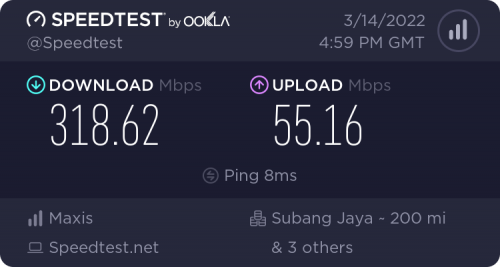
I'm was a Unifi 100mbps user for 1.5 years, recently switched to Maxis 300mbps on TM infra, 3 months in.
My network device:
ONU:ZTE-F620
Router:ASUS AX58U flashed with Merlin
DNS: Google DNS on both IPv4 and IPv6

user posted image

Uptime: 100%, my router and onu is on 24/7, probably manual restart once every 2 weeks.

Speed:
MY:
Always full speed from local national server.

SG:
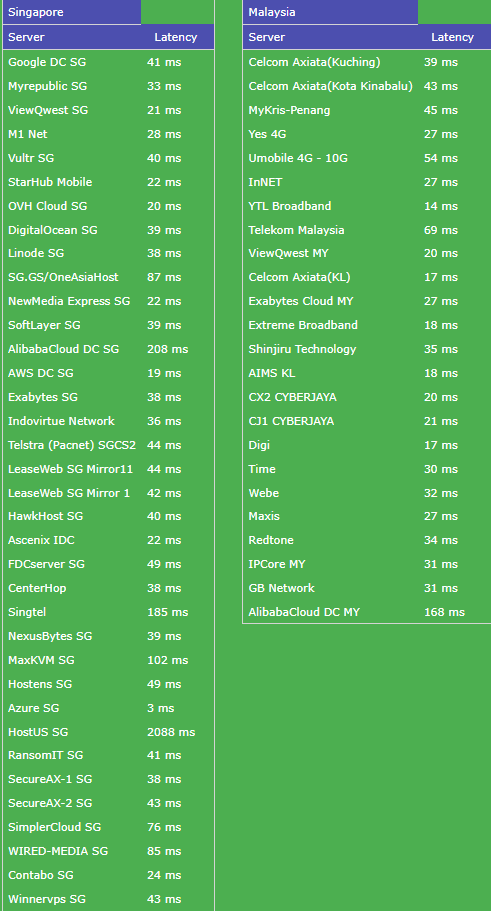
Full speed on most test servers, ping are slightly higher than Unifi but always stable with no ping and lag spikes

Worldwide:
EU around 25~75% speed, NA is slightly higher

Latency:
MY&SG: Slightly higher than TM, but always stable with no ping and lag spikes

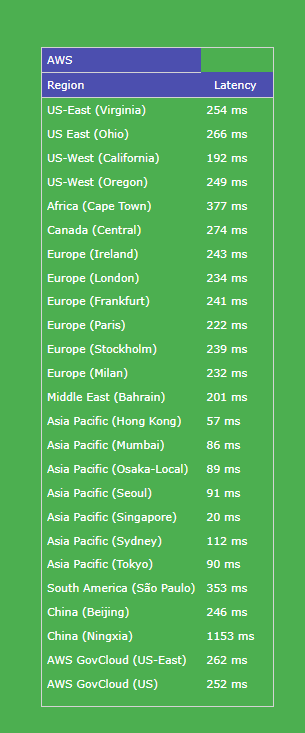
Worldwide: Ping is a bit higher on NA but EU is way better than unifi

Local and SG server ping test:
user posted image
AWS ping test:
user posted image

IPv4/6:
Maxis IPv4 connection no problem at all
Maxis IPv6 is really stable and on by default, no problem viewing Twitter,Facebook, Youtube during peak hour unlike TM having problem loading video or image

For me, changing from Unifi to Maxis experience is night and day.
No more lousy ping and lag spikes during peak hour, no more weird image and video not loading on social media
Most importantly, when Unifi is doing maintenance, Maxis wont be affected (unless it is on their common infra)
The only annoying problem I've had is, you cant watch PrawnHub with Maxis unless using VPN. Changing DNS wont do.
YoungMan
post Mar 15 2022, 08:41 AM

Look at all my stars!!
*******
Senior Member
6,839 posts

Joined: Oct 2008
From: Kuala Lumpur


QUOTE(jimlim007 @ Mar 14 2022, 10:11 PM)
I am using streamyx (>10yrs) and moved to Unifi 100mb already seevral years, contract has already ended.

I have area I like TMnut which their support service to up internet is quick good (responsive once ticket is generated). but I OFTEN encountered frequent hours few days a week (eg: 7pm to 12pm, and so on - random) my unifi speed dropped from 100mb to 2mb - 8mb, all gaming cannot be played this period because latency will be BAD.
Since Allo has started, would like does Allo have this problem? while Maxis is using TM intra, does it has same problem?
user posted image
*
Maxis uses the last mile infra from TM. The connection is then routed to Maxis own server and follows Maxis routing.

QUOTE(QuantumEdge @ Mar 15 2022, 02:14 AM)
I'm was a Unifi 100mbps user for 1.5 years, recently switched to Maxis 300mbps on TM infra, 3 months in.
My network device:
ONU:ZTE-F620
Router:ASUS AX58U flashed with Merlin
DNS: Google DNS on both IPv4 and IPv6

user posted image

Uptime: 100%, my router and onu is on 24/7, probably manual restart once every 2 weeks.

Speed:
MY:
Always full speed from local national server.

SG:
Full speed on most test servers, ping are slightly higher than Unifi but always stable with no ping and lag spikes

Worldwide:
EU around 25~75% speed, NA is slightly higher

Latency:
MY&SG: Slightly higher than TM, but always stable with no ping and lag spikes

Worldwide: Ping is a bit higher on NA but EU is way better than unifi

Local and SG server ping test:
user posted image
AWS ping test:
user posted image

IPv4/6:
Maxis IPv4 connection no problem at all
Maxis IPv6 is really stable and on by default, no problem viewing Twitter,Facebook, Youtube during peak hour unlike TM having problem loading video or image

For me, changing from Unifi to Maxis experience is night and day.
No more lousy ping and lag spikes during peak hour, no more weird image and video not loading on social media
Most importantly, when Unifi is doing maintenance, Maxis wont be affected (unless it is on their common infra)
The only annoying problem I've had is, you cant watch PrawnHub with Maxis unless using VPN. Changing DNS wont do.
*
Hahahaha, goes to show Maxis is better in terms of blocking those website.
QuantumEdge
post Mar 15 2022, 02:32 PM

Regular
******
Senior Member
1,602 posts

Joined: Jan 2016


QUOTE(YoungMan @ Mar 15 2022, 08:41 AM)
Hahahaha, goes to show Maxis is better in terms of blocking those website.
*
Ya legit, everything about Maxis is better than Unifi apart from the website block... If I know in advance... Would stick with Unifi until Allo is ready
YoungMan
post Mar 15 2022, 02:39 PM

Look at all my stars!!
*******
Senior Member
6,839 posts

Joined: Oct 2008
From: Kuala Lumpur


QUOTE(QuantumEdge @ Mar 15 2022, 03:32 PM)
Ya legit, everything about Maxis is better than Unifi apart from the website block... If I know in advance... Would stick with Unifi until Allo is ready
*
Haiya, that prawn block just a small matter bro. You rather stay on not so stable connection just for circumventing the block?
Cincai.La
post Mar 15 2022, 06:18 PM

Getting Started
**
Junior Member
184 posts

Joined: Jun 2020
From: IPOH


I'm Allo user since July 2021(previously using streamyx since 2012). Allo speed is very stable just their CS is very lausy. Here is my rating about this two ISP.

Customer Service: TM -> Allo
Stability: Allo -> TM
TSjimlim007
post Mar 16 2022, 07:33 PM

Enoch
*******
Senior Member
4,073 posts

Joined: Aug 2006


QUOTE(YoungMan @ Mar 15 2022, 02:39 PM)
Haiya, that prawn block just a small matter bro. You rather stay on not so stable connection just for circumventing the block?
*
both are equally important
TSjimlim007
post Mar 16 2022, 07:34 PM

Enoch
*******
Senior Member
4,073 posts

Joined: Aug 2006


QUOTE(Cincai.La @ Mar 15 2022, 06:18 PM)
I'm Allo user since July 2021(previously using streamyx since 2012). Allo speed is very stable just their CS is very lausy. Here is my rating about this two ISP.

Customer Service: TM -> Allo
Stability: Allo -> TM
*
thanks for allo user feedback, allo is cheap also and upload speed is 2x
gvr
post Jun 25 2022, 06:29 PM

Getting Started
**
Junior Member
191 posts

Joined: Apr 2009
QUOTE(QuantumEdge @ Mar 15 2022, 01:14 AM)
I'm was a Unifi 100mbps user for 1.5 years, recently switched to Maxis 300mbps on TM infra, 3 months in.
My network device:
ONU:ZTE-F620
Router:ASUS AX58U flashed with Merlin
DNS: Google DNS on both IPv4 and IPv6

user posted image

Uptime: 100%, my router and onu is on 24/7, probably manual restart once every 2 weeks.

Speed:
MY:
Always full speed from local national server.

SG:
Full speed on most test servers, ping are slightly higher than Unifi but always stable with no ping and lag spikes

Worldwide:
EU around 25~75% speed, NA is slightly higher

Latency:
MY&SG: Slightly higher than TM, but always stable with no ping and lag spikes

Worldwide: Ping is a bit higher on NA but EU is way better than unifi

Local and SG server ping test:
user posted image
AWS ping test:
user posted image

IPv4/6:
Maxis IPv4 connection no problem at all
Maxis IPv6 is really stable and on by default, no problem viewing Twitter,Facebook, Youtube during peak hour unlike TM having problem loading video or image

For me, changing from Unifi to Maxis experience is night and day.
No more lousy ping and lag spikes during peak hour, no more weird image and video not loading on social media
Most importantly, when Unifi is doing maintenance, Maxis wont be affected (unless it is on their common infra)
The only annoying problem I've had is, you cant watch PrawnHub with Maxis unless using VPN. Changing DNS wont do.
*
May I know do you able to login to the ONU page, and do you use Maxis VOIP services with your setup?

tng55
post Jun 25 2022, 09:35 PM

Regular
******
Senior Member
1,459 posts

Joined: Sep 2021


QUOTE(QuantumEdge @ Mar 15 2022, 01:14 AM)
I'm was a Unifi 100mbps user for 1.5 years, recently switched to Maxis 300mbps on TM infra, 3 months in.
My network device:
ONU:ZTE-F620
Router:ASUS AX58U flashed with Merlin
DNS: Google DNS on both IPv4 and IPv6

user posted image

Uptime: 100%, my router and onu is on 24/7, probably manual restart once every 2 weeks.

Speed:
MY:
Always full speed from local national server.

SG:
Full speed on most test servers, ping are slightly higher than Unifi but always stable with no ping and lag spikes

Worldwide:
EU around 25~75% speed, NA is slightly higher

Latency:
MY&SG: Slightly higher than TM, but always stable with no ping and lag spikes

Worldwide: Ping is a bit higher on NA but EU is way better than unifi

Local and SG server ping test:
user posted image
AWS ping test:
user posted image

IPv4/6:
Maxis IPv4 connection no problem at all
Maxis IPv6 is really stable and on by default, no problem viewing Twitter,Facebook, Youtube during peak hour unlike TM having problem loading video or image

For me, changing from Unifi to Maxis experience is night and day.
No more lousy ping and lag spikes during peak hour, no more weird image and video not loading on social media
Most importantly, when Unifi is doing maintenance, Maxis wont be affected (unless it is on their common infra)
The only annoying problem I've had is, you cant watch PrawnHub with Maxis unless using VPN. Changing DNS wont do.
*
i wont switch maxis due we really need access PrawnHub changing DNS works fine Unifi works prefect no blocking

but maxis to much Blocking and if change DNS also wont work look crazy

batter i stay Unifi

i using Unifi 100mbps speed stable ok for me
i waiting 800mbps offering TM

now days no offering so bad so i can wait no problem
filage
post Jun 26 2022, 09:39 AM

Regular
******
Senior Member
1,205 posts

Joined: Aug 2014
May I know are all non-TM Fiber providers riding upon TM infrastructure and if not how do we know whether they ride or use own infra at a location we wish to subscribe?

And if they ride on TM and the location of interest is notorious for having bad latency and ping at nights for all Unifi users in that neighborhood, does it mean changing to Maxis/Allo/Celcom/Digi Fiber will suffer the same latency problems?
PRSXFENG
post Jun 26 2022, 04:54 PM

Look at all my stars!!
*******
Senior Member
2,616 posts

Joined: Nov 2020


QUOTE(filage @ Jun 26 2022, 09:39 AM)
May I know are all non-TM Fiber providers riding upon TM infrastructure and if not how do we know whether they ride or use own infra at a location we wish to subscribe?

And if they ride on TM and the location of interest is notorious for having bad latency and ping at nights for all Unifi users in that neighborhood, does it mean changing to Maxis/Allo/Celcom/Digi Fiber will suffer the same latency problems?
*
Maxis sometimes uses other infrastructer providers, such as their own or Allo, I'm not aware of a way to find out before you install
Celcom has their own infra in some places in Sabah I think
TIME uses thier own infra
Allo/City Broadband uses their own infra

As for the 2nd part, no, unless the local node is overloaded, otherwise beyond that its through your own isps's servers so you may not face the issue
think of it as going from A to B, different ISPs have different routes to get from A to B, some faster, some slower, but the starting point (from your house) is the same shared infra.
QuantumEdge
post Jun 26 2022, 05:55 PM

Regular
******
Senior Member
1,602 posts

Joined: Jan 2016


QUOTE(gvr @ Jun 25 2022, 06:29 PM)
May I know do you able to login to the ONU page, and do you use Maxis VOIP services with your setup?
*
No and No
I couldn’t login to the ZTE ONU as they seems to lock it after configuration. I don’t use Maxis VOIP at all as my plan didn’t come with any call plan, the the technician didn’t even bother to setup in the provided Kaon router.

QUOTE(tng55 @ Jun 25 2022, 09:35 PM)
i wont switch maxis due we really need access PrawnHub changing DNS works fine Unifi works prefect no blocking

but maxis to much Blocking and if change DNS also wont work look crazy

batter i stay Unifi

i using Unifi 100mbps speed stable ok for me
i waiting 800mbps offering TM

now days no offering so bad so i can wait no problem
*
Been browsing without phub for a long time, I first thought it would be a problem but it turns out fine. Since that particular website is pretty much out of contents after the great flush a year or two before. Having a broadband that just works 99.9% of the time is a sacrifice I’m willing to make.


Change to:
| Lo-Fi Version
0.0252sec    0.37    5 queries    GZIP Disabled
Time is now: 24th December 2025 - 03:27 AM