

QUOTE(RiriRuruRara @ Apr 6 2022, 10:14 PM)
Anyone twitch keep buffering??

Yes, random buffering for meUnifi Official TM UniFi High Speed Broadband Thread V40, READ 1ST PAGE FOR RELEVANT WIFI INFO
|
|
 Apr 6 2022, 10:26 PM Apr 6 2022, 10:26 PM
Return to original view | Post
#1
|
 
Junior Member
289 posts Joined: Sep 2012 
|
QUOTE(RiriRuruRara @ Apr 6 2022, 10:14 PM) Anyone twitch keep buffering?? Yes, random buffering for me |
|
|
|
|
|
May 1 2022, 06:48 PM
Return to original view | IPv6 | Post
#2
|
|
Junior Member
289 posts Joined: Sep 2012
|
QUOTE(soonwai @ May 1 2022, 03:28 PM) No charges correct? Just wondering cos last month someone said TM charged them for the visit to replace the modem. Modem is their responsibility. By right, you won't get charged. |
|
|
May 2 2022, 01:17 PM
Return to original view | IPv6 | Post
#3
|
|
Junior Member
289 posts Joined: Sep 2012
|
QUOTE(HippyTony @ May 2 2022, 10:32 AM) Thanks for taking your time to answer my question. As I’m new to Unifi, I just got my Unifi installed a few days ago and I’m changing the Unifi router to DECO HC4(M4) which I just bought. OTW. I just want to prepare for the future as I’m told TM provide poor quality devices. If you're preparing for the future, you should bought higher end router (wifi 6 probably) haha.I have gotten my PPPoE from the installer as advice by members here and will change it when I received the new mesh routers. Thank you again. I'm ex M4 user. After around 13 devices connected, I start to see instability on M4. I upgraded to deco X20. Such issue not happening anymore plus wider coverage and better throughput. This post has been edited by jacktiew: May 2 2022, 01:19 PM HippyTony liked this post
|
|
|
May 2 2022, 09:30 PM
Return to original view | IPv6 | Post
#4
|
|
Junior Member
289 posts Joined: Sep 2012
|
QUOTE(HippyTony @ May 2 2022, 03:31 PM) I was recommended to get a WiFi 6 router but I decided against it because it’s only 2 of us in this old folks house. When the time comes I can add a AX router and reinstall my DECO with it. I hope I’m doing the correct thing. Also can. Since not many person in the house. It's your call. |
|
|
May 16 2022, 09:46 PM
Return to original view | IPv6 | Post
#5
|
|
Junior Member
289 posts Joined: Sep 2012
|
QUOTE(cheekian @ May 16 2022, 09:12 PM) Today I went to TM Point for asking staywithunifi 300Mbps package as original 100Mbps contract has been expired. She said everything are the same (RM129+6%) and minus unifiTV pack, The CS said have to wait 7 working days to process the order, and she said after 7 working days no any status means cannot enjoy the package. Just wait 7 working days. If they called you, probably the application success and they will setup an appointment for router upgrade. If not, try again at tmpoint for luck.Then later I had check on unifi webpage, it has a order for new installation but it shows cancelled status. May it reopen a new order again? cheekian liked this post
|
|
|
May 29 2022, 01:31 PM
Return to original view | Post
#6
|
|
Junior Member
289 posts Joined: Sep 2012
|
Anyone facing slow download speed but normal ping & upload speed?
I only get 0.5/57 out of 300/50. Location: Cyberjaya, Selangor. Update: Things back to normal This post has been edited by jacktiew: May 29 2022, 07:11 PM |
|
|
|
|
|
Jun 18 2022, 10:15 AM
Return to original view | IPv6 | Post
#7
|
|
Junior Member
289 posts Joined: Sep 2012
|
QUOTE(GameSky @ Jun 18 2022, 10:03 AM) haih, apparently LOS led at BTU down this morning..hopefully they fixed it soon.. already reset the port same thing (saw them remote reset port and my btu restarted still the same) Lasy time I reported through live chat, they fixed it within 24hrs business days last time.This post has been edited by jacktiew: Jun 18 2022, 10:16 AM |
|
|
Jul 11 2022, 11:04 PM
Return to original view | IPv6 | Post
#8
|
|
Junior Member
289 posts Joined: Sep 2012
|
QUOTE(westlife @ Jul 11 2022, 09:54 PM) i am using linksys mesh wifi router (which somehow i find it super rare in bolehland, most ppl do not even consider/use this brand of wifi router, but it is my fav and only brand i use for wifi router), it comes with 5GHz band steering function. For me, no budget for linksys, only TP-Link Deco haha. My low budget way to do it. Enable 5G only on main network since some of my old devices are too dumb to do the steering. Surprisingly 2 unit of Deco X20 5G signal can cover my whole 1700 sqft double storey house. Deco's seamless roaming has no issue at all.so both my 5GHz and 2.4GHz are using the same SSID, but as much as possible, the devices will be connected to 5GHz. 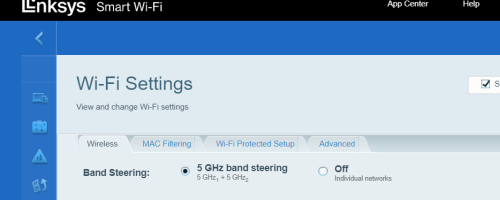 Btw, can linksys split wifi band? This post has been edited by jacktiew: Jul 11 2022, 11:20 PM |
|
|
Aug 10 2022, 04:09 PM
Return to original view | IPv6 | Post
#9
|
|
Junior Member
289 posts Joined: Sep 2012
|
QUOTE(Oltromen Ripot @ Aug 10 2022, 03:16 PM) @neekun, his task prior to today was only to add mesh units into existing installation. that fibre signal check was ... extra or habitual, i guess? I used to have -34. Download speed 0.1Mbps, upload 50Mbps was fine (300Mbps package). Lodged report through livechat. 1st technician came in, only fix the indoor wallmount fiber distribution box and gone missing.the same maxis technician came today (install, add mesh, and today t/shoot). somehow, Maxis 123 CS lodged "red LOS" and TM technician also came. today's reading, which way lower than previous (was it "28" when he tested before?). he said as long as "below 25", it is okay. 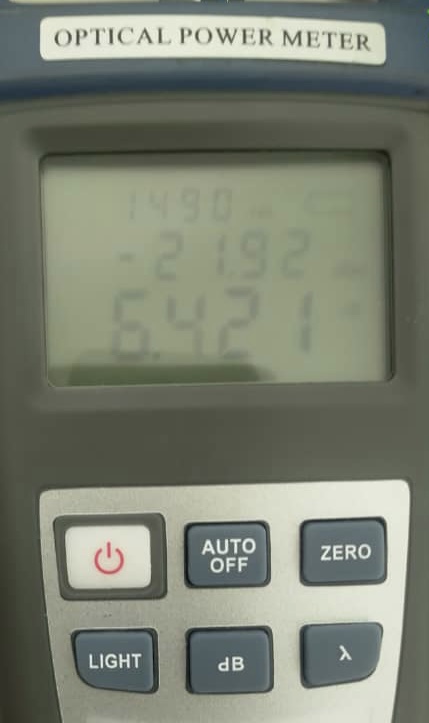 2 days later, same issue happened again. 2nd technician came in, he checked the reading is -32. Then he asked whether the previous guy did checked outdoor or not. I said nope, He went out and check, ended up the my port at outdoor splitter box was squeezed, the head of the port is spoiled. He cut down and redo the broken connector. And now my fiber reading from modem is -23. It's important to get a responsible technician. Luckily TM support is quite fast. Everytime lodged report, they came in within 24 hours. |
|
|
Aug 28 2022, 01:49 PM
Return to original view | IPv6 | Post
#10
|
|
Junior Member
289 posts Joined: Sep 2012
|
QUOTE(westlife @ Aug 28 2022, 09:51 AM) Prefer to use Google dns. Same. Cloudflare DNS often down although they provide better privacy compared to Google DNS. |
|
|
Jan 15 2023, 10:31 PM
Return to original view | IPv6 | Post
#11
|
|
Junior Member
289 posts Joined: Sep 2012
|
QUOTE(Singh93 @ Jan 15 2023, 10:12 PM) hi guys every night I'm facing LOS issue blinking red,then it will turn ok...what could be the issue? Fibre cable issue. Call TM. Singh93 liked this post
|
|
|
Apr 20 2023, 09:23 PM
Return to original view | IPv6 | Post
#12
|
|
Junior Member
289 posts Joined: Sep 2012
|
QUOTE(go626201 @ Apr 20 2023, 04:16 PM) Can i know is that need to bundle with internet plan? Last time I went to TMPoint to convert my copper landline number to fiber number. It works, but the staff did mentioned you might lose the number if the system auto take the number before the staff set it back to fiber number.(I mean at the same time must subscribe with other plan right?) Like keep copper phone,and must having a unifi plan. My relative currently using rm10 per month,but actually does not call out,so every month rm 10 not worth. (copper landline service only) Now I get to maintain my number without paying extra fee. |
|
|
Aug 23 2023, 06:48 PM
Return to original view | Post
#13
|
|
Junior Member
289 posts Joined: Sep 2012
|
Just went to unifi store IOI and asked for SWU3.0 300Mbps package. They said they received the memo from HQ that if your SWU 1.0 or 2.0 contract has not ended yet, you can't switch to SWU 3.0 even if you willing to renew contract. Haih. Waste time and petrol 🥹 This post has been edited by jacktiew: Aug 23 2023, 06:50 PM 1mr3tard3d, speeder_man, and 1 other liked this post
|
|
Topic ClosedOptions
|
| Change to: |  0.3281sec 0.3281sec
 0.24 0.24
 7 queries 7 queries
 GZIP Disabled GZIP Disabled
Time is now: 7th December 2025 - 03:20 PM |
 Quote
Quote