

ripoting in for duty
Unifi Official TM UniFi High Speed Broadband Thread V40, READ 1ST PAGE FOR RELEVANT WIFI INFO
Unifi Official TM UniFi High Speed Broadband Thread V40, READ 1ST PAGE FOR RELEVANT WIFI INFO
|
|
 Mar 14 2022, 11:34 AM Mar 14 2022, 11:34 AM
Return to original view | IPv6 | Post
#1
|
 
Senior Member
4,034 posts Joined: Dec 2019 
|
ripoting in for duty
|
|
|
|
|
|
Mar 20 2022, 09:10 PM
Return to original view | IPv6 | Post
#2
|
|
Senior Member
4,034 posts Joined: Dec 2019
|
QUOTE(cheekian @ Mar 19 2022, 10:44 AM) I just received a notification regarding 30days free speed upgrade, from 100Mbps to 300Mbps, but unfortunately the modem is not supported 300Mbps and it always capped to 92Mbps, can I request new modem? are sure you want to reset contract to another 2yrs over a modem? over a 1mth trial? |
|
|
Mar 21 2022, 05:07 PM
Return to original view | IPv6 | Post
#3
|
|
Senior Member
4,034 posts Joined: Dec 2019
|
QUOTE(shaktiv8 @ Mar 21 2022, 04:30 PM) Hello guys, I am using unifi on iOS Google chrome. Limit IP address tracking and iCloud private relay are all disabled. Disabled Chrome's Data Saver? Or have updated to most recent version without it?But today I’m trying to access Singapore airlines to book flight and it keeps showing me Hong Kong flights and all prices are in Hong Kong dollar If I use cellular in incognito it goes back to myr I am using Google dns for ipv6 and 4, but I thought Google redirects traffic based on location ? Is there something I’m missing? Should I disable ipv6 or use tm own dns? Also, I googled Singapore airlines first and got the link, didn’t go direct to their website if that makes any difference All other website seems to work normally and find location accurately Find my ip also showing Malaysian ip only |
|
|
Mar 21 2022, 11:41 PM
Return to original view | IPv6 | Post
#4
|
|
Senior Member
4,034 posts Joined: Dec 2019
|
Kek....
TM installed pole and fibre cabinet right in front of premise. But avoided checking on Unifi website because Unifi made it as part of registration flow. I just don't want me checking the address become a reason to deny other potential ISPs. It's HSBB. Every few days apart I kept checking on Maxis website instead, but no premise on the same road ever appeared. While I have another transaction with Maxis today, the rep reminded me that Maxis offered discount if I signed up with Maxis. Bloody hell - neighbours have their addresses in the system. Mine does not. (Wondering out loud if TM creates an address in system only when applied with TM kah?) I now recall a Maxis rep did mention over a telemarketing call few weeks ago that they have a different interface to check addresses supposedly not (yet) visible on public site. Moral of the story: walk-in, CHECK! » Click to show Spoiler - click again to hide... « |
|
|
Mar 22 2022, 10:56 AM
Return to original view | Post
#5
|
|
Senior Member
4,034 posts Joined: Dec 2019
|
QUOTE(asellus @ Mar 22 2022, 08:54 AM) Just use https://www.samsam123.name.my/digi-check-infra/ to check for coverage. If it available for Digi, then it is available for Maxis. hey, thanks for that. i can confirm drilled down, at least the road name is already inside system and supposedly open for registration. |
|
|
Mar 22 2022, 05:09 PM
Return to original view | Post
#6
|
|
Senior Member
4,034 posts Joined: Dec 2019
|
QUOTE(supergen3 @ Mar 22 2022, 05:01 PM) I feel your emotions. I got the same thing trying to get Digi fibre on TM HSBB. TM refused to register my home address unless it's for Unifi. Digi don't have power to register unless I was migrating from Unifi. So I end up subbing for Unifi. I plan to move out to another ISP after my Unifi contract expires. Kek.... HSBB is supposed to be ISP agnostic even if TM manages it. Government funds laying it, right? Supposed to be no barrier of entry, right?SKMM tidur. kupang liked this post
|
|
|
|
|
|
Mar 23 2022, 07:45 AM
Return to original view | IPv6 | Post
#7
|
|
Senior Member
4,034 posts Joined: Dec 2019
|
QUOTE(crackedbox @ Mar 23 2022, 01:00 AM) Need input from fellow members here, mesh nodes have ethernet port.Have a CCTV DVR on the ground floor and the wifi router/fiber modem is on the first floor. Pulling a cat6 cable is out of the equation. How can I connect the DVR to the network, it requires an ethernet cable (no WiFi built in). Isit possible to use the tplink WiFi extender or I'll have to use a wireless router as access point. Any specific setup? Please give input. All. I want is to have ethernet connection via WiFi to the DVR. Advice is appreciated. 1. if you already have existing mesh network, you can add new mesh node right next to the DVR rack, connected by ethernet cable. 2. if you have not an existing mesh network, your can set up a new mesh network which includes a node next to your DVR (like above), and another node next to your fibre router. (a) your can switch off existing wifi service by your standalone Access Point and let the new mesh network take over the same wireless SSID and password (your existing user devices might need help to rejoin wifi network), DVR and user will share same wifi network, OR, (b) retain existing wifi service and Access Point; set up the new mesh as a separate network using different wireless SSID (and password), DVR will use separate wifi than user devices. This post has been edited by Oltromen Ripot: Mar 23 2022, 07:47 AM |
|
|
Mar 23 2022, 12:21 PM
Return to original view | IPv6 | Post
#8
|
|
Senior Member
4,034 posts Joined: Dec 2019
|
QUOTE(crackedbox @ Mar 23 2022, 11:17 AM) Have no mesh as current WiFi for this particular house is good enough. Can I add a WiFi router to connect to WiFi and use the lan port on the WiFi router to connect the dvr? You will need an network equipment that have wireless CLIENT feature.The wireless CLIENT feature will allow such network equipment to join an existing wireless network as if it is a wireless client and not as repeater. Years ago, equipments capable of wireless CLIENT is common. Nowadays all manufacturer too busy making MESH/ROUTER device and neglected wireless CLIENT feature. Even looking for a plain wireless ACCESS POINT today is tedious. The closest to a plain wireless ACCESS POINT and wireless CLIENT now is mesh network devices. (There is another type called wireless BRIDGE, but my understanding is that it differs from wireless CLIENT in a sense that it is a 1-to-1 pairing of 2 network equipments; other wireless devices cannot join in as they are a pair.) |
|
|
Mar 23 2022, 12:33 PM
Return to original view | IPv6 | Post
#9
|
|
Senior Member
4,034 posts Joined: Dec 2019
|
QUOTE(crackedbox @ Mar 23 2022, 11:17 AM) Have no mesh as current WiFi for this particular house is good enough. Can I add a WiFi router to connect to WiFi and use the lan port on the WiFi router to connect the dvr? Differentiate what is a MODEM function, what is a ROUTER function, what is an wireless ACCESS POINT function. Probably also need to understand what is DIALER.Used to have MODEM, ROUTER, and AP as separate devices. But nowadays manufacturers like to combine ROUTER and AP function into single unit. You probably have ROUTER+AP for your current wireless network. So you either 1. get another device capable of playing as wireless CLIENT on DVR side (your question). Best performance. 2. extend your existing ROUTER+AP by adding mesh node to it, and another node on DVR side. 3. get a wireless REPEATER w/ ethernet port on DVR side. I would avoid this as your existing wireless client might connect to this repeater instead of direct to your ROUTER+AP; it will degrade your network experience. Worst performance. |
|
|
Mar 31 2022, 09:32 PM
Return to original view | IPv6 | Post
#10
|
|
Senior Member
4,034 posts Joined: Dec 2019
|
QUOTE(joehann @ Mar 31 2022, 11:55 AM) BTW, if you currently with ultimate package and not actually watching the TV, you can call TM to downgrade to aneka pack. This can further save you for RM30. This is what I did previously. The 500Mbps plan (Oct2021) is structured like this:Ultimate Pack +RM60 Rebate -RM60 TM now playing with rebate built into the plan so as to retain their revenue. They know their TV packs are shitty and is subject to cost reduction by users. Nett difference even if cancelled = RM0 |
|
|
Apr 23 2022, 11:42 AM
Return to original view | IPv6 | Post
#11
|
|
Senior Member
4,034 posts Joined: Dec 2019
|
QUOTE(Mazda9 @ Apr 20 2022, 07:58 PM) Hello LYN, unifitv plus box + 3 additional apps (2 fixed [bbc + lionplay] + 1 of your choice)I’m on 800mbps unlimited calls package + all Channels unifi tv pack at rm159 package. Received a call today from TM offering me new box with 3 additional apps and all Channel subscription at the same plan pricing but need to sign up 2 year contract. Was wondering if anyone has got similar offer from TM and isit worth it? don't bite if they increase your subscription price. plus, content pf those fixed apps doesn't seem to be updated. |
|
|
May 17 2022, 11:38 AM
Return to original view | IPv6 | Post
#12
|
|
Senior Member
4,034 posts Joined: Dec 2019
|
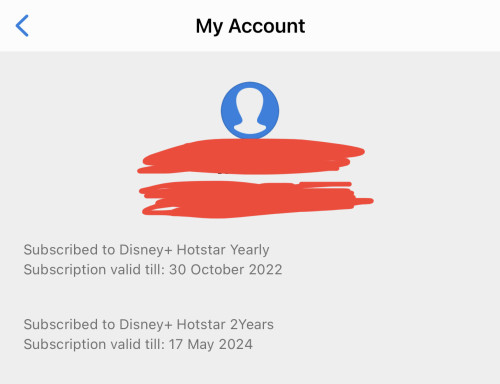 QUOTE(Oltromen Ripot @ May 11 2022, 12:59 PM) Unifi Ultimate Pack offers Disney Hotstar + BeIN Sports Connect + SPOTV NOW, begins 17th May 2022 onwards. Unifi offered to switch from previous bundle of BBC + LionsGate Play + BBC + own choice. So I bite the offer. Unifi Ultimate Pack already bundled into Unifi fibre rateplan. Disney+ on Astro is still payable RM50++/3mth, but on Unifi is supposedly already bundled in. Plus, gets some Sports packs to spare even if I don't watch them; better than LionsGate Play which I can't have on TV anyway because no age limit. (Can't wait to terminate Astro after contract is up.) QUOTE(linkinstreet @ May 11 2022, 04:10 PM) IIRC someone saw an advert on Unifi TV that you now will get free Hotstar Disney+ sub with Unifi 300Mbps, and not only for Unifi TV Ultimate subscriber. So yeah, don't need Astro for Hotstar anymore QUOTE(Oltromen Ripot @ May 11 2022, 06:35 PM) You know what makes it suck-er? When I changed to the new packs, they reset Astro+Disney+Netflix contract date from Nov2021. When I upgrade Netflix to premium, only Netflix supposedly reset again to Feb2022. But they mess up the upgrade that caused me to lose discounts; in April2022, they fixed the discount snafu, but now it appears my Netflix contract shifted to start from Apr2022. So I am curious how the fart will they play those date technicality when I push terminate in Nov2023, which is supposed to be the original start date for the 24mth auto-renewing. QUOTE(-oc-gassa @ May 12 2022, 09:38 AM) do review on Unifi if join the bandwagon later on... I'm fedup with unifi TV slow adaptation... unifi fiber no issue... until TM becomes a game-changer I just wait my upgrade to complete |
|
|
May 17 2022, 12:14 PM
Return to original view | IPv6 | Post
#13
|
|
Senior Member
4,034 posts Joined: Dec 2019
|
QUOTE(jacktiew @ May 16 2022, 09:46 PM) Just wait 7 working days. If they called you, probably the application success and they will setup an appointment for router upgrade. If not, try again at tmpoint for luck. THIS may be the most applicable. just wait.TM counter once told me, all orders inside their system are to be closed within 7 days (regardless "fail", "completed", "cancelled", "refused", whatever code you can imagine as i am making it as example here). |
|
|
|
|
|
May 17 2022, 04:29 PM
Return to original view | IPv6 | Post
#14
|
|
Senior Member
4,034 posts Joined: Dec 2019
|
QUOTE(MyProLife @ May 17 2022, 04:25 PM) i don't know, maaaaan .... my experience with TM changing contact number had always been horrendous.even after i moved my streamyx account to a newly-registered POTS number in another state, they kept sending technicians to t/shoot at the old address whenever i report an issue AND reminded them of that fact each time. |
|
|
May 23 2022, 06:48 PM
Return to original view | IPv6 | Post
#15
|
|
Senior Member
4,034 posts Joined: Dec 2019
|
QUOTE(Rainings @ May 23 2022, 06:46 PM) Is the Hypptv set top box (white box) device account block? I just gave my new unused box to my cousin. He is able to login with his account but when launch the app it shows blank screen. I try to Google around, found that the new unifi plus box also have this blank screen issue. Any idea how to solve it? i think old box need to connect to vlan600(?), then only will work. cannot use general internet (supplied by vlan500) |
|
|
May 27 2022, 05:10 PM
Return to original view | IPv6 | Post
#16
|
|
Senior Member
4,034 posts Joined: Dec 2019
|
QUOTE(AsuKi @ May 27 2022, 01:41 PM) berbaloi tak nak tukar ke celcom fiber? sekarang guna unifi 100Mbps mahu tukar kepada celcom 100Mbps RM120. nak tukar ke maxis promo 300Mbps - RM120 tak boleh sebab blacklist maxis if you are blacklisted by one, you're blacklisted by all. the blacklist is a database shared by all telco and ISP. aniq8676 liked this post
|
|
|
May 29 2022, 12:25 AM
Return to original view | IPv6 | Post
#17
|
|
Senior Member
4,034 posts Joined: Dec 2019
|
QUOTE(fruitie @ May 28 2022, 03:41 PM) soonwai and whoever interested in changing mobile no. for Disney+ Hotstar. We can change mobile no. now, I have already switched to my desired mobile no. One question: after performing this change, does it only affect the Hotstar alone? or does it also change the mobile number registered for fibre account ownership? would be bad if i change to my sibling's number and he ended up getting fibre account-related SMS ... instead of me receiving nothing and thinking everything hunky dory. |
|
|
Jun 6 2022, 08:56 AM
Return to original view | IPv6 | Post
#18
|
|
Senior Member
4,034 posts Joined: Dec 2019
|
QUOTE(kicko0o @ Jun 6 2022, 08:46 AM) Abang abang in lowyat, 30Mbps and 100Mbps can choose w/o entertainment.Current offer from TM unifi package cannot choose just broadband right? it die die must bundle with the 'entertainment' package? 300Mbps and higher can't. Very stupid forced bundling when we don't need such. And TM is smart to apply entetainment bundle (RM60) then immediately give special discount (RM60), so nett effect on bill is RM0; but, that means if we are to unsubscribe just the entertainment, our broadband bill total will still be unaffected and stupidly remain the same high. You can also go for other providers. Unifi (Maxis, Digi, Celcom) all part of national HSBB network, depending on location availability. I engaged Maxis the moment I saw Unifi putting up DB on pole right behind my place, and Maxis do the chasing up to have my address registered ASAP into HSBB premises database. |
|
|
Jun 6 2022, 09:14 AM
Return to original view | IPv6 | Post
#19
|
|
Senior Member
4,034 posts Joined: Dec 2019
|
QUOTE(kicko0o @ Jun 6 2022, 09:09 AM) Ahh I see, thanks for that. Suck big time for TM to do that If Unifi is available, any provider on HSBB will also be available.My location is at JB so its very limited choices here, so far I only saw TM & Astro Fibre are available in my area after I checked Celcom, Time, and Maxis using the coverage checker thing. Maybe register interest like your trick will help. I engaged Maxis right after the DB is put up, before my address even appeared inside HSBB premise database. if address is not in database, it won't be available on the checker; walk-in as they have a different interface with more recent database content than the web checker. Maxis did the chasing; now already have the premise fibre-ed by Maxis, done in a month. P/S: i heard my would-be neighbours went to TM point to register, but got cold treament by staff. aborted, word spread; en-masse straight went to Maxis as well. i guess that will increase the sour puss-ness in TM point. This post has been edited by Oltromen Ripot: Jun 6 2022, 09:19 AM |
|
|
Jun 7 2022, 02:30 PM
Return to original view | IPv6 | Post
#20
|
|
Senior Member
4,034 posts Joined: Dec 2019
|
QUOTE(kupang @ Jun 7 2022, 12:14 PM) I suppose the DB is under TM infra, correct. so both TM & Maxis technician comes visit your house, right ? TM is the caretaker of HSBB. responsibility right until ONU. the maxis guy arrived sometime almost at the end of fibre cabling activity, took the ONU from TM guy's van, helped to configured both ONU and modem as the TM guy do finishing touches. looked like they know each other enough to exchange banter, to not fuss about who's responsibility to configure the ONU. |
|
Topic ClosedOptions
|
| Change to: |  0.2296sec 0.2296sec
 0.77 0.77
 7 queries 7 queries
 GZIP Disabled GZIP Disabled
Time is now: 10th December 2025 - 06:39 AM |
 Quote
Quote
