Outline ·
[ Standard ] ·
Linear+
Anyone using MIUI 12.5 on Mi 10T Pro?
|
neuromancerx
|
 Mar 24 2022, 10:41 PM Mar 24 2022, 10:41 PM
|

|
QUOTE(blackwhitechipsKL @ Mar 2 2022, 11:47 AM) hi, i wonder if anyone upgraded to MIUI 12.5 via OTA? i'm still on MIUI 12.0.11, Global ROM. any official? 12.0.1? That's very old version (late 2020/early 2021). I'm using Mi10T running 12.5.8 (released on Jan 2022) You can try manually download the latest stable version and update it manually https://xiaomifirmwareupdater.com/miui/apol....5.8.0.RJDMIXM/ |
|
|
|
|
|
neuromancerx
|
Mar 25 2022, 09:59 AM
|
|
|
QUOTE(blackwhitechipsKL @ Mar 25 2022, 08:35 AM) do you need to root the phone to use it? i'm not keen to do so, and prefer to use OTA update. i'm just surprised why they are not pushing it Root not required. Can you try this easier method first? Go to settings, about phone, MIUI version. Click on the 3 dots, then download latest package 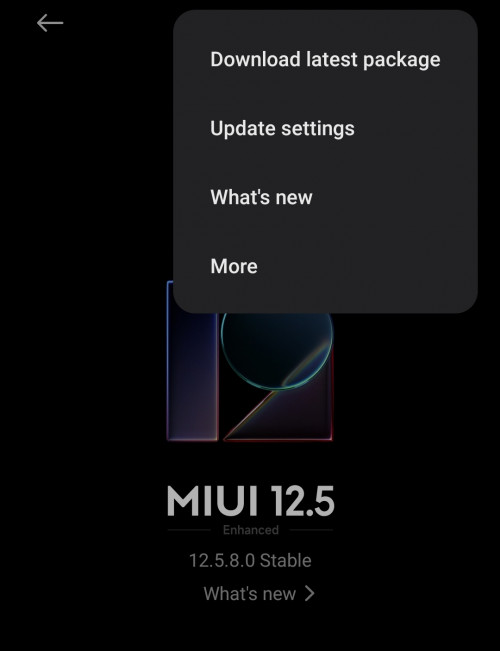 |
|
|
|
|
|
neuromancerx
|
Mar 25 2022, 02:21 PM
|
|
|
sometimes the phone missed the OTA, it did happened to me last time, what i did was to manually update using the recovery ROM. for your case, probably because you already missed so many major version and left behind.
download the recovery firmware from my port #4 (select Full ROM).
1. Transfer the download .zip file to your phone, and ensure you place the file in the “downloaded_rom” folder in the internal storage of your device. If no such folder exists, create one in your internal storage base directory.
2. On your phone, navigate to Settings > About Phone > System Update, and then press the three-dot icon in the top-right corner, and select “Choose Update Package”. If the “Choose Update Package” is not visible, you need to tap on the MIUI version logo 7-10 times.
3. If the “Choose Update Package” option is missing, tap on the MIUI logo 10 times to activate the option.
4. Choose the downloaded .zip file.
5. Wait for the update to install.
|
|
|
|
|
|
neuromancerx
|
Mar 25 2022, 03:38 PM
|
|
|
yes recovery. fastboot ROM require PC to flash (Mi Flash Tool), useful to revive bricked phone.
|
|
|
|
|
|
neuromancerx
|
Mar 25 2022, 04:43 PM
|
|
|
Maybe because you are still on older android version (android 10). 1. Go to here https://xiaomifirmwareupdater.com/archive/miui/apollo/2. In the search box, type global recovery 3. You can try installing the update step-by-step based on the released date or 4. Directly jump to the first Android 11 version (V12.1.1.0.RJDMIXM). Once this is success, update to V12.5.8.0.RJDMIXM make sure your current ROM is ended with DMIXM It is like, your laptop is using Windows 98, then you upgrade to WIN XP, and then update to WIN XP SP2. |
|
|
|
|



 Quote
Quote
 0.0221sec
 0.31
0.31
 6 queries
 GZIP Disabled