

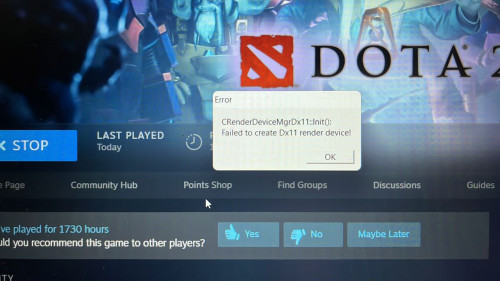
Dota unplayable after upgraded to windows 11
Dota unplayable after upgraded to windows 11
|
|
 Feb 11 2022, 11:31 PM, updated 4y ago Feb 11 2022, 11:31 PM, updated 4y ago
Show posts by this member only | Post
#1
|
 
Newbie
3 posts Joined: Aug 2017 
|
Anyone know the fix to this problem?
|
|
|
|
|
|
Feb 11 2022, 11:48 PM
Show posts by this member only | Post
#2
|

Junior Member
521 posts Joined: Jan 2003
|
update all your driver?
gpu? direct x? |
|
|
Feb 11 2022, 11:49 PM
Show posts by this member only | Post
#3
|
|
Junior Member
521 posts Joined: Jan 2003
|
|
|
|
Apr 14 2022, 10:32 AM
Show posts by this member only | Post
#4
|
|
Junior Member
14 posts Joined: Jan 2022 
|
ya good fix, try to roll back to Win10 first as not all games are fully compatible yet with Win11 drivers
|
|
|
Apr 26 2022, 09:09 PM
Show posts by this member only | Post
#5
|
|
Probation
8 posts Joined: Apr 2022
|
QUOTE(fernandasmila @ Feb 11 2022, 11:31 PM) Anyone know the fix to this problem? Dota 2 got any offline ai version ? |
|
|
May 11 2022, 02:43 PM
Show posts by this member only | Post
#6
|
|
Junior Member
114 posts Joined: Nov 2021 From: Penang, Malaysia
|
Windows 11 is not yet for gaming purpose.
|
|
|
|
|
|
May 11 2022, 03:02 PM
Show posts by this member only | IPv6 | Post
#7
|

All Stars
12,047 posts Joined: Oct 2017
|
QUOTE(cheesey @ Feb 11 2022, 11:48 PM) update all your driver? Huh, directx where can update onegpu? direct x? |
|
|
May 25 2022, 11:27 AM
Show posts by this member only | Post
#8
|
|
Junior Member
114 posts Joined: Nov 2021 From: Penang, Malaysia
|
I hope this link could help you solve your problem.
https://www.drivereasy.com/knowledge/dota-2...2020-quick-fix/ |
|
|
Jul 27 2022, 09:41 AM
Show posts by this member only | Post
#9
|
|
Junior Member
429 posts Joined: Jul 2022
|
QUOTE(fernandasmila @ Feb 11 2022, 11:31 PM)
has your problem been solved? |
|
|
Jul 27 2022, 02:58 PM
|

Junior Member
171 posts Joined: Jan 2009 From: KL
|
Right click on Dota 2 > Properties > DLC > vulkan support.
QUOTE Once the DLC is installed - in general search for launch parameters and type "-vulkan", after that run the Game and Dota 2 should work. |
|
|
Aug 11 2022, 09:33 AM
|
|
Probation
8 posts Joined: May 2022
|
Luckily I read this before upgrading to windows 11
|
|
|
Aug 12 2022, 11:27 AM
|

Probation
30 posts Joined: Nov 2019
|
Is this problem still applicable for Windows 11?
Seems there are quite a lot of bugfixes already to improve gaming performance but haven't tested with DOTA in particular |
|
|
Aug 18 2022, 07:34 AM
|

Junior Member
56 posts Joined: Aug 2022
|
Rollback to Win10. Win11 is not meant for gaming right now, still too many issues.
|
|
|
|
|
|
Sep 12 2022, 10:42 AM
|
|
Junior Member
429 posts Joined: Jul 2022
|
windows 11 can be funky at times.
|
|
|
Oct 24 2022, 08:00 AM
|
|
Probation
2 posts Joined: Oct 2022
|
back up your pc, and then format to window 10 because window 10 been long time and patches many times and mostly it will steady and stable than window 11. hope it helps.
 |
|
|
Nov 14 2022, 09:00 AM
|
|
Junior Member
144 posts Joined: Aug 2022
|
New games should work in Windows 11. Windows 10 is basically if you still play old games that were developed before Windows 11 launched. But remember those big famous games are still developed in Windows 10 including new games such as Battlefield 2042 and Call of Duty: Modern Warfare 2.
|
|
|
Nov 15 2022, 11:20 PM
Show posts by this member only | IPv6 | Post
#17
|

Senior Member
1,614 posts Joined: Apr 2010
|
QUOTE(TW_tankengine95 @ Aug 12 2022, 11:27 AM) Is this problem still applicable for Windows 11? no longer having issue with windows 11Seems there are quite a lot of bugfixes already to improve gaming performance but haven't tested with DOTA in particular might be old news now |
|
|
Jan 5 2023, 09:07 AM
|
|
Junior Member
10 posts Joined: Dec 2022
|
many games cannot play on windows 11?
|
|
|
Jan 9 2023, 08:58 AM
|
|
Junior Member
144 posts Joined: Aug 2022
|
QUOTE(hocuspocus @ Jan 5 2023, 09:07 AM) many games cannot play on windows 11? New games no issue. Old games then the answer might be yes, if the game developer didn't patch it for Windows 11.Upgrade usually will cause a lot of problem. I always recommend to do clean installation. Make sure after clean installation, download all the latest drivers from the hardware manufacturer website. If you using Windows driver, definitely you have a lot of issue. Recently, I help my friend to troubleshoot the issue where his games got no sound but outside game we tested with Youtube and VLC, it play the sound nicely. So I go to the motherboard website to download the audio driver. Install it then reboot before relaunching the game. It solve the issue. Another issue was with my dad desktop, after he upgrade to Windows 11 from Windows 10. All the graphics especially text look blur. Again I download the latest driver from Nvidia and it solve the issue. Recently, I was busy with my work. I ask my Helpdesk team to upgrade my hard drive to SSD. They skip the steps of download the driver from laptop manufacturer (DELL) website. My Skype and Webex can't work properly with audio and webcam when they return my laptop back to me. So I have to download and install the driver back in order for them to work correctly. |
| Change to: |  0.0215sec 0.0215sec
 0.26 0.26
 5 queries 5 queries
 GZIP Disabled GZIP Disabled
Time is now: 15th December 2025 - 07:03 AM |
 Quote
Quote