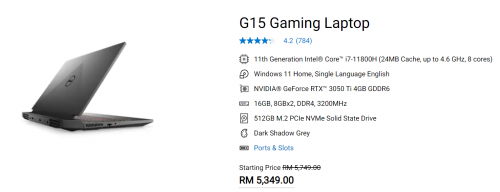
I recently bought this laptop for some gaming and for working as well. Everything is fine except that I found the battery drain is quite fast. I don't have much expert knowledge on computers so I want to seek advice here
Anyways, activities I've done with the laptop without connecting the power plug: 1) Remote desktop working on an office PC 2) Web browsing (not videos) 3) Email checking and microsoft teams chatting (no video or voice conferencing done) 4) Downloading files
And the battery just drains from 80% to 30% in just a little over an hour. Is that normal? I was expecting for such light activities with no gaming, the battery should last longer maybe at least 2 hours.
Gaming laptop never expect it can last more that 2 hours....
My last ASUS rog 6th gen Intel, At most 1 hours plus, If want more that 2 hours plus, Need dim the screen all the way, Screen off after few minute, Etc....
I dont have this laptop. but generally, you might want to check your laptop's power plan - it may be set to use Max performance. change to Balanced or Dell recommended. if you use battery saving mode, you may feel the laptop is slightly underpowered.
Gaming laptop never expect it can last more that 2 hours....
My last ASUS rog 6th gen Intel, At most 1 hours plus, If want more that 2 hours plus, Need dim the screen all the way, Screen off after few minute, Etc....
Thanks. That is what I suspect to be the case. Oh well, it's a slight inconvenience I guess.
QUOTE(overfloe @ Dec 2 2021, 09:43 AM)
I dont have this laptop. but generally, you might want to check your laptop's power plan - it may be set to use Max performance. change to Balanced or Dell recommended. if you use battery saving mode, you may feel the laptop is slightly underpowered.
Power plan is balanced. I also tried battery saving mode but the battery still drains quite fast, almost no difference.
Thanks. That is what I suspect to be the case. Oh well, it's a slight inconvenience I guess. Power plan is balanced. I also tried battery saving mode but the battery still drains quite fast, almost no difference.
do you have the MUX switched on (in bios)? this will use the RTX instead of iGPU. this usually results in higher battery utilization.
do you have the MUX switched on (in bios)? this will use the RTX instead of iGPU. this usually results in higher battery utilization.
After googling MUX, I think I'd rather not fiddle with that since if I want to play games, then I'd need to reactivate MUX again. Thanks, I think this should be the cause of the battery drain. Guess I'd need to live with it
After googling MUX, I think I'd rather not fiddle with that since if I want to play games, then I'd need to reactivate MUX again. Thanks, I think this should be the cause of the battery drain. Guess I'd need to live with it
the MUX in G15 is disabled by default. is your laptop connected to an external monitor?
did u format it before? Things to note: 1. Intel speedstep enabled or not 2. Power plan advance settings CPU must be min 5% max 100% 3. check CPU usage. Should not be constantly high
did u format it before? Things to note: 1. Intel speedstep enabled or not 2. Power plan advance settings CPU must be min 5% max 100% 3. check CPU usage. Should not be constantly high
Hi thanks. I found a solution already. I set the the integrated graphic processor as default and set each individual game to use the Nvidia graphics processor. Battery life improved incredibly after that.
Hi thanks. I found a solution already. I set the the integrated graphic processor as default and set each individual game to use the Nvidia graphics processor. Battery life improved incredibly after that.
good job. yeah.. but its abit tricky if u using external screen for gaming.
somehow i hit this bug before that it doesnt give me the refresh rate i want on external monitor. I had to disable internal graphics card and it became supernice after that haha.. but mine was a GTX1650 without optimus
good job. yeah.. but its abit tricky if u using external screen for gaming.
somehow i hit this bug before that it doesnt give me the refresh rate i want on external monitor. I had to disable internal graphics card and it became supernice after that haha.. but mine was a GTX1650 without optimus
how is the monitor connected to your laptop - is it via HDMI or USB-C DisplayPort ?
does it bypass the igpu and connects directly to the nvidia gpu?
Without optimus, i think it will still use both built in and discrete. althought i force set in nvidia app to use the discrete it will still use the built in. so only way is to disable it.
Without optimus, i think it will still use both built in and discrete. althought i force set in nvidia app to use the discrete it will still use the built in. so only way is to disable it.
thanks.. since it has no optimus, the only way to use the discrete graphics is by plugging with an external monitor. however for your variant, HDMI doesn't seem to be wired to the nvidia chip, means another option for you to try is the displayport (via usb-c) if your external monitor supports displayport.
I'm keen to know if the ryzen variant supports this option as I'm considering this laptop for my boy.
Edit: Ryzen variant uses HDMI to bypass the iGPU.
This post has been edited by overfloe: Dec 23 2022, 10:59 AM
Tumpang a bit since about Dell G15. I recently bought G15 Special Edition and I keep experiencing random blue screen crashes if the Dell is left unattended in a while.
After I spent some time searching, I stumble onto this Youtube Video:
The culprit was the Intell graphic driver provided by Dell couldn't handle the laptop going into sleep more. Just download the graphic driver directly from Intel.


 Dec 2 2021, 09:23 AM, updated 4y ago


 Quote
Quote


 0.0295sec
 0.98
0.98
 5 queries
 GZIP Disabled