Welcome Guest ( Log In | Register )

5 Pages  1 2 3 > » Bottom

Outline · [ Standard ] · Linear+

 [2021]iPhone 13 Pro/Pro Max Discussion Thread | V2, Oh. So. Pro.

views
     
Oltromen Ripot
post Feb 6 2022, 08:57 AM

๐Ÿ‘ 999999 person Likes this member
*******
Senior Member
4,034 posts

Joined: Dec 2019
i reset ip13pm 2 times.

(1) confirm that it is optional to reset without removing cellular plan (i.e. eSIM can survive while reset everything else)

(2) "Move to IoS" failed 5 times to copy even if only opted to carry over SMS messages.

(3) Watch Series 7 remains paired after restoring backup from iCloud (made right before the resets).
Oltromen Ripot
post Feb 8 2022, 12:47 PM

๐Ÿ‘ 999999 person Likes this member
*******
Senior Member
4,034 posts

Joined: Dec 2019
re-using MI 20W wireless charger plate (ex used with sgs10+) for ip13pm.

slow cooking but okay since i leave it idle for hours here @ work.
heat from charging is negligible.
heat self-generated in the rear of ip13pm from prolonged on-screen use is worser in comparison.

This post has been edited by Oltromen Ripot: Feb 8 2022, 12:47 PM
Oltromen Ripot
post Feb 10 2022, 12:01 PM

๐Ÿ‘ 999999 person Likes this member
*******
Senior Member
4,034 posts

Joined: Dec 2019
QUOTE(McMatt @ Feb 9 2022, 06:04 PM)
How does one resolve the issue of camera or the torchlight coming on accidentally? It happens so frequent that it is annoying the OCD in me. Happening since my 12 mini as well.
*
You enabled wake on touch?
wake on lift?
back tap?
Oltromen Ripot
post Feb 18 2022, 03:42 PM

๐Ÿ‘ 999999 person Likes this member
*******
Senior Member
4,034 posts

Joined: Dec 2019
This is driving me nuts and very disruptive:

How to disable Chrome from going back and forth through History when I swipe left and right?

It is very disruptive when I intend to read a zoomed page and have it move left and right, but instead Chrome loaded bck the page that I came from before, or loaded the โ€œnextโ€ page if i am already backtracking.


(the funny thing: i finally found a feature i hate on iphone, and itโ€™s not even by apple.)

This post has been edited by Oltromen Ripot: Feb 18 2022, 05:26 PM
Oltromen Ripot
post Feb 23 2022, 10:14 AM

๐Ÿ‘ 999999 person Likes this member
*******
Senior Member
4,034 posts

Joined: Dec 2019
i13pm;

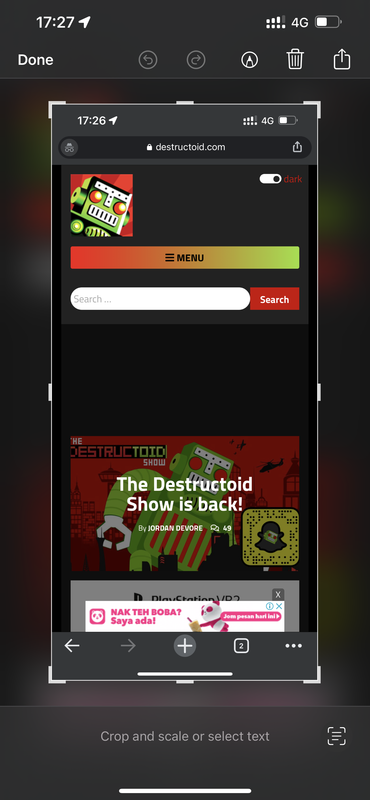
why am i missing scrolling screenshot option? even in safari.


press power+up volume to screenshot.
click on the floating preview of captured.
no โ€œfull pageโ€ option like how they say it should have been.


โ€”โ€”


wtf.


apparently if you launch from app folder, the full page screenshot feature wonโ€™t appear.
if launched from app library, it will be available.
it will even appear in chrome, not limited to just safari.

This post has been edited by Oltromen Ripot: Feb 23 2022, 11:31 AM
Oltromen Ripot
post Feb 23 2022, 03:19 PM

๐Ÿ‘ 999999 person Likes this member
*******
Senior Member
4,034 posts

Joined: Dec 2019
QUOTE(shaniandras2787 @ Feb 23 2022, 01:48 PM)
» Click to show Spoiler - click again to hide... «


what do you mean by "full page" option?
*
like this attachment.

on huawei, we use knuckle twice onto the screen, then drag the appearing floating snapshot to signal for huawei to capture the rest on the scrolling page.


Attached File(s)
Attached File  Screenshot_2022_02_23_at_15.16.56.pdf ( 623.34k ) Number of downloads: 22
Oltromen Ripot
post Feb 23 2022, 03:22 PM

๐Ÿ‘ 999999 person Likes this member
*******
Senior Member
4,034 posts

Joined: Dec 2019
QUOTE(RDoe @ Feb 23 2022, 03:12 PM)
Apparently it's easier to do it on an Android phone, or Samsung as I've experienced. It's also possible for iOS but from what I can remember, only Safari browser and having to tap a couple of buttons.

I'll have to go explore as I've forgotten the exact steps.
*
i took the screenshot above from chrome.

so itโ€™s not just safari, contrary to what most people posted over the years.

apparently, even if initially launched from app folder, i just return to the app library (without terminating chrome), then clicked to bring back chrome, and the โ€œfull pageโ€ screenshot reappears.

screenshot attached as above.
Oltromen Ripot
post Feb 23 2022, 03:24 PM

๐Ÿ‘ 999999 person Likes this member
*******
Senior Member
4,034 posts

Joined: Dec 2019
QUOTE(yayiyu99 @ Feb 23 2022, 03:12 PM)
You should buy IP13 regular set only if you dont need 120Hz dry.gif
*
aiyo, i also donโ€™t need 120Hz, but i do love huge screen to read over.
Oltromen Ripot
post Feb 23 2022, 03:30 PM

๐Ÿ‘ 999999 person Likes this member
*******
Senior Member
4,034 posts

Joined: Dec 2019
QUOTE(RDoe @ Feb 23 2022, 01:56 PM)
I guess it's a screenshot of a full page rather than what one sees on the screen. Like a long page of text in which we normally have to scroll down to read the rest.
*
QUOTE(shaniandras2787 @ Feb 23 2022, 02:00 PM)
ouh, is this "a thing" for iOS because apparently, i have no knowledge this feature whatsoever  doh.gif
*
not just IOS.

huawei phone have this feature called โ€œscrolling screenshotโ€. not sure if available in other brands.

basically it allows to capture the rest of the page and not just what fits in your current visible display.

though IOS captures on its own from top to bottom and force save as PDF, while huawei saves it from the point where you are viewing (it could be halfway through the page) and saves it as image.

love the feature on huawei as i can then crop the image to present interesting part. forcing to save as PDF will cause pagonation effect and might cut the interesting part onto several pages.
Oltromen Ripot
post Feb 23 2022, 05:41 PM

๐Ÿ‘ 999999 person Likes this member
*******
Senior Member
4,034 posts

Joined: Dec 2019
QUOTE(soonwai @ Feb 23 2022, 04:46 PM)
Mine got. Screen and Full Page. Tried on destructoid.com
*
The following were captured using the same Chrome browser session i.e did not terminate the Chrome app from background.
As can be seen, โ€œfull pageโ€ not available when launched from app folder.
Same behaviour with Safari.

a) clicked Chrome app icon inside app folder.
» Click to show Spoiler - click again to hide... «


b) clicked Chrome app icon inside app library OR recall Chrome to foreground from list of background apps.
» Click to show Spoiler - click again to hide... «

Oltromen Ripot
post Feb 24 2022, 10:34 AM

๐Ÿ‘ 999999 person Likes this member
*******
Senior Member
4,034 posts

Joined: Dec 2019
QUOTE(attw @ Feb 24 2022, 09:24 AM)
- Because you came from the 6S and the XR on 60hz, you donโ€™t feel that much of a difference with the 120hz especially during scrolling. But if you are used to 120hz, going back to 60hz is a challenge. Iโ€™ve used the 13 Pro Max for a couple of months before downgrading back to the 11, initially I can see the difference between the refresh rates but now Iโ€™ve gotten back used to 60hz. Again, it could be a matter of preference. Some people have sharper eyes to distinguish this while some people canโ€™t appreciate it - especially those who are used to using iPhones.
*
care to elaborate what visual difference can be expected from the higher refresh rate?

/me never cared of it before. not looking to argue against or for, but want to understand the not-so-recent phenomenon of aiming for higher refresh rate on a phone. i simply set to lower rate to supposedly conserve battery.
Oltromen Ripot
post Feb 24 2022, 10:59 AM

๐Ÿ‘ 999999 person Likes this member
*******
Senior Member
4,034 posts

Joined: Dec 2019
QUOTE(celciuz @ Feb 24 2022, 10:43 AM)
Do you feel the differences when scrolling with and without? If you don't, then just leave it at 60Hz.

For me I do feel the scrolling is more fluid vs. 13, feels nice la. Its like from 60Hz upgrade to 144Hz monitor biggrin.gif.
*
i tried flipping the button imaged below on and off, but it didnโ€™t give me any discernible visual difference. and, that is the only setting governing display refresh rate, right?


QUOTE(attw @ Feb 24 2022, 10:47 AM)
Scrolling around just feels smoother, but like celciuz said, if you donโ€™t see a difference then you donโ€™t need it.

For the 13 Pro, itโ€™s best to leave the refresh rate to auto, coz it can go lower than 60hz when the screen is static and you would be conserving more juice then.
*
means, just leave this unchecked?

user posted image


/me believe this is the only setting affecting refresh rate.

This post has been edited by Oltromen Ripot: Feb 24 2022, 11:00 AM
Oltromen Ripot
post Feb 24 2022, 05:04 PM

๐Ÿ‘ 999999 person Likes this member
*******
Senior Member
4,034 posts

Joined: Dec 2019
QUOTE(๐Ÿฆต๐Ÿฆต๐Ÿป๐Ÿฆต๐Ÿผcawan๐Ÿฆต๐Ÿฝ๐Ÿฆต๐Ÿพ๐Ÿฆต๐Ÿฟ @ Feb 24 2022, 04:57 PM)
come kick me
*
but why โ€ฆ ?
Oltromen Ripot
post Mar 4 2022, 09:43 AM

๐Ÿ‘ 999999 person Likes this member
*******
Senior Member
4,034 posts

Joined: Dec 2019
Is there any particular reason? if notice when i use Chrome, ip13pm will noticeably heat up in the rear, top area next to the cameras. even just browsing lowyat for 5 minutes is enough.
Oltromen Ripot
post Mar 5 2022, 02:07 AM

๐Ÿ‘ 999999 person Likes this member
*******
Senior Member
4,034 posts

Joined: Dec 2019
ip13pm.

how do i determine which of 2 eSIM had received SMS? (NOT how to select which eSIM to send out through)

swipe left only displayed time received(?).

long press on message does not show anything similar to properties ln the message.

Oltromen Ripot
post Mar 5 2022, 05:19 PM

๐Ÿ‘ 999999 person Likes this member
*******
Senior Member
4,034 posts

Joined: Dec 2019
QUOTE(Wifi_One @ Mar 5 2022, 10:38 AM)
Click on the msg, then slick on the sender icon and see the highlighted text after Conversation Line. Depending of your selection for your simsโ€ฆ might show primary or personal. Whichever u set when setting up.

Abit hassle thoโ€ฆ
*
i know which screen you are referring to.

what if the sender is same number, but he sent a message to each of my 2 eSIMs?

my problem is, ASTRO is spamming me daily eventhough they said already removed both my numbers from spam list. the thing is, unlike in Android SMS client, there is no indication in iPhone of which number had received the SMS. thus cannot be certain which is the one being spammed. is it my officially-registered number with ASTRO, or is it the number which i used only for whatsapp to ASTRO. by yesterday, already 3 times complained in past 2 weeks.yet today still get another fcuking marketing SMS.
Oltromen Ripot
post Mar 5 2022, 06:14 PM

๐Ÿ‘ 999999 person Likes this member
*******
Senior Member
4,034 posts

Joined: Dec 2019
QUOTE(Wifi_One @ Mar 5 2022, 10:38 AM)
Click on the msg, then slick on the sender icon and see the highlighted text after Conversation Line. Depending of your selection for your simsโ€ฆ might show primary or personal. Whichever u set when setting up.

Abit hassle thoโ€ฆ
*
QUOTE(Oltromen Ripot @ Mar 5 2022, 05:19 PM)
i know which screen you are referring to.

what if the sender is same number, but he sent a message to each of my 2 eSIMs?
*
i took my own pill.


i used a separate phone to message my 2 iPhone numbers in alternating fashion.

user posted image

The Conversation Line - which you mentioned of - will only incorrectly reflect the last SMS in the thread. It won't reflect, for example, that 2nd latest SMS is from a different SIM. What seemes to be the only dependable way to determine which SIM is to read the nearest "Number changed to _____" preceeding the SMS that I am interested of.


user posted image
user posted image


Why I call Conversation Line information to be incorrect:
If you have 2 most recent SMS from different SIMs sandwiching "Number changed to ______", and you delete the SMS supposedly from the "Number changed to _____" SIM, then your Conversation Line will not change: it will still reflect the SIM of the deleted message instead of the surviving message's. However, if you reboot the phone and check again the Conversation Line, it will now correctly reflect the SIM of the last message in the thread.
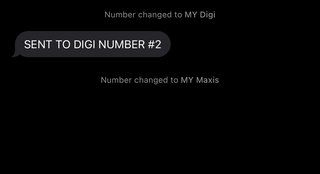

user posted image


after doing the above, I am now certain ASTRO have been spamming the number that I had used to Whatsapp them. This is uncalled for farming numbers.

Oltromen Ripot
post Mar 6 2022, 09:38 PM

๐Ÿ‘ 999999 person Likes this member
*******
Senior Member
4,034 posts

Joined: Dec 2019
QUOTE(un_id @ Mar 6 2022, 08:15 PM)
swiftkey is nice but i don't feel safe when using 3rd party keyboard that will remember things i type, bank acc and passwords particularly
*
swiftkey was bought over by microsoft. already for a few years. so in terms of trustworthiness in its purpose, itself is no issue.
Oltromen Ripot
post Mar 15 2022, 02:54 PM

๐Ÿ‘ 999999 person Likes this member
*******
Senior Member
4,034 posts

Joined: Dec 2019
QUOTE(parmasean @ Mar 15 2022, 11:24 AM)
Long awaited MaskID like, finally!

Is it smooth when unlocking? Any failed attempts so far?
*
Smooth like butter.

Though i don't have another face or two to test for false positive.
Oltromen Ripot
post Mar 18 2022, 11:14 AM

๐Ÿ‘ 999999 person Likes this member
*******
Senior Member
4,034 posts

Joined: Dec 2019
QUOTE(naturalfool @ Mar 18 2022, 11:03 AM)
Is everyone on iOS 15.4 already? Any problems?
*
yeah - it's irresistable.


(nod head while unlocking wearing mask)

5 Pages  1 2 3 > » Top
 

Change to:
| Lo-Fi Version
0.0608sec    0.55    7 queries    GZIP Disabled
Time is now: 10th December 2025 - 08:33 PM