Welcome Guest ( Log In | Register )

115 Pages « < 35 36 37 38 39 > » Bottom

Outline · [ Standard ] · Linear+

 [2021]iPhone 13 Pro/Pro Max Discussion Thread | V2, Oh. So. Pro.

views
     
razkal
post Feb 21 2022, 12:06 PM

Casual
***
Junior Member
416 posts

Joined: Jul 2009
From: Penang mali


QUOTE(RDoe @ Feb 20 2022, 10:47 PM)
I'm using SwiftKey keyboard for all my iPhones and iPads.

Used to be on both OS, mainly Android, until I decided to go full-fledge iOS. Depends on usage I guess, but I've not been feeling that I'm missing anything...

Wait for iPhone 14? Depends on you, I'd say. I personally just went for whatever's available when I decide to get it. Got my iPhone 12PM and then the iPhone 13PM, one regular and one personal use. If iPhone 14PM comes along and I think I like that, I'll just sell the iPhone 12PM off. I'm not exactly patient, I guess.  tongue.gif
*
Ok thanks for the insight. I think I will make the switch. Android offering nowadays is not very exciting anymore. Might also need to invest with new lightning cable old USB c from android can work ke for car android auto connection?
cawan
post Feb 23 2022, 10:08 AM

Casual
***
Junior Member
404 posts

Joined: Jul 2006


Welcome me with ip 13 Pro , silver white. Cont. Contract with maxis.

Previous come from ip 6s, and XR last within 3 years usage.

Let me give my opinion..

Physical Size yes a bit smaller then XR term of wide.
Notch smaller. Still no battery percentage. “4G” wording status on top very large! Weird.
With 3 camera bump, lay on desk out of balance, lol.
And power/volume button placement offset lowered awkward for me. I like it much a higher set, feel much normal with previous other models, xr and ip 11.
Side shining side chassis? Lolwat.. if 1 scratch, u will crying everyday. Why not matte.

screen feel sharp, oled yes. I set 60 hz only. Not significant performance screen for my eye. I seeing only while doing side swipe, opening apps. Not youtube, photo.. scrolling articles or reading? Meh.. u not scrolling fast to read page by page.. Challenge me why need 120hz..

Will continue more.. come share your thoughts and burn me.
Oltromen Ripot
post Feb 23 2022, 10:14 AM

👍 999999 person Likes this member
*******
Senior Member
4,034 posts

Joined: Dec 2019
i13pm;

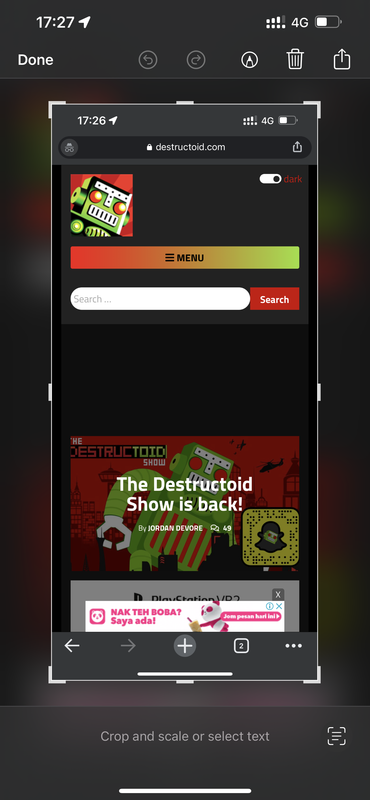
why am i missing scrolling screenshot option? even in safari.


press power+up volume to screenshot.
click on the floating preview of captured.
no “full page” option like how they say it should have been.


——


wtf.


apparently if you launch from app folder, the full page screenshot feature won’t appear.
if launched from app library, it will be available.
it will even appear in chrome, not limited to just safari.

This post has been edited by Oltromen Ripot: Feb 23 2022, 11:31 AM
shaniandras2787
post Feb 23 2022, 01:48 PM

drugged coordinator
*******
Senior Member
2,309 posts

Joined: Apr 2011
» Click to show Spoiler - click again to hide... «


what do you mean by "full page" option?
RDoe
post Feb 23 2022, 01:56 PM

Regular
******
Senior Member
1,554 posts

Joined: Jul 2015
QUOTE(shaniandras2787 @ Feb 23 2022, 01:48 PM)
» Click to show Spoiler - click again to hide... «


what do you mean by "full page" option?
*
I guess it's a screenshot of a full page rather than what one sees on the screen. Like a long page of text in which we normally have to scroll down to read the rest.
shaniandras2787
post Feb 23 2022, 02:00 PM

drugged coordinator
*******
Senior Member
2,309 posts

Joined: Apr 2011
QUOTE(RDoe @ Feb 23 2022, 01:56 PM)
I guess it's a screenshot of a full page rather than what one sees on the screen. Like a long page of text in which we normally have to scroll down to read the rest.
*
ouh, is this "a thing" for iOS because apparently, i have no knowledge this feature whatsoever doh.gif
yayiyu99
post Feb 23 2022, 03:12 PM

Enthusiast
*****
Senior Member
958 posts

Joined: Feb 2008


QUOTE(cawan @ Feb 23 2022, 10:08 AM)
Welcome me with ip 13 Pro , silver white. Cont.  Contract with maxis.

Previous come from ip 6s, and XR last within 3 years usage.

Let me give my opinion..

Physical Size yes a bit smaller then XR term of wide.
Notch smaller. Still no battery percentage. “4G” wording status on top very large! Weird.
With 3 camera bump, lay on desk out of balance, lol.
And power/volume button placement offset lowered awkward for me. I like it much a higher set, feel much normal with previous other models,  xr and ip 11.
Side shining side chassis? Lolwat.. if 1 scratch, u will crying everyday. Why not matte.

screen feel sharp, oled yes. I set 60 hz only. Not significant performance screen for my eye. I seeing only while doing side swipe, opening apps. Not youtube, photo.. scrolling articles or reading? Meh.. u not scrolling fast to read page by page.. Challenge me why need 120hz..

Will continue more.. come share your thoughts and burn me.
*
You should buy IP13 regular set only if you dont need 120Hz dry.gif
RDoe
post Feb 23 2022, 03:12 PM

Regular
******
Senior Member
1,554 posts

Joined: Jul 2015
QUOTE(shaniandras2787 @ Feb 23 2022, 02:00 PM)
ouh, is this "a thing" for iOS because apparently, i have no knowledge this feature whatsoever  doh.gif
*
Apparently it's easier to do it on an Android phone, or Samsung as I've experienced. It's also possible for iOS but from what I can remember, only Safari browser and having to tap a couple of buttons.

I'll have to go explore as I've forgotten the exact steps.
Oltromen Ripot
post Feb 23 2022, 03:19 PM

👍 999999 person Likes this member
*******
Senior Member
4,034 posts

Joined: Dec 2019
QUOTE(shaniandras2787 @ Feb 23 2022, 01:48 PM)
» Click to show Spoiler - click again to hide... «


what do you mean by "full page" option?
*
like this attachment.

on huawei, we use knuckle twice onto the screen, then drag the appearing floating snapshot to signal for huawei to capture the rest on the scrolling page.


Attached File(s)
Attached File  Screenshot_2022_02_23_at_15.16.56.pdf ( 623.34k ) Number of downloads: 22
Oltromen Ripot
post Feb 23 2022, 03:22 PM

👍 999999 person Likes this member
*******
Senior Member
4,034 posts

Joined: Dec 2019
QUOTE(RDoe @ Feb 23 2022, 03:12 PM)
Apparently it's easier to do it on an Android phone, or Samsung as I've experienced. It's also possible for iOS but from what I can remember, only Safari browser and having to tap a couple of buttons.

I'll have to go explore as I've forgotten the exact steps.
*
i took the screenshot above from chrome.

so it’s not just safari, contrary to what most people posted over the years.

apparently, even if initially launched from app folder, i just return to the app library (without terminating chrome), then clicked to bring back chrome, and the “full page” screenshot reappears.

screenshot attached as above.
Oltromen Ripot
post Feb 23 2022, 03:24 PM

👍 999999 person Likes this member
*******
Senior Member
4,034 posts

Joined: Dec 2019
QUOTE(yayiyu99 @ Feb 23 2022, 03:12 PM)
You should buy IP13 regular set only if you dont need 120Hz dry.gif
*
aiyo, i also don’t need 120Hz, but i do love huge screen to read over.
Oltromen Ripot
post Feb 23 2022, 03:30 PM

👍 999999 person Likes this member
*******
Senior Member
4,034 posts

Joined: Dec 2019
QUOTE(RDoe @ Feb 23 2022, 01:56 PM)
I guess it's a screenshot of a full page rather than what one sees on the screen. Like a long page of text in which we normally have to scroll down to read the rest.
*
QUOTE(shaniandras2787 @ Feb 23 2022, 02:00 PM)
ouh, is this "a thing" for iOS because apparently, i have no knowledge this feature whatsoever  doh.gif
*
not just IOS.

huawei phone have this feature called “scrolling screenshot”. not sure if available in other brands.

basically it allows to capture the rest of the page and not just what fits in your current visible display.

though IOS captures on its own from top to bottom and force save as PDF, while huawei saves it from the point where you are viewing (it could be halfway through the page) and saves it as image.

love the feature on huawei as i can then crop the image to present interesting part. forcing to save as PDF will cause pagonation effect and might cut the interesting part onto several pages.
soonwai
post Feb 23 2022, 04:46 PM


********
All Stars
11,456 posts

Joined: Oct 2007
From: KL


QUOTE(Oltromen Ripot @ Feb 23 2022, 10:14 AM)
i13pm;

why am i missing scrolling screenshot option? even in safari.
press power+up volume to screenshot.
click on the floating preview of captured.
no “full page” option like how they say it should have been.
——
wtf.
apparently if you launch from app folder, the full page screenshot feature won’t appear.
if launched from app library, it will be available.
it will even appear in chrome, not limited to just safari.
*
Mine got. Screen and Full Page. Tried on destructoid.com
Oltromen Ripot
post Feb 23 2022, 05:41 PM

👍 999999 person Likes this member
*******
Senior Member
4,034 posts

Joined: Dec 2019
QUOTE(soonwai @ Feb 23 2022, 04:46 PM)
Mine got. Screen and Full Page. Tried on destructoid.com
*
The following were captured using the same Chrome browser session i.e did not terminate the Chrome app from background.
As can be seen, “full page” not available when launched from app folder.
Same behaviour with Safari.

a) clicked Chrome app icon inside app folder.
» Click to show Spoiler - click again to hide... «


b) clicked Chrome app icon inside app library OR recall Chrome to foreground from list of background apps.
» Click to show Spoiler - click again to hide... «

RDoe
post Feb 23 2022, 06:05 PM

Regular
******
Senior Member
1,554 posts

Joined: Jul 2015
QUOTE(Oltromen Ripot @ Feb 23 2022, 05:41 PM)
The following were captured using the same Chrome browser session i.e did not terminate the Chrome app from background.
As can be seen, “full page” not available when launched from app folder.
Same behaviour with Safari.

a) clicked Chrome app icon inside app folder.
» Click to show Spoiler - click again to hide... «


b) clicked Chrome app icon inside app library OR recall Chrome to foreground from list of background apps.
» Click to show Spoiler - click again to hide... «

*
Thanks so much for refreshing my memory about this. rclxms.gif
attw
post Feb 24 2022, 09:24 AM

20k VIP Club
*********
All Stars
32,468 posts

Joined: Mar 2005


QUOTE(cawan @ Feb 23 2022, 10:08 AM)
Welcome me with ip 13 Pro , silver white. Cont.  Contract with maxis.

Previous come from ip 6s, and XR last within 3 years usage.

Let me give my opinion..

Physical Size yes a bit smaller then XR term of wide.
Notch smaller. Still no battery percentage. “4G” wording status on top very large! Weird.
With 3 camera bump, lay on desk out of balance, lol.
And power/volume button placement offset lowered awkward for me. I like it much a higher set, feel much normal with previous other models,  xr and ip 11.
Side shining side chassis? Lolwat.. if 1 scratch, u will crying everyday. Why not matte.

screen feel sharp, oled yes. I set 60 hz only. Not significant performance screen for my eye. I seeing only while doing side swipe, opening apps. Not youtube, photo.. scrolling articles or reading? Meh.. u not scrolling fast to read page by page.. Challenge me why need 120hz..

Will continue more.. come share your thoughts and burn me.
*
Well, generally, we don’t “burn” people here laugh.gif

- Yeah, the reduced notch with no additional info available on the status bar such as battery percentage makes no sense to me too
- The camera bump causing the phone to be not balanced when laid on the table can be solved by one of two ways - getting a case, or laying it down on the screen.
- Power button lower is meant for easier reach with the finger when using single-handed but ya, it’s a matter preference
- That shining side is stainless steel - makes the phone more premium than the matte aluminium on the regular iPhone 13 - but yes, it is a fingerprint nightmare. Again, get a case to avoid scratches.
- Because you came from the 6S and the XR on 60hz, you don’t feel that much of a difference with the 120hz especially during scrolling. But if you are used to 120hz, going back to 60hz is a challenge. I’ve used the 13 Pro Max for a couple of months before downgrading back to the 11, initially I can see the difference between the refresh rates but now I’ve gotten back used to 60hz. Again, it could be a matter of preference. Some people have sharper eyes to distinguish this while some people can’t appreciate it - especially those who are used to using iPhones.

Overall, the 13 Pro is a great phone to have and a nice upgrade from your XR. Enjoy the phone!
Oltromen Ripot
post Feb 24 2022, 10:34 AM

👍 999999 person Likes this member
*******
Senior Member
4,034 posts

Joined: Dec 2019
QUOTE(attw @ Feb 24 2022, 09:24 AM)
- Because you came from the 6S and the XR on 60hz, you don’t feel that much of a difference with the 120hz especially during scrolling. But if you are used to 120hz, going back to 60hz is a challenge. I’ve used the 13 Pro Max for a couple of months before downgrading back to the 11, initially I can see the difference between the refresh rates but now I’ve gotten back used to 60hz. Again, it could be a matter of preference. Some people have sharper eyes to distinguish this while some people can’t appreciate it - especially those who are used to using iPhones.
*
care to elaborate what visual difference can be expected from the higher refresh rate?

/me never cared of it before. not looking to argue against or for, but want to understand the not-so-recent phenomenon of aiming for higher refresh rate on a phone. i simply set to lower rate to supposedly conserve battery.
celciuz
post Feb 24 2022, 10:43 AM

10k Club
********
All Stars
14,033 posts

Joined: Nov 2004
QUOTE(Oltromen Ripot @ Feb 24 2022, 10:34 AM)
care to elaborate what visual difference can be expected from the higher refresh rate?

/me never cared of it before. not looking to argue against or for, but want to understand the not-so-recent phenomenon of aiming for higher refresh rate on a phone. i simply set to lower rate to supposedly conserve battery.
*
Do you feel the differences when scrolling with and without? If you don't, then just leave it at 60Hz.

For me I do feel the scrolling is more fluid vs. 13, feels nice la. Its like from 60Hz upgrade to 144Hz monitor biggrin.gif.
attw
post Feb 24 2022, 10:47 AM

20k VIP Club
*********
All Stars
32,468 posts

Joined: Mar 2005


QUOTE(Oltromen Ripot @ Feb 24 2022, 10:34 AM)
care to elaborate what visual difference can be expected from the higher refresh rate?

/me never cared of it before. not looking to argue against or for, but want to understand the not-so-recent phenomenon of aiming for higher refresh rate on a phone. i simply set to lower rate to supposedly conserve battery.
*
Scrolling around just feels smoother, but like celciuz said, if you don’t see a difference then you don’t need it.

For the 13 Pro, it’s best to leave the refresh rate to auto, coz it can go lower than 60hz when the screen is static and you would be conserving more juice then.
Oltromen Ripot
post Feb 24 2022, 10:59 AM

👍 999999 person Likes this member
*******
Senior Member
4,034 posts

Joined: Dec 2019
QUOTE(celciuz @ Feb 24 2022, 10:43 AM)
Do you feel the differences when scrolling with and without? If you don't, then just leave it at 60Hz.

For me I do feel the scrolling is more fluid vs. 13, feels nice la. Its like from 60Hz upgrade to 144Hz monitor biggrin.gif.
*
i tried flipping the button imaged below on and off, but it didn’t give me any discernible visual difference. and, that is the only setting governing display refresh rate, right?


QUOTE(attw @ Feb 24 2022, 10:47 AM)
Scrolling around just feels smoother, but like celciuz said, if you don’t see a difference then you don’t need it.

For the 13 Pro, it’s best to leave the refresh rate to auto, coz it can go lower than 60hz when the screen is static and you would be conserving more juice then.
*
means, just leave this unchecked?

user posted image


/me believe this is the only setting affecting refresh rate.

This post has been edited by Oltromen Ripot: Feb 24 2022, 11:00 AM

115 Pages « < 35 36 37 38 39 > » Top
 

Change to:
| Lo-Fi Version
0.0294sec    0.46    6 queries    GZIP Disabled
Time is now: 2nd December 2025 - 08:51 PM