Outline ·
[ Standard ] ·
Linear+
Enquiries/Recommendations Need help regarding RAM
|
TSSseize88 P
|
 Nov 6 2021, 01:02 AM, updated 5y ago Nov 6 2021, 01:02 AM, updated 5y ago
|
New Member


|
Hi all the masters out there, can I have advice on RAM to be added to my new laptop? PIC 1 is my current  PIC 2 is most close to identical to my current one. 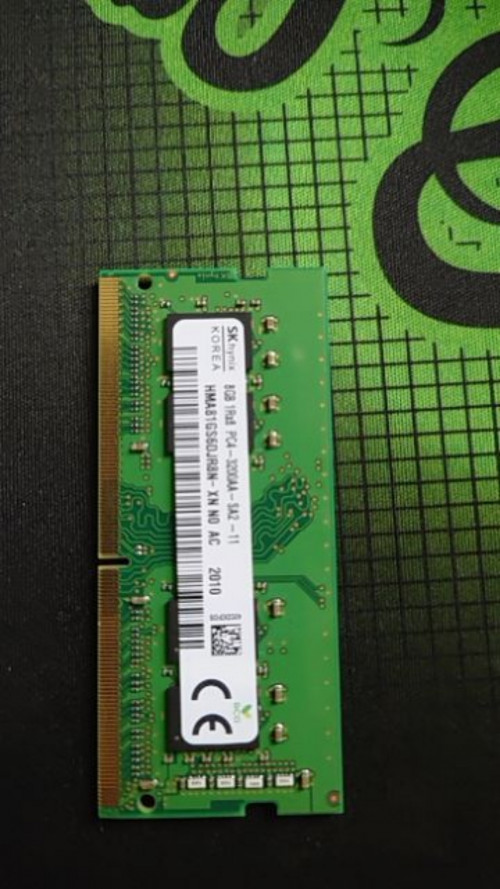 I read it somewhere it's the best to have identical ram to achieve dual channel memory, but I really couldn't find it shopee. So my question is, 1. Can I buy RAM from pic 2 and still able to achieve dual channel memory? 2. Or I should forget about dual channel memory and just go for Kingston fury 16gb ddr4? So I'll have hynix 8gb+Kingston 16gb? Thank you in advance all the masters. |
|
|
|
|
|
TSSseize88 P
|
Nov 6 2021, 01:04 AM
|
New Member
|
Things forget to mention, PIC 1 and PIC 2 have different part number, and sorry for the bad quality on PIC 2. Pulled out from shopee seller and it's kinda blurry.
|
|
|
|
|
|
heihei
|
Nov 6 2021, 01:36 AM
|
Getting Started
|
QUOTE(Sseize88 @ Nov 6 2021, 01:02 AM) Hi all the masters out there, can I have advice on RAM to be added to my new laptop? PIC 1 is my current PIC 2 is most close to identical to my current one. I read it somewhere it's the best to have identical ram to achieve dual channel memory, but I really couldn't find it shopee. So my question is, 1. Can I buy RAM from pic 2 and still able to achieve dual channel memory? 2. Or I should forget about dual channel memory and just go for Kingston fury 16gb ddr4? So I'll have hynix 8gb+Kingston 16gb? Thank you in advance all the masters. Mine , 4gb + 8gb diff manufacturer , 1 is samsung, 1 is kingston Still run at dual channel as per the pic below  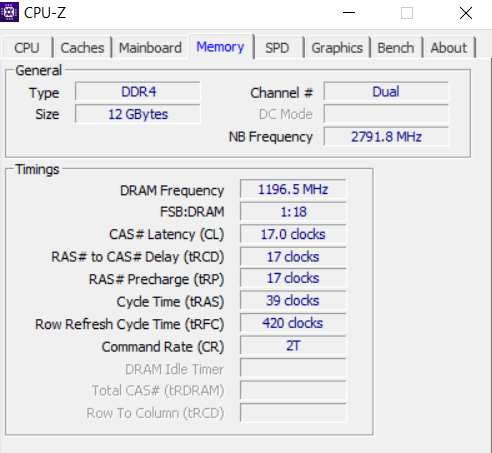 |
|
|
|
|
|
PJng
|
Nov 6 2021, 09:36 PM
|
|
|
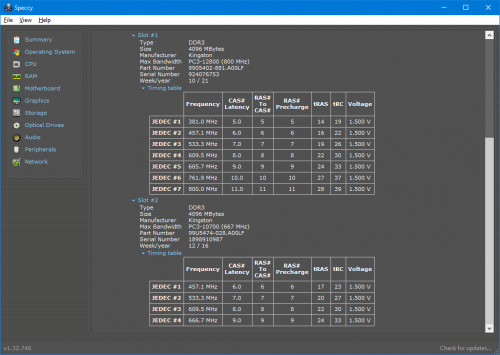 My old pc, brand and size is same, part number and speed not same Is depend board can support or not |
|
|
|
|
|
DuitNow
|
Nov 7 2021, 11:40 PM
|
|
|
QUOTE(heihei @ Nov 6 2021, 01:36 AM) Mine , 4gb + 8gb diff manufacturer , 1 is samsung, 1 is kingston Still run at dual channel as per the pic below How this even possible?  |
|
|
|
|
|
TSSseize88 P
|
Nov 8 2021, 01:44 AM
|
New Member
|
hmm, perhaps I should state my laptop model as well, it's legion 5 pro. If brand doesnt really matters, then perhaps I shall go for kingston since they are a liltte bit cheaper.
|
|
|
|
|
|
baby_4ever
|
Nov 8 2021, 01:48 AM
|
Getting Started
|
QUOTE(Sseize88 @ Nov 8 2021, 01:44 AM) hmm, perhaps I should state my laptop model as well, it's legion 5 pro. If brand doesnt really matters, then perhaps I shall go for kingston since they are a liltte bit cheaper. Brand does not matter. Try to match same rank and clock speed, dont worry much about the rest |
|
|
|
|
|
MyProLife
|
Nov 8 2021, 11:25 AM
|
|
|
QUOTE(DuitNow @ Nov 7 2021, 11:40 PM) How this even possible? :confused: Is possible with most modern laptops thanks to Flex mode But will have minor performance penalty with ram-heavy applications like Games |
|
|
|
|
|
MyProLife
|
Nov 8 2021, 11:30 AM
|
|
|
QUOTE(baby_4ever @ Nov 8 2021, 01:48 AM) Brand does not matter. Try to match same rank and clock speed, dont worry much about the rest For TS: For modern ddr4 systems, not only same rank and clock speed, but also need to make sure the CAS latency timing is also the same Do not match the Hyperx/fury with tighter timing with the normal OEM ram with normal timing, may cause compatibility issues like not detecting additional ram or running at lower speed than specified But its okay to match normal/VALUE/KVR ram with OEM ram with same rank/speed on laptops This post has been edited by MyProLife: Nov 8 2021, 01:39 PM |
|
|
|
|
|
baby_4ever
|
Nov 8 2021, 12:12 PM
|
Getting Started
|
QUOTE(MyProLife @ Nov 8 2021, 11:30 AM) For TS: For modern ddr4 systems, not only same rank and clock speed, but also need to make sure the CAS latency timing is also the same Do not match the Hyperx/fury with tighter timing with the normal OEM ram with normal timing, may cause compatibility issues like not detecting additional ram But its okay to match normal/VALUE/KVR ram with OEM ram with same rank/speed on laptops No issue, negligible impact. Modern but not as critical as for server processors. |
|
|
|
|
|
heihei
|
Nov 9 2021, 01:03 AM
|
Getting Started
|
QUOTE(DuitNow @ Nov 7 2021, 11:40 PM) How this even possible? intel have some sort of tech to make this happen |
|
|
|
|



 Quote
Quote


 0.0752sec
 0.60
0.60
 5 queries
 GZIP Disabled