Outline ·
[ Standard ] ·
Linear+
[2021] MacBook Pro w/ M1 Pro/Max Discussion Thread, All systems Pro.
|
pew333 P
|
 Dec 7 2021, 07:36 PM Dec 7 2021, 07:36 PM
|
New Member


|
I am looking to purchase a MacBook Pro 16 inch. I am aware that it comes with fast charge 140W power brick, just wondering is there a way to disable the fast charge as I do not and probably never will fast charge my electronic device. A bit concerned that it might damage the MacBook battery in the long run.
|
|
|
|
|
|
pew333 P
|
Dec 7 2021, 07:47 PM
|
New Member
|
QUOTE(dikae @ Dec 7 2021, 07:38 PM) just charge it using a different brick.. don't use the 140w... you can skip the MagSafe 3 too if you want, use a normal 20w charging brick with usb c to usb c..but going to take a while to charge it (about 2-3 hours) not too bad imo... with the 140w + MagSafe 3 you can charge it full in an hour+.. Never own any MacBook before this, so buying the new brick is gonna cost a bit. Even the 67W brick cost MYR 279  |
|
|
|
|
|
pew333 P
|
Dec 7 2021, 08:03 PM
|
New Member
|
QUOTE(dikae @ Dec 7 2021, 07:52 PM) bro, if you are getting the 16" MacBook Pro, it comes with the 140w in the box (across all 16" variant)..no need to pay for it  also comes with the braided cable usb c to MagSafe 3 connector.. if you get the 14" base model it comes with 67w (with an option to top up RM 40 for 96w), while the 14" 10/16 core comes with 96w... Haha. I am aware of that. I am just thinking of getting the 16 inch and perhaps buy the 67W brick as I do not want to fast charge the device. |
|
|
|
|
|
pew333 P
|
Dec 8 2021, 04:32 PM
|
New Member
|
Pulled the trigger and bought the 16 inch base model. Estimated delivery 23-30 Dec.
Just wondering if anyone uses a thin screen protector and any tips in cleaning/taking care of the screen as I noticed it gets smudges and finger prints on it pretty easily.
|
|
|
|
|
|
pew333 P
|
Dec 8 2021, 07:20 PM
|
New Member
|
QUOTE(dikae @ Dec 8 2021, 05:00 PM) Imo best way to take care of the screen is to use it without any protection..do a light cleaning with cloth if it smudges too much, which it shouldn’t, coz it’s not touch screen…only at parts that you pull the lid up like the notch and the corners..the more protection applied to the screen the higher the risk of spoiling it.. Is it advisable to clean the screen using alcohol swab?  |
|
|
|
|
|
pew333 P
|
Dec 8 2021, 07:55 PM
|
New Member
|
QUOTE(dikae @ Dec 8 2021, 07:34 PM) No lol, just use a damp cloth to remove smudges .,, then go dry microfiber cloth...that’s safest I think…but macbook screen is a little more sensitive than iPads and iPhones from what I read, I would just go with light dry cloth and not even damp…but it’s very likely I will do it once in a blue blue moon unless those smudges bother me so much that it affects my vision..otherwise I won’t bother wiping it..just like people don’t wipe their TV screens all the time (or maybe never)  Haha I see. Because apple support website does mention that we can clean our mac with 70% alcohol gently. |
|
|
|
|
|
pew333 P
|
Jan 8 2022, 10:54 AM
|
New Member
|
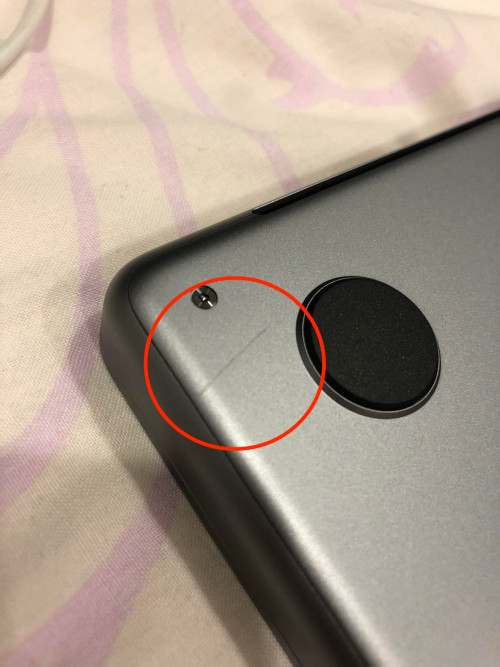
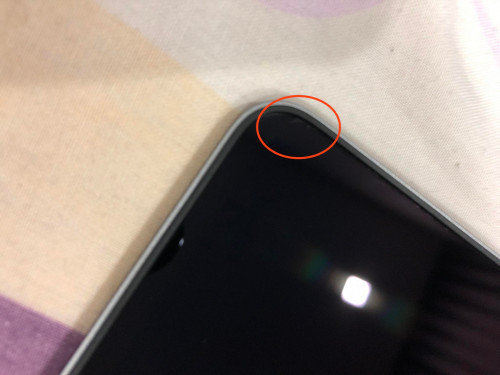
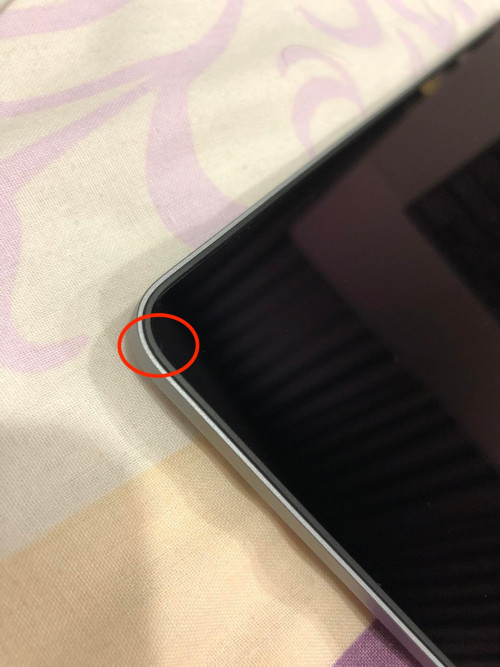
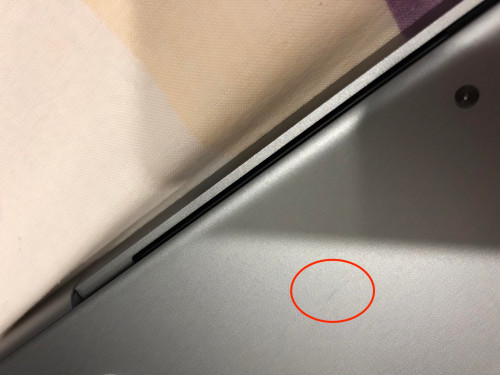
Just received my MacBook Pro 16 inch yesterday. Unbox it at night and noticed scratches at the bottom of the laptop as well as both upper corners of the screen. Contacted Apple and was offered a replacement device but have to wait until early February for it to arrive.  Ordered a MacBook Pro 14 inch way back in November and also had similar issues. Seeing that I have experienced devices with scratches twice, apple said will file a report and investigate but I wonder what outcome would it be??  |
|
|
|
|
|
pew333 P
|
Jan 8 2022, 11:04 AM
|
New Member
|
QUOTE(faizfizy39 @ Jan 8 2022, 10:59 AM) Do you mind to share the pictures? Sure. I will share it later. I am currently outstation and did not bring the MacBook with me. |
|
|
|
|
|
pew333 P
|
Jan 9 2022, 11:52 AM
|
New Member
|
QUOTE(dikae @ Jan 8 2022, 10:53 PM) Wow, getting similar issue twice in a row is pretty bad, with all the delays in replacement units I would suggest you push for some sort of compensation from them… Will definitely do so. But I wonder what compensation they will offer  |
|
|
|
|
|
pew333 P
|
Jan 14 2022, 08:06 PM
|
New Member
|
Just received by replacement device from Apple today after complaining that the previous device has scratches. The replacement device looks fine but the screen has multiple micro scratches (in dot shapes) and smudges. The smudges are easily removable with microfibre cloth though. Otherwise the device is working fine. Not sure if I am having bad luck or this batch of laptop is bad. I am thinking if I should ask for another replacement or just live with the micro scratches. Sigh |
|
|
|
|



 Quote
Quote

 0.0831sec
 1.16
1.16
 7 queries
 GZIP Disabled