Welcome Guest ( Log In | Register )

Outline · [ Standard ] · Linear+

 I need help with port forwarding - DIR-830M UNIFI

views
     
TSEndofworld
post Oct 18 2021, 05:25 PM, updated 5y ago

New Member
*
Newbie
5 posts

Joined: Oct 2015
Dear all,

I am using softphone at my home and i cannot connect to the softphone.

I tried using mobile data and connect to UNIFI at my friend house is totally no problem. Both my phone and laptop is not able to connect using WIFI , both my phone and laptop is able to connect once i change to mobile data.

I check with the softphone provider and they told me my internet connect block the port 5060

I tried configure with my router but I just cannot successfully configure it.

I would be appreciate if someone here can help me on this.

thanks
Oltromen Ripot
post Oct 18 2021, 07:53 PM

👍 999999 person Likes this member
*******
Senior Member
4,034 posts

Joined: Dec 2019
I had a look at it.
Yeah, it is confusing. It says it's to forward to specific machine behind NAT.
It insists on entering a "local IP" and port range, forwarded to a "remote IP" and port range.


(Local IP is not the DIR-830M itself!? Then what should it be? Very intuitive, dlink.)
Oltromen Ripot
post Oct 18 2021, 08:03 PM

👍 999999 person Likes this member
*******
Senior Member
4,034 posts

Joined: Dec 2019
Found the solution.

"LOCAL IP" is your internal server IP.

"Local Port Range" is the port you want to open on the DIR-830M WAN side, it will map 1-to-1 same port number(s) on the internal server IP.

Restrict the REMOTE side with who you want to allow to access your internal server.


Attached thumbnail(s)
Attached Image
TSEndofworld
post Oct 18 2021, 08:05 PM

New Member
*
Newbie
5 posts

Joined: Oct 2015
What should i put in the remote side? any numbers like yours?

QUOTE(Oltromen Ripot @ Oct 18 2021, 08:03 PM)
Found the solution.

"LOCAL IP" is your internal server IP.

"Local Port Range" is the port you want to open on the DIR-830M WAN side, it will map 1-to-1 same port number(s) on the internal server IP.

Restrict the REMOTE side with who you want to allow to access your internal server.
*
Oltromen Ripot
post Oct 18 2021, 08:13 PM

👍 999999 person Likes this member
*******
Senior Member
4,034 posts

Joined: Dec 2019
Local IP Address: <your SIP server>
SIP Local Port Range: 5060/UDP (default)
RTP Local Port Range: <dependent on configuration>

You need to check what ranges are applicable to your softphone, for both SIP protocol and and RTP protocol. Both SIP and RTP ranges need to be exposed. So 2 rules at the very least.

SIP is for setting up the call, but the RTP carrying audio will be assigned random port during negotiation.

You might want to restrict the remote IPs that actually can hit your SIP and RTP. Don't just allow ANY.


TSEndofworld
post Oct 18 2021, 08:18 PM

New Member
*
Newbie
5 posts

Joined: Oct 2015
QUOTE(Oltromen Ripot @ Oct 18 2021, 08:13 PM)
Local IP Address: <your SIP server>
SIP Local Port Range: 5060/UDP (default)
RTP Local Port Range: <dependent on configuration>

You need to check what ranges are applicable to your softphone, for both SIP protocol and and RTP protocol. Both SIP and RTP ranges need to be exposed. So 2 rules at the very least.

SIP is for setting up the call, but the RTP carrying audio will be assigned random port during negotiation.

You might want to restrict the remote IPs that actually can hit your SIP and RTP. Don't just allow ANY.
*
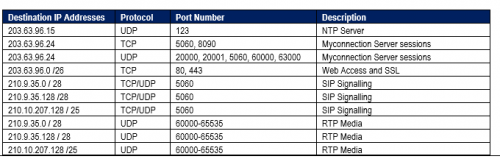
user posted image

these are list that the softphone said i have to allow. But is complicated as I dont know whats the range to put
Oltromen Ripot
post Oct 18 2021, 08:21 PM

👍 999999 person Likes this member
*******
Senior Member
4,034 posts

Joined: Dec 2019
QUOTE(Endofworld @ Oct 18 2021, 08:05 PM)
What should i put in the remote side? any numbers like yours?
*
I am just testing.
Usually we don't really care from which port that people are connecting from. That's why i simply put remote FROM PORT 1-65535. The whole possible range.

But the remote FROM IP, i would advice that you restrict the IP to your friend's. Don't just ANY like what I use for the port forwarding test. The last thing we need is for you to accidentally host another unsecured, open SIP server used by scammer to harass the world.

No, I'm not being sarcastic, nor I intend to question your tech prowess. Just cautioning in case you overlooked. Unsecured, open SIP servers is a problem, so avoid becoming one. Do limit who can reach your SIP softphone in addition to securing it.
Oltromen Ripot
post Oct 18 2021, 08:29 PM

👍 999999 person Likes this member
*******
Senior Member
4,034 posts

Joined: Dec 2019
QUOTE(Endofworld @ Oct 18 2021, 08:18 PM)
user posted image

these are list that the softphone said i have to allow. But is complicated as I dont know whats the range to put
*
I translate those columns to you:

"Destination IP Address" is the "REMOTE IP"

"Protocol" is the "PROTOCOL".

"Port Number" is the "LOCAL PORT".
unless you can combine to make it contiguous, create a new forwarding entry.
e.g. you can't combine 5060 and 6500-65535 as one entry; so create an entry just for 5060-5060 and another entry for 6500-65535.

That NTP is nice, but not necessary if your router and softphone are already syncing to a time server.

I don't know of the "MyConnection server" and that "web and SSL". Probably they're for front-end GUI administration.

But those SIP and RTP are definitely needed in any VoIP communication.
TSEndofworld
post Oct 18 2021, 08:32 PM

New Member
*
Newbie
5 posts

Joined: Oct 2015
QUOTE(Oltromen Ripot @ Oct 18 2021, 08:29 PM)
I translate those columns to you:

"Destination IP Address" is the "REMOTE IP"

"Protocol" is the "PROTOCOL".

"Port Number" is the "LOCAL PORT".
unless you can combine to make it contiguous, create a new forwarding entry.
e.g. you can't combine 5060 and 6500-65535 as one entry; so create an entry just for 5060-5060 and another entry for 6500-65535.

That NTP is nice, but not necessary if your router and softphone are already syncing to a time server.

I don't know of the "MyConnection server" and that "web and SSL". Probably they're for front-end GUI administration.

But those SIP and RTP are definitely needed in any VoIP communication.
*
What should i put at the remote ip address?
Oltromen Ripot
post Oct 18 2021, 08:54 PM

👍 999999 person Likes this member
*******
Senior Member
4,034 posts

Joined: Dec 2019
QUOTE(Endofworld @ Oct 18 2021, 08:32 PM)
What should i put at the remote ip address?
*
QUOTE(Oltromen Ripot @ Oct 18 2021, 08:29 PM)
"Destination IP Address" is the "REMOTE IP"
*
TSEndofworld
post Oct 19 2021, 02:03 PM

New Member
*
Newbie
5 posts

Joined: Oct 2015
QUOTE(Oltromen Ripot @ Oct 18 2021, 08:54 PM)

*
I tried all the configurations but it doesnt seems to be able to connect to the softphone. Sigh. Called Unifi and no one seems to know about this
Oltromen Ripot
post Oct 19 2021, 07:05 PM

👍 999999 person Likes this member
*******
Senior Member
4,034 posts

Joined: Dec 2019
what's the RTP port range configured in YOUR softphone?

what's the static LAN IP of YOUR softphone?

This post has been edited by Oltromen Ripot: Oct 19 2021, 07:10 PM


Change to:
| Lo-Fi Version
0.0247sec    0.77    6 queries    GZIP Disabled
Time is now: 24th December 2025 - 12:27 PM