Welcome Guest ( Log In | Register )

Outline · [ Standard ] · Linear+

 Boost home wifi across 3 concrete walls

views
     
TSNGV22
post Oct 11 2021, 01:46 AM, updated 5y ago

On my way
****
Junior Member
615 posts

Joined: Feb 2014


I am moving into new house (condo) soon however I am facing difficulty with this floor layout.

user posted image

the fibre optic point and router is in the living room.

ISP is TIME.

Apparently the wifi needs to go through 3 concrete walls then only can reach to the working desk. This is important especially when the house occupants are WFH.

Any strategies which do not involve hacking and setup LAN ports and things like this, as this is rented house.

I can think of wifi extenders but this also dont guarantee can penetrate and not losing speed.

worse case i think is just pull long ass LAN cable and then set up AP in each room through the hallway.....

Any advices? kinda new on these though notworthy.gif


WaCKy-Angel
post Oct 11 2021, 01:50 AM

PeACe~~
*********
All Stars
21,963 posts

Joined: Dec 2004
From: KL


put cable running on the ceiling and router in the middle as best as possible.

cheapest, easiest maintenance way
ryansxs
post Oct 11 2021, 01:51 AM

Look at all my stars!!
*******
Senior Member
2,380 posts

Joined: Dec 2005


QUOTE(NGV22 @ Oct 11 2021, 01:46 AM)
I am moving into new house (condo) soon however I am facing difficulty with this floor layout.
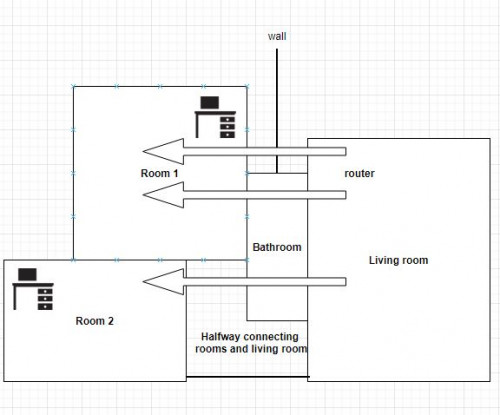
user posted image

the fibre optic point and router is in the living room.

ISP is TIME.

Apparently the wifi needs to go through 3 concrete walls then only can reach to the working desk. This is important especially when the house occupants are WFH.

Any strategies which do not involve hacking and setup LAN ports and things like this, as this is rented house.

I can think of wifi extenders but this also dont guarantee can penetrate and not losing speed.

worse case i think is just pull long ass LAN cable and then set up AP in each room through the hallway.....

Any advices? kinda new on these though notworthy.gif
*
Buy good routers set up mesh WIFI. Done.

Have a good day
metalfire
post Oct 11 2021, 01:53 AM

Regular
******
Senior Member
1,310 posts

Joined: Oct 2005


pull cable cheaper end of story...condo only easy job la.
TSNGV22
post Oct 11 2021, 02:00 AM

On my way
****
Junior Member
615 posts

Joined: Feb 2014


QUOTE(metalfire @ Oct 11 2021, 01:53 AM)
pull cable cheaper end of story...condo only easy job la.
*
out of option since its a rented house, no hacking allowed
LarryPizzaGuy
post Oct 11 2021, 02:33 AM

/k 20k Club (Verified)
*****
Junior Member
880 posts

Joined: Oct 2015
QUOTE(NGV22 @ Oct 11 2021, 01:46 AM)
I am moving into new house (condo) soon however I am facing difficulty with this floor layout.

user posted image

the fibre optic point and router is in the living room.

ISP is TIME.

Apparently the wifi needs to go through 3 concrete walls then only can reach to the working desk. This is important especially when the house occupants are WFH.

Any strategies which do not involve hacking and setup LAN ports and things like this, as this is rented house.

I can think of wifi extenders but this also dont guarantee can penetrate and not losing speed.

worse case i think is just pull long ass LAN cable and then set up AP in each room through the hallway.....

Any advices? kinda new on these though notworthy.gif
*
There are 3 components to this.

1. Modem (Provided by the ISP)
2. Router (Optional, need to purchase separately, unless already provided by ISP).
3. LAN cable.

Step 1: Place the Router at the center of the condo unit, ROOM 1.
Step 2: Measure the cable routing distance from the router to the modem.
Step 3: Purchase a longer LAN cable to connect the router and modem.

This should be the most cost effective way to improve your coverage.

If you're unable to find a way to route the cable and place the router in ROOM 1, the other method you can do is to invest in a better router, I'd recommend the Asus TUF AX3000 (RM6XX to RM7XX) as a better router will provide a better signal penetration through walls.

This post has been edited by LarryPizzaGuy: Oct 11 2021, 02:34 AM

TSNGV22
post Oct 11 2021, 03:06 AM

On my way
****
Junior Member
615 posts

Joined: Feb 2014


QUOTE(LarryPizzaGuy @ Oct 11 2021, 02:33 AM)
There are 3 components to this.

1. Modem (Provided by the ISP)
2. Router (Optional, need to purchase separately, unless already provided by ISP).
3. LAN cable.

Step 1: Place the Router at the center of the condo unit, ROOM 1.
Step 2: Measure the cable routing distance from the router to the modem.
Step 3: Purchase a longer LAN cable to connect the router and modem.

This should be the most cost effective way to improve your coverage.

If you're unable to find a way to route the cable and place the router in ROOM 1, the other method you can do is to invest in a better router, I'd recommend the Asus TUF AX3000 (RM6XX to RM7XX) as a better router will provide a better signal penetration through walls.
*
Thanks. Option 1 is def favorable while option 2 buying better router seems exp so that will be last choice.

What you think about mesh WiFi? Main node replace stock router while node 2 and node 3 in each room?

SilentVampire
post Oct 11 2021, 09:26 AM

Networking Enthusiast
*******
Senior Member
5,714 posts

Joined: Mar 2007


QUOTE(NGV22 @ Oct 11 2021, 03:06 AM)
Thanks. Option 1 is def favorable while option 2 buying better router seems exp so that will be last choice.

What you think about mesh WiFi? Main node replace stock router while node 2 and node 3 in each room?
*
Yes, you have to opt for mesh wifi as it is the only solution without hacking or connecting any cables.
metalfire
post Oct 11 2021, 09:35 AM

Regular
******
Senior Member
1,310 posts

Joined: Oct 2005


QUOTE(NGV22 @ Oct 11 2021, 02:00 AM)
out of option since its a rented house, no hacking allowed
*
there are ways to pull the cable without hacking..and there are flat cat cables to consider also.

don't just simply say out of option.
shinichi88
post Oct 11 2021, 09:58 AM

Holy Crusader
*****
Senior Member
984 posts

Joined: Sep 2005
From: Selangor
I would suggest you get a Mesh.

1. TIME ISP now using Huawei Modem + Router combo.
2. That Huawei combo, I wouldn't want to mess routing the fiber optic. (unless you're pro)
3. Pulling LAN cable is good for PC/Laptop, but not for mobile/tablet. (you might be using wifi on your bed/room)
4. You don't want to have different wifi SSID on Living Room and Bedroom (if you're pulling cable and set a wifi router at the hallway)(* this might work if you have a powerful wifi router. Turn off TIME wifi. e.g: Asus/NetGear those kind)

for 100Mbps, get TP-Link E4 / Tenda Nova MW3
for 300Mbps and above, get TP-Link M4 / Tenda Mova MW6

This post has been edited by shinichi88: Oct 11 2021, 10:02 AM
chamelion
post Oct 11 2021, 10:10 AM

Back to Bricking
*******
Senior Member
2,755 posts

Joined: Dec 2004
Setup an 802.11r network.
802.11r is better than proprietary mesh.

If ISP router support 802.11r, just buy another router to place in halfway.

If ISP router does not support 802.11r, just buy 2 routers with one connect to the router and another in halfway.
cannavaro
post Oct 11 2021, 10:33 AM

CATTENACIO
*******
Senior Member
3,008 posts

Joined: Sep 2005
From: T.T.D.I, Bukit Damansara


Use powerline adapters


xCryptik
post Oct 11 2021, 01:30 PM

On my way
****
Junior Member
584 posts

Joined: May 2013
What's the suitable mesh for him? Someone requested similar layout. LOL!

M9? Asus Mesh?
SUStsunade
post Oct 11 2021, 01:34 PM

Look at all my stars!!
*******
Senior Member
2,063 posts

Joined: Jan 2003
From: Konoha
New Time subscription or contract renewal comes with free Mesh
TSNGV22
post Oct 11 2021, 04:34 PM

On my way
****
Junior Member
615 posts

Joined: Feb 2014


QUOTE(tsunade @ Oct 11 2021, 01:34 PM)
New Time subscription or contract renewal comes with free Mesh
*
This one?
https://www.time.com.my/omnimesh
TSNGV22
post Oct 11 2021, 04:35 PM

On my way
****
Junior Member
615 posts

Joined: Feb 2014


QUOTE(shinichi88 @ Oct 11 2021, 09:58 AM)
I would suggest you get a Mesh.

1. TIME ISP now using Huawei Modem + Router combo.
2. That Huawei combo, I wouldn't want to mess routing the fiber optic. (unless you're pro)
3. Pulling LAN cable is good for PC/Laptop, but not for mobile/tablet. (you might be using wifi on your bed/room)
4. You don't want to have different wifi SSID on Living Room and Bedroom (if you're pulling cable and set a wifi router at the hallway)(* this might work if you have a powerful wifi router. Turn off TIME wifi. e.g: Asus/NetGear those kind)

for 100Mbps, get TP-Link E4 / Tenda Nova MW3
for 300Mbps and above, get TP-Link M4 / Tenda Mova MW6
*
How many mesh nodes recommended?
shinichi88
post Oct 11 2021, 05:54 PM

Holy Crusader
*****
Senior Member
984 posts

Joined: Sep 2005
From: Selangor
QUOTE(NGV22 @ Oct 11 2021, 04:35 PM)
How many mesh nodes recommended?
*
1 main, 1 nodes is enough..

I'm using Tp-Link E4 for my 100Mbps Time,
Before using mesh, my bedroom gets 5-15Mbps, After setup mesh, get 50 Mbps.


Change to:
| Lo-Fi Version
0.0198sec    0.75    5 queries    GZIP Disabled
Time is now: 24th December 2025 - 10:43 PM