Welcome Guest ( Log In | Register )

Outline · [ Standard ] · Linear+

 Rekomen me good router (RM400-900), 2 storey house

views
     
TSadix4
post Sep 22 2021, 11:05 PM, updated 5y ago

ich bin eine Katze :3
******
Senior Member
1,254 posts

Joined: Apr 2007
From: Berlin

Hi /k/tards

/k/ > Hardware/Network sub

Can u guys rekomen me any good router for a 2 storey house, right now im using a xiaomi brand router where upstairs and downstairs same model

Down use repeater and internet quite slow compared to upstairs (can use 5ghz lol)

Since now got some kids need to do distance learning, so need to upgrade router so people downstairs can study in peace

Thanks boss
vandar59
post Sep 22 2021, 11:07 PM

New Member
*
Junior Member
42 posts

Joined: Aug 2010


park here interested to know too

keep hearing about this deco m9 thingy
TSadix4
post Sep 22 2021, 11:08 PM

ich bin eine Katze :3
******
Senior Member
1,254 posts

Joined: Apr 2007
From: Berlin

QUOTE(vandar59 @ Sep 22 2021, 11:07 PM)
park here interested to know too

keep hearing about this deco m9 thingy
*
Ya right now people suggesting em Deco M5 and M4

I think good for longevity also a point because almost every year my unifi upgrade lol
XP750
post Sep 22 2021, 11:09 PM

Casual
***
Junior Member
324 posts

Joined: Mar 2006


get asus mesh, like this model
will be enough for you home
RM 800+ nia

https://shopee.com.my/Asus-ZenWiFi-AX-Mini-...4361&position=0

This post has been edited by XP750: Sep 22 2021, 11:09 PM
enduser
post Sep 22 2021, 11:09 PM

Regular
******
Senior Member
1,283 posts

Joined: Jan 2003
Go to this tered, 1st page got few

https://forum.lowyat.net/topic/4658096
submergedx
post Sep 22 2021, 11:10 PM

Regular
******
Senior Member
1,134 posts

Joined: Jun 2015
TP Link Archer AX72 or Archer AX90
very good range
pisces88
post Sep 22 2021, 11:11 PM

Look at all my stars!!
*******
Senior Member
3,972 posts

Joined: Nov 2007


where is your modem? 2 Mesh router should be sufficient
TSadix4
post Sep 22 2021, 11:13 PM

ich bin eine Katze :3
******
Senior Member
1,254 posts

Joined: Apr 2007
From: Berlin

QUOTE(pisces88 @ Sep 22 2021, 11:11 PM)
where is your modem? 2 Mesh router should be sufficient
*
Upstair ruang tamu

but downstair ruang tamu weak connection
pisces88
post Sep 22 2021, 11:13 PM

Look at all my stars!!
*******
Senior Member
3,972 posts

Joined: Nov 2007


QUOTE(adix4 @ Sep 22 2021, 11:13 PM)
Upstair ruang tamu

but downstair ruang tamu weak connection
*
Thats okay. Put one Mesh at upstairs, another downstairs ruang tamu
duperam
post Sep 22 2021, 11:15 PM

New Member
*
Newbie
33 posts

Joined: Jan 2019
QUOTE(adix4 @ Sep 22 2021, 11:05 PM)
Hi /k/tards

/k/ > Hardware/Network sub

Can u guys rekomen me any good router for a 2 storey house, right now im using a xiaomi brand router where upstairs and downstairs same model

Down use repeater and internet quite slow compared to upstairs (can use 5ghz lol)

Since now got some kids need to do distance learning, so need to upgrade router so people downstairs can study in peace

Thanks boss
*
Asus rt-ac86u

https://shopee.com.my/product/143507751/216...36-1632323688.9
shaqmunak
post Sep 22 2021, 11:15 PM

Getting Started
**
Junior Member
287 posts

Joined: Apr 2007
From: Depan Monitor


Buy rm900 router settle
SUSDezs
post Sep 22 2021, 11:31 PM

On my way
****
Junior Member
623 posts

Joined: Jan 2011
From: Lobang Batu


QUOTE(adix4 @ Sep 22 2021, 11:05 PM)
Hi /k/tards

/k/ > Hardware/Network sub

Can u guys rekomen me any good router for a 2 storey house, right now im using a xiaomi brand router where upstairs and downstairs same model

Down use repeater and internet quite slow compared to upstairs (can use 5ghz lol)

Since now got some kids need to do distance learning, so need to upgrade router so people downstairs can study in peace

Thanks boss
*
Force kids come down and prove to you they are learning. Why spend more money on retards if it will only help them diam2 play Valorant topkek
noobz4ever
post Sep 22 2021, 11:33 PM

Getting Started
**
Junior Member
290 posts

Joined: Nov 2014


Happen to me.. So I'm recommending not to buy any tplink or dlink router, suckz big time, both have difficult interface and both got setting/configuration suddenly missing issue and it's only good point is it have almost no/fewer software update..
TSadix4
post Sep 22 2021, 11:34 PM

ich bin eine Katze :3
******
Senior Member
1,254 posts

Joined: Apr 2007
From: Berlin

QUOTE(Dezs @ Sep 22 2021, 11:31 PM)
Force kids come down and prove to you they are learning. Why spend more money on retards if it will only help them diam2 play Valorant topkek
*
cakap biar ada adab walaupun online tak kelakar pun apa kau tulis
ry8128
post Sep 22 2021, 11:36 PM

♣Just a noob♣
*******
Senior Member
3,650 posts

Joined: Jul 2014


2 biji mesh cukup. Tp link. I am a fan of asus products, but somehow for routers, tp link seems to out last Asus and is damn reliable
erizdagreat
post Sep 22 2021, 11:37 PM

Getting Started
**
Junior Member
109 posts

Joined: Aug 2012


I'm using Tp-link ER605 router. Access point is Tp-link EAP225 powered via POE by Tp-link TL-SG2210MP smart switch. Whole network is controlled using OC200 Omada SDN.
SUSDezs
post Sep 22 2021, 11:38 PM

On my way
****
Junior Member
623 posts

Joined: Jan 2011
From: Lobang Batu


QUOTE(adix4 @ Sep 22 2021, 11:34 PM)
cakap biar ada adab walaupun online tak kelakar pun apa kau tulis
*
Unker kasi u real life lesson from my online kerases. U think ur kids duduk dlm bilik tidur tu rajin belaja ke? Mrk sendiri yg mengaku hari2 dgn cikgu sialan ni. Hari2 tidur lewat lambat bangun 2jam lewat baru masuk keras sbb game 1 malam.

Nak dengar nasihat ke tidak tu tepuk dada tanya selera lettew.

Btw gotta love that siggy topkek

This post has been edited by Dezs: Sep 22 2021, 11:39 PM
Steponlego
post Sep 22 2021, 11:38 PM

Enthusiast
*****
Junior Member
938 posts

Joined: Sep 2013
Get Deco X20.
upcars
post Sep 22 2021, 11:43 PM

Getting Started
**
Junior Member
97 posts

Joined: Feb 2017
i dun recomend deco m series. not good.
bobowyc
post Sep 22 2021, 11:44 PM

You are who you are.
******
Senior Member
1,921 posts

Joined: Apr 2013
From: Petaling Jaya


i use asus router. but can try tp link also. some of my friends are using and its quite worth it for them, using for about 2 years no issues. my asus router i just bought only last year, so cant tell. lol. using AC86U and AX56U. 86U for downstairs, AX56U for upstairs, as im using it for gaming hahaa. xD
quadcube
post Sep 22 2021, 11:49 PM

Regular
******
Senior Member
1,924 posts

Joined: May 2009
From: Yokohama, JP


QUOTE(erizdagreat @ Sep 22 2021, 11:37 PM)
I'm using Tp-link ER605 router. Access point is Tp-link EAP225 powered via POE by Tp-link TL-SG2210MP smart switch. Whole network is controlled using OC200 Omada SDN.
*
Nice, I use a mix of vendors, mikrotik for routing, tplink PoE+ switch for power to Aruba APs.
FollowMeRogerThat
post Sep 22 2021, 11:49 PM

Getting Started
**
Junior Member
236 posts

Joined: Aug 2010
From: PLANT


Asus router at your budget
erizdagreat
post Sep 22 2021, 11:57 PM

Getting Started
**
Junior Member
109 posts

Joined: Aug 2012


QUOTE(quadcube @ Sep 22 2021, 11:49 PM)
Nice, I use a mix of vendors, mikrotik for routing, tplink PoE+ switch for power to Aruba APs.
*
I was planning to get the mikrotik router given all the positive reviews I read. But eventually decided to go all in on TP-Link Omada products so I can control the whole network via a single interface (instead of configuring each device one by one). It's similar to Unifi's OS controller software (SDN via cloud key), just a lot cheaper and less powerful.
TSadix4
post Sep 22 2021, 11:59 PM

ich bin eine Katze :3
******
Senior Member
1,254 posts

Joined: Apr 2007
From: Berlin

QUOTE(upcars @ Sep 22 2021, 11:43 PM)
i dun recomend deco m series. not good.
*
why liao
lawrencesha
post Sep 23 2021, 12:01 AM

Enthusiast
*****
Junior Member
882 posts

Joined: Nov 2004


I upgraded to a Asus TUF-AX3000. Wifi damn fast. No regret.
zerorating
post Sep 23 2021, 12:02 AM

Miskin Adab
*****
Senior Member
977 posts

Joined: Aug 2007
From: Lokap Polis


you could go with xiaomi ax6000


This post has been edited by zerorating: Sep 23 2021, 12:03 AM
upcars
post Sep 23 2021, 12:02 AM

Getting Started
**
Junior Member
97 posts

Joined: Feb 2017
QUOTE(adix4 @ Sep 22 2021, 11:59 PM)
why liao
*
stability issues over a period

bononoz
post Sep 23 2021, 12:03 AM

Getting Started
**
Junior Member
190 posts

Joined: Mar 2008
do not buy a deco. cannot change wifi channel if your area congested (stuck on auto select, google it)

as others said already, 2 storey house: get the Asus 86u

speaking from experience
zerorating
post Sep 23 2021, 12:06 AM

Miskin Adab
*****
Senior Member
977 posts

Joined: Aug 2007
From: Lokap Polis


QUOTE(bononoz @ Sep 23 2021, 12:03 AM)
do not buy a deco. cannot change wifi channel if your area congested (stuck on auto select, google it)

as others said already, 2 storey house: get the Asus 86u

speaking from experience
*
had a collegue who had his asus 86u broke twice smile.gif

personally i also have asus router broke on me, the wan port just died, so i use the common LAN port and have my modem to act as a router. after few week, the router failed to turn on.

This post has been edited by zerorating: Sep 23 2021, 12:11 AM
amir.asyraf
post Sep 23 2021, 12:07 AM

On my way
****
Junior Member
504 posts

Joined: Oct 2012
From: It's all relative


Asus RT-AX3000

Great router
TSadix4
post Sep 23 2021, 12:12 AM

ich bin eine Katze :3
******
Senior Member
1,254 posts

Joined: Apr 2007
From: Berlin

QUOTE(amir.asyraf @ Sep 23 2021, 12:07 AM)
Asus RT-AX3000

Great router
*
once downstairs loss of signal?
khusyairi
post Sep 23 2021, 12:17 AM

Getting Started
**
Junior Member
147 posts

Joined: Dec 2011


QUOTE(bononoz @ Sep 23 2021, 12:03 AM)
do not buy a deco. cannot change wifi channel if your area congested (stuck on auto select, google it)

as others said already, 2 storey house: get the Asus 86u

speaking from experience
*
I will try to explain why we don't give the Deco administrator the permission to manually choose a channel on the current Deco system, which may not precise but I will try my best:

Firstly, we need to clarify that the wireless channels on the current Deco firmware are not manually configurable as Deco automatically selects a 2.4GHz channel to use based on what it sees around it, selecting the channel that has the least interference. The 5GHz channel appears to be configured based on the region the device was manufactured for use in and they are apparently not auto-selected and are definitely not manually configurable.

Secondly, we need to reiterate what is the point of having a whole mesh Wi-Fi system in your network. The whole point of mesh networks is to give a seamless, unfettered, and performant experience for wireless networking, and thus a mesh network is "self-configuring" and "self-healing", the network automatically incorporates a new node into the existing structure without needing any adjustments manually by a network administrator and it automatically finds the fastest and most reliable paths to send data. If you change the wireless channel on the Deco nodes manually, it may give you the risk of losing the other Deco nodes and thus ruin your Deco system, you may need to start over again to reconfigure them.

What's more, it is not always easy to choose a clear wireless channel in your networks, you may need to test with all of them in order to find one that may be usable. Most importantly, crowded isn’t the same as busy, even though some channel scanning apps tell you one specific channel is busy, they don’t always measure other sources of congestion and interference. Non-Wi-Fi signals (like those from microwaves, Bluetooth devices, cordless phones, garage door openers, baby monitors, etc.) can all congest a channel but may not show up in a scan. So it’s possible that a channel can appear empty, while it is, in fact, saturated with other kinds of interference.

PS: copy paste anwer for Deco

msacras
post Sep 23 2021, 12:19 AM

Regular
******
Senior Member
1,767 posts

Joined: Jan 2019
QUOTE(FollowMeRogerThat @ Sep 22 2021, 11:49 PM)
Asus router at your budget
*
asus router if imported price = good

if get from local = harga cekik dara, can pretty much get 2x unit of competing brands.

user posted image

This post has been edited by msacras: Sep 23 2021, 12:23 AM
amir.asyraf
post Sep 23 2021, 12:25 AM

On my way
****
Junior Member
504 posts

Joined: Oct 2012
From: It's all relative


QUOTE(adix4 @ Sep 23 2021, 12:12 AM)
once downstairs loss of signal?
*
Nope, strong and stable all around the house for me. 5ghz some more.
msacras
post Sep 23 2021, 12:25 AM

Regular
******
Senior Member
1,767 posts

Joined: Jan 2019
QUOTE(adix4 @ Sep 23 2021, 12:12 AM)
once downstairs loss of signal?
*
Of course, it can't do magic against walls/floors.

Best is still drag some LAN cable and run wired MESH or AP.
TSadix4
post Sep 23 2021, 12:25 AM

ich bin eine Katze :3
******
Senior Member
1,254 posts

Joined: Apr 2007
From: Berlin

QUOTE(pisces88 @ Sep 22 2021, 11:13 PM)
Thats okay. Put one Mesh at upstairs, another downstairs ruang tamu
*
what model u rekomen
TSadix4
post Sep 23 2021, 12:26 AM

ich bin eine Katze :3
******
Senior Member
1,254 posts

Joined: Apr 2007
From: Berlin

QUOTE(msacras @ Sep 23 2021, 12:25 AM)
Of course, it can't do magic against walls/floors.

Best is still drag some LAN cable and run wired MESH or AP.
*
what model u rekomen
potatobanana
post Sep 23 2021, 12:26 AM

Casual
***
Junior Member
453 posts

Joined: Jul 2016
Come here la
https://forum.lowyat.net/topic/4658096
Captain89
post Sep 23 2021, 12:27 AM

Jiken
*******
Senior Member
3,191 posts

Joined: Dec 2017

QUOTE(adix4 @ Sep 22 2021, 11:13 PM)
Upstair ruang tamu

but downstair ruang tamu weak connection
*
Get 2 tplink mesh. One connect to wifi router another one put downstair living room.
zerorating
post Sep 23 2021, 12:28 AM

Miskin Adab
*****
Senior Member
977 posts

Joined: Aug 2007
From: Lokap Polis


QUOTE(adix4 @ Sep 23 2021, 12:12 AM)
once downstairs loss of signal?
*
alot of time the connection become not good is not because the router/ap is crap, it was the client device that is not good, signal from those devices not being able to reach back to router. a better router might have more sensentive anttena might being able to help on this situation, but i dont think it will help alot, thats why for this kind of situation,having a mesh setup will help more since your devices will only talk with the closest ap.

but why my download is effected if router is not to be blame? do note that for tcp connection each stream of network being send will need some sort of acknowledgement from the client device that those network packets being received, so if these acknowledgement packets is loss or being delayed. your download speed is likely to be affected too.

This post has been edited by zerorating: Sep 23 2021, 12:28 AM
msacras
post Sep 23 2021, 12:28 AM

Regular
******
Senior Member
1,767 posts

Joined: Jan 2019
QUOTE(adix4 @ Sep 23 2021, 12:26 AM)
what model u rekomen
*
Like others said, ASUS is good, but it's budget killer and local pricing totally nuts. The AX55u used to be the cheapo solution for running mesh (about RM200 per bijik) but at current pricing, hell no.

TP-LINK on the other hand don't give MESH support for their normal router (if I not mistaken), they go with sub-unit like DECO which can't work as router individually.

So I dono LOL, perhaps Hualaowei AX3 Pro? 2 bijik should be under RM500. Can support wired MESH by plugging in LAN cable.

This post has been edited by msacras: Sep 23 2021, 12:33 AM
red4900
post Sep 23 2021, 12:31 AM

Casual
***
Junior Member
464 posts

Joined: Aug 2008
Using Asus now. A bit pricier than TP Link. Admin UI is totally not noob friendly
CyberSetan
post Sep 23 2021, 12:32 AM

-KNowLEdGe BRiNGs FEaR-
*******
Senior Member
2,527 posts

Joined: Feb 2007
From: Im a Medical Officer in /K. I'm here to lepak.


QUOTE(adix4 @ Sep 22 2021, 11:05 PM)
Hi /k/tards

/k/ > Hardware/Network sub

Can u guys rekomen me any good router for a 2 storey house, right now im using a xiaomi brand router where upstairs and downstairs same model

Down use repeater and internet quite slow compared to upstairs (can use 5ghz lol)

Since now got some kids need to do distance learning, so need to upgrade router so people downstairs can study in peace

Thanks boss
*
Y U NO MESH WIFI?

CyberSetan
post Sep 23 2021, 12:38 AM

-KNowLEdGe BRiNGs FEaR-
*******
Senior Member
2,527 posts

Joined: Feb 2007
From: Im a Medical Officer in /K. I'm here to lepak.


QUOTE(lawrencesha @ Sep 23 2021, 12:01 AM)
I upgraded to a Asus TUF-AX3000. Wifi damn fast. No regret.
*
Alang-alang buy router... buy godly one... like mine biggrin.gif biggrin.gif biggrin.gif :

Attached Image

Can cover 2 storeys no problem~

Now Asus released an even better router with wifi 6E protocol:

https://shopee.com.my/ASUS-ROG-Rapture-WiFi...750?position=14
pisces88
post Sep 23 2021, 12:59 AM

Look at all my stars!!
*******
Senior Member
3,972 posts

Joined: Nov 2007


QUOTE(adix4 @ Sep 23 2021, 12:25 AM)
what model u rekomen
*
using DECO M5. nice, small je biggrin.gif
creep
post Sep 23 2021, 01:10 AM

On my way
****
Junior Member
531 posts

Joined: Jan 2003
From: Cheras


get wifi6 router la if budget rm8xx …just bought asus ax82u replacing my asus ac87u …ac87u never prob b4 after more than 3yrs
Kwar
post Sep 23 2021, 01:42 AM

Getting Started
**
Junior Member
65 posts

Joined: Apr 2013
I am using tp-link archer AX73, really good router. the router is located on second floor living room and I still receive solid wifi at the bottom floor room.

been using since March, can even play games at very stable ping on wifi.

So yeah kinda good at rm400.

This post has been edited by Kwar: Sep 23 2021, 01:42 AM
technod
post Sep 23 2021, 03:01 AM

Getting Started
**
Junior Member
58 posts

Joined: Mar 2007


tenda Ax1800 rm210+_
narf03
post Sep 23 2021, 03:23 AM

Look at all my stars!!
*******
Senior Member
4,547 posts

Joined: Dec 2004
From: Metro Prima, Kuala Lumpur, Malaysia, Earth, Sol


a good router is not as good as a normal router at perfect location, find a position in the middle of the house, prefer stairs, and install the router somewhere in the top of ground floor, below 1st floor, hang it upside down, antenna pointing downwards, and all antenna keep some distance from any wall.

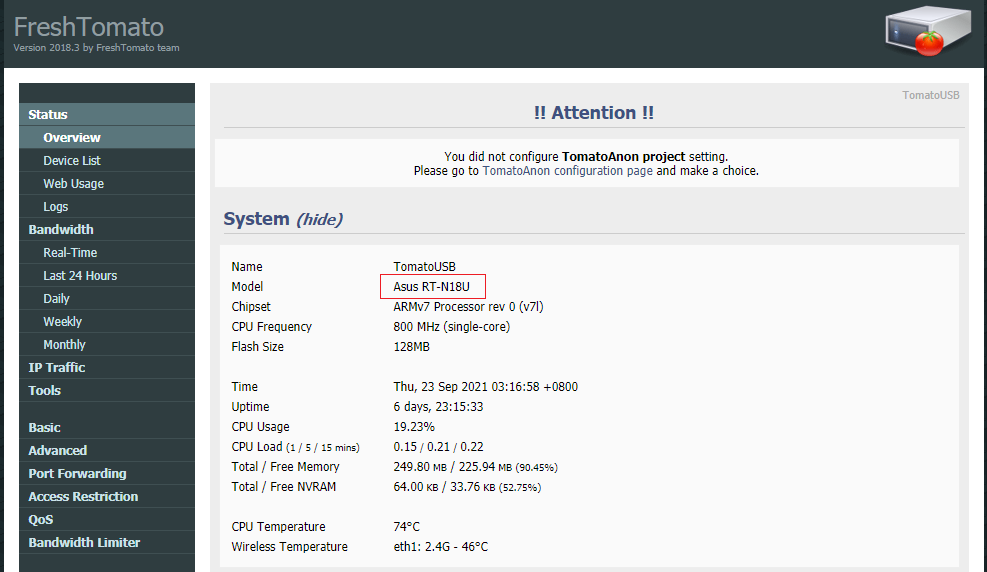
im using a asus rtn18u with custom tomato firmware, been using it for like about 10 years already, so far so good

user posted image

oh and i swap the original antenna with these long antenna, which supposed to give better range

https://shopee.com.my/15dbi-2.4GHz-WiFi-Mod...680?position=12

btw, the higher the bandwidth, the lesser range of the wifi, 2.4ghz has better range, while 5ghz has better speed, if your device is phone and mainly to get internet access, you should go 2.4ghz, should have no trouble getting like 100mbps for each device(20mbps is enough for video streaming)
lawrencesha
post Sep 23 2021, 08:05 AM

Enthusiast
*****
Junior Member
882 posts

Joined: Nov 2004


QUOTE(CyberSetan @ Sep 23 2021, 12:38 AM)
Alang-alang buy router... buy godly one... like mine  biggrin.gif  biggrin.gif  biggrin.gif  :

Attached Image

Can cover 2 storeys no problem~

Now Asus released an even better router with wifi 6E protocol:

https://shopee.com.my/ASUS-ROG-Rapture-WiFi...750?position=14
*
Depends on individual needs and budget la. This is a bit over-kill and over my budget la.
msacras
post Sep 23 2021, 08:08 AM

Regular
******
Senior Member
1,767 posts

Joined: Jan 2019
QUOTE(lawrencesha @ Sep 23 2021, 08:05 AM)
Depends on individual needs and budget la. This is a bit over-kill and over my budget la.
*
More like most phones or devices don’t even have the supporting bands to utilise it.
nickchk89
post Sep 23 2021, 08:11 AM

Vodka martini,shaken,not stirred
*******
Senior Member
2,909 posts

Joined: Jan 2012


QUOTE(Kwar @ Sep 23 2021, 01:42 AM)
I am using tp-link archer AX73, really good router. the router is located on second floor living room and I still receive solid wifi at the bottom floor room.

been using since March, can even play games at very stable ping on wifi.

So yeah kinda good at rm400.
*
+1

i also no issue with this, can broadcast to other house no issue (parent and my house side by side)
Mau
post Sep 23 2021, 08:17 AM

On my way
****
Senior Member
660 posts

Joined: Jan 2003


I'm using a pair of Deco M5 and it is working great, it is a double storey house 22' x 75'. The wifi covers all corners and the speedtest is stable too. I'm using UniFi 300Mbps btw.

This post has been edited by Mau: Sep 23 2021, 08:17 AM
Zot
post Sep 23 2021, 08:25 AM

Look at all my stars!!
*******
Senior Member
7,940 posts

Joined: Mar 2014
I use this
https://shopee.com.my/Brand-New-ASUS-GT-AC5...540?position=10

Put in living hall cover the whole house (2-storey ~ 3000sqft). The minimum speed I get is around 200Mbps on either 5GHz or 2.4GHz as I remembered., anywhere in the house and in room with door closed.

The reason I bought Asus at that time was because many can be converted into mesh (mixed models) but at the end I found out I don't need one laugh.gif
andrekua2
post Sep 23 2021, 08:29 AM

10k Club
********
All Stars
13,494 posts

Joined: Jan 2012


Bazir wang aje... Beli Ethernet cable, tarik sampai tangga, then put your router there. 1 router dah cukup... Semua letak router kat corner macam banggang...wifi range tu bulat, letak kat tenggah rumah, biasanya di mana tangga tu berada

This post has been edited by andrekua2: Sep 23 2021, 08:30 AM
Digifriend07
post Sep 23 2021, 08:36 AM

On my way
****
Junior Member
596 posts

Joined: Nov 2007
From: Kg Pandan


QUOTE(andrekua2 @ Sep 23 2021, 08:29 AM)
Bazir wang aje... Beli Ethernet cable, tarik sampai tangga, then put your router there. 1 router dah cukup... Semua letak router kat corner macam banggang...wifi range tu bulat, letak kat tenggah rumah, biasanya di mana tangga tu berada
*
This… Put at middle home, even need to sangkut at wall, just the router need to be powerful enough la. Bought Asus tuf-ax3000, really good one. Bought under rm480 at lazada, last year sale…
azbro
post Sep 23 2021, 08:39 AM

Look at all my stars!!
*******
Senior Member
4,403 posts

Joined: Jan 2007
From: Johor Bahru


Got any with VoIP support or not? Cos using the phone regularly.
msacras
post Sep 23 2021, 08:43 AM

Regular
******
Senior Member
1,767 posts

Joined: Jan 2019
QUOTE(azbro @ Sep 23 2021, 08:39 AM)
Got any with VoIP support or not? Cos using the phone regularly.
*
That one not handled by TM’s BTU?
azbro
post Sep 23 2021, 08:44 AM

Look at all my stars!!
*******
Senior Member
4,403 posts

Joined: Jan 2007
From: Johor Bahru


QUOTE(msacras @ Sep 23 2021, 08:43 AM)
That one not handled by TM’s BTU?
*
Mine is connected to the router.

Those grey ports
user posted image

This post has been edited by azbro: Sep 23 2021, 08:46 AM
soulseeker6187
post Sep 23 2021, 08:47 AM

Look at all my stars!!
*******
Senior Member
2,774 posts

Joined: Jun 2009


QUOTE(azbro @ Sep 23 2021, 08:44 AM)
Mine is connected to the router.

Those grey ports
user posted image
*
Use maxis?

Too bad very few router support voip.
nikholai
post Sep 23 2021, 08:54 AM

New Member
*
Newbie
11 posts

Joined: Jun 2006
From: CyberJaya


QUOTE(adix4 @ Sep 22 2021, 11:05 PM)
Hi /k/tards

/k/ > Hardware/Network sub

Can u guys rekomen me any good router for a 2 storey house, right now im using a xiaomi brand router where upstairs and downstairs same model

Down use repeater and internet quite slow compared to upstairs (can use 5ghz lol)

Since now got some kids need to do distance learning, so need to upgrade router so people downstairs can study in peace

Thanks boss
*
before u buy new router, try reposition the repeater to an area less obstructive and see if that helps.....
PrinceJoe
post Sep 23 2021, 09:01 AM

Casual
***
Junior Member
410 posts

Joined: Sep 2017
I use dlink covr 1103
3 units can connect 2 house 😅

Distance between house is around 35 ft. Not terrace.
Same speed in 2nd house vs 1st house since only have 30mbps plan

for a 2 storey house, 2 units can cover big house.

But settings quite limited maybe due to i’m using it in bridged mode.


samftrmd
post Sep 23 2021, 09:01 AM

Interface 2037
******
Senior Member
1,774 posts

Joined: Nov 2007
From: Planet Earth


QUOTE(adix4 @ Sep 22 2021, 11:05 PM)
Hi /k/tards

/k/ > Hardware/Network sub

Can u guys rekomen me any good router for a 2 storey house, right now im using a xiaomi brand router where upstairs and downstairs same model

Down use repeater and internet quite slow compared to upstairs (can use 5ghz lol)

Since now got some kids need to do distance learning, so need to upgrade router so people downstairs can study in peace

Thanks boss
*
Unifi no giv free mesh? I got one but no use because live in flat.
LegendLee
post Sep 23 2021, 11:39 AM

><3LG3|\|D
Group Icon
Elite
2,727 posts

Joined: Mar 2006


Best is to pull a wired Ethernet cable to an access point.

If that fails, there are power line and coaxial cable. Powerline in my experience is really not reliable. Cuts the speed in half with quite a bit of lossy packets. But, it’s really easy to use. Just plug in and forget about it.

I am using a moca adapter to give one of my mesh AP a wired backhaul. It goes through like 10 meters of coaxial cable.

Can achieve over 600mbps speed with no noticeable increase to lag.

This post has been edited by LegendLee: Sep 23 2021, 11:40 AM
abhipraaya
post Sep 23 2021, 11:58 AM

On my way
****
Junior Member
565 posts

Joined: Sep 2011


use a hybrid mesh router for peace of mind.
abhipraaya
post Sep 23 2021, 12:03 PM

On my way
****
Junior Member
565 posts

Joined: Sep 2011


QUOTE(azbro @ Sep 23 2021, 08:44 AM)
Mine is connected to the router.

Those grey ports
user posted image
*
same here. i'm using maxis with a TM fibrehome modem.

I need to have VoIP

absolutely no way to get rid of that maxis router. Keeping it just for VoIP purpose. I've set it to bridge mode.

This post has been edited by abhipraaya: Sep 23 2021, 12:04 PM
SUSskyblu3
post Sep 23 2021, 02:28 PM

Getting Started
**
Junior Member
157 posts

Joined: Jan 2013
Cisco ASR9922


Change to:
| Lo-Fi Version
0.0259sec    0.46    6 queries    GZIP Disabled
Time is now: 25th December 2025 - 01:59 AM