Welcome Guest ( Log In | Register )

Outline · [ Standard ] · Linear+

 Need help for advice 2nd floor low network.

views
     
TSdotatornado
post Sep 5 2021, 03:48 PM, updated 5y ago

Getting Started
**
Junior Member
132 posts

Joined: Sep 2008
Hi all , I'm using tp link AX10 rounter , at 1st floor I'm only get 80M , at my room second floor I'm getting 5M to 30M , sometimes disconnect .
Batter
Should I upgrade my rounter to ax73 ? Will solve my problems?


vamfire
post Sep 5 2021, 04:10 PM

Getting Started
**
Junior Member
171 posts

Joined: Feb 2005
From: North South East West


Well, I suppose it would not solve your problem totally, maybe a bit better results than current setup...

I suggest u look into mesh setups e.g. tplink decos

I have much better experience/results with it compared to upgrading to just one powerful wifi router
The.Lucas.DaY
post Sep 5 2021, 04:14 PM

On my way
****
Junior Member
671 posts

Joined: May 2019

I get a Tenda Ac2100 at first floor living hall, and a TP-Link Archer T4U for laptop, now i can get 5ghz full speed (100Mbps) at 2nd floor

Even get a reliable wifi router or TP-link archer T4U connect 2.4ghz, i still get weak 2.4ghz wifi connection due to wifi congestion among my neighbors

Also, it depend on wifi congestion, wireless adapter, router stability, etc.

5ghz
user posted image
2.4ghz
user posted image

This post has been edited by The.Lucas.DaY: Sep 5 2021, 04:22 PM
failed.hashcheck
post Sep 5 2021, 04:46 PM

Neighborhood plant pathologist
*******
Senior Member
2,096 posts

Joined: Aug 2009
From: Shithole Klang
Upgrading router won't fix wifi range issue. You need AP or mesh. Adding more antenna (mimo) wont improve anything if the signal can't be heard to begin with.

Another alternative is tuning your wifi to extend range by sacrificing some max speed.
You may try using lower channel width. Try use 20mhz instead of 40 or 80mhz. Lower width requires less SNR to mantain speed at given range.
Don't try to use high gain antenna, it will only worsen the vertical range for your situation.

This post has been edited by failed.hashcheck: Sep 6 2021, 01:51 AM
tyja
post Sep 5 2021, 04:52 PM

-I Just Want To Share-
*****
Senior Member
913 posts

Joined: Dec 2008
From: Nusa Indah, Johor Bahru


Asus xt8 go go go. It work for me. Come from deco than change to xt8. Same location device, but better speed n coverage
cannavaro
post Sep 5 2021, 05:30 PM

CATTENACIO
*******
Senior Member
3,008 posts

Joined: Sep 2005
From: T.T.D.I, Bukit Damansara


QUOTE(dotatornado @ Sep 5 2021, 03:48 PM)
Hi all , I'm using tp link AX10 rounter , at 1st floor I'm only get 80M , at my room second floor I'm getting 5M to 30M , sometimes disconnect .
Batter
Should I upgrade my rounter to ax73 ? Will solve my problems?
*
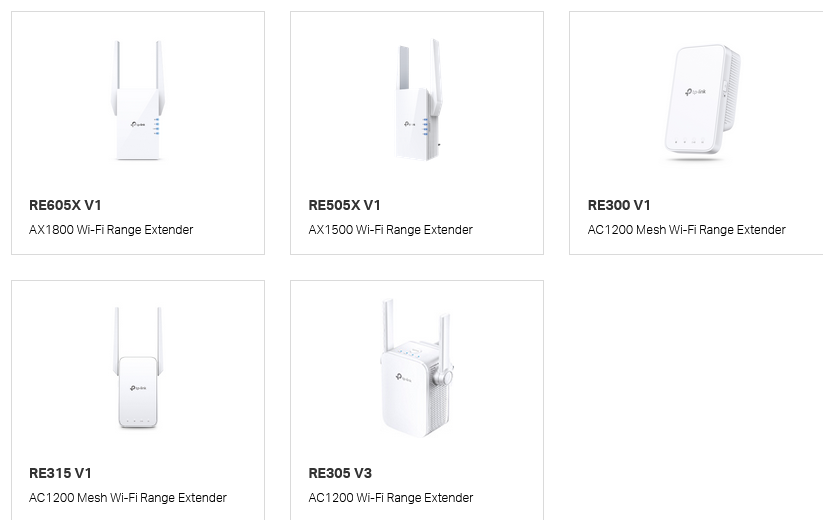
AX10 supports OneMesh.
You can drastically improve the speed you're getting by adding one of these OneMesh extenders to your network:
user posted image

TSdotatornado
post Sep 5 2021, 09:02 PM

Getting Started
**
Junior Member
132 posts

Joined: Sep 2008
QUOTE(cannavaro @ Sep 5 2021, 05:30 PM)
AX10 supports OneMesh.
You can drastically improve the speed you're getting by adding one of these OneMesh extenders to your network:
user posted image
*
I'm have 1 WiFi extender at 2nd floor but it keep lost connection ...

TSdotatornado
post Sep 5 2021, 09:06 PM

Getting Started
**
Junior Member
132 posts

Joined: Sep 2008
QUOTE(failed.hashcheck @ Sep 5 2021, 04:46 PM)
Upgrading router won't fix wifi range issue. You need AP or mesh.

Another alternative is tuning your wifi to extend range by sacrificing some max speed.
You may try using lower channel width. Try use 20mhz instead of 40 or 80mhz. Lower width requires less SNR to mantain speed at given range.
Don't try to use high gain antenna, it will only worsen the vertical range for your situation.
*
Thx for advice , but I'm need some speed on it to watch movie sometimes.

QUOTE(tyja @ Sep 5 2021, 04:52 PM)
Asus xt8 go go go. It work for me. Come from deco than change to xt8. Same location device, but better speed n coverage
*
Over my budget.. don't want span so much money on it . Nearly 2k .. I hope can solve around rm600..
afif92
post Sep 5 2021, 09:54 PM

Casual
***
Junior Member
374 posts

Joined: Mar 2010
QUOTE(tyja @ Sep 5 2021, 04:52 PM)
Asus xt8 go go go. It work for me. Come from deco than change to xt8. Same location device, but better speed n coverage
*
The best choice for mesh wifi for consumer grade.
TSdotatornado
post Sep 5 2021, 10:05 PM

Getting Started
**
Junior Member
132 posts

Joined: Sep 2008
QUOTE(afif92 @ Sep 5 2021, 09:54 PM)
The best choice for mesh wifi for consumer grade.
*
consider over over budget...
failed.hashcheck
post Sep 6 2021, 01:38 AM

Neighborhood plant pathologist
*******
Senior Member
2,096 posts

Joined: Aug 2009
From: Shithole Klang
QUOTE(dotatornado @ Sep 5 2021, 09:06 PM)
Thx for advice , but I'm need some speed on it to watch movie sometimes.
Over my budget.. don't want span so much money on it . Nearly 2k .. I hope can solve around rm600..
*
reducing channel width even on cheapest 1x1 routers still gives you like 70+mbps in 2.4ghz (or at least 140mbps in 5ghz, but its pointless) for nearest clients - more than enough speed to watch movies, and has very high chance to gain you net speed increase for distant clients. And all this happen at zero cost.
But then again this workaround could only do so much, based on assumption that crowded channels are part of cause. Like any other wifi range issues - The real root cause here is due to router can't hear the client, not the other way around.


If you don't want to spend so much money then you have only one option available - pull cable to the other floor, buy used whatever n routers for at most RM50 or cheaper, feel free to explore for ac options. Then set up AP mode. Total cost for each extension would be from rm50+rm1 for each meter cable of you run.
This is actually more preferable set up then mesh in many ways.

This post has been edited by failed.hashcheck: Sep 6 2021, 01:56 AM

TSdotatornado
post Sep 6 2021, 07:16 AM

Getting Started
**
Junior Member
132 posts

Joined: Sep 2008
QUOTE(failed.hashcheck @ Sep 6 2021, 01:38 AM)
reducing channel width even on cheapest 1x1 routers still gives you like 70+mbps in 2.4ghz (or at least 140mbps in 5ghz, but its pointless) for nearest clients - more than enough speed to watch movies, and has very high chance to gain you net speed increase for distant clients. And all this happen at zero cost.
But then again this workaround could only do so much, based on assumption that crowded channels are part of cause. Like any other wifi range issues -  The real root cause here is due to router can't hear the client, not the other way around.
If you don't want to spend so much money then you have only one option available - pull cable to the other floor, buy used whatever n routers for at most RM50 or cheaper, feel free to explore for ac options. Then set up AP mode. Total cost for each extension would be from rm50+rm1 for each meter cable of you run.
This is actually more preferable set up then mesh in many ways.
*
Thx for advice ,my second floor got lan port too , u mean that buy another rounter set as ap ? So if buy 200 ++ Vs 600++ will it have big difference?


enduser
post Sep 6 2021, 07:33 AM

Regular
******
Senior Member
1,283 posts

Joined: Jan 2003
QUOTE(dotatornado @ Sep 6 2021, 07:16 AM)
Thx for advice ,my second floor got lan port too , u mean that buy another rounter set as ap ? So if buy 200 ++ Vs 600++ will it have big difference?
*
Used ur lan port as backbone, choose ur wifi router here
https://forum.lowyat.net/topic/4658096
TSdotatornado
post Sep 6 2021, 07:43 AM

Getting Started
**
Junior Member
132 posts

Joined: Sep 2008
QUOTE(enduser @ Sep 6 2021, 07:33 AM)
Used ur lan port as backbone, choose ur wifi router here
https://forum.lowyat.net/topic/4658096
*
Thank .


This post has been edited by dotatornado: Sep 6 2021, 07:47 AM
cannavaro
post Sep 6 2021, 01:15 PM

CATTENACIO
*******
Senior Member
3,008 posts

Joined: Sep 2005
From: T.T.D.I, Bukit Damansara


QUOTE(dotatornado @ Sep 5 2021, 09:02 PM)
I'm have 1 WiFi extender at 2nd floor but it keep lost connection ...
*
What model is that? You can install a wifi signal checking app like Wifiman on your phone, stand at the spot where the extender is placed and see what signal you're getting from the main wifi.. -40 to -60 dBm is a good range
failed.hashcheck
post Sep 6 2021, 06:29 PM

Neighborhood plant pathologist
*******
Senior Member
2,096 posts

Joined: Aug 2009
From: Shithole Klang
QUOTE(dotatornado @ Sep 6 2021, 07:16 AM)
So if buy 200 ++ Vs 600++ will it have big difference?
*
Mostly no. you will want just its radio part. More expensive routers mostly have more powerful cpu/memory which you don't really touch in AP mode.

BUT, expensive routers tend also come with better radio.
But then again, the radio is 'better' in an aspect that won't benefit you - things like up to 4x4 mimo to allow your router to handle lots of connected devices.
With AP mode, your devices are now distributed to multiple different routers. Unless you have a PC that has expensive PCIE wifi card, you will not benefit anything more than 2x2 mimo (generally cheap routers with 2 antenna).

This post has been edited by failed.hashcheck: Sep 6 2021, 06:36 PM
andrekua2
post Sep 11 2021, 10:13 AM

10k Club
********
All Stars
13,494 posts

Joined: Jan 2012


If you have a double storey house, then its better to put the router in the center of the house.

ie. on the wall where you had stairs... WiFi coverage is spherical and if you put it in a corner of your house, you are just basically reducing the range of the router by half or more.
quadcube
post Sep 11 2021, 08:28 PM

Regular
******
Senior Member
1,924 posts

Joined: May 2009
From: Yokohama, JP


QUOTE(andrekua2 @ Sep 11 2021, 10:13 AM)
If you have a double storey house, then its better to put the router in the center of the house.

ie. on the wall where you had stairs... WiFi coverage is spherical and if you put it in a corner of your house, you are just basically reducing the range of the router by half or more.
*
no guarantee though, mine are downward donut instead of spherical laugh.gif
TSdotatornado
post Sep 18 2021, 07:10 PM

Getting Started
**
Junior Member
132 posts

Joined: Sep 2008
QUOTE(afif92 @ Sep 5 2021, 09:54 PM)
The best choice for mesh wifi for consumer grade.
*
haha, im can't stand for keep disconnect .. , already buy xt8 during 9.9 ..

now speed is ok, can run till 300M ay my room , but have a problem is im playing clash of clan , it can suddenly disconnected, any advice or how to solve please help.
afif92
post Sep 18 2021, 11:10 PM

Casual
***
Junior Member
374 posts

Joined: Mar 2010
QUOTE(dotatornado @ Sep 18 2021, 07:10 PM)
haha, im can't stand for keep disconnect .. , already buy xt8  during 9.9 ..

now speed is ok, can run till 300M ay my room , but have a problem is im playing clash of clan , it can suddenly disconnected, any advice or how to solve please help.
*
Hope you can answer below questions:
1) use 80MHz or 160MHz for backhaul?

2) wifi link in aimesh section 'Fair' or 'Great'?

3) what firmware do you use right now?

4) main router XT8 or others

2 Pages  1 2 >Top
 

Change to:
| Lo-Fi Version
0.0221sec    1.04    5 queries    GZIP Disabled
Time is now: 24th December 2025 - 09:53 PM