Welcome Guest ( Log In | Register )

Outline · [ Standard ] · Linear+

 Old pc games, Red Alert

views
     
TSbeebee1314
post Aug 13 2021, 11:24 AM, updated 5y ago

Regular
******
Senior Member
1,683 posts

Joined: Sep 2018
Anyone still playing the old Red Alert 2 game? Suddenly feel like playing, tried to download in the internet. found that not compatible with Windows 10. Went through the whole internet to solve it, but still can't.

Set compatibility to XP SP2
Reduce to 16 bit colors.
Run as administrator.

Aih anyone pro enough to save me.
TSbeebee1314
post Aug 13 2021, 11:30 AM

Regular
******
Senior Member
1,683 posts

Joined: Sep 2018
QUOTE(chtan @ Aug 13 2021, 11:28 AM)
Use Virtualbox to install the OS you want and play from there.
https://www.virtualbox.org/wiki/Downloads
*
What does this virtual box do? What do you mean by installing OS?
TSbeebee1314
post Aug 13 2021, 12:00 PM

Regular
******
Senior Member
1,683 posts

Joined: Sep 2018
QUOTE(ezze22 @ Aug 13 2021, 11:37 AM)
How come not compatible? I got RA2 installed in my windows 10
*
I try downloading online, at first when loading is blank black screen. Then I googled and they teach using the graphics patch. Patch d got thing but when Masuk play, less than 5mins, hang game. So I googled further and it says some setting change which I did. Now can play, but 1 min later all bomb lose. Aih.

QUOTE(kevinlim001 @ Aug 13 2021, 11:39 AM)
yup had a few games yesterday.. playing on Win 10..
u can skip the hassle and play the online version too.
https://cncnet.org/red-alert-2
*
Play online need pay? I just wanna single player play
TSbeebee1314
post Aug 14 2021, 09:52 PM

Regular
******
Senior Member
1,683 posts

Joined: Sep 2018
QUOTE(svfn @ Aug 13 2021, 10:55 PM)
that 1 min lose mission sounds like old piracy deterrent haha.

even if you play singleplayer only, download CnCNet client, it adds ddraw wrapper also which fixes the black screen.

install the game via Origin: https://www.origin.com/mys/en-us/store/comm...mate-collection
disable Origin in game and Cloud Saves.

install CnCNet client: https://cncnet.org/red-alert-2

run CnCNetYRLauncher.exe, get any remaining updates, then go to Options > Display > change the Renderer to TS-DDraw. change your resolution and other options then can exit.

this CnCNetYRLauncher.exe for multiplayer.

RA2Launcher.exe for campaign.

if you want the game to run from shortcut without the launcher to select RA2/Yuri then use https://bibber.eu/downloads/cnc-ultimate-co...tion-launchers/
create a shortcut to RA2Launcher.exe on your desktop, right click the shortcut > Properties, add " -game ra2" or " -game ra2ep1" for the expansion, to the end of the Target, like this:
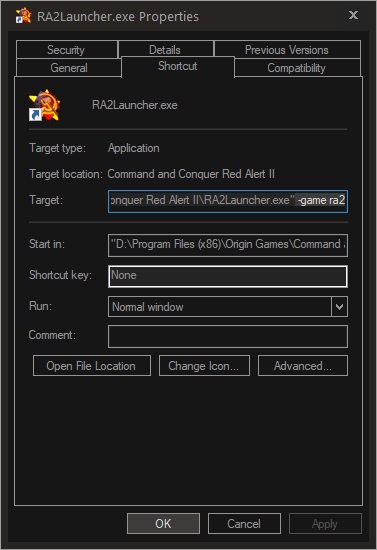
user posted image

the menu and cutscenes are small for me, by keeping aspect ratio. but the game itself is fullscreen.

user posted image
*
I don't have origin account. Need join member to download?

 

Change to:
| Lo-Fi Version
0.0209sec    1.27    6 queries    GZIP Disabled
Time is now: 19th December 2025 - 04:24 AM