Outline ·
[ Standard ] ·
Linear+
Unifi Evidence of unifi bandwidth throttling?, Data is available
|
TS[-]
|
 Jul 14 2021, 05:47 PM, updated 5y ago Jul 14 2021, 05:47 PM, updated 5y ago
|

|
I set up an automated speedtest measurement and recording system, it runs every 15 minutes for 24/7 and has been running for the past 16 days so that works out to be over 1,500 tests. This is what I see: 
I'm subscribed to 500mbps package but I seem to be artificially limited to 300mbps most of the time. The spikes that you see when I get 500mbps are always because I either restarted my router or when TM resets my connection after I make a complaint. However, the graph shows that my speeds get reduced back down to 300mbps shortly after that - sometimes it could last 2 days, sometimes only a few hours. I've made complaints to TM several times and every time they "reset my port", the speed goes back to normal and they declare that they solved my problem so there's no avenue for me to escalate further. Is this the work of TM or is it caused by something else? |
|
|
|
|
|
TS[-]
|
Jul 14 2021, 05:53 PM
|
|
|
QUOTE(l4nunm4l4y4 @ Jul 14 2021, 05:50 PM) In my housing area, someone complained about loss of speed, and TM said 10 houses in my area were having the issue. If TM tells me there is a widespread slowdown due to MCO or whatever I can still accept, but the data here suggests that it is a very specific situation where my bandwidth is capped after a while, and the remedy (reset port / restart router) is made to look like it has resolved the problem only for the cap to return when the case is closed. |
|
|
|
|
|
TS[-]
|
Jul 14 2021, 06:06 PM
|
|
|
QUOTE(heLL_bOy @ Jul 14 2021, 05:59 PM) your speedtest is local or international server? 99.5% local servers. Sometimes the automated server picks a server in Indonesia but only happened a few times. |
|
|
|
|
|
TS[-]
|
Jul 14 2021, 06:18 PM
|
|
|
QUOTE(zannisenhart @ Jul 14 2021, 06:12 PM) Seems like qos , shaping. Need to check on the user and also isp. If you're enterprise customer, like company using mpls link can ask them the shaper config at their side. Besides checking your router. As normal home user don't think so we can ask them... At least I never done. I'm sure I've disabled QoS on my end. I just want to rule out all possibilities that it is caused by anything on my end. |
|
|
|
|
|
TS[-]
|
Jul 14 2021, 06:20 PM
|
|
|
QUOTE(Lurker @ Jul 14 2021, 06:16 PM) i hv a feeling that my unifi service is like TS also but no evidence to backup 500mbps but now getting 90mbps If you suddenly get good speeds after you restart your router, then it may be an indication that you're facing the same thing. This post has been edited by [-]: Jul 14 2021, 06:21 PM |
|
|
|
|
|
TS[-]
|
Jul 14 2021, 06:49 PM
|
|
|
QUOTE(heLL_bOy @ Jul 14 2021, 06:44 PM) i believe they bottleneck over international speed at peak hours. but for local the connection to TIME or MYIX only sometime might caused by congestion traffic. I don't quite believe this is caused by congestion though. Have a look at the graph, the variance is very small. It is either 500+/-mbps or 300+/-mbps with almost nothing in between. It has also never dropped below 300mbps either. It looks like an artificial cap. |
|
|
|
|
|
TS[-]
|
Jul 14 2021, 09:07 PM
|
|
|
QUOTE(mus6677 @ Jul 14 2021, 07:43 PM) This is my SpeedTest History graph. ROuter never reboot in the last week or so. I set it to always speed teset TM cyberjaya server. I noticed automatic speed test server selection sometime point to unreliable server. Try to set your speed test to test nearest TM speedtest server. 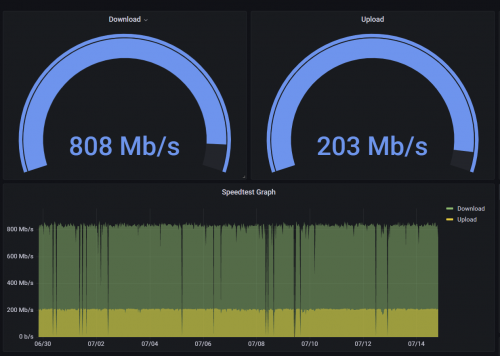 I have logs that show the speedtests were performed using local servers and I can set a static server if I wanted to, but I feel there should be some randomness in choosing the servers. If the connection cannot even maintain a consistent speed across a few local servers, then it is simply not reliable. |
|
|
|
|
|
TS[-]
|
Jul 15 2021, 11:15 AM
|
|
|
QUOTE(zannisenhart @ Jul 14 2021, 09:52 PM) From the image ts shares, what I can see is short burst, allowed by shapers. It will allow to beyond cir for a while then reduce the rate to smoothen traffic. It's hard to check with tm since they won't provide. Noted that you mentioned you have checked qos. If Cisco router I can check the config if you attach here. Not other device though. Do you have another vendor router to test this? Please correct me if I have the wrong understanding, but the "short bursts" that you're seeing in the graph are not really short. That graph shows data over 16 days so the spikes that look like bursts are in fact over a period of few hours up to few days. That is to say, I can sustain consistent 500mbps speeds over a few hours/days, then it will suddenly drop. |
|
|
|
|
|
TS[-]
|
Jul 15 2021, 11:38 AM
|
|
|
QUOTE(mystvearn @ Jul 15 2021, 11:30 AM) Been in this situation before. TM only says whatever advertised speed to TM server, not to other server for speedtest. Have you tried doing the same test only to TM servers? Would like to see the results of that as well. I did not automate the speedtest to run purely on TM server, but I did manual verification when reporting to TM: 
|
|
|
|
|
|
TS[-]
|
Jul 28 2021, 05:00 PM
|
|
|
QUOTE(zannisenhart @ Jul 26 2021, 01:58 PM) Bro what if you send not more than 500mb. And show the graph again. Want to see the behavior if not exceed the 500mb. Referring to my graph? I'm not sending any files. That graph represents the results of speedtest in mbps. |
|
|
|
|



 Quote
Quote

 0.0221sec
 0.73
0.73
 7 queries
 GZIP Disabled