
Welcome Guest ( Log In | Register )

3 Pages  1 2 3 >Bottom

Outline · [ Standard ] · Linear+

 UNIFI keeps disconnecting recently, Going out of my mind

views
     
TSPhonzy
post Jul 13 2021, 07:35 PM, updated 5y ago

On my way
****
Junior Member
542 posts

Joined: Nov 2004
From: Petaling Jaya


I have been a UNIFI user since 2018 and have never experience disconnects. However recently I've been getting a lot of disconnects in a day and even several times in an hour.

With that, I called the Unifi team and they sent their technician over.

1st visit - they changed modem

problem still persist

2nd visit - they blamed my router so they change modem (again) and my asus router with theirs

problem still persist

all these while indicating that the problem is at my end and nothing wrong with them but after the first 2 visits and nothing resolve, and i called customer service 100 line they finally told me they can see from their end that i disconnect from their server 16-20 times a day (in which they call intermittent connection)

hence the technician team came back for a 3rd visit

they direct pull my current fiber line from the pole at the backlane into my modem and the disconnect was still happening and sometimes my modem shows the PON light blinking and the phone line disappears. so, they replaced the entire fiber line from outside.

yet , today i still got 16 disconnects after they left.

the only thing they have not changed or check is the fiber cables concealed in my house. could that be the issue?

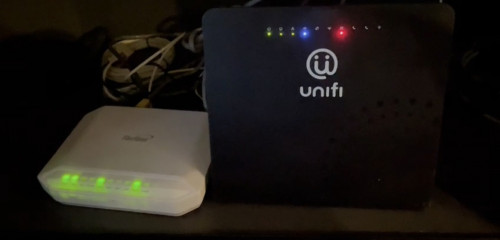
i am not sure what's happening, basically i have 2 kinds of disconnect. the long 5-10 minute one will show my PON light disappearing and the phone line.

the short ones that kicks me out of video conference or any online games will have all lights ON but the router the internet (earth symbol) will be red for like few seconds.

the PON disappearing thing seems to have disappeared when they came and replace the fiber cable entirely

but the frequent disconnect still happens and the router still shows the red light at the internet symbol when i am disconnected and then reconnected again.

does anyone know or have any suggestion what the issue might be? the only thing a common man like me with no IT knowledge can think of is the cables concealed in my house.

they said they dont know what to do anymore and will escalate it to "level 2"

some advice will be appreciated or comments because its hella frustrating especially when i have my meetings!
user posted image
Cincai.La
post Jul 14 2021, 08:53 AM

Getting Started
**
Junior Member
184 posts

Joined: Jun 2020
From: IPOH


Recommend you go to MCMC to make a report. Just tell them the same thing that u write in here.
cmah89
post Jul 15 2021, 08:25 AM

Getting Started
**
Junior Member
157 posts

Joined: May 2014
QUOTE(Phonzy @ Jul 13 2021, 07:35 PM)
I have been a UNIFI user since 2018 and have never experience disconnects. However recently I've been getting a lot of disconnects in a day and even several times in an hour.

With that, I called the Unifi team and they sent their technician over.

1st visit - they changed modem

problem still persist

2nd visit - they blamed my router so they change modem  (again) and my asus router with theirs

problem still persist

all these while indicating that the problem is at my end and nothing wrong with them but after the first 2 visits and nothing resolve, and i called customer service 100 line they finally told me they can see from their end that i disconnect from their server 16-20 times a day (in which they call intermittent connection)

hence the technician team came back for a 3rd visit

they direct pull my current fiber line from the pole at the backlane into my modem and the disconnect was still happening and sometimes my modem shows the PON light blinking and the phone line disappears. so, they replaced the entire fiber line from outside.

yet , today i still got 16 disconnects after they left.

the only thing they have not changed or check is the fiber cables concealed in my house. could that be the issue?

i am not sure what's happening, basically i have 2 kinds of disconnect. the long 5-10 minute one will show my PON light disappearing and the phone line.

the short ones that kicks me out of video conference or any online games will have all lights ON but the router the internet (earth symbol) will be red for like few seconds.

the PON disappearing thing seems to have disappeared when they came and replace the fiber cable entirely

but the frequent disconnect still happens and the router still shows the red light at the internet symbol when i am disconnected and then reconnected again.

does anyone know or have any suggestion what the issue might be? the only thing a common man like me with no IT knowledge can think of is the cables concealed in my house.

they said they dont know what to do anymore and will escalate it to "level 2"

some advice will be appreciated or comments because its hella frustrating especially when i have my meetings!

user posted image
*
I'm using mikrotik , lately (2-3 days) been getting syn flood (mostly) / ddos hence the disconnection and reconnected... first 2 days like every hour sometimes 2-3 hour.
After some configuration (not sure if blocked the attacks), 24 hours link down about 2 times.

Wondering if other having the same issue (frequent/intermittent connectivity using unifi) coz i saw unifi page a lot of ppl complain.
dcheah
post Jul 19 2021, 09:20 AM

OldSkool
******
Senior Member
1,457 posts

Joined: Jan 2005
From: Kajang


QUOTE(Phonzy @ Jul 13 2021, 07:35 PM)
I have been a UNIFI user since 2018 and have never experience disconnects. However recently I've been getting a lot of disconnects in a day and even several times in an hour.

With that, I called the Unifi team and they sent their technician over.

1st visit - they changed modem

problem still persist

2nd visit - they blamed my router so they change modem  (again) and my asus router with theirs

problem still persist

all these while indicating that the problem is at my end and nothing wrong with them but after the first 2 visits and nothing resolve, and i called customer service 100 line they finally told me they can see from their end that i disconnect from their server 16-20 times a day (in which they call intermittent connection)

hence the technician team came back for a 3rd visit

they direct pull my current fiber line from the pole at the backlane into my modem and the disconnect was still happening and sometimes my modem shows the PON light blinking and the phone line disappears. so, they replaced the entire fiber line from outside.

yet , today i still got 16 disconnects after they left.

the only thing they have not changed or check is the fiber cables concealed in my house. could that be the issue?

i am not sure what's happening, basically i have 2 kinds of disconnect. the long 5-10 minute one will show my PON light disappearing and the phone line.

the short ones that kicks me out of video conference or any online games will have all lights ON but the router the internet (earth symbol) will be red for like few seconds.

the PON disappearing thing seems to have disappeared when they came and replace the fiber cable entirely

but the frequent disconnect still happens and the router still shows the red light at the internet symbol when i am disconnected and then reconnected again.

does anyone know or have any suggestion what the issue might be? the only thing a common man like me with no IT knowledge can think of is the cables concealed in my house.

they said they dont know what to do anymore and will escalate it to "level 2"

some advice will be appreciated or comments because its hella frustrating especially when i have my meetings!

user posted image
*
You need to check the fibre cable that is inside your house first, determine that it is not the root cause of it.

Also you might want to call TM to get them to "Reset" your port, sometimes overload of cache will cause this problems also.

Third you can also check with your neighbors whether they experience the same issues or not, if yes then most probably the distribution block having issues. If not then it is most likely your in house fibre cable issues. TM Engineer have the tools to check whether its the cable problems or not.

Lastly you may need to check is there any other computers in the house that is doing DDoS attack or something similar that is causing the auto disconnect. TM have their own firewall & will auto disconnect you if your computers got infected with malware. Another way to test this is to ensure only a clean computer or mobile is connecting to the network, disconnects all others for a few hours or days to test it out.

SUSpfizer
post Jul 19 2021, 09:40 AM

Getting Started
**
Junior Member
149 posts

Joined: Jul 2021
Agreed. The line is not stable.
vin6
post Jul 19 2021, 09:43 AM

Getting Started
**
Junior Member
204 posts

Joined: May 2016
report to mcmc ..confirm will settle in few days after report.
TSPhonzy
post Jul 19 2021, 05:30 PM

On my way
****
Junior Member
542 posts

Joined: Nov 2004
From: Petaling Jaya


just to update you guys

they bypassed my house cable from pole back lane straight into my modem/pc through my window

disconnect still happen

unifi “level 2” team came. told them router changed 3 times, modem 3 times, cable outside changed, bypass house fiber direct from pole also done, port swapped and everything.

they showed me their laptop from my cable heat to the dust or debris near my cable and everything and said all is well on their end

they came earlier at 12pm . so they suggest disconnect EVERY device ans just let the modem and router run without any devices connected, even wifi. and after they left i just called unifi at 5:10pm earlier and….

1 - 12:18pm
2 - 1:04pm
3 - 3:30pm
4 - 3:55pm
6 - 3:58pm

6 disconnects today even with the new set up with 0 devices connected via cable or wifi

it’s so obvious the problem is on their end but can’t figure out what

let’s see what story they give this time…. it’s getting absurd

also one last thing to add i realize this disconnection only happens a little in the morning and noon, crazily in the evenings and nothing after 10pm all the way to 6am smoooth

if anyone can provide some insights it will be much appreciated! thanks

This post has been edited by Phonzy: Jul 19 2021, 05:32 PM
heLL_bOy
post Jul 19 2021, 06:19 PM

Regular
******
Senior Member
1,350 posts

Joined: Nov 2004
From: HEAVEN & HELL


QUOTE(Phonzy @ Jul 19 2021, 05:30 PM)
just to update you guys

they bypassed my house cable from pole back lane straight into my modem/pc through my window

disconnect still happen

unifi “level 2” team came. told them router changed 3 times, modem 3 times, cable outside changed, bypass house fiber direct from pole also done, port swapped and everything.

they showed me their laptop from my cable heat to the dust or debris near my cable and everything and said all is well on their end

they came earlier at 12pm . so they suggest disconnect EVERY device ans just let the modem and router run without any devices connected, even wifi. and after they left i just called unifi at 5:10pm earlier and….

1 - 12:18pm
2 - 1:04pm
3 - 3:30pm
4 - 3:55pm
6 - 3:58pm

6 disconnects today even with the new set up with 0 devices connected via cable or wifi

it’s so obvious the problem is on their end but can’t figure out what

let’s see what story they give this time…. it’s getting absurd

also one last thing to add i realize this disconnection only happens a little in the morning and noon, crazily in the evenings and nothing after 10pm all the way to 6am smoooth

if anyone can provide some insights it will be much appreciated! thanks
*
- did your neighbor who using unifi fiber encounter the same issue with you? or only yourself?
- did you try another swap device(pc/mobile/router) to do test?


TSPhonzy
post Jul 19 2021, 07:25 PM

On my way
****
Junior Member
542 posts

Joined: Nov 2004
From: Petaling Jaya


QUOTE(heLL_bOy @ Jul 19 2021, 06:19 PM)
- did your neighbor who using unifi fiber encounter the same issue with you? or only yourself?
- did you try another swap device(pc/mobile/router) to do test?
*
not sure about neighbor i have to check

yes when they use their unifi router my disconnects are around 20-30 a day and get thrown out of the internet (the bottom right logo from pc logo change to the earth logo to show no internet)

but if i use my own asus router it never disconnected from internet just there will be no line for a good 10-20 seconds then sudddnly everything ok again but doesn’t disconnect from internet , well i mean layman like me still thinking it’s disconnect la coz zoom meeting all freeze then suddenly fast forward back to normal

unifi router straight kick me out of zoom and internet gone and disconnect

if use my router the disconnects a day is around 10-15 versus their zte and d link router which they tried already while troubleshooting
TSPhonzy
post Jul 19 2021, 07:27 PM

On my way
****
Junior Member
542 posts

Joined: Nov 2004
From: Petaling Jaya


oh just one more thing to add not sure if it helps - because now they direct connect the router/modem to my pc from the backlane tiang lampu direct so the modem/router is always next to my eyes compared to downstairs in the lviing room last time.

so when it disconnects.

the MODEM the PHONE LINE light and the PON light will usually disappear

for the ROUTER the earth logo blue dot will disappear and then come back on as red then back to green again

this is what happens when disconnect
heLL_bOy
post Jul 19 2021, 08:06 PM

Regular
******
Senior Member
1,350 posts

Joined: Nov 2004
From: HEAVEN & HELL


QUOTE(Phonzy @ Jul 19 2021, 07:25 PM)
not sure about neighbor i have to check

yes when they use their unifi router my disconnects are around 20-30 a day and get thrown out of the internet (the bottom right logo from pc logo change to the earth logo to show no internet)

but if i use my own asus router it never disconnected from internet just there will be no line for a good 10-20 seconds then sudddnly everything ok again but doesn’t disconnect from internet , well i mean layman like me still thinking it’s disconnect la coz zoom meeting all freeze then suddenly fast forward back to normal

unifi router straight kick me out of zoom and internet gone and disconnect

if use my router the disconnects a day is around 10-15 versus their zte and d link router which they tried already while troubleshooting
*
try check out with your neighbor are they having same situation like u. if they didn't encounter this issue i guess the problem may come problem the FDP port or the fiber cable to your house since you already tried swap router between TM router and own router still occur the same situation.

how about asking TM to switching your existing port to another FDP port see still have the same issue or not if possible TM could done for you.
TSPhonzy
post Jul 21 2021, 11:27 PM

On my way
****
Junior Member
542 posts

Joined: Nov 2004
From: Petaling Jaya


yeah only im suffering from this frequent disconnect.

they finally came and took my router and modem back to their server room in TTDI or something of that sort

they tested it there and confirmed that there are still disconnects happening

they said they have to call their "vendor" to fix or check the equipment

its still not resolved. this happened earlier today.
heLL_bOy
post Jul 21 2021, 11:51 PM

Regular
******
Senior Member
1,350 posts

Joined: Nov 2004
From: HEAVEN & HELL


QUOTE(Phonzy @ Jul 21 2021, 11:27 PM)
yeah only im suffering from this frequent disconnect.

they finally came and took my router and modem back to their server room in TTDI or something of that sort

they tested it there and confirmed that there are still disconnects happening

they said they have to call their "vendor" to fix or check the equipment

its still not resolved. this happened earlier today.
*
weird case.. only yourself have such issue while the rest are normal.

did they mention the problem it from the FDP or their exchange server?

hopefully can resolve for you asap!

while you suffering downtime pls ask them to do rebate on your bills don't forget
BenYeeHua
post Jul 22 2021, 01:53 PM

Regular
******
Senior Member
1,873 posts

Joined: Nov 2010


QUOTE(heLL_bOy @ Jul 21 2021, 11:51 PM)
weird case.. only yourself have such issue while the rest are normal.

did they mention the problem it from the FDP or their exchange server?

hopefully can resolve for you asap!

while you suffering downtime pls ask them to do rebate on your bills don't forget
*
In past my ADSL exchange(I guess is this one) will having issues around 5PM noon, and they keep coming when no issues, so call to MCMC and last fixed by change to new one and complain to me that thing is expensive(and still 2M). laugh.gif
Then on UniFi, working fine for few months, then after that, sometimes it disconnect but rare, then the whole area network down, when it back up, no more disconnect issues. nod.gif

Interesting to see that it only happen to single users for fiber GPON, so I guess no matter how advanced the tech, anything can happen. tongue.gif
TSPhonzy
post Jul 22 2021, 06:57 PM

On my way
****
Junior Member
542 posts

Joined: Nov 2004
From: Petaling Jaya


somehow the line fixed today. asked him what happened?

first and foremost i’m not a tech guy so try to do best with my half assed interpretation of his explanation

he said upon checking they realize the issue was in their system/server in ttdi whereby my house is under something called fiber home. and there is a CARD? in their system that had to be replaced and it was not under their jurisdiction as they had to call their vendor to fix it and it was done this morning 2am.

so far no more disconnects … i still don’t get his explanation lol
PRSXFENG
post Jul 22 2021, 07:40 PM

Look at all my stars!!
*******
Senior Member
2,613 posts

Joined: Nov 2020


QUOTE(Phonzy @ Jul 22 2021, 06:57 PM)
somehow the line fixed today. asked him what happened?

first and foremost i’m not a tech guy so try to do best with my half assed interpretation of his explanation

he said upon checking they realize the issue was in their system/server in ttdi whereby my house is under something called fiber home. and there is a CARD? in their system that had to be replaced and it was not under their jurisdiction as they had to call their vendor to fix it and it was done this morning 2am.

so far no more disconnects … i still don’t get his explanation lol
*
FibreHome is the provider of the equipment, depending on your area it varies, usually its either Huawei, FibreHome or ZTE
What your area uses, you will get a ONT (the box that fibre goes into) of the same brand

Not sure on the card side of things though.
heLL_bOy
post Jul 22 2021, 08:27 PM

Regular
******
Senior Member
1,350 posts

Joined: Nov 2004
From: HEAVEN & HELL


QUOTE(Phonzy @ Jul 22 2021, 06:57 PM)
somehow the line fixed today. asked him what happened?

first and foremost i’m not a tech guy so try to do best with my half assed interpretation of his explanation

he said upon checking they realize the issue was in their system/server in ttdi whereby my house is under something called fiber home. and there is a CARD? in their system that had to be replaced and it was not under their jurisdiction as they had to call their vendor to fix it and it was done this morning 2am.

so far no more disconnects … i still don’t get his explanation lol
*
should be the transmitter..
BenYeeHua
post Jul 22 2021, 10:21 PM

Regular
******
Senior Member
1,873 posts

Joined: Nov 2010


Fixed then good la, normally it is hard to reach this level of support, which know it is their problem on their side, not your side, specially random one. thumbsup.gif
And look like they(fiber home) really working ot at midnight.... sweat.gif
TSPhonzy
post Jul 25 2021, 08:35 PM

On my way
****
Junior Member
542 posts

Joined: Nov 2004
From: Petaling Jaya


just to update

they called their vendor to fix the system on thursday and i had zero disconnects

till this sunday morning it reverted back to usual .. 3-4 disconnects in an hour

called their personal number that they left me and said they will check on it with the vendor tomororw again

i asked them what they changed the previous time they just told me when they checked they notice it was equipment on the vendors end so the vendor replaced it or did some settings

that is really their explanation to me. LOL.

hope they fix it for good tomorrow
BenYeeHua
post Jul 26 2021, 01:32 AM

Regular
******
Senior Member
1,873 posts

Joined: Nov 2010


QUOTE(Phonzy @ Jul 25 2021, 08:35 PM)
hope they fix it for good tomorrow
*
Hope so la, I guess it solved because the equipment reboot after setup, so no more drop, but after running for certain time it coming back. hmm.gif

3 Pages  1 2 3 >Top
 

Change to:
| Lo-Fi Version
0.0249sec    0.55    5 queries    GZIP Disabled
Time is now: 18th December 2025 - 08:23 PM