do you guys really think Windows 11 will enforce the minimum hardware requirement such as 8th gen proc, TPM2.0 etc or will they relax it once they have launched
It will but latest news is Microsoft allow you install via ISO for not meet requirement PC. They later also correct they will let you download cumulative update until next build and they will not provide you next build update. (probably another half year later)
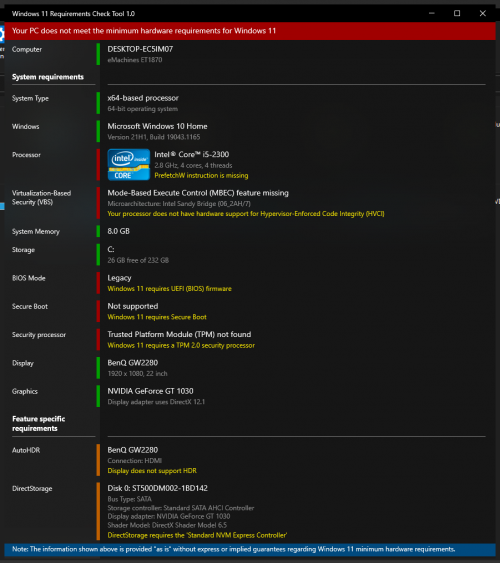
Left that 1 month left, i just wait and see, no more care because my pc maybe too slow or cannot run 11, i5 2300
I think your PC will not smooth running Windows 11. It is a bit too old as your CPU is gen 2 which is release in year 2011. Wow! Salute your PC still running, this is 10 years ago PC.
This post has been edited by Andrewtst: Sep 13 2021, 12:08 AM
I think your PC will not smooth running Windows 11. It is a bit too old as your CPU is gen 2 which is release in year 2011. Wow! Salute your PC still running, this is 10 years ago PC.
You should change one important part - HDD to SSD. SSD help a lot of performance boast even on Windows 10.
You can try manual installation via ISO after official release. Your spec kind of ok except you should change to SSD. Your major performance issue is HDD as Windows OS drive.
Beside those TPM or Secure Boot where Microsoft may not check for manual ISO installation. But UEFI is definitely required if I not remember wrong.
This post has been edited by Andrewtst: Sep 13 2021, 12:18 AM
You should change one important part - HDD to SSD. SSD help a lot of performance boast even on Windows 10.
You can try manual installation via ISO after official release. Your spec kind of ok except you should change to SSD. Your major performance issue is HDD as Windows OS drive.
Beside those TPM or Secure Boot where Microsoft may not check for manual ISO installation. But UEFI is definitely required if I not remember wrong.
Yes, normal use i don see any slow down, but when windows is checking update, install update, 100% disk usage, cause very slow And i put pagefile t second HDD, i feel a bit better, got 2 HDD Currently windows got few issue after major update i don want clone, some windows apps cannot run, when open black screen then auto close, i no idea how to fix HDD is running since 2014, got problem that time rma back, bad sector There is no UEFI on this pc, only BIOS
It will but latest news is Microsoft allow you install via ISO for not meet requirement PC. They later also correct they will let you download cumulative update until next build and they will not provide you next build update. (probably another half year later)
does it mean for non compliance hardware 1. Windows 11 will allow to install via ISO but not the Windows Updates (if re install is update OS hope all licenses will be valid) 2. any cumulative updates will be able to download 3. Any next build need to download and update manually
Yes, normal use i don see any slow down, but when windows is checking update, install update, 100% disk usage, cause very slow And i put pagefile t second HDD, i feel a bit better, got 2 HDD Currently windows got few issue after major update i don want clone, some windows apps cannot run, when open black screen then auto close, i no idea how to fix HDD is running since 2014, got problem that time rma back, bad sector There is no UEFI on this pc, only BIOS
Go buy a new SSD and fresh install, you will notice why you using such slow system where you suppose can using a very speedy system. HDD to SSD is not a little improvement, it is a very huge improvement.
See this video, I record it previously, my CPU is only Intel Pentium Dual Core E2160 which is even slower than yours with 3 GB RAM only but I manage to run Windows 10 smooth. All thanks to SSD. For GPU wise, that system also use same as yours Which is Nvidia GeForce GT 1030.
Performance gain not only CPU and GPU, SSD also playing a very big part here and it help a lot even on lower RAM PC.
For that age, I don't think will have UEFI.
QUOTE(1kokies @ Sep 13 2021, 12:49 AM)
does it mean for non compliance hardware 1. Windows 11 will allow to install via ISO but not the Windows Updates (if re install is update OS hope all licenses will be valid) 2. any cumulative updates will be able to download 3. Any next build need to download and update manually
if that is the case it is not so bad
1. Should be but Microsoft anytime can change term, Microsoft change many times already. 2. So far yes. 3. Maybe Microsoft will totally not given you next build anymore. The build here I mean major update where Microsoft did it around 1/2 year once in Windows 10.
This post has been edited by Andrewtst: Sep 13 2021, 04:45 AM
1. Should be but Microsoft anytime can change term, Microsoft change many times already. 2. So far yes. 3. Maybe Microsoft will totally not given you next build anymore. The build here I mean major update where Microsoft did it around 1/2 year once in Windows 10.
[/quote]
Thanks in other words need upgrade hardware to the latest and greatest........MS did a great job for Windows 10 and O365 which i am very very happy with them (migrated everything from OSX to Windows in 2017) but to upgrade all my hardware due to OS is not so interesting and W10 support up to 2025
This post has been edited by 1kokies: Sep 13 2021, 07:26 AM
. The EU and US should sue M$ the Market-Monopolist for such anti-competition shenanigans in Windows 11.
Everyone should throw M$ out the Windows and adopt MacOS or ChromeOS or Linux or Android.
For casual home-users, it is possible for them to only use 4G LTE Android tablets in desktop mode, eg just for emails, web-surfing and music/video-streaming. .
What is New? - Nothing I not sure why Microsoft Highlight "We added a link to the sign-in options under the power menu on Start." This feature is there since 22449.1000.
Bugs Taskbar icon alignment not center is still there.
This post has been edited by Andrewtst: Sep 16 2021, 02:49 AM
How to Properly Setup VMware Virtual Machine for Windows 11 for continue received Windows Update Officially.
Some of you may notice you no longer can Windows Update to latest Dev Channel 22458.1000 as Microsoft also checking now for Virtual Machine (VM). To overcome this, you need to reconfigure your VMware setting for now and future Windows Update Officially.
Choose UEFI and Tick Enable Secure Boot.
Encryption the Access Control.
Added in Trusted Platform Module (TPM).
You will notice your TPM 2.0 manufacturer by VMW is Ready after enable all 3 necessary requirement for VMware.
Windows 11 will run perfectly fine as long your CPU is in Windows 11 supported list and you turn on TPM 2.0 and Secure Boot at your VMware Workstation.
This post has been edited by Andrewtst: Sep 20 2021, 02:20 AM
Snipping Tool, Calculator, and Clock with Focus Sessions! (This is New if you are pure Beta Channel user, it is the same for user joining Dev Channel before).
What is Not Fixed Yet
Sadly Right Click under Single Click bugs fixed in Dev Channel did not bring over to Beta Channel. This bugs still around.
Predictable the pop-up message at Taskbar still simply pop-up here and there. 😅
I think your PC will not smooth running Windows 11. It is a bit too old as your CPU is gen 2 which is release in year 2011. Wow! Salute your PC still running, this is 10 years ago PC.
still rocking my 10y i7 2700k too. and its still flying for ex-hardcore 24/7 gamer like me. yeah.. im old..
Snipping Tool, Calculator, and Clock with Focus Sessions! (This is New if you are pure Beta Channel user, it is the same for user joining Dev Channel before).
What is Not Fixed Yet
Sadly Right Click under Single Click bugs fixed in Dev Channel did not bring over to Beta Channel. This bugs still around.
Predictable the pop-up message at Taskbar still simply pop-up here and there. 😅


 Sep 13 2021, 12:04 AM


 Quote
Quote


 0.0371sec
 1.17
1.17
 6 queries
 GZIP Disabled