Outline ·
[ Standard ] ·
Linear+
Laptop not connecting on Wifi-5 (802.11ac)
|
TSRayleighH
|
 Jun 1 2021, 03:10 PM, updated 5y ago Jun 1 2021, 03:10 PM, updated 5y ago
|
Getting Started


|
My router is RT-AC86U and my unifi plan is 300Mbps. My laptop wifi adaptor is Realtek 8822be wireless lan 802.11ac pci-e nic. By right it should be able to connect to the internet using Wi-fi 5. 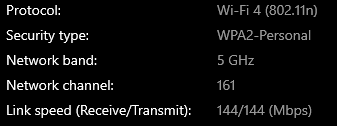 However, when I connect to the internet, my laptop is only connected through Wi-fi 4 instead of Wi-fi 5. Therefore, I am only able to get speeds up to around 100Mbps. On my smartphone, I am able to connect through Wi-fi 5 and am able to get speeds up to 260-290Mbps consistently.   Is there a way to force my laptop to use Wi-fi 5 settings? |
|
|
|
|
|
firdausbhari
|
Jun 1 2021, 05:28 PM
|
|
|
» Click to show Spoiler - click again to hide... « QUOTE(RayleighH @ Jun 1 2021, 03:10 PM) My router is RT-AC86U and my unifi plan is 300Mbps. My laptop wifi adaptor is Realtek 8822be wireless lan 802.11ac pci-e nic. By right it should be able to connect to the internet using Wi-fi 5. However, when I connect to the internet, my laptop is only connected through Wi-fi 4 instead of Wi-fi 5. Therefore, I am only able to get speeds up to around 100Mbps. On my smartphone, I am able to connect through Wi-fi 5 and am able to get speeds up to 260-290Mbps consistently. Is there a way to force my laptop to use Wi-fi 5 settings? Separate your 2.4ghz n 5ghz ssid |
|
|
|
|
|
TSRayleighH
|
Jun 1 2021, 09:12 PM
|
Getting Started
|
QUOTE(firdausbhari @ Jun 1 2021, 05:28 PM) Separate your 2.4ghz n 5ghz ssid I did. 2.4 Ghz has a different SSID from the 5Ghz. When I connect to the 5Ghz network on my smartphone, I can get up to 290Mbps. But when I connect to the same 5Ghz network on my laptop, I only get up to 100Mbps. This post has been edited by RayleighH: Jun 1 2021, 09:14 PM |
|
|
|
|
|
ayam_kampung
|
Jun 1 2021, 09:22 PM
|
Getting Started
|
update your wifi card driver using realtek driver?
realtek 8822be as ayam know have bad tendency to drop wifi signal especially on lenovo laptop
|
|
|
|
|
|
TSRayleighH
|
Jun 2 2021, 12:54 AM
|
Getting Started
|
QUOTE(ayam_kampung @ Jun 1 2021, 09:22 PM) update your wifi card driver using realtek driver? realtek 8822be as ayam know have bad tendency to drop wifi signal especially on lenovo laptop I've also updated the driver. It's the latest based on the Asus website for this laptop wifi card. Wifi card has 802.11ac label on it but it's not connecting using 802.11ac protocol. Sigh.  |
|
|
|
|
|
developer
|
Jun 2 2021, 02:16 PM
|
Getting Started
|
can u show us the driver dates and the driver version? if possible copy the hardware ID here as well.
u can get these information in device manager
|
|
|
|
|
|
firdausbhari
|
Jun 2 2021, 02:36 PM
|
|
|
QUOTE(RayleighH @ Jun 1 2021, 09:12 PM) I did. 2.4 Ghz has a different SSID from the 5Ghz. When I connect to the 5Ghz network on my smartphone, I can get up to 290Mbps. But when I connect to the same 5Ghz network on my laptop, I only get up to 100Mbps. u might wanna try to change 5ghz settings to only AC and 80mhz |
|
|
|
|
|
TSRayleighH
|
Jun 4 2021, 12:45 AM
|
Getting Started
|
QUOTE(developer @ Jun 2 2021, 02:16 PM) can u show us the driver dates and the driver version? if possible copy the hardware ID here as well. u can get these information in device manager In fact, for some reason, the driver now is a newer version than the one listed in the Asus website. Screenshot of my wireless driver: 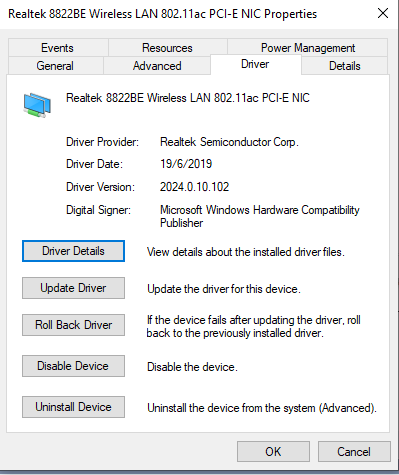 Version listed on Asus website QUOTE(firdausbhari @ Jun 2 2021, 02:36 PM) u might wanna try to change 5ghz settings to only AC and 80mhz Unfortunately, there is no AC only option for me. 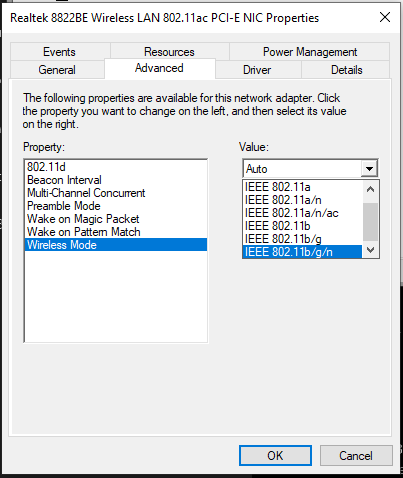 This post has been edited by RayleighH: Jun 4 2021, 12:49 AM This post has been edited by RayleighH: Jun 4 2021, 12:49 AM |
|
|
|
|
|
firdausbhari
|
Jun 4 2021, 02:07 AM
|
|
|
QUOTE(RayleighH @ Jun 4 2021, 12:45 AM) In fact, for some reason, the driver now is a newer version than the one listed in the Asus website. Screenshot of my wireless driver: Version listed on Asus websiteUnfortunately, there is no AC only option for me. wifi settings in asus web login |
|
|
|
|
|
SUSceo684
|
Jun 4 2021, 02:12 AM
|
|
|
Asus router works better if you use intel wifi [7260/8265] dep on ur machine slot
|
|
|
|
|
|
TSRayleighH
|
Jun 8 2021, 08:10 PM
|
Getting Started
|
After some further digging around the internet on this matter, it seems that this issue is quite common on earlier versions of Asus TUF models. Many place the blame on the supposedly cheapo stock Realtek wifi card that came with the laptop. It seems that this wifi card has issues with being unable to utilize the 802.11ac protocol despite having the latest driver or even rolling back to an earlier versions. I've replaced the wifi card with an Intel AC9260NGW NGFF and now I'm able to obtain maximum capacity of my internet package. RM60, including shipping, from a China retailer through Shopee.  Thanks for all your help anyway. Appreciate it much. |
|
|
|
|
|
Blackthorn
|
Feb 25 2022, 05:25 PM
|
|
|
QUOTE(RayleighH @ Jun 8 2021, 08:10 PM) After some further digging around the internet on this matter, it seems that this issue is quite common on earlier versions of Asus TUF models. Many place the blame on the supposedly cheapo stock Realtek wifi card that came with the laptop. It seems that this wifi card has issues with being unable to utilize the 802.11ac protocol despite having the latest driver or even rolling back to an earlier versions. I've replaced the wifi card with an Intel AC9260NGW NGFF and now I'm able to obtain maximum capacity of my internet package. RM60, including shipping, from a China retailer through Shopee. Thanks for all your help anyway. Appreciate it much. thanks for the info bro. I just bought a 2ndhand laptop FX505DD and having same issue to connect 5ghz. tried so many method still failed. and now I know that the culprit was the Wifi card itself. btw can this Asus FX505D support killer wifi card? |
|
|
|
|
|
PRSXFENG
|
Feb 25 2022, 06:05 PM
|
|
|
QUOTE(Blackthorn @ Feb 25 2022, 05:25 PM) thanks for the info bro. I just bought a 2ndhand laptop FX505DD and having same issue to connect 5ghz. tried so many method still failed. and now I know that the culprit was the Wifi card itself. btw can this Asus FX505D support killer wifi card? Just make sure the wifi card is pcie and not cnvio Intel AX200 good choice rn |
|
|
|
|
|
BenYeeHua
|
Feb 25 2022, 10:27 PM
|
|
|
QUOTE(Blackthorn @ Feb 25 2022, 05:25 PM) thanks for the info bro. I just bought a 2ndhand laptop FX505DD and having same issue to connect 5ghz. tried so many method still failed. and now I know that the culprit was the Wifi card itself. btw can this Asus FX505D support killer wifi card? As above, but because of covid, Intel AX200 have price increased a lot, at least 1.75x... Also intel are bad support for BT + WiFi, so if you don't care about BT but highest WiFi speed, then it is fine. |
|
|
|
|
|
tj01
|
Feb 27 2022, 08:08 AM
|
New Member
|
check if there is a setting at the AP to turn off WPA3 and disable PMF
|
|
|
|
|
|
PRSXFENG
|
Feb 27 2022, 09:23 AM
|
|
|
QUOTE(BenYeeHua @ Feb 25 2022, 10:27 PM) As above, but because of covid, Intel AX200 have price increased a lot, at least 1.75x... Also intel are bad support for BT + WiFi, so if you don't care about BT but highest WiFi speed, then it is fine. I think cheapest now is around RM99 Also tbh BT + Wifi is okay in my experience, it's even worse on Mediatek wifi6 cards |
|
|
|
|
|
BenYeeHua
|
Feb 27 2022, 10:07 PM
|
|
|
QUOTE(PRSXFENG @ Feb 27 2022, 09:23 AM) I think cheapest now is around RM99 Also tbh BT + Wifi is okay in my experience, it's even worse on Mediatek wifi6 cards Or Realtek network card 1Gbps over LAN cable, that experience is... Worst ever. |
|
|
|
|



 Quote
Quote




 0.0206sec
 0.83
0.83
 5 queries
 GZIP Disabled