Welcome Guest ( Log In | Register )

4 Pages < 1 2 3 4 >Bottom

Outline · [ Standard ] · Linear+

 Disney+Hotstar MY is AVAILABLE NOW!, On all supported platform

views
     
jimmychangas
post Jun 5 2021, 12:11 AM

Getting Started
**
Junior Member
149 posts

Joined: Jul 2012


QUOTE(joeblow @ Jun 4 2021, 05:30 PM)
Wow I just installed this CloudFlare on my PC. It works and rocks!!! Don't even need VPN to watch PH... haha. Many thanks.

For LG I give up. Since my PC is linked to TV just have to use PC to watch on TV. Just no soundbar.

The resolution not very great, and unlike Netflix this disney+ doesn't allow me to choose and force to be in HDR. Only Automatic based on your bandwidth and my Unifi here speed not very stable.
*
Yours is SG D+ account right? Do you get the full Star content including Deadpool those?
jimmychangas
post Jun 5 2021, 12:27 PM

Getting Started
**
Junior Member
149 posts

Joined: Jul 2012


QUOTE(WickyWeeky @ Jun 5 2021, 11:38 AM)
Yeah got star full content if use cloudflare vpn. I subscribed disney plus 2 days ago and use the 1.1.1.1 vpn, much better than shitstar thats for sure. Abit susah if wanna watch on smart tv. Better use pc or android tv.
*
Thanks man. I have this cheap TCL 4k TV that comes with Android TV lol so it might work
jimmychangas
post Jun 5 2021, 05:31 PM

Getting Started
**
Junior Member
149 posts

Joined: Jul 2012


QUOTE(stormstrider @ Jun 5 2021, 05:14 PM)
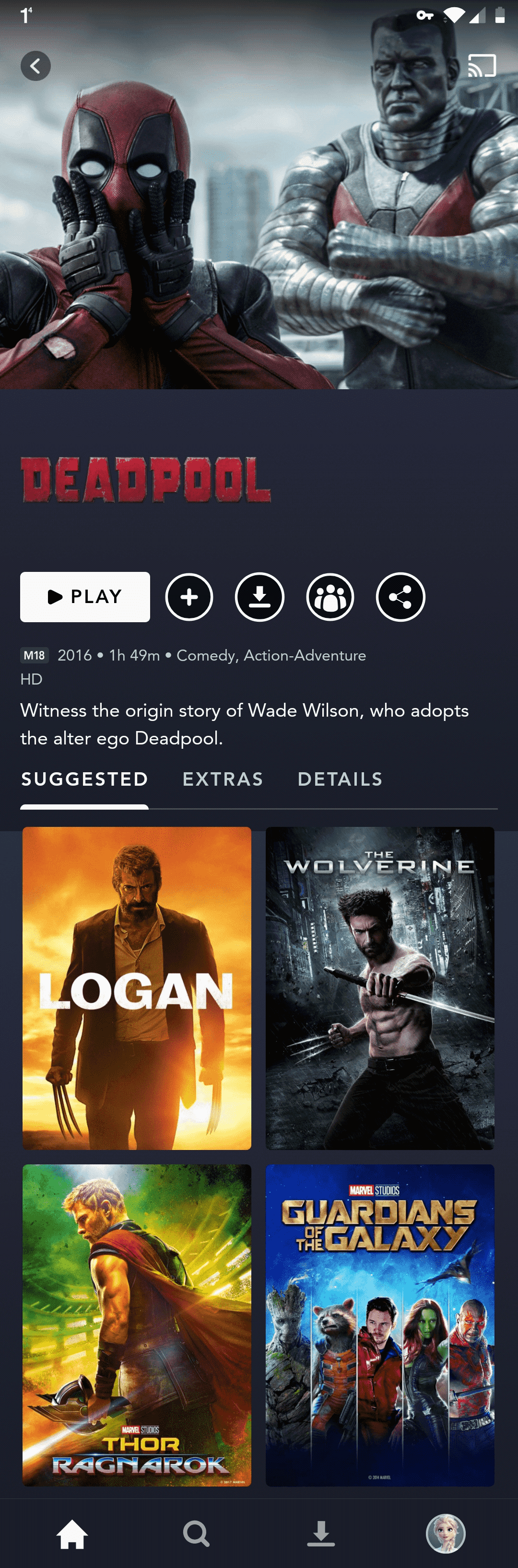
App latest from Google Play. I've already clear cache and data. Even restart my phone but still not available. Reason i ask is because i saw you show screenshot of deadpool and logan movies. Disney+ Canada and Australia though have Star channel doesn't have those two movies. That's why i try to go into Disney+ SG.
*
Actually our Malaysia D+H got Deadpool 1 and 2, as well as Logan. Just that I have found the following:
- do not have English subtitles
- playback speed is sped up (like 1.05x) no idea why
- shortened runtime due to suspected censorship
jimmychangas
post Jun 5 2021, 09:47 PM

Getting Started
**
Junior Member
149 posts

Joined: Jul 2012


QUOTE(stormstrider @ Jun 5 2021, 06:01 PM)
I use VPN to enter other country Disney+. Like i said i can use Disney+ AUS or Disney+ CAD where both have Star channel. But both done have Deadpool and Logan which i interested to watch.

If we use VPN mean the library contents also changed right? Mine is Disney+ US. Bought long time ago. Subscribe with RM though... not in USD.
*
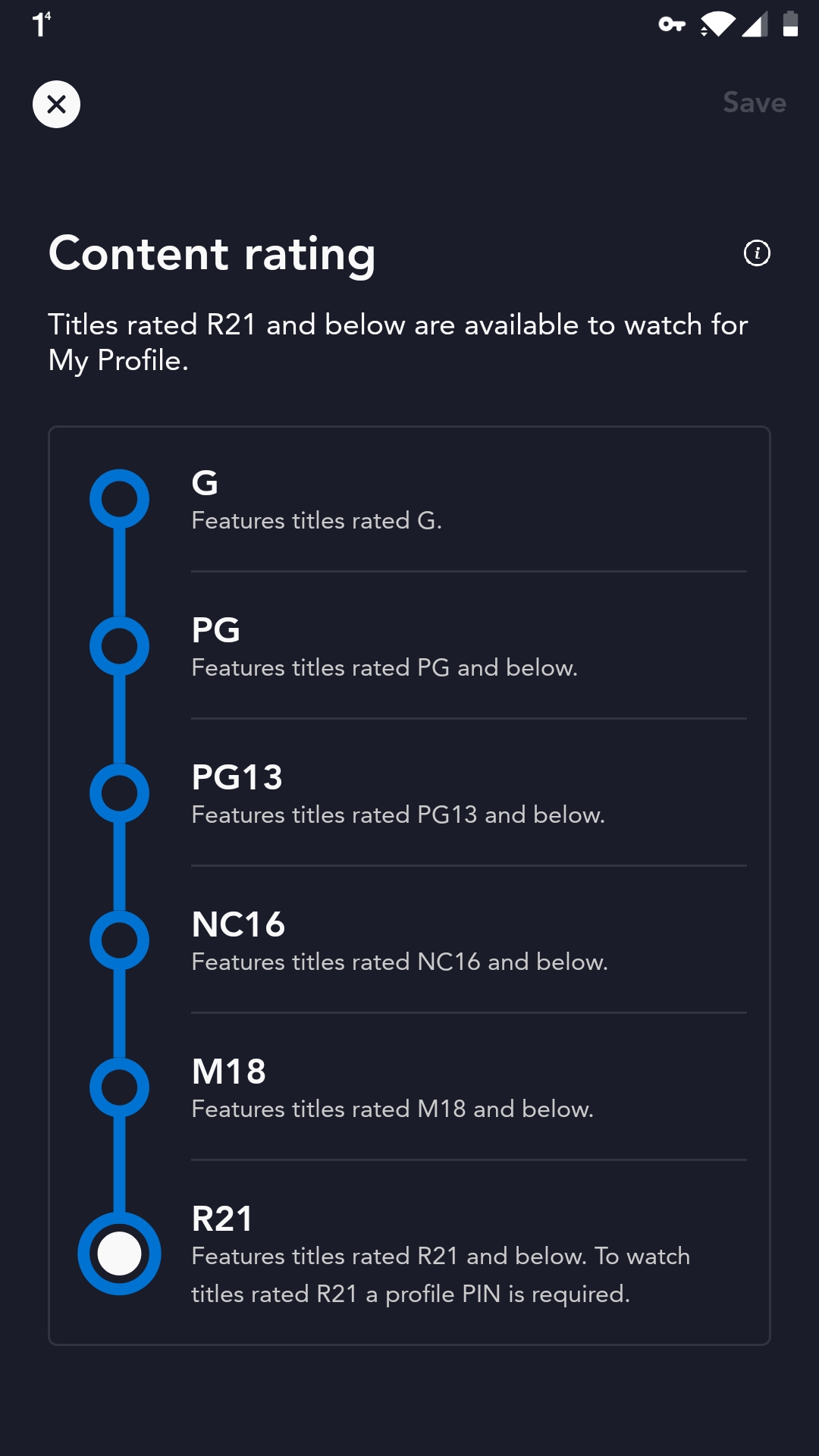
You can check the content ratings settings in your account. If it shows TV-14 at the last one, means you have US account and thus even if you VPN to Singapore you will have a lot of content hidden from you due to the US ratings.

You need the account to be in other countries in order for the ratings to show numbers so that you get full content from SG.
jimmychangas
post Jun 6 2021, 08:58 AM

Getting Started
**
Junior Member
149 posts

Joined: Jul 2012


QUOTE(joshhd @ Jun 6 2021, 12:09 AM)
It seems to me that they just take the existing video copy of movies that is meant to be shown on TV channels like Fox Movies?

As you mentioned playback speed sped up, it seems to me that the movie is being speed up from 24fps into 25fps from their end (There's nothing we can do about it).
fps = frames per second
You can Google more about "PAL speedup" if you interested to know why TV broadcasters do that to 24fps content. Do note that PAL speedup is only used for 24fps content.
It is where the 24fps content is being sped up by exactly 4% to matches the PAL TV standard frame rate of 25fps, and also you'll realise the audio pitch is slightly higher than the original as a result of the speedup.
That also explains part of the reason why the movie runtime is shorter than original. Another reason, may be due to some scenes have been cut/censored.

I don't know why didn't they use the original 24fps copy of the movie to put it on Disney+ Hotstar....
Instead, they use back the already sped-up 25fps version of the movie and let Disney+ Hotstar viewers watch that version instead hmm.gif  hmm.gif

And as of why no English subtitles... Because Fox Movies channels don't even offer English subtitles to viewers?  hmm.gif
*
This is a very good explanation! Thanks for that!

jimmychangas
post Jun 6 2021, 10:46 PM

Getting Started
**
Junior Member
149 posts

Joined: Jul 2012


QUOTE(khainiz94 @ Jun 6 2021, 02:58 PM)
Yep.
But so far only BigPay card is the most easiest to link.
*
Bigpay best exchange rate I've seen.
I subscribed USD 6.99 and BigPay charge me RM28.90
jimmychangas
post Jun 7 2021, 11:48 AM

Getting Started
**
Junior Member
149 posts

Joined: Jul 2012


QUOTE(WickyWeeky @ Jun 7 2021, 09:52 AM)
How you get charged with bigpay? I tried to use mine cannot. Said can detect MY country
*
Ok here's what I did, guided by @khainiz94
Please note that this only applies to Android.
What you need before you begin:

1. An Android phone
2. Your primary Google account configured with a valid payment method (if you want to pay in RM)
3. A spare, secondary Google account (if you don't have one, go ahead and create it)
4. The CloudFlare WARP app. This app is a godsend
5. Understand that these steps will allow you to create a new international Disney+ account and subscription (nothing to do with Disney+ Hotstar)
6. Read through all steps first before you actually begin, because there are a few options down the road for you to choose depending on your needs.
7. Understand that the success rate is not guaranteed. Both @khainiz94 and I are not liable for any unintended outcomes from this.

Steps I took:
1. In your phone's Google Play store, add your spare Google account, and make sure Google Play has selected the spare account for downloading apps (you can confirm by tapping the icon on the top right corner)

2. Go to pay.google.com, login using your spare account. There, add a new payment method with your BigPay card. Make sure you also configure the country/region to United States. You will need a full U.S. billing address for this, but you can easily google "random address generator" to get a random U.S. address and put it in.

3. Once successful, go back to Google Play store on your phone. At this point, your spare account should already be set to United States, and you should be able to download the Disney+ app (not Disney+ Hotstar) directly from Play store without VPN. If you already have the app sideloaded to your phone, you can ignore this step. If you want to remove the sideloaded app and install from Play store, that's fine too.

4. Open up the WARP app and turn it on.

5. If you have an existing international Disney+ account, log out from the app, and then clear cache for the app in phone settings.

6. Open Disney+ app, and sign in. If you do not have an account, go ahead and create one.

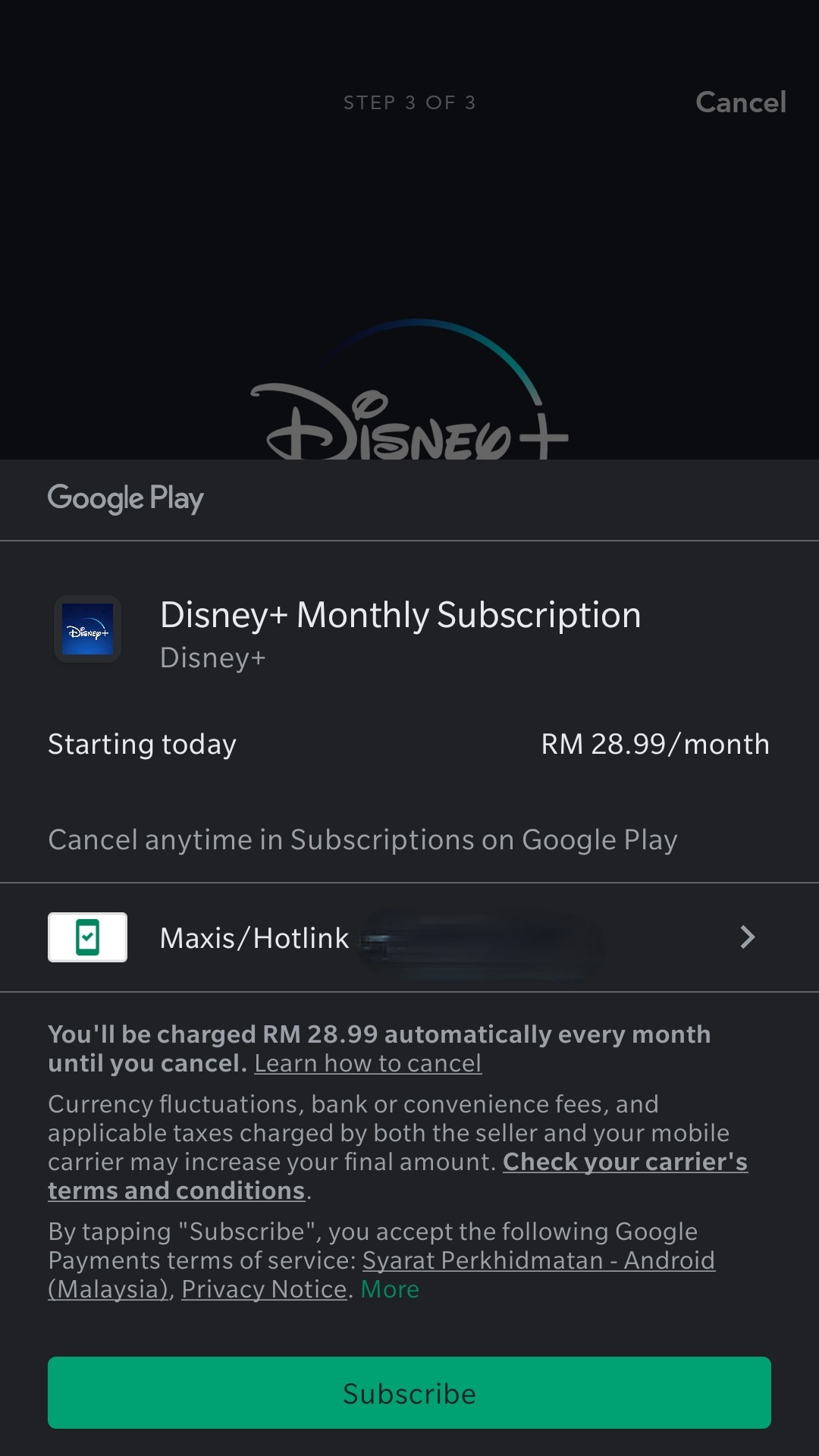
7. Because your spare account is set to the United States, in the Disney+ subscription page it will show you U.S. subscription prices (USD6.99 per month). If you select the monthly option, the Google Play pop up should appear and will ask you if you want to proceed with subscribing for USD6.99

From here onwards you have 2 options.
If you want to pay in RM:
8. Cancel the Google Play confirmation pop up, but do not quit the Disney+ app
9. Go to your phone settings > Accounts > remove the spare Google account from your phone. This will remove it from Google Play as well.
10. Go back to the Disney+ app, and tap the monthly option again. The Google Play pop up will re-appear, but this time it should show the price in RM. At the time of this writing, it showed me RM28.99
11. Proceed to subscribe and pay using your primary Google account in RM.
12. Login to Disney+ using your newly subscribed account.

Caveats:
- For my case, this did not work. About 2 or 3 seconds after the pop up with prices in RM, it disappears immediately and Disney+ throws an error. You will need to re-add back your spare account to Google Play, clear cache on the Disney+ app, and try again. I tried this 4 to 5 times. Same issue.

With that, I resorted to the 2nd option:
8. Proceed to subscribe and pay using the spare Google account (that is configured with the BigPay card)
9. You should receive a notification from BigPay app about the confirmation of payment, as well as the amount. (I was charged RM28.90)
10. Login to Disney+ using your newly subscribed account.

If you followed the 2nd option, you're not done yet.
- This new Disney+ account that you have subscribed, it will be based in the U.S. because it follows the region set in your spare Google account (which is set to United States)
- As a result, while you do have a valid Disney+ account, the content ratings location is also set to the U.S. which means you can only watch contents at the maximum rating of TV-14.
- If you VPN to Singapore to try to access Singapore Disney+ R-rated contents, you won't be able to due to your U.S. content ratings configuration of TV-14. You will basically access a reduced content library.

To fix this, you have 2 options:
- Stop at step 7 above, and then backtrack to Step 2. Instead of setting your spare account to the U.S. in step 2 above, set it to Singapore instead. However this will cause the Disney+ app to show the subscription fees in SGD, which is SGD11.98 at the time of this writing (more expensive than U.S.)

**OR**

- Proceed with subscribing for the U.S. Disney+ account. With WARP still switched on, contact Disney+ support and request them to change your Disney+ account location and content ratings location to Singapore. They will ask you for a valid Singaporean zipcode and also a valid Singaporean IP address before they can make the change. This should allow you to regain access to R-rated contents (up to M21 rating), but it also results in a loophole where you are paying USD6.99 monthly, but your account is set to Singapore (where the subscription fee is higher). I cannot guarantee if Disney+ support will continue to do this; they might discover this lubang and will stop all future requests to change location. They might just ask you to cancel the existing subscription and re-subscribe with a new account where the payment comes from a Singaporean Google Play account.

For me, I went with the 2nd option and it worked for me. But because I paid the subscription using my spare account set in the U.S., in the next payment I'm not sure if that will "kick" my Disney+ account location and content ratings location back to the U.S. If it did, then I'll have to cancel the subscription and resort to the first option (set spare account region to Singapore and pay the higher monthly fees). UPDATE (6th July 2021): After the auto renewal, I can confirm my Disney+ account remained the same; content ratings settings untouched. Which is good.

Sekian.

This post has been edited by jimmychangas: Jul 6 2021, 09:41 AM

jimmychangas
post Jun 7 2021, 02:14 PM

Getting Started
**
Junior Member
149 posts

Joined: Jul 2012


QUOTE(ahemdolah @ Jun 7 2021, 01:10 PM)
» Click to show Spoiler - click again to hide... «


Wow! Thank you. I actually just missed 1 step to get it in RM yesterday.

Made mistake by closing the Disney+ app before removing the US google account.

» Click to show Spoiler - click again to hide... «
Glad it worked for you. So you did not have the issue I had where the Google Play pop up disappear on its own?
jimmychangas
post Jun 7 2021, 02:30 PM

Getting Started
**
Junior Member
149 posts

Joined: Jul 2012


QUOTE(ahemdolah @ Jun 7 2021, 02:25 PM)
No issue at all, first time try and it went through without any issue.
*
that means my old Huawei P9 was the root cause. hahahaha
I could have done it on my primary device (Pixel 5), but because I'm running the Android 12 beta, whenever i tried to remove the spare Google account the damn thing crashed.
jimmychangas
post Jun 7 2021, 04:01 PM

Getting Started
**
Junior Member
149 posts

Joined: Jul 2012


QUOTE(khainiz94 @ Jun 7 2021, 03:37 PM)
Anyway just a small info for everyone.
For the steps jimmy just posted.

I tried for the other apps like Peacock, Paramount+ and any other US apps, it does not show the RM price, only USD price but you can pay via your MY account.

That means Disney+ International should be launched in MY due to price is available inside the app, but Disney made a stupid decision to launch D+H app.
Oh well.

P.S. Now all of you seen the loophole, now you can subscribe to US services directly via your BigPay card without having to go buy Google Play Gift Card or resort to iTunes Gift Card.
But of course, paying in USD will depend on the current exchange rate of USD to MYR.
*
that means i'm the only one here who used my spare Google account (set to U.S.) to subscribe and pay using USD.
What's left now is to see by end of the month, after using the same Google account to renew, let's see if that kicks my Disney+ account content ratings location back to U.S. or not.
jimmychangas
post Jun 7 2021, 06:40 PM

Getting Started
**
Junior Member
149 posts

Joined: Jul 2012


QUOTE(khainiz94 @ Jun 7 2021, 06:21 PM)
Most VPNs with server to SG to access Disney+ does not work.
Dunno why.
I suggest connect to different server like CA or AU.
And you install the D+ or D+H app?
Sideload or direct from Play Store?
Show us some pics.
*
I have an active Surf shark VPN subscription. The Singapore gateway works but it's damn slow. Can load catalog but can't stream.
jimmychangas
post Jun 7 2021, 06:40 PM

Getting Started
**
Junior Member
149 posts

Joined: Jul 2012


QUOTE(ahemdolah @ Jun 7 2021, 06:21 PM)
Need a mouse, or air mouse to use the sideloaded warp app. Tried yesterday.
*
Can you confirm what version of the app you side loaded that worked?
jimmychangas
post Jun 7 2021, 06:42 PM

Getting Started
**
Junior Member
149 posts

Joined: Jul 2012


I noticed another thing about WARP... It only works with my home wifi network.

Just now I was outside and waiting while my dad is getting his vaccine, I used LTE and WARP.... Doesn't work. Terpaksa pakai VPN to Canada which works
jimmychangas
post Jun 7 2021, 08:20 PM

Getting Started
**
Junior Member
149 posts

Joined: Jul 2012


QUOTE(evilhomura89 @ Jun 7 2021, 07:49 PM)
Still couldn't subscribe - payment wouldn't go through
I was wondering if i should resolve to buying google gift card from amazon  rclxub.gif
*
What error are you getting?
jimmychangas
post Jun 7 2021, 08:30 PM

Getting Started
**
Junior Member
149 posts

Joined: Jul 2012


QUOTE(khainiz94 @ Jun 7 2021, 08:28 PM)
Eh I use WARP with my phone with LTE ok je.
Maybe your Android 12 Beta giving issue?
😂😂😂
*
Dunno wey, what Telco you using? Mine is DiGi
jimmychangas
post Jun 8 2021, 09:52 AM

Getting Started
**
Junior Member
149 posts

Joined: Jul 2012


QUOTE(stormstrider @ Jun 8 2021, 07:41 AM)
Mine previously Disney+ US cost RM294.99 anually. Then i change location to Disney+ SG based account.
Mine got discount RM5.00.. lol laugh.gif
*
you paid using Google Play? What country your Google account is set to?
jimmychangas
post Jun 8 2021, 12:36 PM

Getting Started
**
Junior Member
149 posts

Joined: Jul 2012


QUOTE(ahemdolah @ Jun 7 2021, 06:21 PM)
Need a mouse, or air mouse to use the sideloaded warp app. Tried yesterday.
*
i still couldn't get it to work on my Android TV.
Switched it on but it still says "disconnected" along with "1.1.1.1 is not configured on your device"
Any ideas?
jimmychangas
post Jun 8 2021, 01:56 PM

Getting Started
**
Junior Member
149 posts

Joined: Jul 2012


QUOTE(ahemdolah @ Jun 8 2021, 12:44 PM)
You still need a mouse or air mouse even though a remote can navigate and pressed the button.

https://streamable.com/txkh9a

When there is an action in warp app with no arrow, it mean I am using the remote. I won't work.
*
thank you bro. It's working now LOL
the modified Warp+ did not work for me, so i just sideloaded the regular Warp app and VOILAAAAAA
jimmychangas
post Jun 8 2021, 02:47 PM

Getting Started
**
Junior Member
149 posts

Joined: Jul 2012


QUOTE(ahemdolah @ Jun 8 2021, 02:03 PM)
With normal remote? Can share the apk? I want to avoid the air mouse if possible. 🤭
*
no bro, i followed your advice and paired a bluetooth mouse and tekan

i downloaded from evozi, put in the Google Play store link for the app https://play.google.com/store/apps/details?...one&hl=en&gl=US

jimmychangas
post Jun 8 2021, 07:31 PM

Getting Started
**
Junior Member
149 posts

Joined: Jul 2012


QUOTE(KrankZ @ Jun 8 2021, 06:12 PM)
is Loki available 12am wed Malaysia?
*
Should be 4.01pm Wednesday Malaysia time

4 Pages < 1 2 3 4 >Top
 

Change to:
| Lo-Fi Version
0.0218sec    0.58    7 queries    GZIP Disabled
Time is now: 2nd December 2025 - 05:48 PM