Joined: Jan 2021
From: Malaysia, Kuala Lumpur, Cheras Business Center
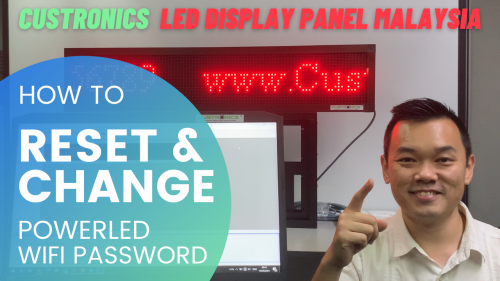
Item(s): FREE Tutorial - How to RESET | CHANGE | RESTORE POWERLED WIFI Password on Programmable LED Display Panel | TF-S6UW | WIFI LED Display restoration | Recover WIFI Password
Package includes: Do you still remember your WIFI password on your LED Display panel? If you have forgotten your password, the video link shown below guide you through How to RESET & Change the WIFI password on the LED Display panel?
Joined: Jan 2021
From: Malaysia, Kuala Lumpur, Cheras Business Center
QUOTE(# led display panel @ May 29 2021, 04:59 PM)
Item(s): FREE Tutorial - How to RESET | CHANGE | RESTORE POWERLED WIFI Password on Programmable LED Display Panel | TF-S6UW | WIFI LED Display restoration | Recover WIFI Password
Package includes: Do you still remember your WIFI password on your LED Display panel? If you have forgotten your password, the video link shown below guide you through How to RESET & Change the WIFI password on the LED Display panel?
Reason for sale: share the knowledge who have difficulty on connecting your LED display panel via WIFI <iframe width="640" height="360" src="https://www.youtube.com/embed/ZzFAk8CWIAE" title="YouTube video player" frameborder="0" allow="accelerometer; autoplay; clipboard-write; encrypted-media; gyroscope; picture-in-picture" allowfullscreen></iframe> Contact Us For Further Inquiry: Jim@custronics.com
How to Reset WIFI password for TF-S6UW0 l TF-A6UW l TF-M6W/TF-WF-M l TF-M6UW l TF-C6UW/TF-WF-C l TF-E6UW/TF-E5UW l TF-F6UW/TF-F5UW l PowerLED? 1. Connect the 5VDC Power to the main controller unit (MCU). How to reset & Change Power LED WIFI Password
2. From your laptop WiFi, search for TF-WIFI-XXXX WiFi hotspot. If you are not able to locate this hotspot name, it means previous user has changed the name.
3. Make sure the Main controller LED switch is turned on (Red & Blue) - If the light is off, the main controller board might be not working.
4. Look for a "push button" (black in colour) on the MCU that is meant for Test and Reset purpose. Press once, you will notice that there are few patterns display on the LED Display panel.
5. Press & hold the [push button] for 5seconds until the blue light turns off.
5a. Press & hold the [push button] for 5 seconds to restart the LED display panel (blue light blink).
6. Once you have reset the MCU, search for the default WiFi name "TF-WIFI-XXXX" and the password "88888888".
**You may repeat Step 5 & 5a if you failed to locate the Default WiFi name.
If you tried the above method for few times but still not able to locate the hotspot name, do try another way to reconfigure the WiFi setting; [Export to USB] with PowerLED software and program through MCU USB port.
Set the WiFi name in [SSID] column and enter in your desired password to the [password] section.
How to Reset WIFI password for TF-S6UW0 l TF-A6UW l TF-M6W/TF-WF-M l TF-M6UW l TF-C6UW/TF-WF-C l TF-E6UW/TF-E5UW l TF-F6UW/TF-F5UW l PowerLED? Resetting TF-S6UW type WIFI card manually from the main controller card
1. Connect the 5VDC Power to the main controller unit (MCU). More Information
2. From your laptop WiFi, search for TF-WIFI-XXXX WiFi hotspot. If you are not able to locate this hotspot name, it means previous user has changed the name.
3. Make sure the Main controller LED switch is turned on (Red & Blue) - If the light is off, the main controller board might be not working.
4. Look for a "push button" (black in colour) on the MCU that is meant for Test and Reset purpose. Press once, you will notice that there are few patterns display on the LED Display panel.
5. Press & hold the [push button] for 5seconds until the blue light turns off.
5a. Press & hold the [push button] for 5 seconds to restart the LED display panel (blue light blink).
6. Once you have reset the MCU, search for the default WiFi name "TF-WIFI-XXXX" and the password "88888888".
**You may repeat Step 5 & 5a if you failed to locate the Default WiFi name.
If you tried the above method for few times but still not able to locate the hotspot name, do try another way to reconfigure the WiFi setting; [Export to USB] with PowerLED software and program through MCU USB port.
Set the WiFi name in [SSID] column and enter in your desired password to the [password] section.
Specification :- Model
State
TF-S6UW0
Batch supply
Function introduction More arbitrary division,dazzle colour border area Usage indoor/outdoor Pixel Single colour 1280x16;640x32 Double colour 640x16;320x32 USB function: USB program update, USB brightness adjustment, USB panel setup. Settings stored as a file format and do not affect the original document in USB. SD card/mini-SD card is Compatible when using USB. Ports one 08 port; two 12 ports Scanning mode support 1/16,1/8,1/4,1/2,Scan the monochrome,double color module. Storage 2M Program number Support at most 200 programs,each program support 16 partitions simultaneous play,each image-text 200 messages.(Quantity in storage space under the premise of memory) Display rain,fountain,scroll and much more Border support many Color border,Picture border Flash format support GIF,SWF
Joined: Jan 2021
From: Malaysia, Kuala Lumpur, Cheras Business Center
Importance of Sustainable Electronics
Sustainable electronics are electronic products or made with sustainable practices and materials. With this said, the products are made as below:
No toxic chemicals in the products
All parts are recyclable or reusable
Parts are made from repurposed materials
Carbon emissions are kept as low as possible during production
With the improvement of economy and technology advancement from time to time, natural resources are becoming scarce in the world. It is important for us to make a change in our economy direction now and sustain the natural resources for as long as we can, for our future.
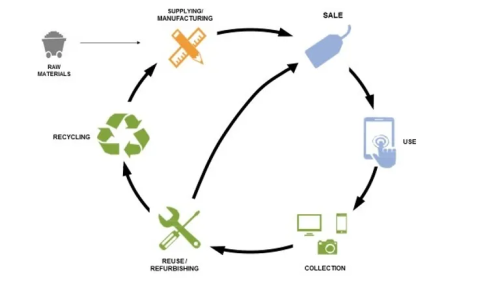
Repair: Custronics products are designed for easy repair. Almost every parts can be dismantled, so that the damaged components or parts can be changed without changing the entire product. This will be a waste if other useable components or parts are being thrown away.
Refurbish: With the collection from the repair of the damaged components, Custronics use it to refurbish and reuse it on other different products system in order to reduce e-waste.
Reinvent: With Custronics own in-house R&D team, Custronics will always innovates and look for product improvements in order to increase the product durability. By this mean, the current product are able to be upgraded in order to adapt to new technologies such as 5G wireless technology and IIOT cloud dashboard.
Contact Us For Further Inquiry: Jim@custronics.com


 May 29 2021, 04:59 PM, updated 7d ago


 Quote
Quote


 0.0190sec
 0.41
0.41
 5 queries
 GZIP Disabled