Welcome Guest ( Log In | Register )

Outline · [ Standard ] · Linear+

 Unifi fibre lagging badly for Dragon Nest Sea

views
     
TSalphacross
post May 16 2021, 12:03 AM, updated 5y ago

Getting Started
**
Junior Member
59 posts

Joined: Jul 2017
Hi Lowyat sifus,

Any Unifi or telco experts here can explain and help why dragon nest is very lag especially their PVP mode.
it's either packet loss or lag cause i can see my opponent blinking here and there
https://www.youtube.com/watch?v=B4vGdaV8xYs

it seems like im the one who's lagging because dragon nest so called support told me that there are unstable connection issue from my ISP which is Unifi.

I tried using my another laptop connecting to my network, still the same. (im playing on PC)

I tried playing using my laptop on my friend network( also unifi), still the same lag.

im using 300mbps and im the only one using it. no downloading no opening youtube, only opening the game.

This post has been edited by alphacross: May 16 2021, 12:08 AM
go626201
post May 16 2021, 12:35 AM

Regular
******
Senior Member
1,882 posts

Joined: Sep 2017
QUOTE(alphacross @ May 16 2021, 12:03 AM)
Hi Lowyat sifus,

Any Unifi or telco experts here can explain and help why dragon nest is very lag especially their PVP mode.
it's either packet loss or lag cause i can see my opponent blinking here and there
https://www.youtube.com/watch?v=B4vGdaV8xYs

it seems like im the one who's lagging because dragon nest so called support told me that there are unstable connection issue from my ISP which is Unifi.

I tried using my another laptop connecting to my network, still the same. (im playing on PC)

I tried playing using my laptop on my friend network( also unifi), still the same lag.

im using 300mbps and im the only one using it. no downloading no opening youtube, only opening the game.
*
get a SG vpn,that is the only way to fix your problem now.
Or u can complain to TM everday.(The permanent solution but u need to complain everyday until they solve the problem.
Or use your data to play when u need to pvp.

This post has been edited by go626201: May 16 2021, 12:35 AM
TSalphacross
post May 16 2021, 12:59 AM

Getting Started
**
Junior Member
59 posts

Joined: Jul 2017
QUOTE(go626201 @ May 16 2021, 12:35 AM)
get a SG vpn,that is the only way to fix your problem now.
Or u can complain to TM everday.(The permanent solution but u need to complain everyday until they solve the problem.
Or use your data to play when u need to pvp.
*
im using mudfish VPN, but the problem still persist. maybe the VPN is too dirt cheap.
i wanted to complain to TM but im not sure what to complain, do i tell them that im having hard time connecting to SG server?

will changing ISP fix the issue tho?
heLL_bOy
post May 16 2021, 01:14 AM

Regular
******
Senior Member
1,350 posts

Joined: Nov 2004
From: HEAVEN & HELL


QUOTE(alphacross @ May 16 2021, 12:59 AM)
im using mudfish VPN, but the problem still persist. maybe the VPN is too dirt cheap.
i wanted to complain to TM but im not sure what to complain, do i tell them that im having hard time connecting to SG server?

will changing ISP fix the issue tho?
*
which server did you use for mudfish?
zuozi
post May 16 2021, 01:18 AM

Regular
******
Senior Member
1,267 posts

Joined: Oct 2009
QUOTE(alphacross @ May 16 2021, 12:59 AM)
im using mudfish VPN, but the problem still persist. maybe the VPN is too dirt cheap.
i wanted to complain to TM but im not sure what to complain, do i tell them that im having hard time connecting to SG server?

will changing ISP fix the issue tho?
*
never play dragon nest
the only mmorpg i play guild wars 2 for 8 year now , before im NA-north america server always lagging issue without reason , once i transfer to EU server problem solve but every year will having issue lag spike have to wait 2 week sometimes even month for back to normal if compare to NA and EU , NA are worst ping can up to 2k mostly whole year not playable

my point if you change your router or request TM reset port or changing ISP not going to help , been there done that ,like request TM replace their back end broadband terminal unit problem still not solve using VPN more terrible

i guess either dragon nest sea server having issue or full of junk or no idea where your connection has been route ? house using 800Mb shop using 100Mb is just a download speed wont effect much connection between you and game server

long time ago streamyx ping also 200 after unifi release until now ping still the same 200 for the game i play
TSalphacross
post May 16 2021, 02:21 AM

Getting Started
**
Junior Member
59 posts

Joined: Jul 2017
QUOTE(heLL_bOy @ May 16 2021, 01:14 AM)
which server did you use for mudfish?
*
I tried Malaysia server - KL Aliyun, Singapore - Azure 3, Singapore - Google 2 and other nodes, all of them also same issue.
There's still micro packet loss, but in PVP this is very crucial.

At first I thought even after using VPN, im still having lag issue and thought that the server has an issue, but I asked all my in game friends and they all said no issue during PVP.

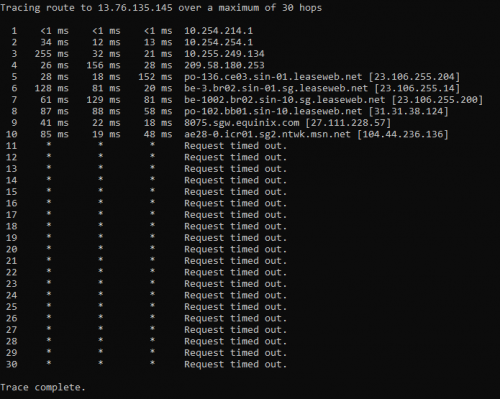
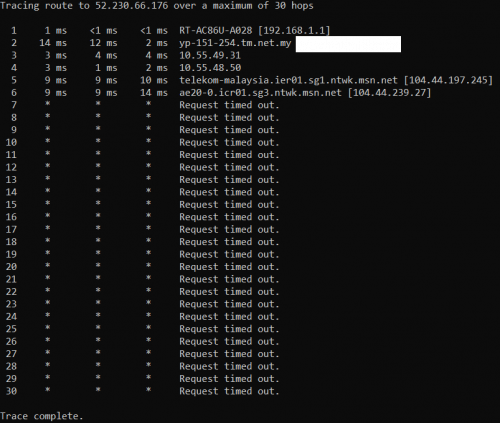
I tried to run tracert to the game server as well, and as expected, there's timed out request.
user posted image

And here's using the mudfish
user posted image

The IP address is found using resource monitor.

I also bought a new router thinking maybe ISP routers are unable to cope with the load, but the issue still persist. There goes RM600 :'(

QUOTE(zuozi @ May 16 2021, 01:18 AM)
never play dragon nest
the only mmorpg i play guild wars 2 for 8 year now , before im NA-north america server always lagging issue without reason , once i transfer to EU server problem solve but every year will having issue lag spike have to wait 2 week sometimes even month for back to normal if compare to NA and EU , NA are worst ping can up to 2k mostly whole year not playable

my point if you change your router or request TM reset port or changing ISP not going to help , been there done that ,like request TM replace their back end broadband terminal unit problem still not solve using VPN more terrible

i guess either dragon nest sea server having issue or full of junk or no idea where your connection has been route ? house using 800Mb shop using 100Mb is just a download speed wont effect much connection between you and game server

long time ago streamyx ping also 200 after unifi release until now ping still the same 200 for the game i play
*
have u never tried to play it in your friend house? with different ISPs. Cus Streamyx and Unifi still under TM.

This post has been edited by alphacross: May 16 2021, 02:21 AM
heLL_bOy
post May 16 2021, 03:12 AM

Regular
******
Senior Member
1,350 posts

Joined: Nov 2004
From: HEAVEN & HELL


QUOTE(alphacross @ May 16 2021, 02:21 AM)
I tried Malaysia server - KL Aliyun, Singapore - Azure 3, Singapore - Google 2 and other nodes, all of them also same issue.
There's still micro packet loss, but in PVP this is very crucial.

At first I thought even after using VPN, im still having lag issue and thought that the server has an issue, but I asked all my in game friends and they all said no issue during PVP.

I tried to run tracert to the game server as well, and as expected, there's timed out request.
user posted image

And here's using the mudfish
user posted image

The IP address is found using resource monitor.

I also bought a new router thinking maybe ISP routers are unable to cope with the load, but the issue still persist. There goes RM600 :'(
have u never tried to play it in your friend house? with different ISPs. Cus Streamyx and Unifi still under TM.
*
you on LAN or wifi connection when playing game?

your gaming friends also using unifi fiber or ?

your tracert result getting time out request because server or CDN has block ICMP ping request so unable to get further ping/tracert back to you.


go626201
post May 16 2021, 10:11 AM

Regular
******
Senior Member
1,882 posts

Joined: Sep 2017
Try update your windows and graphic driver.
And confirm the game is running on your dedicated graphic card.
I think if using vpn or changing router also not help,then that might not be a network problem.
TSalphacross
post May 16 2021, 10:48 AM

Getting Started
**
Junior Member
59 posts

Joined: Jul 2017
QUOTE(heLL_bOy @ May 16 2021, 03:12 AM)
you on LAN or wifi connection when playing game?

your gaming friends also using unifi fiber or ?

your tracert result getting time out request because server or CDN has block ICMP ping request so unable to get further ping/tracert back to you.
*
Im playing on LAN connection, most of my gaming friends are not malaysian, one of it is indonesian and he's using phone hotspot, and im amazed that it worked better than Unifi fiber.


QUOTE(go626201 @ May 16 2021, 10:11 AM)
Try update your windows and graphic driver.
And confirm the game is running on your dedicated graphic card.
I think if using vpn or changing router also not help,then that might not be a network problem.
*
ive updated my graphic drivers and windows to up to date, and confirmed that the game is running on my graphic card. if not a network problem, do you know any other possible problems?


Welp, i read the official TM Unifi thread, in there they mentioned that TM is having an issue connecting to SG server since it's MCO, raya etc and the pipe there is over congested. Seems like the only thing to do is complain to TM about this?

This post has been edited by alphacross: May 16 2021, 11:06 AM
zuozi
post May 16 2021, 11:24 AM

Regular
******
Senior Member
1,267 posts

Joined: Oct 2009
QUOTE(alphacross @ May 16 2021, 02:21 AM)
I tried Malaysia server - KL Aliyun, Singapore - Azure 3, Singapore - Google 2 and other nodes, all of them also same issue.
There's still micro packet loss, but in PVP this is very crucial.

At first I thought even after using VPN, im still having lag issue and thought that the server has an issue, but I asked all my in game friends and they all said no issue during PVP.

I tried to run tracert to the game server as well, and as expected, there's timed out request.
user posted image

And here's using the mudfish
user posted image

The IP address is found using resource monitor.

I also bought a new router thinking maybe ISP routers are unable to cope with the load, but the issue still persist. There goes RM600 :'(
have u never tried to play it in your friend house? with different ISPs. Cus Streamyx and Unifi still under TM.
*
I did mention my house using 800Mbps , shop 100 Mbps how far between this two locations around 14km

Streamyx I use very long time ago now playing gw2 still getting below 200 ping

Is not our or the game server problem sometime,is just the routing issue or the world router we route unlucky having issue? I'm not sure

So far the only thing I know at the end connection from KL exit to penang port I guess ,then only route to other country and I'm not sure is there any cable from JB to sg since I didn't search for it

And mostly everything you trace route is a waste of time most device are hidden this is why so many request time out ,if all devices still showing IP can simply attacked by ddos attack

If we want to get below 50 ping either game server at sg or in malaysia

And forgot to ask only recently you having this issue or all the way?
Because those server you mentioned too suspicious I guess not the actual server just a name port the way they setup

The time I get below 50 ping are playing cs source server hosting at sg the rest game I play mostly over 200

Anyway nothing much you can do just keep waiting until they're solve

This post has been edited by zuozi: May 16 2021, 11:40 AM

TSalphacross
post May 16 2021, 11:40 AM

Getting Started
**
Junior Member
59 posts

Joined: Jul 2017
QUOTE(zuozi @ May 16 2021, 11:24 AM)
I did mention my house using 800Mbps , shop 100 Mbps how far between this two locations around 14km

Streamyx I use very long time ago now playing gw2 still getting below 200 ping

Is not our or the game server problem sometime,is just the routing issue or the world router we route unlucky having issue? I'm not sure

So far the only thing I know at the end connection from KL exit to penang port I guess ,then only route to other country and I'm not sure is there any cable from JB to sg or not since I didn't search for it

And mostly everything you trace route is a waste of time most device are hidden this is why request time out after Malaysia,if all devices still showing IP can simply attacked by ddos attack

If we want to get below 50 ping either game server at sg or in malaysia

And forgot to ask only recently you having this issue or all the way?
Because those server you mentioned too suspicious I guess not the actual server just a name port the way they setup

The time I get below 50 ping are playing cs source server hosting at sg the rest game I play mostly over 200

Anyway nothing much you can do
*
from what i know, the game server is on Singapore, hosted by Starhub. Weird thing is, in game ping shows me im having 50-100ms ping, but the packet loss is unbearable.

Actually, this issue is happening since end of last year. At first, the packet loss is less and happens every few matches so thought maybe this is normal. But its getting worse and worse until to the point it happens on every matches.
zuozi
post May 16 2021, 11:42 AM

Regular
******
Senior Member
1,267 posts

Joined: Oct 2009
QUOTE(alphacross @ May 16 2021, 11:40 AM)
from what i know, the game server is on Singapore, hosted by Starhub. Weird thing is, in game ping shows me im having 50-100ms ping, but the packet loss is unbearable.

Actually, this issue is happening since end of last year. At first, the packet loss is less and happens every few matches so thought maybe this is normal. But its getting worse and worse until to the point it happens on every matches.
*
Possible sg now so much people WFH? cannot handle the load can causing all this issue or the game server cannot handle the load
heLL_bOy
post May 16 2021, 11:54 AM

Regular
******
Senior Member
1,350 posts

Joined: Nov 2004
From: HEAVEN & HELL


QUOTE(alphacross @ May 16 2021, 10:48 AM)
Im playing on LAN connection, most of my gaming friends are not malaysian, one of it is indonesian and he's using phone hotspot, and im amazed that it worked better than Unifi fiber.
ive updated my graphic drivers and windows to up to date, and confirmed that the game is running on my graphic card. if not a network problem, do you know any other possible problems?
Welp, i read the official TM Unifi thread, in there they mentioned that TM is having an issue connecting to SG server since it's MCO, raya etc and the pipe there is over congested. Seems like the only thing to do is complain to TM about this?
*
try to reach out your malaysian gaming friends and asked about this whether they encounter similar issue.

most indonesia provider have direct pipe to SG including Equinix SG/SGIX and their major telco there and their ping latency is higher by us.
heLL_bOy
post May 16 2021, 11:59 AM

Regular
******
Senior Member
1,350 posts

Joined: Nov 2004
From: HEAVEN & HELL


QUOTE(alphacross @ May 16 2021, 11:40 AM)
from what i know, the game server is on Singapore, hosted by Starhub. Weird thing is, in game ping shows me im having 50-100ms ping, but the packet loss is unbearable.

Actually, this issue is happening since end of last year. At first, the packet loss is less and happens every few matches so thought maybe this is normal. But its getting worse and worse until to the point it happens on every matches.
*
from the above screenshot that IPs are not belong to starhub and it was Azure SG. even you try local Aliyun vpn to connect also having issue i doubt the problem is from your side.

local aliyun ping to SG normally the ping is not higher then 10ms AFAIK even randomly spikes highest was 30ms - 40ms sometimes will bearable to run.
TSalphacross
post May 16 2021, 12:31 PM

Getting Started
**
Junior Member
59 posts

Joined: Jul 2017
QUOTE(zuozi @ May 16 2021, 11:42 AM)
Possible sg now so much people WFH? cannot handle the load can causing all this issue or the game server cannot handle the load
*
But Dragon nest support mentioned that they had no issue reported on their server, not sure whether it's true or not. But 1 thing i know is other players said im the one whos lagging and not them. even my friend said that when he matched with me.

QUOTE(heLL_bOy @ May 16 2021, 11:54 AM)
try to reach out your malaysian gaming friends and asked about this whether they encounter similar issue.

most indonesia provider have direct pipe to SG including Equinix SG/SGIX and their major telco there and their ping latency is higher by us.
*
I asked my friend, whos using TIME fiber, and he said that he never encountered any issues during PVP, but i never tested it. This makes me want to change ISPs but my contract is still long sad.gif

QUOTE(heLL_bOy @ May 16 2021, 11:59 AM)
from the above screenshot that IPs are not belong to starhub and it was Azure SG. even you try local Aliyun vpn to connect also having issue i doubt the problem is from your side.

local aliyun ping to SG normally the ping is not higher then 10ms AFAIK even randomly spikes highest was 30ms - 40ms sometimes will bearable to run.
*
maybe they had changed providers, I only knew that someone in this forum mentioned that the game is running on Starhub network long time ago.

Funny thing about aliyun is when I connected to the game using this node, I'm actually having worse micro lag/packet loss, to the point i see my opponent not moving, but at the same time i cant hit them. Then suddenly im dragged all over the map with their attacks. This doesn't happen if im not using VPN.

This post has been edited by alphacross: May 16 2021, 12:39 PM
go626201
post May 16 2021, 01:15 PM

Regular
******
Senior Member
1,882 posts

Joined: Sep 2017
QUOTE(alphacross @ May 16 2021, 12:31 PM)
But Dragon nest support mentioned that they had no issue reported on their server, not sure whether it's true or not. But 1 thing i know is other players said im the one whos lagging and not them. even my friend said that when he matched with me.
I asked my friend, whos using TIME fiber, and he said that he never encountered any issues during PVP, but i never tested it. This makes me want to change ISPs but my contract is still long sad.gif
maybe they had changed providers, I only knew that someone in this forum mentioned that the game is running on Starhub network long time ago.

Funny thing about aliyun is when I connected to the game using this node, I'm actually having worse micro lag/packet loss, to the point i see my opponent not moving, but at the same time i cant hit them. Then suddenly im dragged all over the map with their attacks. This doesn't happen if im not using VPN.
*
i downloaded the game and get the game ip to try 1st.
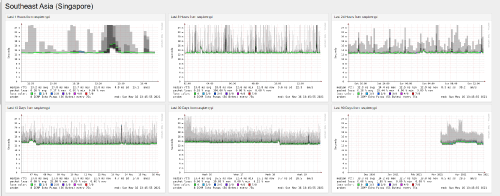
I will add the game server ip to my smokeping for monitoring as your network reference.
go626201
post May 16 2021, 01:48 PM

Regular
******
Senior Member
1,882 posts

Joined: Sep 2017
Update my research:
Now the dragon nest sea is hosted at Microsoft SG.
And normally this should not be any network issue occurs as Microsoft have peering with most isp.
(Previously is managed by Cherry but 2017 transfer back to developer managed the game so not longer hosted on starhub network)

And i give up to login the game...
Crap company ,cant register account with outlook...

Here give a Microsoft SG network reference with unifi.

user posted image
TSalphacross
post May 16 2021, 02:42 PM

Getting Started
**
Junior Member
59 posts

Joined: Jul 2017
QUOTE(go626201 @ May 16 2021, 01:48 PM)
Update my research:
Now the dragon nest sea is hosted at Microsoft SG.
And normally this should not be any network issue occurs as Microsoft have peering with most isp.
(Previously is managed by Cherry but 2017 transfer back to developer managed the game so not longer hosted on starhub network)

And i give up to login the game...
Crap company ,cant register account with outlook...

Here give a Microsoft SG network reference with unifi.

user posted image
*
Thank you for your hard work! you even downloaded the game.
Crap company indeed, not sure why they can't sent email to hotmail account.

Ive PMed you a test account if you would like to test some more.

What i have found that the IP address of the game keep changing depending on the map. When im in town im A IP address, when i go to PVP im B address, when im in a dungeon im C address.

I dont really understand what the attached image means, but from what i see there shouldnt be any problem right as there's a lot of greens.
go626201
post May 16 2021, 02:57 PM

Regular
******
Senior Member
1,882 posts

Joined: Sep 2017
QUOTE(alphacross @ May 16 2021, 02:42 PM)
Thank you for your hard work! you even downloaded the game.
Crap company indeed, not sure why they can't sent email to hotmail account.

Ive PMed you a test account if you would like to test some more.

What i have found that the IP address of the game keep changing depending on the map. When im in town im A IP address, when i go to PVP im B address, when im in a dungeon im C address.

I dont really understand what the attached image means, but from what i see there shouldnt be any problem right as there's a lot of greens.
*
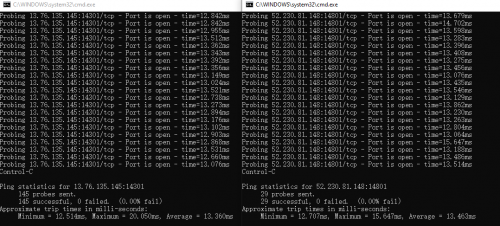
Just used your test account to get the game ip,and didn't found any problem from it.
user posted image

Update:
I think the problem is on the game server,not a network issue.
I just monitor the latency between the client to the game server and i can see the latency will spikes to 60+ms.(Which mean internal game server processing issue)

This post has been edited by go626201: May 16 2021, 03:07 PM
zuozi
post May 16 2021, 07:33 PM

Regular
******
Senior Member
1,267 posts

Joined: Oct 2009
QUOTE(alphacross @ May 16 2021, 02:42 PM)
Thank you for your hard work! you even downloaded the game.
Crap company indeed, not sure why they can't sent email to hotmail account.

Ive PMed you a test account if you would like to test some more.

What i have found that the IP address of the game keep changing depending on the map. When im in town im A IP address, when i go to PVP im B address, when im in a dungeon im C address.

I dont really understand what the attached image means, but from what i see there shouldnt be any problem right as there's a lot of greens.
*
Go6201 already helped you so don't do anything stupid go void ISP contract hahahaha, I don't play any games link to sg but maybe company of heroes 2 since is p2p connection,you know lah during online multiplayer I don't often ask where you from hahaha

Except mmorpg I usually choose EU instead NA , have a very very bad experience on player and connection

2 Pages  1 2 >Top
 

Change to:
| Lo-Fi Version
0.0207sec    1.29    5 queries    GZIP Disabled
Time is now: 19th December 2025 - 02:08 AM