Welcome Guest ( Log In | Register )

Outline · [ Standard ] · Linear+

 Ax20 auto disconnect

views
     
TSLim0716
post May 10 2021, 09:01 AM, updated 5y ago

New Member
*
Newbie
31 posts

Joined: Sep 2017


Hi, my archer ax20 router auto reboot. Last 2 days, just upgrade firmware to the latest version. But, the problem still the same. Any ax20 user here faced this problem.
I check on its system log. I noticed that Traffic Statistics INFO [8519] Clear all stats because time changed. After this sentence, my router start reboot itself. Any solution to solve it?

This post has been edited by Lim0716: May 13 2021, 08:52 AM
sHawTY
post May 10 2021, 04:12 PM

Frequent Reporter
********
All Stars
14,909 posts

Joined: Jul 2005

Where did you place the router?
Post some pictures
GOPI56
post May 10 2021, 04:15 PM

Regular
******
Senior Member
1,495 posts

Joined: Dec 2012
QUOTE(Lim0716 @ May 9 2021, 07:01 PM)
Hi, my archer ax20 router auto reboot. Last 2 days, just upgrade firmware to the latest version. But, the problem still the same. Any ax20 user here faced this problem.
I check on its system log. I noticed that Traffic Statistics INFO [8519] Clear all stats because time changed. After this sentence, my router start reboot itself. Any solution to solve it?
*
Maybe your router is overheating and it auto shutdown to prevent system damage.
TSLim0716
post May 12 2021, 09:00 AM

New Member
*
Newbie
31 posts

Joined: Sep 2017


QUOTE(sHawTY @ May 10 2021, 04:12 PM)
Where did you place the router?
Post some pictures
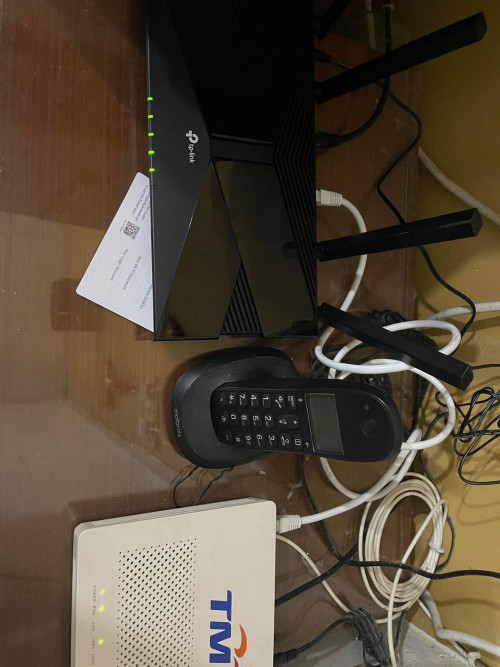
*
user posted image

I'm place router at the corner. After doing factory reset, the router did not reboot itself. But another problem coming, mad.gif . I check back the system log, found that the router will auto disconnect and connect to the network. But, when i using wifi at that time, still can work as usually.

2021-05-11 09:56:04 Led Controller INFO [1146] Start to run WAN1_ON

2021-05-11 09:56:04 Led Controller INFO [1146] Start to run WAN0_OFF

2021-05-11 09:56:04 Led Controller INFO [1146] Start to run LAN_ON

2021-05-11 09:55:49 Led Controller INFO [1146] Start to run WAN1_OFF

2021-05-11 09:55:49 Led Controller INFO [1146] Start to run WAN0_ON

2021-05-11 09:55:49 Led Controller INFO [1146] Start to run LAN_ON

2021-05-11 09:55:47 Led Controller INFO [1146] Start to run WAN1_OFF

2021-05-11 09:55:47 Led Controller INFO [1146] Start to run WAN0_OFF

2021-05-11 09:55:47 Led Controller INFO [1146] Start to run LAN_ON

sHawTY
post May 12 2021, 09:46 AM

Frequent Reporter
********
All Stars
14,909 posts

Joined: Jul 2005

Sell it then get ASUS RT-AX56U
sadlyfalways
post May 12 2021, 01:17 PM

Regular
******
Senior Member
1,187 posts

Joined: Nov 2020
QUOTE(sHawTY @ May 12 2021, 09:46 AM)
Sell it then get ASUS RT-AX56U
*
I’m having horrible experience with my AX88U, keeps dropping internet multiple times a day and needs to be reset for it to come back.

Put back my old tp link and everything works fine
TSLim0716
post May 12 2021, 02:19 PM

New Member
*
Newbie
31 posts

Joined: Sep 2017


QUOTE(sadlyfalways @ May 12 2021, 01:17 PM)
I’m having horrible experience with my AX88U, keeps dropping internet multiple times a day and needs to be reset for it to come back.

Put back my old tp link and everything works fine
*
Already update firmware to the latest? If still cant bangwall.gif , take it to warranty.
sadlyfalways
post May 12 2021, 06:32 PM

Regular
******
Senior Member
1,187 posts

Joined: Nov 2020
QUOTE(Lim0716 @ May 12 2021, 02:19 PM)
Already update firmware to the latest? If still cant bangwall.gif , take it to warranty.
*
Yes already updated, trying some method now which support sent.

But I have another question, with my ASUS, I feel websites and small items load much slower. Speedtest are wonderful, ping test also normal only, but like thumbnails and profile pictures take forever to load on my asus router.

I thought this was my internet issue because some other places I tried also had the issue and some didn’t

But when I put back my old backup routers, everything was light night quick. Usually when I open a YouTube videos and scroll through the comments, none of their profile pictures load in time and take about 15-20 seconds. With the tp link it is all loaded before I can scroll

I found that with tp link and maybe even dlink, the dns it shows in the phone settings is the dns I set, either google or unifi public dns. But with the asus the dns is the default gateway and could this be the cause of the lacklustre performance when pinging multiple small pictures on a network?

I’ll post this in asus forum too
PRSXFENG
post May 12 2021, 07:05 PM

Look at all my stars!!
*******
Senior Member
2,616 posts

Joined: Nov 2020


QUOTE(Lim0716 @ May 12 2021, 09:00 AM)
user posted image

I'm place router at the corner. After doing factory reset, the router did not reboot itself. But another problem coming, mad.gif . I check back the system log, found that the router will auto disconnect and connect to the network. But, when i using wifi at that time, still can work as usually.

2021-05-11 09:56:04 Led Controller INFO [1146] Start to run WAN1_ON

2021-05-11 09:56:04 Led Controller INFO [1146] Start to run WAN0_OFF

2021-05-11 09:56:04 Led Controller INFO [1146] Start to run LAN_ON

2021-05-11 09:55:49 Led Controller INFO [1146] Start to run WAN1_OFF

2021-05-11 09:55:49 Led Controller INFO [1146] Start to run WAN0_ON

2021-05-11 09:55:49 Led Controller INFO [1146] Start to run LAN_ON

2021-05-11 09:55:47 Led Controller INFO [1146] Start to run WAN1_OFF

2021-05-11 09:55:47 Led Controller INFO [1146] Start to run WAN0_OFF

2021-05-11 09:55:47 Led Controller INFO [1146] Start to run LAN_ON
*
I don't exactly know how the logs work, but it looks like it's just logging it turning the LED on and off, why on earth does it log this I have no idea
Could be wrong too
PRSXFENG
post May 12 2021, 07:10 PM

Look at all my stars!!
*******
Senior Member
2,616 posts

Joined: Nov 2020


QUOTE(sadlyfalways @ May 12 2021, 06:32 PM)
Yes already updated, trying some method now which support sent.

But I have another question, with my ASUS, I feel websites and small items load much slower. Speedtest are wonderful, ping test also normal only, but like thumbnails and profile pictures take forever to load on my asus router.

I thought this was my internet issue because some other places I tried also had the issue and some didn’t

But when I put back my old backup routers, everything was light night quick. Usually when I open a YouTube videos and scroll through the comments, none of their profile pictures load in time and take about 15-20 seconds. With the tp link it is all loaded before I can scroll

I found that with tp link and maybe even dlink, the dns it shows in the phone settings is the dns I set, either google or unifi public dns. But with the asus the dns is the default gateway and could this be the cause of the lacklustre performance when pinging multiple small pictures on a network?

I’ll post this in asus forum too
*
I'm not too sure on the peformance side of things but for the DNS

Change your DNS in the LAN -> DHCP Server section
Not the WAN section
Then restart and see if your devices are now using the dns server you've set.
TSLim0716
post May 12 2021, 07:21 PM

New Member
*
Newbie
31 posts

Joined: Sep 2017


QUOTE(PRSXFENG @ May 12 2021, 07:05 PM)
I don't exactly know how the logs work, but it looks like it's just logging it turning the LED on and off, why on earth does it log this I have no idea
Could be wrong too
*
I already ask tplink cs. It means that the router and btu connection dropped. After few seconds, connect back. They also tell me to change dns. But, still same. But when it drop, I didn’t not feel any lag or high ping when playing game.

After that, they give me this explanation. it may be because our router now goes through the same port every once in a while to check with the ISP to see if the network connection is working, and some ISPs will deny continuous access from the same port, causing the router to incorrectly think it has lost network connectivity. Does unifi like this? Because, last router dir850l don’t have this issue(except auto disconnect)

This post has been edited by Lim0716: May 12 2021, 07:24 PM
blacktubi
post May 13 2021, 06:23 PM

-
Group Icon
Elite
8,430 posts

Joined: Jul 2008

What firmware do you use? Have you tried a factory reset?

Do you accidentally changed the internet to connect on demand. TP-Link should totally remove this option as many accidentally selected this.
TSLim0716
post May 13 2021, 07:43 PM

New Member
*
Newbie
31 posts

Joined: Sep 2017


QUOTE(blacktubi @ May 13 2021, 06:23 PM)
What firmware do you use? Have you tried a factory reset?

Do you accidentally changed the internet to connect on demand. TP-Link should totally remove this option as many accidentally selected this.
*
Now using the latest firmware. Before that, my ax20 got auto reboot problem. After doing factory reset, it don’t auto reboot anymore. But, it always disconnect and recover after few seconds. Today, I changed the internet to manually.
blacktubi
post May 13 2021, 10:33 PM

-
Group Icon
Elite
8,430 posts

Joined: Jul 2008

QUOTE(Lim0716 @ May 13 2021, 07:43 PM)
Now using the latest firmware. Before that, my ax20 got auto reboot problem. After doing factory reset, it don’t auto reboot anymore. But, it always disconnect and recover after few seconds. Today, I changed the internet to manually.
*
Internet connection mode should be set to Auto

If you change to manual, if the PPPOE session is dropped, it will not auto reconnect.
TSLim0716
post May 14 2021, 10:12 AM

New Member
*
Newbie
31 posts

Joined: Sep 2017


QUOTE(blacktubi @ May 13 2021, 10:33 PM)
Internet connection mode should be set to Auto

If you change to manual, if the PPPOE session is dropped, it will not auto reconnect.
*
If like that, still need to set to auto. Maybe I need to downgrade to original firmware version, and monitor it.
MrGuGuZai
post Jul 17 2021, 11:59 AM

Getting Started
**
Junior Member
121 posts

Joined: Sep 2013
From: Klang Valley


i also have this problem, ts solved yet?
zuozi
post Jul 17 2021, 12:09 PM

Regular
******
Senior Member
1,267 posts

Joined: Oct 2009
QUOTE(MrGuGuZai @ Jul 17 2021, 11:59 AM)
i also have this problem, ts solved yet?
*
I'm using ax 20 for shop another unit at home,and I don't have this issue


Change to:
| Lo-Fi Version
0.0217sec    1.33    5 queries    GZIP Disabled
Time is now: 24th December 2025 - 11:09 PM