

 , right after he left, the problem came back. My current plan is 30mbps, using the provided router and modem. Please advise, thank you so much.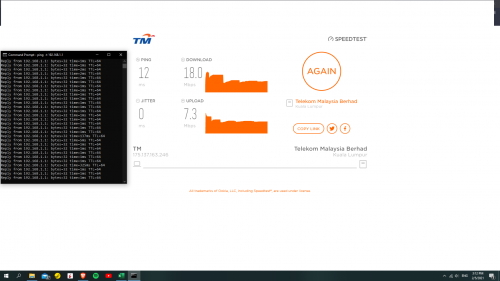
Unifi Random Ping Spike on Unifi
|
|
 May 2 2021, 03:31 PM, updated 5y ago May 2 2021, 03:31 PM, updated 5y ago
Show posts by this member only | IPv6 | Post
#1
|
 
Junior Member
205 posts Joined: Jan 2016  
|
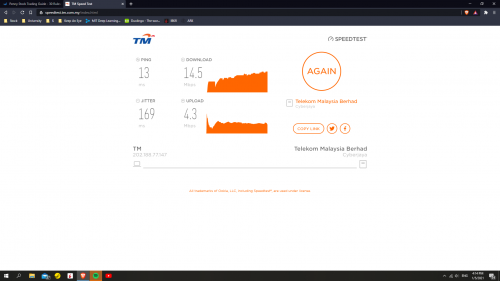
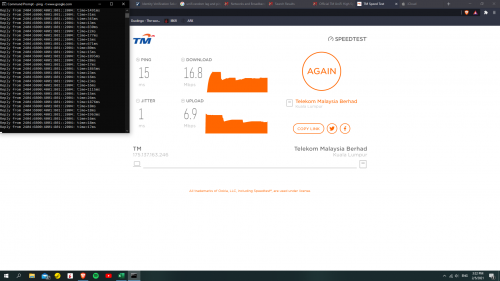
Hi guys, for the past few days my internet was not good. Random spikes at random times. I first noticed it when playing CSGO, and after that I started doing some tests to confirm it. Today, I had a technician to check the issue and the internet was working fine
, right after he left, the problem came back. My current plan is 30mbps, using the provided router and modem. Please advise, thank you so much. |
|
|
|
|
|
May 2 2021, 03:33 PM
Show posts by this member only | Post
#2
|

Senior Member
4,490 posts Joined: Oct 2014
|
It seems like you're using Wifi and the ping spike is cause by it. Run ping command side by side to 192.168.1.1 and any website, if they both spike at the same time, you can confirm it's caused by wifi.
|
|
|
May 2 2021, 03:38 PM
Show posts by this member only | IPv6 | Post
#3
|
|
Junior Member
205 posts Joined: Jan 2016
|
QUOTE(zher4883 @ May 2 2021, 04:33 PM) It seems like you're using Wifi and the ping spike is cause by it. Run ping command side by side to 192.168.1.1 and any website, if they both spike at the same time, you can confirm it's caused by wifi. Both got spike, it spikes more when i test it with google.com, than 192.168.1.1....   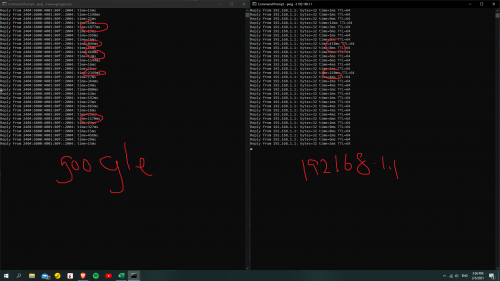 |
|
|
May 2 2021, 05:55 PM
Show posts by this member only | Post
#4
|

Senior Member
1,350 posts Joined: Nov 2004 From: HEAVEN & HELL
|
are you using TM given router or your own router?
if you are using TM router there was high possibility is router problem. |
|
|
May 2 2021, 06:14 PM
Show posts by this member only | Post
#5
|
|
Senior Member
4,490 posts Joined: Oct 2014
|
QUOTE(issac96 @ May 2 2021, 03:38 PM) Both got spike, it spikes more when i test it with google.com, than 192.168.1.1.... Are you using 2.4GHz Wifi or the 5GHz? |
|
|
May 2 2021, 06:16 PM
Show posts by this member only | IPv6 | Post
#6
|

Junior Member
362 posts Joined: Jan 2011
|
Did you tried test using LAN cable direct to router?
This post has been edited by michaelkkl: May 2 2021, 06:17 PM |
|
|
|
|
|
May 2 2021, 08:19 PM
Show posts by this member only | IPv6 | Post
#7
|

Senior Member
1,206 posts Joined: Dec 2007 From: Kuala Lumpur
|
QUOTE(issac96 @ May 2 2021, 03:38 PM) Both got spike, it spikes more when i test it with google.com, than 192.168.1.1.... When you ping 192.168.1.1 , it is between your computer and the router, within your LAN (may be WIFI). If there is a spike between that, means your LAN (WIFI) has latency. If your LAN has latency, sure the result pinging google is bad too, because it has to travel through your WIFI. Its not a UNIFI problem but your own WIFI problem. Optimize your WIFI connection, and the worst case, get a better WIFI router. |
|
|
May 2 2021, 10:16 PM
Show posts by this member only | Post
#8
|

Junior Member
584 posts Joined: May 2013
|
If using TM provided router, use LAN cable to play CSGO.
If still want use WiFi to play, buy a better router. |
|
|
May 3 2021, 02:57 PM
Show posts by this member only | IPv6 | Post
#9
|
|
Junior Member
205 posts Joined: Jan 2016
|
QUOTE(heLL_bOy @ May 2 2021, 06:55 PM) are you using TM given router or your own router? I have been using the same router for the past year, no problem, only these few days only.if you are using TM router there was high possibility is router problem. QUOTE(zher4883 @ May 2 2021, 07:14 PM) Are you using 2.4GHz Wifi or the 5GHz? BothQUOTE(michaelkkl @ May 2 2021, 07:16 PM) Did you tried test using LAN cable direct to router? Yeah I did. Initially it was good, but then the spike came backQUOTE(WongGei @ May 2 2021, 09:19 PM) When you ping 192.168.1.1 , it is between your computer and the router, within your LAN (may be WIFI). Previously If there is a spike between that, means your LAN (WIFI) has latency. If your LAN has latency, sure the result pinging google is bad too, because it has to travel through your WIFI. Its not a UNIFI problem but your own WIFI problem. Optimize your WIFI connection, and the worst case, get a better WIFI router. |
|
|
May 3 2021, 05:27 PM
Show posts by this member only | IPv6 | Post
#10
|

Junior Member
203 posts Joined: Jun 2020
|
quite same problem like mine, i also play csgo on wifi 2.4ghz, but im using maxis 30Mbps
called technichian and he do the troubleshoot but everything seems fine. but when the technichian left, my ping high af I reported back to maxis and asked them to change the router since the modem has been checked by both tm and maxis and confirmed in good condition and strong fibre signal next day, they changed my router to tp-link AX20 for FREE, and the problem gone. so, try to change ur router  |
|
|
May 3 2021, 05:42 PM
|
|
Senior Member
1,350 posts Joined: Nov 2004 From: HEAVEN & HELL
|
QUOTE(issac96 @ May 3 2021, 02:57 PM) I have been using the same router for the past year, no problem, only these few days only. how about you try to master reset your router see whether the random spike still occur?Both Yeah I did. Initially it was good, but then the spike came back Previously |
|
|
May 3 2021, 10:28 PM
|
 
Elite
8,418 posts Joined: Jul 2008 
|
You are using WiFi which is subjected to interference.
Using a better WiFi router and WiFi adapter may help but at the end of the day, it's still wireless. |
|
|
May 7 2021, 10:42 AM
Show posts by this member only | IPv6 | Post
#13
|
|
Junior Member
205 posts Joined: Jan 2016
|
I actually updated the router's firmware and the problem is solved! Thanks for the replies guys. Meanwhile I will shop for new router
|
|
|
|
|
|
Sep 5 2021, 07:44 PM
Show posts by this member only | IPv6 | Post
#14
|
|
Probation
1 posts Joined: Sep 2021
|
QUOTE(issac96 @ May 7 2021, 10:42 AM) I actually updated the router's firmware and the problem is solved! Thanks for the replies guys. Meanwhile I will shop for new router Hello, what router do you use and what firmware version? |
|
|
Sep 8 2021, 04:49 PM
Show posts by this member only | IPv6 | Post
#15
|
|
Junior Member
205 posts Joined: Jan 2016
|
QUOTE(Gwyenbleidd @ Sep 5 2021, 08:44 PM) Hello, what router do you use and what firmware version? Hi, I use the in-house provided router (Huawei). Version: DL4480V1_2.0.9e VER |
|
|
Mar 14 2022, 11:03 PM
|

Senior Member
1,326 posts Joined: Dec 2010
|
i started having this problem 3 weeks ago.. unifi came change modem, check fiber reading all good.. i decline change to their router and tech suggest me buy my own.. problem on console gaming, random spike.. can suggest good gaming router that not cost a bomb?
|
|
|
Mar 14 2022, 11:15 PM
|
|
Senior Member
1,882 posts Joined: Sep 2017
|
QUOTE(mytaffeta @ Mar 14 2022, 11:03 PM) i started having this problem 3 weeks ago.. unifi came change modem, check fiber reading all good.. i decline change to their router and tech suggest me buy my own.. problem on console gaming, random spike.. can suggest good gaming router that not cost a bomb? I think not router issue,is unifi routing issue. Can only use vpn to temporary mitigate the issue. As you said the issue start recently. |
| Change to: |  0.0246sec 0.0246sec
 0.45 0.45
 5 queries 5 queries
 GZIP Disabled GZIP Disabled
Time is now: 16th December 2025 - 04:48 AM |
 Quote
Quote