Welcome Guest ( Log In | Register )

Bump Topic Topic Closed RSS Feed
155 Pages « < 126 127 128 129 130 > » Bottom

Outline · [ Standard ] · Linear+

LG LG KS20, supports both HSDPA and HSUPA

views
     
SUSJubee
post Aug 12 2009, 08:24 PM

Getting Started
**
Junior Member
58 posts

Joined: Jun 2009
Mayb is software problem. I sent my phone in to LG service ctr coz few days back I screw up the screen. Thought it was hardware problem. Cost me $50 only to reinstall the WM. but he can only install 6.0 ver. (yea what a waste.. i came back I installed 6.1 successfully.)

Try sending in to their service ctr.


stutzedward
post Aug 13 2009, 07:26 AM

Enthusiast
*****
Senior Member
700 posts

Joined: Sep 2007
From: Kuala Lumpur


There is no such process of REINSTALLING. All they did was just a HARD RESET.
SUSJubee
post Aug 13 2009, 11:52 AM

Getting Started
**
Junior Member
58 posts

Joined: Jun 2009
QUOTE(stutzedward @ Aug 13 2009, 07:26 AM)
There is no such process of REINSTALLING. All they did was just a HARD RESET.
*
izzit. It looks different. Hmm... that means he cheated my $50 saying reintall?

I can never do a hard reset when i press send + lowVol key + power. What should i see if its successful hard reset?
DrWho
post Aug 13 2009, 12:17 PM

Jack of All Trades
*****
Senior Member
967 posts

Joined: Aug 2008
From: A Computer Near Me
After few minutes of booting the device will ask you to setup regional settings and screen alignment.
SUSJubee
post Aug 13 2009, 12:34 PM

Getting Started
**
Junior Member
58 posts

Joined: Jun 2009
QUOTE(DrWho @ Aug 13 2009, 12:17 PM)
After few minutes of booting the device will ask you to setup regional settings and screen alignment.
*
i got this message prompts up "The device will switch off and you may lose unsaved data" when i tried to do a hard reset.

am i doing it right?
DrWho
post Aug 13 2009, 12:45 PM

Jack of All Trades
*****
Senior Member
967 posts

Joined: Aug 2008
From: A Computer Near Me
WRONG This only switches off your device. READ your User Manual!
adz83
post Aug 13 2009, 04:02 PM

Casual
***
Junior Member
424 posts

Joined: May 2009
From: Petaling Jaya


u still need to switch off ur ks20 1st tho. err by the way, anyone knows how to adjust the mobile java to be full screen? its hard to play java games with some of lower detais missing. thanking in advance.

This post has been edited by adz83: Aug 13 2009, 07:39 PM
SUSJubee
post Aug 13 2009, 09:15 PM

Getting Started
**
Junior Member
58 posts

Joined: Jun 2009
QUOTE(DrWho @ Aug 13 2009, 12:45 PM)
WRONG This only switches off your device. READ your User Manual!
*
OMG !!! so fierce. sweat.gif rolleyes.gif

QUOTE(adz83 @ Aug 13 2009, 04:02 PM)
u still need to switch off ur ks20 1st tho. err by the way, anyone knows how to adjust the mobile java to be full screen? its hard to play java games with some of lower detais missing. thanking in advance.
*
oh... to do a hard reset is press (send + lowerVol + ON button) to boot it up. and not the other way.. manual so confusing la. doh.gif

this is from the manual.

To perform a hard reset

• Press and hold both
buttons(Send+Volume Down) shown
enclosed by circles in the picture
below. Keep these keys pressed, and
at the same time, press the POWER
button on the right side of your
device. And hold both buttons for a
while (about 10 seconds).

u shouldn't play any games on your KS20, really spoilt your eyes worst than computer.

This post has been edited by Jubee: Aug 13 2009, 09:16 PM

DrWho
post Aug 13 2009, 10:22 PM

Jack of All Trades
*****
Senior Member
967 posts

Joined: Aug 2008
From: A Computer Near Me
QUOTE(Jubee @ Aug 13 2009, 09:15 PM)
OMG !!! so fierce.  sweat.gif   rolleyes.gif
I am practicing Anger Management. biggrin.gif Could have been worse.user posted image

BTW the Korean might have confused you with their English. It should be:

To perform a hard reset
• Press and hold both
buttons(Send+Volume Down) shown
enclosed by circles in the picture
below. Keep these keys pressed, and
at the same time, press the POWER
button on the right side of your
device and release. And still holding both buttons for a
while until the device start booting(about 10 seconds).

This post has been edited by DrWho: Aug 13 2009, 10:42 PM
adz83
post Aug 14 2009, 02:55 AM

Casual
***
Junior Member
424 posts

Joined: May 2009
From: Petaling Jaya


err, correct me if i'm wrong... but on my experience, u should really turn off before u do the button combo. not just turn off ur screen. n there's video on youtube too. errrr, by the way anyone on my mobile java issue? :')
DrWho
post Aug 14 2009, 09:15 AM

Jack of All Trades
*****
Senior Member
967 posts

Joined: Aug 2008
From: A Computer Near Me
That is right, device to be turned off first before the buttons sequence. rclxms.gif
SUSJubee
post Aug 14 2009, 01:19 PM

Getting Started
**
Junior Member
58 posts

Joined: Jun 2009
QUOTE(DrWho @ Aug 14 2009, 09:15 AM)
That is right, device to be turned off first before the buttons sequence. rclxms.gif
*
im eager to give it a try.. will i lose my sms too?
stutzedward
post Aug 14 2009, 03:20 PM

Enthusiast
*****
Senior Member
700 posts

Joined: Sep 2007
From: Kuala Lumpur


u loose everthing except the WinMo original application
SUSJubee
post Aug 14 2009, 03:59 PM

Getting Started
**
Junior Member
58 posts

Joined: Jun 2009
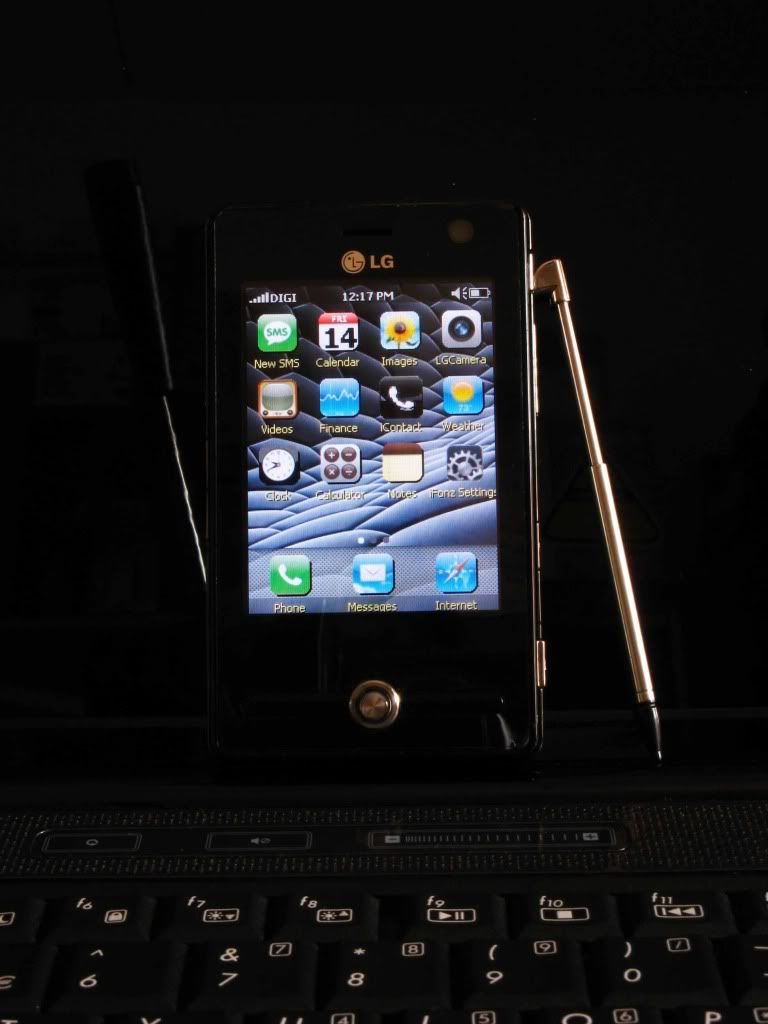
showing off... tongue.gif
user posted image
stutzedward
post Aug 14 2009, 04:35 PM

Enthusiast
*****
Senior Member
700 posts

Joined: Sep 2007
From: Kuala Lumpur


nice iFonz screen. Go look for hi-res icon, it will be prefect.
SUSJubee
post Aug 14 2009, 06:28 PM

Getting Started
**
Junior Member
58 posts

Joined: Jun 2009
QUOTE(stutzedward @ Aug 14 2009, 04:35 PM)
nice iFonz screen. Go look for hi-res icon, it will be prefect.
*
oh.. got high res icon too. hmm.. where to find ar?
evilpuppy
post Aug 14 2009, 07:02 PM

Look at all my stars!!
*******
Senior Member
4,092 posts

Joined: Feb 2006
From: PENANG


QUOTE(Jubee @ Aug 13 2009, 09:15 PM)
OMG !!! so fierce.  sweat.gif  rolleyes.gif
oh... to do a hard reset is press (send + lowerVol + ON button) to boot it up. and not the other way.. manual so confusing la. doh.gif

this is from the manual.

To perform a hard reset

• Press and hold both
buttons(Send+Volume Down) shown
enclosed by circles in the picture
below. Keep these keys pressed, and
at the same time, press the POWER
button on the right side of your
device. And hold both buttons for a
while (about 10 seconds).

*
remembering my earlier dopod838pro performing hardreseting using 3button combination is killing me. i even has to bring up my toe to do this crazy hardreset. rclxub.gif


DrWho
post Aug 14 2009, 10:19 PM

Jack of All Trades
*****
Senior Member
967 posts

Joined: Aug 2008
From: A Computer Near Me
QUOTE(Jubee @ Aug 14 2009, 03:59 PM)
showing off...  tongue.gif
» Click to show Spoiler - click again to hide... «

*
whaaaa......... so fast show off already brows.gif
Looks good, but why wanna sell so fast. Play with the new toy longer.
adz83
post Aug 15 2009, 12:49 AM

Casual
***
Junior Member
424 posts

Joined: May 2009
From: Petaling Jaya


hurm... it seems theres no solution for my mobile java issue huh? :'(
SUSJubee
post Aug 15 2009, 12:11 PM

Getting Started
**
Junior Member
58 posts

Joined: Jun 2009
QUOTE(DrWho @ Aug 14 2009, 10:19 PM)
whaaaa......... so fast show off already brows.gif
Looks good, but why wanna sell so fast. Play with the new toy longer.
*
see got value or not only. kakaka.


S2U2 seems to hang the machine when calls/sms comes in. I wonder why?

155 Pages « < 126 127 128 129 130 > » Top
Topic ClosedOptions
 

Change to:
| Lo-Fi Version
0.0524sec    0.50    6 queries    GZIP Disabled
Time is now: 9th December 2025 - 10:15 PM