Outline ·
[ Standard ] ·
Linear+
Windows 10 Home Single Language
|
TSkoowilliams
|
 Apr 8 2021, 06:08 PM, updated 5y ago Apr 8 2021, 06:08 PM, updated 5y ago
|
New Member


|
Hi guys, as per title spec, Can this type of windows allow me to use ALT+SHIFT to switch between different language typing? I don't need the whole computer to be in other language, I just need to type chinese. I still need my computer to be in english. I know I need to install the language keyboard first. But can Single Language version allow me to install without upgrading?
microsoft answers was all about switching the whole computer to another language...
computer salesmen everything also say CAN one...
thanks!!!!
This post has been edited by koowilliams: Apr 8 2021, 06:11 PM
|
|
|
|
|
|
ktek
|
Apr 9 2021, 12:46 PM
|
|
|
have u asd chinese keyboarf
use this two key to switch >>>>>>> win + space bar
sohigh sale man
|
|
|
|
|
|
PJng
|
Apr 9 2021, 03:19 PM
|
|
|
to ts 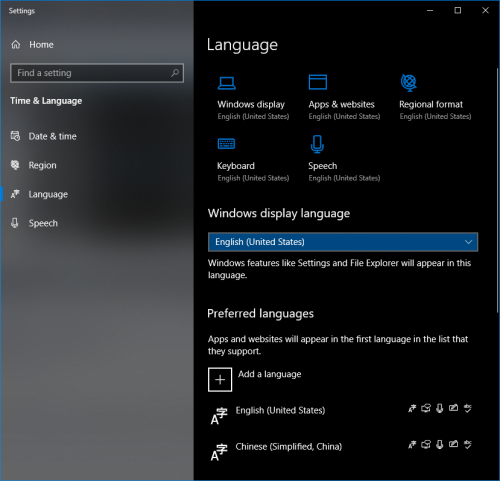 try add language here if shortcut key not working QUOTE(ktek @ Apr 9 2021, 12:46 PM) have u asd chinese keyboarf use this two key to switch >>>>>>> win + space bar sohigh sale man never know win + space, i use alt + shift since windows xp This post has been edited by PJng: Apr 9 2021, 03:19 PM |
|
|
|
|
|
sanderz
|
Apr 9 2021, 04:04 PM
|
|
|
QUOTE(koowilliams @ Apr 8 2021, 06:08 PM) Hi guys, as per title spec, Can this type of windows allow me to use ALT+SHIFT to switch between different language typing? I don't need the whole computer to be in other language, I just need to type chinese. I still need my computer to be in english. I know I need to install the language keyboard first. But can Single Language version allow me to install without upgrading? microsoft answers was all about switching the whole computer to another language... computer salesmen everything also say CAN one... thanks!!!! Yes, you can, that's the input language, just go to language and settings add other input language you desired. But you cannot change your Windows language to something else. (That's why it said Windows 10 Home Single Language) |
|
|
|
|
|
RectangleX
|
Apr 16 2021, 03:40 PM
|
|
|
QUOTE(koowilliams @ Apr 8 2021, 06:08 PM) Hi guys, as per title spec, Can this type of windows allow me to use ALT+SHIFT to switch between different language typing? I don't need the whole computer to be in other language, I just need to type chinese. I still need my computer to be in english. I know I need to install the language keyboard first. But can Single Language version allow me to install without upgrading? microsoft answers was all about switching the whole computer to another language... computer salesmen everything also say CAN one... thanks!!!! Chinese language? Use GooglePinyin 2.7.25.128 Final Beta (Free). |
|
|
|
|



 Quote
Quote




 0.0142sec
 0.39
0.39
 5 queries
 GZIP Disabled